 By
By 
Ever wondered how influencers appear in Bali one day and New York the next? Or tried updating your business address, only to see Instagram show the wrong location? If you're looking for how to change location on Instagram, you're in the right place.
Changing your location isn't just for aesthetics. It helps protect your privacy, reach new audiences, and keep business information accurate. But Instagram uses multiple signals, including GPS, IP address, and Meta's database, so there's no single "fix-all" button. Whether you want to add a custom location tag, update a post's location, or change your Instagram region, this guide will walk you through the exact steps quickly and clearly. Let's dive in.
Part 1. How to Change Location on Instagram Posts and Stories
When you tap "Add Location" on a post or Story, Instagram uses your phone's GPS to suggest nearby places. But what if you want to tag a location on the other side of the world to boost engagement or hide your real whereabouts?
Standard VPNs often fail here because they only change your IP address, not your GPS coordinates. If you truly want to change location on Instagram posts or Stories, you need to modify the GPS data your device sends to the app.
If you want to tag a landmark, café, or city miles away, a reliable solution is Pokeep Location Changer. This tool lets you teleport your iOS or Android device's GPS anywhere in the world - no jailbreak required.

PoKeep Location Changer
Connect, click, and teleport anywhere in the world to tag global hotspots, unlock region features, and control your Instagram presence in seconds.
Here is how to set it up:
Step 1. Download and launch Pokeep Location Changer on your computer, then connect your iPhone or Android device via USB.
Step 2. Launch PoKeep, finish the required setup, and choose General Mode when prompted.
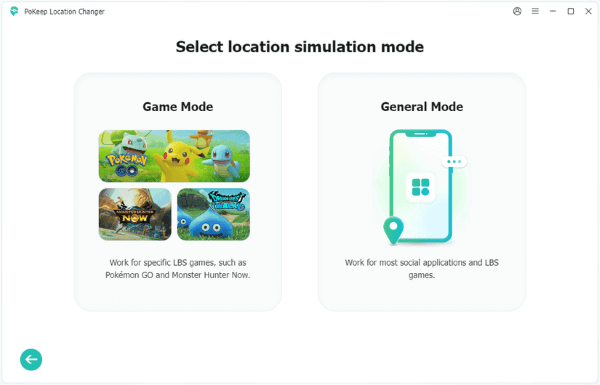
Step 3. Once your map loads, select Teleport Mode, which is usually the first icon in the top right corner. Enter the specific address or city you want to appear on Instagram into the search bar and click Start Modifying.

Step 4. Open your Instagram app on your phone. When you go to create a post or Story and tap Add Location, you will see that Instagram now believes you are actually in Tokyo, offering you local tags that were previously invisible.
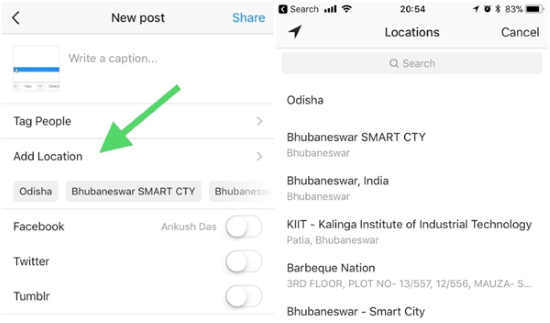
This method is particularly useful for creators who want to plan feed aesthetics ahead of time or maintain privacy by not revealing real-time home location.
Part 2. How to Create Location on Instagram
You've probably seen people tag fun places like "Hogwarts School of Witchcraft" or "Harry's Living Room." In the past, you could type custom locations directly into Instagram. Today, that feature is removed to reduce spam. But don't worry, you can still create location on Instagram using Facebook. Since both platforms are owned by Meta, their location databases are connected.
Step 1. Open the Facebook app and start a new post by tapping What's on your mind?
Step 2. Select Check In from the menu options.
Step 3. In the search bar, enter the name you want, for example, My Secret Coffee Spot. Scroll down and tap Add a new place.
Step 4. Choose a category. It's suggested to choose a specific category like "Restaurant" or "Art Gallery" rather than something generic like Just for Fun. Instagram indexes real business categories faster.
Step 5. Set a physical location by choosing I'm currently here or dropping a pin on the map. Then tap Save.
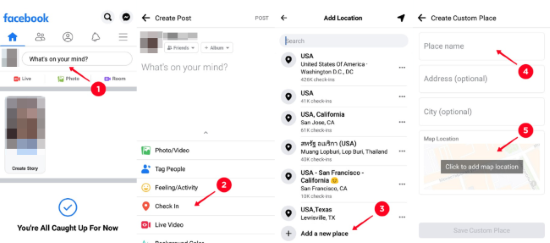
Step 6. Open Instagram and search for the location when adding a tag to your post. Syncing usually takes 2–24 hours, so don't panic if it doesn't appear instantly.
Part 3. How to Change Business Location on Instagram
For business accounts, your location isn't based on GPS. Instead, it's tied to your profile's contact information and helps customers find your store through map services like Google Maps or Apple Maps.
If you've moved offices or your address is incorrect, here's how to change location on Instagram for a business profile:
Step 1. Go to your Instagram profile page and tap the Edit Profile button.
Step 2. Scroll down to Public Business Information and tap Contact Options.
Step 3. Select Business Address.
Step 4. Enter your new Street Address, City/Town, and Zip Code.
Step 5. Tap Save in the top right corner to save.
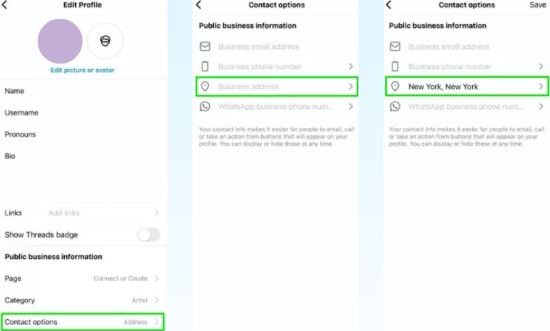
Step 6. Return to your profile and verify that the address link works correctly.
 Tips:
Tips:
If you see a "Location not found" error, make sure your Instagram account is connected to a Facebook Business Page with a verified address. Because both platforms are owned by Meta, Instagram may pull location data directly from your linked Facebook Page. Updating the address there first often resolves the issue.
Part 4. How to Change Region on Instagram for Music
Sometimes, you wonder how to change Instagram region because certain features locked to specific countries, such as Instagram Music libraries or Instagram Shopping. However, unlike tagging a photo (which uses GPS), your "Account Region" is determined by your IP address and long-term usage history.
This means a GPS spoofer alone usually won't unlock region-based features. Instagram checks where your internet connection originates, so you'll typically need a VPN to change your IP address to your target country.
For the best results, especially if you are trying to convince the algorithm you have permanently moved, using a VPN (for IP) combined with a tool like Pokeep (for GPS) provides the most consistent experience.
By aligning both your internet location (IP) and your physical coordinates (GPS), you create a more natural and consistent signal. This reduces mismatched data that could trigger suspicious activity checks.
Part 5. Conclusion
This is all about how to change location on Instagram. Whether you want to create a custom tag, update your business address, or unlock region-based features, understanding how Instagram handles location data is key. GPS controls post tags, profile settings manage business addresses, and IP signals determine your account region.
 Related Articles


 Leave Your Comment