 By
By 

Quick Verdict
Glympse Tracking is best for temporary live location sharing, ETA updates, and short-term trip coordination. It is not a hidden phone tracker or a tool for tracking someone by phone number.
Who It's For
This guide is for users who want to understand how Glympse live tracking works, how to view or request shared locations, and when to use alternatives like Life360, Google Maps, Find My, WhatsApp, or PoKeep.
Key Takeaways:
- Main Use: Share real-time location for minutes or hours through a live tracking link.
- Tracking Limit: You can only track someone who shares their location or approves a request.
- GPS Control Tip: Use PoKeep when you need to manage your own device’s GPS location.
When someone sends “I’m on my way,” the next question is usually simple: where are they now, and when will they arrive? That is exactly where Glympse tracking becomes useful. Instead of calling, texting back and forth, or asking someone to keep sending updates, Glympse lets a person share a live location link for a limited time.
But Glympse is often misunderstood. Some users think it works like a hidden phone tracker, a tracking-number lookup tool, or a full family monitoring app. In reality, the Glympse tracking app is mainly designed for temporary, permission-based live location sharing.
This guide explains how Glympse live tracking works, how to track someone on Glympse, what the app cannot do, and when tools like Life360, Google Maps, Find My, WhatsApp, or PoKeep Location Changer may fit better.
What Is Glympse Tracking?
Glympse tracking is a temporary live location sharing feature that lets someone share their real-time GPS location through a link. The sender chooses who can view the location and how long the location stays visible.

The biggest advantage is convenience. A viewer usually does not need to download the Glympse app just to view a shared location. They can open the link from a text message, email, or supported messaging app and see the sender moving on a live map.
This makes Glympse useful for short-term situations:
- Meeting friends at a busy place
- Letting family know your ETA
- Coordinating pickups, deliveries, events, or mobile teams
Glympse works best when the question is “Where are you right now?” rather than “Where are you all day?”
How Does Glympse Tracking Work?
Glympse uses the sender’s mobile device location to create a temporary live tracking session. When a person sends a Glympse, the recipient receives a link. After opening the link, the viewer can see the sender’s live location on a map for the selected time window.
The process is simple:
Step 1. The sender opens Glympse and chooses to share their location.
Step 2. The sender selects a recipient and sets a sharing duration.
Step 3. The recipient opens the Glympse link and watches the live location update on a map.
Once the timer runs out, the live sharing session expires automatically. This is the key difference between Glympse GPS tracking and many always-on family tracking apps. Glympse is built around temporary visibility, not permanent background monitoring.
How to Track Someone on Glympse
You can track someone on Glympse only when they share their location with you or approve a location request. If someone sends you a Glympse link, you can open it and view their live location until the sharing timer expires.
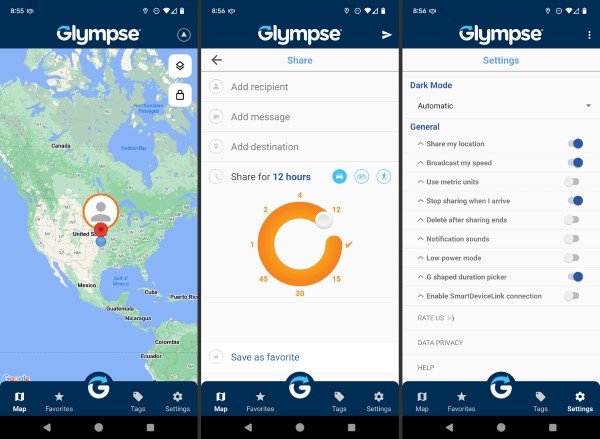
For group use, Glympse Private Groups can help trusted members share and request locations inside an invite-only group. This can be useful for road trips, sports teams, event staff, family outings, and other situations where multiple people need to stay coordinated.
A practical example would be a group hike. Instead of everyone sending separate location updates, members can share their live positions inside the group for a limited period. Once the activity ends, they can stop sharing.
The important point is that Glympse tracking depends on active sharing. It is not a tool for silently monitoring someone who has not agreed to share their location.
Can You Track Someone on Glympse by Phone Number?
No, Glympse should not be treated as a phone-number tracker. Looking for Glympse tracking phone number, Glympse cell phone tracker, or Glympse free phone location tracker can create the wrong expectation.
Glympse does not let you type in a phone number and secretly locate that person. You need one of these conditions:
- The person sends you a Glympse link.
- The person accepts your location request.
- The person shares location inside a Private Group.
This distinction matters for both accuracy and user expectations. Glympse is a live location sharing app, not a hidden surveillance tool. If your goal is to coordinate with someone, it works well. If your goal is to locate someone without their participation, Glympse is not the right product.
How Long Does Glympse Live Tracking Last?
Glympse tracking is time-limited. The sender chooses how long their location will be visible, and the live sharing session expires automatically when the timer ends.
This time limit is one of the reasons Glympse feels lighter and more privacy-friendly than continuous family tracking apps. Instead of leaving location access on indefinitely, users can share for a specific trip, pickup, meeting, delivery, or event.
For most everyday situations, this makes sense. If you are driving to meet a friend, you may only need to share your location for 30 minutes. If you are coordinating a longer trip or shift, you may need several hours. Either way, the sharing is designed around a temporary purpose.
Glympse Tracking App Features You Should Know
The Glympse tracking app is not overloaded with complex monitoring features. Its value comes from making temporary location sharing quick and easy.
Live Location Link Sharing
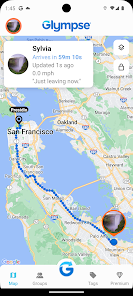
The sender can share a live map link with another person. The viewer can open the link from a browser or device without needing a complicated setup.
This is useful when the viewer is not a regular Glympse user. For example, a client, coworker, friend, or family member can open a link and follow the sender’s ETA without installing a new app.
Location Requests
Glympse can also be used to request someone else’s location. The other person still needs to approve or respond by sharing. This keeps the experience centered on user control.
Location requests are especially useful in groups where people already expect coordination, such as families, road-trip groups, event teams, or mobile workers.
Private Groups
Private Groups create an invite-only space where members can share real-time locations on a private map. This makes Glympse more useful for recurring group coordination without turning it into a full family surveillance app.
Private Groups can work well for short-term family outings, carpools, sports teams, school activities, volunteer groups, or event staff.
Glympse Tracking for Business, Food Trucks, and Events
Some people searching for Glympse tracking are not looking for the consumer app at all. They may be looking for a business tracking link, a food truck tracker, a Santa tracker, or an event map powered by Glympse.

Glympse has business-oriented uses where companies share live ETA links with customers. A technician, driver, or mobile worker can be tracked while on the way, helping customers know when to expect arrival. This is different from personal Glympse sharing, but the idea is similar: a live map, a clear ETA, and a limited tracking session.
Glympse-powered public tracking can also be used for:
- Food and ice cream trucks
- Santa parades and holiday routes
- Races, community events, pop-up shops, and mobile services
This also explains why some people search for Glympse tracking number. In many cases, they may not actually need a number. They may need a live Glympse link, a branded tracking page, or a public event tracker.
Glympse vs Life360 vs Google Maps vs Find My vs WhatsApp
Glympse is useful, but it is not always the best location sharing app for every situation. The right choice depends on how long you want to share location, who needs to view it, and whether you need ongoing family safety features.
Glympse vs Life360

Glympse is better for temporary live tracking. It is ideal when you want to share a trip, ETA, meeting route, pickup, or delivery status for a limited time.
Life360 is better for ongoing family location sharing. It is designed around family circles, place alerts, location history, driving safety, and long-term family coordination.
Use Glympse when you want to say, “Track my arrival.” Use Life360 when you want a family safety app that stays active over time.

Glympse vs Google Maps Location Sharing
Google Maps Location Sharing is a strong option when both people already use Google Maps and want account-based sharing. It can be useful for friends, family, and travel coordination.
Glympse is simpler when you want to send a quick link to someone who may not want to install an app or set up ongoing sharing. For temporary ETA sharing, Glympse often feels more lightweight.
Glympse vs Apple Find My

Apple Find My is a better fit for iPhone users who want ongoing location sharing with trusted friends or family members. It works well inside the Apple ecosystem and gives users controls to stop sharing or respond to requests.
Glympse is more flexible when the viewer may be on Android, desktop, or another platform. A Glympse link can be easier for one-time sharing across different devices.
(article_re: https://www.pokeep.com/change-location/find-my-location-not-updating.html)
Glympse vs WhatsApp Live Location
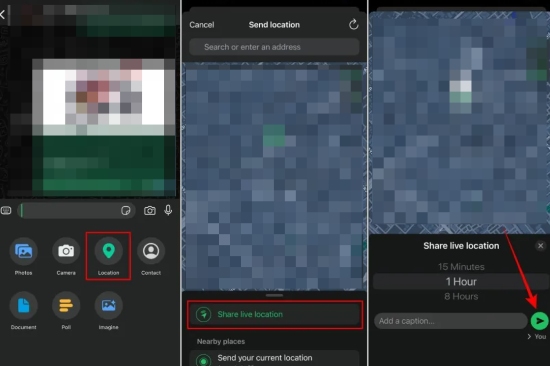
WhatsApp Live Location is convenient when the conversation is already happening inside WhatsApp. You can share live location in an individual or group chat for a selected duration.
Glympse is better when you want a standalone live tracking link that works outside a specific chat platform. It is also useful for events, customers, and public-facing tracking scenarios.
Why Glympse Tracking May Not Update Correctly
If Glympse tracking stops updating or the live location looks wrong, the problem is usually related to GPS, permissions, connection quality, battery settings, or the app running in the background.
Common causes include weak cellular signal, poor GPS reception, low battery, disabled location permissions, battery saver restrictions, or the phone being indoors or surrounded by tall buildings. Since Glympse depends on the sender’s device location, the live map can only be as accurate as the phone’s current GPS data.
Try these fixes first:
Step 1. Check that location permissions are enabled for Glympse.
Step 2. Make sure the phone has a stable cellular or Wi-Fi connection.
Step 3. Turn off aggressive battery-saving settings that may stop background location updates.
Step 4. Reopen Glympse and start a new sharing session if the old link has expired.
If the viewer says your location is not moving, also check whether the sharing timer has ended. Expired Glympse links will not continue showing live movement.
Want More Control Over Your Own GPS Location? Try PoKeep Location Changer
Glympse is useful when you want to share your real location temporarily. But some users have a different need: they want more control over what their own device reports to location-based apps.

That is where PoKeep Location Changer fits naturally. PoKeep lets users change GPS location on iPhone and Android without jailbreak or root. It supports 1-click location changing, GPS joystick movement, route simulation, and location-based app scenarios.


This can be useful for privacy testing, app testing, social app location control, map behavior checks, and other situations where you want to manage your own GPS position instead of physically moving. It is not a tool for secretly tracking other people, and it should not be presented as a way to bypass Glympse’s sharing model.
Glympse Tracking FAQs
Is Glympse free?
The consumer Glympse app is generally available as a free location sharing app, with optional paid or business-oriented features depending on the product version and use case. Users should check the current app store listing for the latest pricing and feature availability.
Does Glympse work internationally?
Glympse can work across countries as long as the sender’s phone has GPS access and a working data connection. Actual performance depends on network coverage, device settings, and local app availability.
Can I use Glympse as a family tracking app?
Yes, but only for certain family scenarios. Glympse can work well for temporary family location sharing, pickups, road trips, and group outings. If you need ongoing family safety features, location history, place alerts, or always-on circles, Life360 or Apple Find My may be a better fit.
Can someone view my Glympse without the app?
Yes, the viewer can usually open a Glympse link from a browser or web-enabled device. This is one of the reasons Glympse is convenient for quick ETA sharing.
What is a Glympse tracking number?
Glympse does not usually work like a delivery carrier where you enter a tracking number. If you see “Glympse tracking number,” the real target may be a Glympse link, a business ETA page, a Premium Tag, a food truck tracker, or a public event tracking map.
Is Glympse better than Life360?
Glympse is better for temporary live tracking and ETA sharing. Life360 is better for continuous family location safety. The better app depends on whether you need short-term sharing or ongoing monitoring.
Can PoKeep replace Glympse?
No. PoKeep and Glympse solve different problems. Glympse helps you share live location with others for a limited time. PoKeep helps you control or change the GPS location reported by your own iPhone or Android device.
Final Thoughts on Glympse Tracking
Glympse tracking is best understood as temporary live location sharing. It is simple, fast, and useful when you want someone to follow your trip, ETA, pickup, delivery, or event route for a limited time.
It is not a hidden phone tracker, and it is not a tool for tracking someone by phone number. If you need ongoing family tracking, consider Life360, Apple Find My, or Google Maps Location Sharing. If you only need a quick live location inside a chat, WhatsApp Live Location may be enough.
For users who want more control over their own GPS location, PoKeep Location Changer is a practical companion tool. Glympse helps you share where you are; PoKeep helps you manage where your device appears to be.
 Related Articles

 Leave Your Comment