 By
By 

Virtual location software has become an essential tool for many smartphone users today. Whether you are trying to access geo-restricted content, protect your privacy on dating apps, or gain a strategic edge in location-based games, the demand for reliable GPS spoofers is incredibly high.
LocaChange has emerged as a widely discussed option in this crowded market. However, with mixed reviews circulating online, many potential users are left wondering if it is truly reliable or just another subscription trap. This comprehensive LocaChange review will break down its features, analyze real user sentiment regarding safety, and explain exactly how to manage its sometimes confusing billing practices.
Is LocaChange Safe? Addressing the Virus and Ban Concerns
When researching this software, one of the most common questions that pops up is, "Is LocaChange a virus?" The short answer is no, the official software itself is not malicious malware. However, the term "safe" means different things to different users, especially when it comes to account security in popular apps.
If you are looking through "Is LocaChange safe reddit" threads, you will quickly notice a clear divide in user experiences based on how the app is utilized.
Using the software via a tethered connection to a PC or Mac is generally considered the safest method. This approach modifies the GPS data sent to your device without requiring you to tamper with the actual applications on your phone.
Conversely, using the standalone LocaChange mod APK or customized mobile apps carries a significant risk. Game developers and social platforms frequently detect these modified apps, which can lead to rapid account warnings, strikes, or permanent bans.
How to Use LocaChange: Device Compatibility and Setup
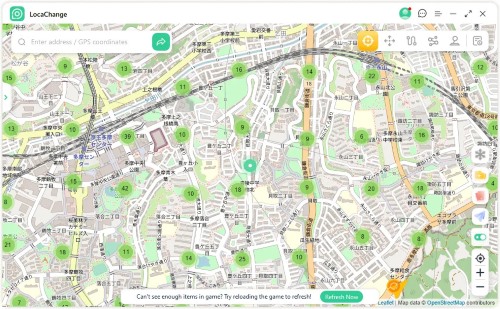
LocaChange offers multiple ways to spoof your location depending on your hardware preferences and risk tolerance. Whether you want to tether to a computer, use a standalone mobile app, or even plug in a physical device, the platform has different setups.
Here is a breakdown of how to use LocaChange across its main versions.
The PC Version: Tethered and Secure
Using the desktop software (available for Windows and Mac) is the most stable and highly recommended method for avoiding account bans. By keeping the spoofing engine on your computer, your phone remains free of risky modified applications.
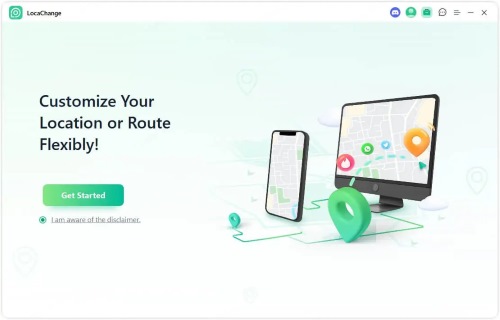
You connect your smartphone to your computer using a USB cable for the initial setup. Once trusted and connected, you can even manage your device wirelessly over Wi-Fi, supporting up to 10 devices simultaneously. The PC version gives you access to all five core movement modes, including standard teleportation, multi-spot routing, and a 360-degree joystick. It also features a "Fluctuation Mode" that makes your virtual location jump around slightly, mimicking natural GPS drift to reduce detection risks.
The iOS App: On-the-Go Spoofing
Due to Apple's strict closed ecosystem, you cannot simply download a location changer directly from the App Store. LocaChange provides a workaround, though it requires a bit of initial effort.
Step 1. Download the LocaChange iOS Assistant on your computer and connect your iPhone via USB to inject the required LocaChange App. Then download iGoSpeed VPN app to your device from App Store.
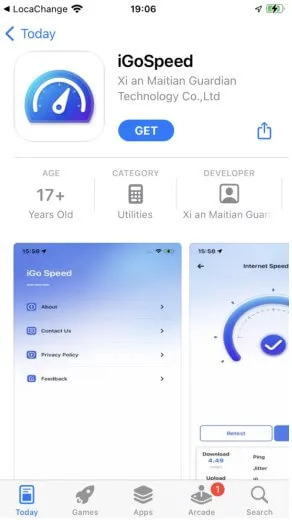
Step 2. Open the iGoSpeed app on your iPhone, click to configure the VPN environment, and wait for the LocaChange app to launch automatically.
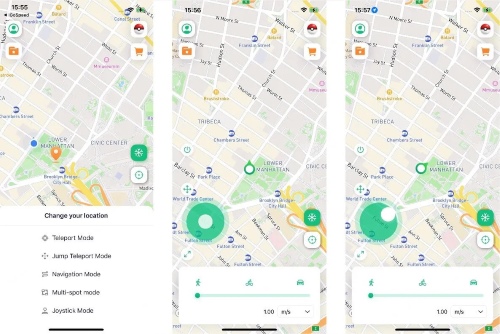
Step 3. Use the map interface to long-press your desired destination and tap the move button to instantly change your global coordinates.
It is important to note that this specific app signature is usually only valid for 7 days. Once it expires, you will need to reconnect your iPhone to the computer to reinstall it.
 Note:
Note:
For my expierence, Locachange iOS app has not been working for Pokemon Go for a long time. If you find it’s not wokring for other LBS games, it’s maybe normal, the developer team seems to be struggling with the issue.
The Android App: No Root Required
Android users have a more straightforward experience. You can download the APK directly from the official website without needing a computer or rooting your device.
Step 1. Go to your Android settings, tap your build number seven times to unlock Developer Options, and select LocaChange as your designated mock location app.
Step 2. Open the app and choose between Universal Mode (for standard apps like Google Maps or WhatsApp) or Game Mode (specifically tailored for AR titles).
Step 3. Utilize the on-screen joystick or plan a multi-point route directly from your phone screen.
The Android version also includes helpful safety features like a cooldown timer, which calculates how long you should wait before performing actions in a game after a long-distance teleport.
The Plug-in Device: The Hardware Route
For players who want to avoid modified apps entirely but still want to spoof on the go, LocaChange offers a physical hardware option. This involves purchasing a small LocaChange Plug-in Device (LBS) that connects directly to your iPhone's charging port.
Step 1. Download the dedicated iGO-LocaChange app using the secure link provided in your hardware purchase confirmation email.
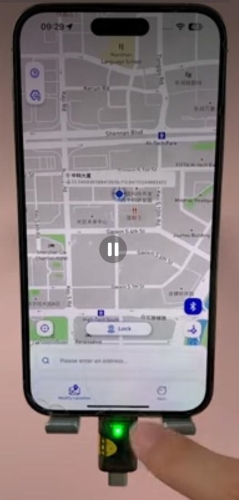
Step 2. Plug the LBS hardware into your phone and pair it via Bluetooth within the app interface.
Step 3. Drag the map to your desired location and click the lock button to safely modify your GPS coordinates at the hardware level.
Note:
Although Locachange claims they have a plug-in device, I can’ find anywhere on their website to buy it, it seems like this device is not available any more.
Is LocaChange Free? Pricing and Subscription Realities
A major point of frustration for many users revolves around the platform's pricing model. If you are wondering, "Is LocaChange free?", the answer is unfortunately no. While they occasionally advertise a trial period for just $0.01, this is where many consumers run into trouble.
This almost-free trial is designed to automatically renew into a full, expensive subscription—often $19.99 a month or more—if it is not explicitly canceled before the trial window closes.
Many LocaChange reviews on independent forums highlight this billing practice as deceptive. While the company boasts high ratings on aggregate review sites, independent discussions often reveal complaints about unexpected charges and a difficult refund process.
And below is the details of their pricing:

How Do I Cancel LocaChange? A Step-by-Step Guide
Because of the automatic renewal system, "LocaChange cancel subscription" is a highly searched phrase. If you are currently caught in a trial or want to end your paid plan, the method depends entirely on how you initially signed up.
If you purchased the subscription directly through their official website, follow these steps to stop future billing:
Step 1. Navigate to the official LocaChange website and log into your account using your credentials.
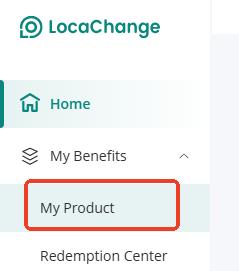
Step 2. Locate and click on the "My product" section within your user dashboard.
Step 3. Find your active plan and select the option to cancel the subscription, ensuring you follow all on-screen prompts until you receive a confirmation message.
If you happen to use a dedicated LocaChange app downloaded from an official app store, you must cancel through your device's native settings. For iOS users, go to your Apple ID settings and select "Subscriptions". For Android users, open the Google Play Store, tap your profile icon, and navigate to "Payments & subscriptions".
A Safer, Transparent Alternative to Locachange
If you are looking for a reliable way to change your device's location without the anxiety of account bans from modded apps or the stress of hidden subscription traps, Pokeep Location Changer is an excellent alternative.


Designed entirely as a desktop tool, Pokeep provides a stable, privacy-safe environment for location simulation. It works seamlessly with common map, social, and location-based applications by tethering your device, meaning you never have to download risky third-party mobile apps to your phone.

Pokeep Location Changer focuses on delivering exactly what you need without exaggerated claims. Its core features include:
- Straightforward one-click teleportation to any global destination.
- Route simulation with multi-point movement and adjustable speeds for realistic paths.
- A built-in history and favorites manager for repeating specific workflows.
Whether you are performing location simulation for app testing, planning geo-specific content, or just seeking privacy-sensitive location masking, Pokeep offers a clean, transparent, and highly effective desktop solution.
Final Verdict on This LocaChange App Review
LocaChange undeniably offers a powerful set of features for users focused heavily on location-based gaming. However, its reliance on potentially risky modified apps and a pricing structure that catches many users off guard makes it a hesitant recommendation for general use.
For those who prioritize data privacy, device safety, and straightforward billing, utilizing a dedicated desktop tethering tool like Pokeep Location Changer is generally the smarter, more secure route to take.
 Related Articles




 Leave Your Comment