 By
By 

Quick Verdict
A Pokémon GO softban is usually a temporary location cooldown that causes Pokémon to flee and PokéStops to stop giving items. The best response is to stop interacting, check your last location-sensitive action, and wait for the cooldown to expire.
Who It's For
This guide is for Pokémon GO players who are experiencing repeated catch failures, PokéStop errors, or uncertainty about whether they received a softban, GPS error, or official account warning.
Key Takeaways:
- Common Signs: Pokémon repeatedly flee and PokéStops return no items after a major location change.
- Typical Duration: Cooldowns may last from a few minutes to around two hours, depending on distance.
- Best Fix: Stop location-sensitive actions, wait conservatively, and test the account only once afterward.
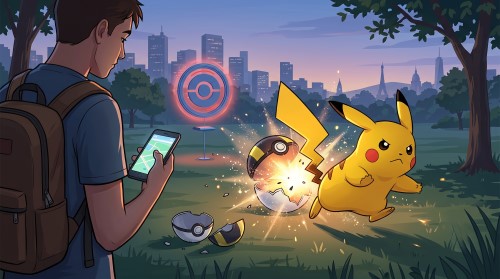
A wild Pokémon escapes after your first throw. You try another one, and it flees too. Then you spin a PokéStop and receive no items—or see a “Try Again Later” message.
These symptoms are commonly described as a Pokémon GO softban, especially when they appear shortly after a major location change. In most cases, the player has interacted at two distant locations without allowing enough cooldown time between them.
A Pokémon GO softban is normally temporary, with community cooldown charts using wait times ranging from a few seconds to approximately two hours. However, “softban” is a community term rather than an official Pokémon GO punishment category. An official warning, suspension, or permanent termination is a different and considerably more serious issue.
Are You Actually Softbanned in Pokémon GO?
One Pokémon fleeing does not necessarily mean you have a softban. Pokémon can escape naturally, while weak GPS reception, network problems, game bugs, and high-volume gameplay restrictions can also interrupt normal interactions.
A location-related cooldown becomes more likely when all three conditions apply:
-
Several ordinary wild Pokémon flee immediately after you throw.
-
Nearby PokéStops do not provide items.
-
The problem begins after you move or teleport a significant distance.
The timing is the strongest clue. If you caught a Pokémon in one city and then immediately tried to catch another Pokémon hundreds of kilometers away, Pokémon GO may reject the second interaction because the travel time is unrealistic.
Pokémon GO Softban Symptoms Checklist
Pokémon Keep Fleeing After the First Throw
The most widely recognized Pokémon GO softban symptom is a series of wild Pokémon fleeing after the first attempted catch. This normally affects even common Pokémon that would not usually escape so consistently.
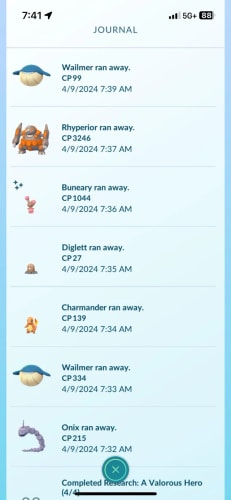
Do not diagnose the problem based on one encounter. Test only after considering your recent location history, because repeatedly throwing balls while troubleshooting can make it harder to remember your last location-sensitive action.
PokéStops Give No Items
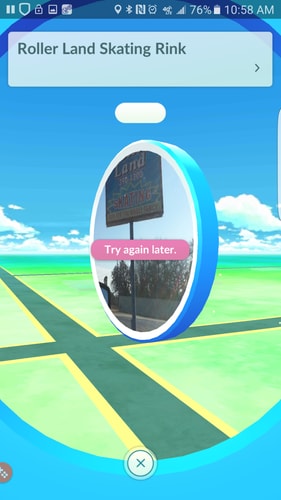
Another common sign is being unable to collect items from PokéStops. The Photo Disc may spin without producing rewards, or the game may display a “Try Again Later” message.
A single PokéStop failure can also happen because of connection problems or because the stop has not reset. Multiple stops failing alongside repeated Pokémon escapes provides much stronger evidence of a location cooldown.
Gym and Raid Interactions May Fail
Some Gym and Raid activities may not work normally during a cooldown. Raid behavior is especially difficult to summarize because entering a lobby, battling, feeding a Raid Boss, and throwing a Premier Ball are separate actions.
As a conservative rule, treat feeding a Raid Boss or throwing a ball during the encounter as a location-sensitive interaction. Avoid using a valuable Raid Pass merely to test whether a cooldown has ended.
You Can Still Access Your Account
A normal Pokémon GO softban does not usually prevent you from opening the game. You can often view the map, manage Pokémon, check your inventory, and access other menus.
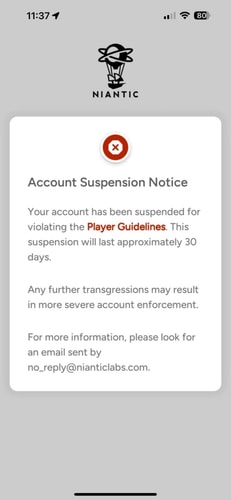
If Pokémon GO displays an explicit message saying your account has been suspended or terminated for violating the Terms of Service, you are dealing with an official account action—not an ordinary interaction cooldown.
Pokémon GO Softban vs. Warning, Suspension, and GPS Errors
Several unrelated problems are frequently labeled as softbans. Identifying the correct one prevents unnecessary waiting, reinstalling, or repeated account testing.
| Problem | Typical Signs | Expected Duration |
|---|---|---|
| Location cooldown or “softban” | Pokémon repeatedly flee and PokéStops give no items after an unrealistic location change | Seconds to around two hours based on community charts |
| GPS or connection problem | Location jumps, map fails to load, avatar drifts, or the game cannot determine your position | Until the signal, permission, network, or device issue is fixed |
| Strike 1 warning | An in-app cheating warning and degraded gameplay features | Approximately 7 days |
| Strike 2 suspension | A suspension message prevents account access | Approximately 30 days |
| Strike 3 termination | The account is permanently banned | Permanent |
| Catch or spin restriction | Interactions fail after unusually heavy gameplay without a recent location change | Varies |
Pokémon GO officially uses a three-strike enforcement policy. The first strike lasts approximately seven days, the second approximately 30 days, and the third results in permanent termination. The policy also states that certain serious violations may lead to immediate termination without all three strikes being issued.
Official support also identifies falsifying a device’s location through GPS spoofing as cheating. Following a community cooldown chart may reduce obvious time-and-distance mistakes, but it does not make location spoofing compliant with the game’s rules or guarantee that an account will avoid enforcement.
Is “Failed to Detect Location” a Softban?
Not usually. A “Failed to detect location” error is more likely to involve GPS configuration, permissions, mock-location settings, or device compatibility.
Pokémon GO’s GPS troubleshooting guidance recommends checking signal strength, switching between Wi-Fi and cellular data, enabling improved location accuracy on Android, and reviewing mock-location settings when the game cannot detect a location. Tall buildings can also cause GPS drift or sudden position jumps.
If the game cannot establish your position at all, troubleshoot GPS first. If the map works normally but catches and PokéStop spins consistently fail after a long-distance move, a cooldown is more likely.
How Long Does a Pokémon GO Softban Last?
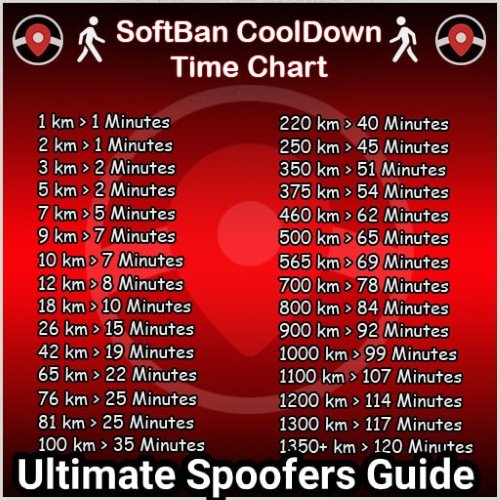
A Pokémon GO softban is generally associated with the distance between your last location-sensitive interaction and the place where you next attempt to interact.
Short movements require less waiting. International or cross-country location changes commonly use a maximum community guideline of approximately 120 minutes.
| Approximate Distance | Commonly Suggested Cooldown |
|---|---|
| 1–10 km | A few seconds to about 6 minutes |
| 25–250 km | About 11–45 minutes |
| 500–1,000 km | About 60–90 minutes |
| 1,500 km or more | Up to approximately 120 minutes |
These times are community-derived operating guidelines, not an official chart published or guaranteed by Pokémon GO. PoKeep maintains a more detailed Pokémon GO cooldown time chart for readers who need distance-specific estimates.
When Does the Pokémon GO Cooldown Timer Start?
The most important time is normally your last location-sensitive action, not simply the moment you changed your GPS location.
Consider this example:
- You catch a Pokémon in Los Angeles at 10:00 a.m.
- You change your location to London at 10:10 a.m.
- You immediately attempt another catch in London.
The relevant waiting period is calculated from the Los Angeles interaction at 10:00 a.m. Changing location at 10:10 a.m. does not erase the earlier activity or restart the clock in your favor.
This is why recording the last catch, spin, Berry, Gym interaction, or auto-catcher action is more useful than recording only the teleport time.
What If You Do Not Remember Your Last Action?
Stop all location-sensitive interactions and wait conservatively. Remember that an accidental ball drop, a Berry, a PokéStop attempt, or an auto-catcher operating in the background may be more recent than the last successful catch you remember.
Do not test the account every few minutes. Repeated testing creates more uncertainty and may generate additional interaction attempts at the wrong location.
How to Fix a Softban in Pokémon GO
There is no reliable instant-unban button or item. The dependable response is to stop interacting, identify the last recorded location, and allow the appropriate time to pass.
Step 1: Stop Location-Sensitive Actions
Temporarily avoid:
- Catching wild Pokémon
- Throwing or dropping Poké Balls
- Feeding Berries during wild or Raid encounters
- Spinning PokéStops or Gym Photo Discs
- Battling, feeding, or placing defenders in nearby Gyms
- Allowing an auto-catcher to catch or spin
Turn off Pokémon GO Plus, GO Plus +, Gotcha, DuoMon, or similar accessories. Otherwise, the device may continue performing actions even while you believe the account is resting.
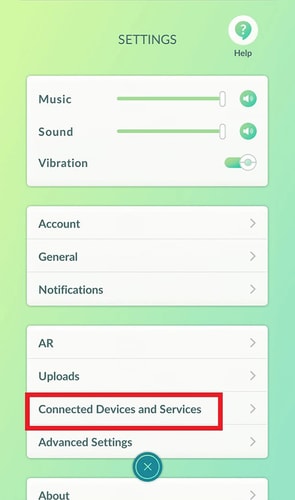
Step 2: Identify Your Last Triggering Action
Think beyond the last successful catch. Your most recent action may have been:
- A failed catch
- A Poké Ball that missed
- A Berry used before leaving an encounter
- A PokéStop spin with a full item bag
- A Gym interaction
- An automated catch or spin
Record both the approximate time and location. The required waiting period depends on the distance between that location and where you plan to interact next.
Step 3: Wait for the Cooldown
Allow the estimated cooldown to finish without performing new location-sensitive actions. For a long-distance jump, community charts commonly recommend waiting up to approximately two hours.
Adding a small buffer is more sensible than interacting the exact second a manually calculated timer expires. Device clocks, remembered interaction times, and location estimates may not be perfectly accurate.
Step 4: Test the Account Once
After waiting, test one ordinary interaction:
- Spin one nearby PokéStop, or
- Attempt to catch one common wild Pokémon.
If the interaction works, normal gameplay has likely resumed. If it still fails, stop rather than repeatedly testing and move to the troubleshooting checks below.
Step 5: Check GPS, Network, and Game Data
A persistent problem may not be a softban. Check that:
- Pokémon GO is updated.
- Your internet connection is stable.
- Automatic date and time are enabled.
- Location permission is enabled.
- GPS works correctly in another map application.
- The game is not experiencing a known issue.
Pokémon GO’s Android and iOS troubleshooting guides also recommend refreshing game data and restarting the application when resolving temporary gameplay problems. These steps may fix a technical error, but they do not remove a server-side cooldown or official strike.
Step 6: Contact Support Only When Appropriate
A normal cooldown generally resolves through waiting and does not require a ban appeal.
Use official support when:
- You receive an explicit suspension or termination message.
- The problem continues despite sufficient waiting and legitimate GPS troubleshooting.
- You believe an official account action was applied incorrectly.
Niantic provides a separate appeal process for formal enforcement actions.
What Triggers a Pokémon GO Softban?
A cooldown-triggering action generally connects an account interaction to a physical location. Common examples include:
- Catching a wild Pokémon
- Throwing or accidentally dropping a Poké Ball
- Feeding a Berry to a wild Pokémon or Raid Boss
- Spinning a PokéStop or Gym
- Placing a Pokémon in a Gym
- Battling a Gym defender
- Feeding nearby Gym defenders
- Using an auto-catcher to catch or spin
The complete action list is covered more extensively in PoKeep’s dedicated Pokémon GO cooldown guide.
Does Teleporting Alone Trigger Cooldown?
Community cooldown rules generally distinguish between changing coordinates and interacting at those coordinates. Teleporting without catching, spinning, feeding, or affecting a Gym may not create the same location record as an actual gameplay interaction.
However, teleporting still does not make spoofing risk-free. Official enforcement can consider behavior beyond the visible cooldown system, and Pokémon GO explicitly identifies GPS location falsification as cheating.
What Can You Do During a Pokémon GO Cooldown?
Players commonly use the waiting period for account-management activities that are not tied to a nearby map location.
These may include:
- Evolving, powering up, transferring, or using TMs
- Organizing Pokémon and item storage
- Opening or sending Gifts
- Trading
- Participating in PvP
- Changing a Buddy
- Reviewing Research and medal progress
Community behavior lists can change, so avoid using valuable or time-sensitive actions merely to test the system. When uncertain, the simplest approach is to close the game or limit activity to storage management until the waiting period ends.
How to Avoid Another Pokémon GO Softban
Track Your Last Interaction
Record the time and place of your last catch, spin, Berry, Gym action, or Raid Boss catch attempt. Tracking only the teleport time is not enough.
Turn Off Auto-Catchers Before Changing Location
An auto-catcher can quietly create a new location interaction. Disconnect or disable it before moving between distant locations, and confirm that it is no longer attempting catches or spins.
Avoid Rapidly Jumping Between Multiple Places
Repeatedly changing cities makes it difficult to identify which action and location are controlling the cooldown. Plan fewer destinations and complete one session before starting another.
Use Conservative Cooldown Estimates
Do not treat community charts as precision guarantees. Use a buffer when the previous interaction time is uncertain, and remember that the commonly cited two-hour maximum applies only to the cooldown model—not to official account enforcement.
Manage Pokémon GO Cooldowns More Easily with PoKeep
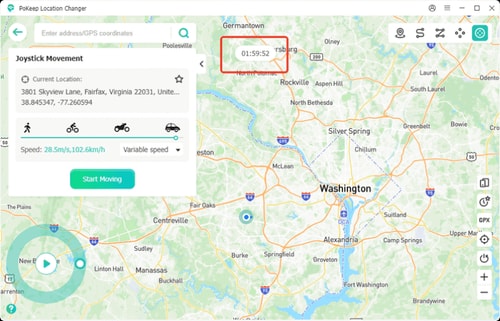
Manually managing a Pokémon GO cooldown requires several steps: remembering the previous location, measuring the distance, finding the corresponding waiting period, and setting a separate timer. Missing any one of these steps can lead to an accidental interaction.
PoKeep Location Changer reduces this manual work by displaying a recommended cooldown timer based on the distance traveled. After selecting a destination, users can review the timer before performing actions at the new location.


PoKeep also provides several movement and planning tools:
- Jump Teleport: Create a sequence of locations and enable Auto Jump to continue after the cooldown period expires.
- Favorites and History: Revisit saved locations and check previously used destinations.
- Two-spot and Multi-spot Modes: Plan routes with adjustable speed, waypoints, loops, and road-based navigation.
- Joystick Mode: Control movement manually with an on-screen joystick or keyboard.
- GPX Support: Import or export reusable routes.
These features are most useful for organizing location changes and reducing timing mistakes. PoKeep cannot instantly remove an active cooldown, guarantee that an account will not be detected, or make GPS spoofing compliant with Pokémon GO’s rules.
Can Repeated Softbans Lead to a Permanent Ban?
Pokémon GO does not publish a specific number of softbans that an account can receive. Claims that an account is guaranteed to remain safe for five, ten, or any other fixed number of cooldown violations are unsupported.
A temporary interaction cooldown is not automatically the same as an official strike. Nevertheless, the behavior associated with it—particularly GPS location falsification—may violate the official gameplay policy.
The formal enforcement system consists of:
- An approximately seven-day warning
- An approximately 30-day suspension
- Permanent account termination
The policy also allows some violations to bypass the normal progression. There is therefore no meaningful “safe number” of softbans.
Pokémon GO Softban FAQs
Is a Pokémon GO softban permanent?
A standard location cooldown is temporary. Community timing charts generally range from seconds to approximately two hours, depending on travel distance.
An official Strike 3 termination is permanent and displays a clear account-enforcement message. Do not confuse the two.
How long does a softban last in Pokémon GO?
Short-distance cooldowns may last only a few minutes. Long-distance jumps commonly use a maximum guideline of approximately two hours.
The precise time depends on the previous interaction location, the next interaction location, and how much time has already passed.
How many softbans can you get in Pokémon GO?
There is no published safe number. Pokémon GO does not officially classify temporary cooldown failures as a numbered softban system.
Repeated location spoofing or other detected violations may still lead to a warning, suspension, or termination.
Does restarting Pokémon GO remove a softban?
No. Restarting can fix temporary app or GPS problems, but it does not erase a server-side cooldown.
Can you trade during a Pokémon GO cooldown?
Community cooldown lists generally classify trading as a non-location-sensitive activity. However, an official seven-day warning may separately restrict trading and other social features.
Does a Raid trigger Pokémon GO cooldown?
Raid behavior should be considered by stage. Viewing a Raid, entering the lobby, battling, feeding the Boss, and attempting the catch are not necessarily handled identically.
Treat feeding a Berry or throwing a Premier Ball at the Raid Boss as a location-sensitive interaction. Avoid joining a valuable Raid when you know a long-distance cooldown is still active.
Is there a Pokémon GO softban checker?
There is no official softban checker that displays an account’s hidden cooldown status. Diagnosis depends on recent location history and the combination of catch and PokéStop symptoms.
Formal suspensions and terminations are identified by an official message during login.
Is Pokémon GO SoftBank related to a softban?
No. SoftBank is a Japanese telecommunications company that has participated in Pokémon GO promotions and Partner Research. “Pokémon GO SoftBank” and “Pokémon GO softban” refer to completely different subjects.
Final Thoughts on Pokémon GO Softbans
When Pokémon repeatedly flee and PokéStops stop giving items after a major location change, stop interacting and review your last catch, spin, Berry, Gym action, or auto-catcher activity. Wait for the estimated cooldown, add a reasonable buffer, and test the game only once afterward.
If the problem continues, investigate GPS, network, app, or server issues rather than assuming every failure is a ban. An explicit warning, suspension, or termination message indicates official enforcement and should be handled through Pokémon GO support.
For players who manage frequent location changes, PoKeep’s cooldown timer, history, route planning, and Jump Teleport tools can make the process easier to organize. They reduce manual timing errors, but they do not eliminate the risks or rule implications of changing a device’s GPS location.
 Related Articles



 Leave Your Comment