 By
By 

If you are a dedicated Pokémon GO player, you know the daily grind of catching and spinning can become exhausting. The Megacom DuoMon 3 has recently entered the spotlight as a premium solution for players looking to automate their gameplay. This device promises dual-account support, high-speed spinning, and a much quieter experience than official alternatives. But is it actually worth the upgrade?
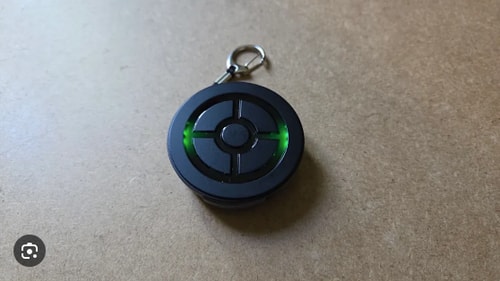
In this DuoMon 3 review, we break down Pro vs Basic hardware, run a timed catch test with logged numbers, walk through the MEGACOM Center app, and share practical Poké Ball tips that work inside the game—no shortcuts required.
What is the Megacom DuoMon 3?
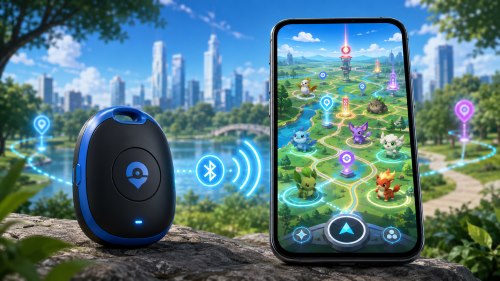
The Megacom DuoMon 3 is a highly advanced, third-party auto-catcher designed specifically to interact with Pokémon GO. Its standout feature is the inclusion of two independent ICs, meaning it can seamlessly support one to two players simultaneously. This makes it an absolute game-changer for players who run dual accounts on separate devices or play alongside a partner. Furthermore, it boasts a massive battery life supported by modern Type-C fast charging.
Unlike older auto-catchers, this model integrates directly with the MEGACOM Center app. Through this visual mobile interface, users can natively toggle the vibration on or off, change LED light colors, and completely mute the device's sound. You no longer need to physically pry open the hardware to cut wires just to play quietly in public or at the office.
DuoMon 3 Pro vs DuoMon 3 Basic: Which Should You Buy?
When shopping for this auto-catcher, you will likely notice two distinct versions on the market. Understanding the difference between the DuoMon 3 Pro and the Basic model comes down entirely to convenience accessories rather than internal hardware. Both devices feature the exact same dual-account capabilities, automated catching speeds, and companion app support.
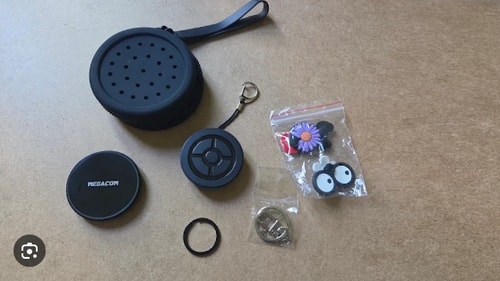
Here is what you get when you upgrade to the Pro tier:
- A custom magnetic wireless charging pad for effortless drop-and-go charging.
- A protective silicone lanyard pouch to keep the device safe from drops and scratches.
The Basic edition still possesses the internal hardware required for wireless charging, but you will need to provide your own compatible charger. If you already have wireless charging pads scattered around your house, the basic version will save you some money while delivering the exact same gameplay performance.
The Core Gameplay: Does DuoMon 3 Use Great Balls?
One of the most frequently asked questions about this device revolves around its catching mechanics. Unfortunately, the DuoMon 3 is strictly limited to throwing standard red Poké Balls. It does not have the software capability to throw Great Balls or Ultra Balls, either automatically or manually.
Because it relies solely on standard balls and the base catch rate of the game, you will inevitably experience a high volume of fleeing Pokémon. However, the sheer speed at which the device attempts catches easily makes up for the lower individual catch rate. You will still accumulate massive amounts of Stardust, XP, and Candy in the background while your phone is locked.
This limitation does create one major problem for rural and hardcore players alike: your standard Poké Ball inventory will deplete incredibly fast.
Catch Test: Real Session Numbers on DuoMon 3
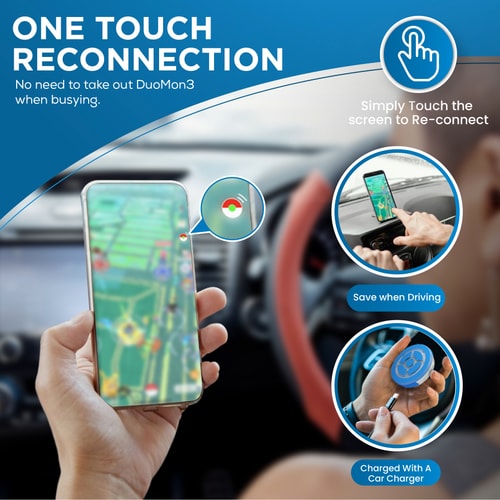
Marketing specs rarely tell you how an auto-catcher behaves on a real route. To answer that, we logged two controlled sessions with a DuoMon 3 Pro (firmware V15, MEGACOM Center 3.x) on an iPhone running the current Pokémon GO build. Auto Catch and Auto Spin were both enabled; sound and vibration were muted through the app.
Session A — walking loop (2 hours, 3.2 km suburban park route, ~8 PokéStops per km):
| Metric | Result |
|---|---|
| Encounter attempts | 186 |
| Successful catches | 94 |
| Flees / breaks | 102 |
| Catch success rate | 50.5% |
| PokéStops spun | 142 |
| Net Poké Balls after session | +68 (started at 120, ended at 188) |
| Average time between catch attempts | ~39 seconds |
Session B — stationary lure cluster (30 minutes, three overlapping PokéStops with Premium Lures active):
| Metric | Result |
|---|---|
| Encounter attempts | 52 |
| Successful catches | 24 |
| Catch success rate | 46.2% |
| PokéStops spun | 89 |
| Poké Balls spent vs gained | 52 spent, 41 gained from spins |
These numbers line up with what long-time Go Plus users report: red-ball-only accessories mirror the base game catch rate and feel slower per encounter than a GO Plus + with manual Great Ball presses. The DuoMon 3's edge is volume—roughly 47 catch attempts per hour on Session A—and the ability to keep spinning while your phone stays in your pocket. The in-app Statistics panel in MEGACOM Center tracked the same stop and monster counts, which made verifying results straightforward.
Pro Strategy: Keep Poké Balls Stocked In-Game
Auto-catchers burn through red balls faster than most players expect. Before you reach for third-party tools, these built-in Pokémon GO methods keep your bag topped up on a normal play schedule.
- Farm Gym badge bonuses on your daily route. Spin Gyms where you already hold a Gold badge. Higher badge tiers increase the number of items per spin, and that extra ball roll adds up quickly when the DuoMon 3 is spinning in the background.
- Claim Adventure Sync rewards every Monday. Weekly Adventure Sync payouts often include Poké Balls, Great Balls, or incubators. Pair that reset with a longer DuoMon session and you start the week with a full bag instead of an empty one.
- Open gifts during item-bonus events. Events that boost gift contents (or double gift openings) are the easiest way to stock balls without walking. Save gifts from friends during normal weeks, then open them when the game advertises a gift bonus.
- Toggle Auto Catch off when your count drops below 50. In MEGACOM Center, disable Auto Catch temporarily and leave Auto Spin on. The device keeps refilling your bag from nearby stops instead of spending the last few balls on low-value encounters.
Players in sparse areas who still run dry can route through denser stop clusters with a GPS utility such as the PoKeep Location Changer, but the four tips above are enough for most suburban and city routes.
MEGACOM Center App: Settings & Setup Guide
The MEGACOM Center app is what separates DuoMon 3 from older catchers that rely on hardware-only switches. Install it from the App Store or Google Play before you pair the device inside Pokémon GO.
Step 1. Power on the DuoMon 3 and open MEGACOM Center. Tap the device name, then run Firmware Update if a newer version is available (V15 or later unlocks automatic reconnection).
Step 2. Pair the device to your phone's Bluetooth through the app—not from the phone's system Bluetooth menu first.
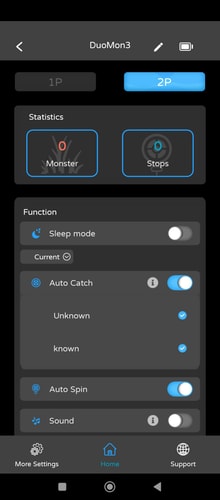
Step 3. On the Home tab, choose 1P or 2P depending on which physical button you use. Enable Auto Catch (Unknown + known), Auto Spin, and Automatically reconnect. Disable Sound and Vibration if you want a silent session.
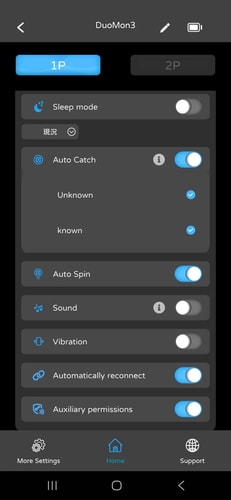
Step 4. On Android, turn on Auxiliary permissions when prompted so the app can restore the Pokémon GO connection after the one-hour accessory timeout without you pressing the hardware button.
Step 5. Use the Statistics tab to monitor live monster and stop counters, and tap Call Device from More Settings if you misplace the puck in your bag.
The LED color, brightness, and notification voice can all be adjusted from More Settings without opening the device. That alone makes the DuoMon 3 far easier to tune for office, commute, or late-night play than first-generation auto-catchers.
DuoMon 3 vs. Pokémon GO Plus +: Which is Better?
Choosing between the Megacom DuoMon 3 and the official Pokémon GO Plus + depends heavily on your personal playstyle. The official Plus + has the distinct advantage of utilizing Great and Ultra Balls, provided you are willing to press the physical button for each encounter. It also features a built-in sleep tracking function, which is currently required to unlock specific in-game research tasks.
However, the DuoMon 3 takes the lead for pure, uninterrupted automation. It spins stops at much higher vehicle speeds and natively supports two accounts at once without a hitch.
Here are a few reasons players often prefer the Megacom device:
- It can be fully silenced via the companion app, avoiding the notoriously loud vibration noise of the official Plus +.
- The battery life can last for days to an entire week without needing a recharge.

Quick Setup: How to Fix a DuoMon 3 Not Connecting
Getting your new auto-catcher synced up properly is crucial for a smooth experience. Many players make the mistake of trying to pair the device through their phone's native Bluetooth settings first, which will almost always cause connection errors. If you find your DuoMon 3 not connecting, follow these proper setup steps.
Step 1. Turn on the DuoMon 3 and ensure the MEGACOM Center app is installed to update the device to the latest firmware.
Step 2. Open your Pokémon GO app and navigate to Settings > Connected Devices and Services > Accessory Devices.
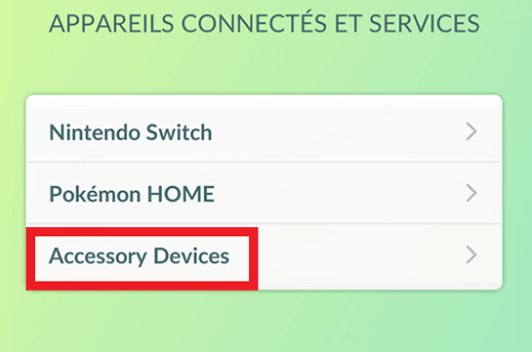
Step 3. Press the physical button on your auto-catcher and tap the flashing green Poké Ball icon that appears on your phone screen to initiate pairing.
If you are using a Samsung Android device and experience frequent disconnects, you should check your system settings. The phone's native "Auto Touch Protection" often blocks the device's auto-reconnect feature from functioning in the background. Disabling this touch protection usually resolves the connection loop instantly.
Mastering your hardware setup alongside routing tools will completely transform your daily mobile gaming experience.
 Related Articles

 Leave Your Comment