 By
By 

Keeping Pokémon GO open during a walk can get tiring fast. You have to watch for spawns, tap PokéStops, manage items, and keep checking your phone just to avoid missing something. That is where Pokémon GO Plus + comes in. It helps you catch Pokémon, spin PokéStops, and track sleep with less screen time.
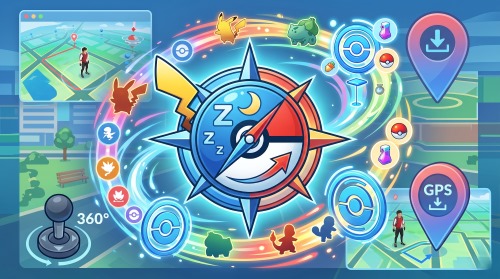
But it also has limits. It can automate nearby actions, but it cannot change where you play or help you move through different areas. If you want GPS joystick, route simulation, or location control, a tool like PoKeep Location Changer may be a better fit.
In this guide, we will cover what Pokémon GO Plus + does, how to use it, whether it is worth buying, and when PoKeep can help.
What Is Pokémon GO Plus +?
Pokémon GO Plus + is an official Bluetooth accessory that connects to Pokémon GO and Pokémon Sleep. In Pokémon GO, it helps you interact with nearby Pokémon, PokéStops, and Gyms without needing to stare at your phone the entire time. In Pokémon Sleep, it can track your sleep with the press of a button and use that sleep data for in-game features.
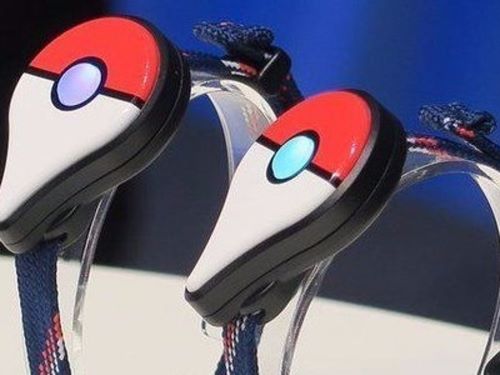
The device is similar in concept to the older Pokémon GO Plus and Poké Ball Plus, but it adds newer functions. It can automatically throw regular Poké Balls, automatically spin PokéStops, support Great Ball and Ultra Ball selection for button throws, and track sleep data. It also includes Pikachu voice prompts, vibration, lights, and a rechargeable battery.
Pokémon GO Plus + cannot work as a standalone game device. It needs a compatible iPhone or Android phone with Pokémon GO and/or Pokémon Sleep installed, and it is not compatible with Nintendo Switch family systems.
What Can Pokémon GO Plus + Do in Pokémon GO?
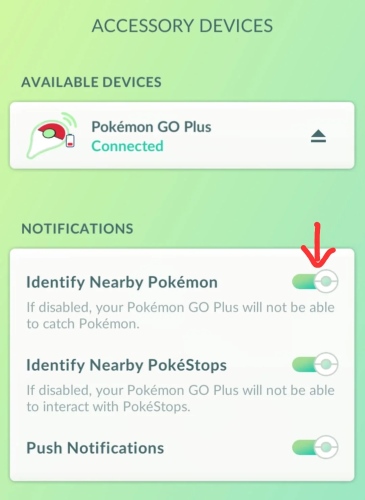
The biggest reason players buy Pokémon GO Plus + is convenience. Once connected, the device can notify you when Pokémon, PokéStops, or Gyms are nearby. You can press the main button to catch Pokémon or collect items, and if certain automatic options are enabled, the device can perform some actions without button presses.
Catch Pokémon More Easily
When a wild Pokémon appears nearby, Pokémon GO Plus + vibrates. You can press the main button to try catching it. The device can also automatically throw regular Poké Balls if auto-throw is enabled. This is useful when walking, commuting as a passenger, or playing during casual outdoor activities.
There is one important detail: automatic throwing uses regular Poké Balls. You can select Great Balls or Ultra Balls for button throws, but they are not used in the same way as regular Poké Ball auto-throw. Also, the device will not automatically throw at a Pokémon you have never caught before; you need to press the button or catch it manually on your phone.
Spin PokéStops and Gyms
Pokémon GO Plus + can collect items from PokéStops and Gyms. If auto-spin is enabled, it can collect items automatically without pressing the button. This is one of its most practical features because it helps keep your bag stocked while you walk through areas with many stops.
If your item bag is full, auto-spin will fail. If your Pokémon storage is full, catching will also fail. So before using the device during an event or long walk, clear storage and make sure you have enough Poké Balls.
Use Pokémon GO in the Background
Pokémon GO Plus + can work when your phone screen is asleep or when Pokémon GO is running in the background. You can later check your Journal to see which Pokémon were caught or which items were collected.
This feature makes the device especially useful for players who want to reduce screen time while still making progress.
Pokémon GO Plus + Sleep Mode: How It Works
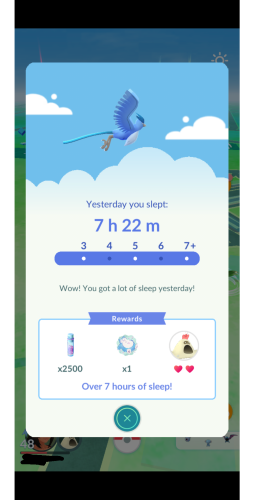
Sleep mode is one of the biggest differences between Pokémon GO Plus + and older Pokémon GO accessories. The device can track your sleep and share sleep data with Pokémon GO or Pokémon Sleep. In Pokémon GO, sleep data can be used for rewards, but sleep-data sharing must be enabled in the Pokémon GO Plus + settings.
To start sleep tracking, the device must be paired but not actively connected for Pokémon GO gameplay. Hold the main button until the indicator flashes blue and a lullaby plays. When you wake up, hold the main button again until the light flashes multicolored lights, then reconnect the device to Pokémon GO to transfer sleep data.
A sleep session shorter than 90 minutes will not be recorded successfully. For Pokémon GO rewards, you also need to connect the device and log in to Pokémon GO to claim them; rewards are not collected automatically.
How to Connect Pokémon GO Plus + to Pokémon GO
Pairing the device is simple, but it can be easy to miss one of the button prompts.
Step 1. Open Pokémon GO and tap the Poké Ball icon.
Step 2. Tap Settings in the top-right corner.
Step 3. Choose Connected Devices and Services.
Step 4. Tap Pokémon GO Plus +.
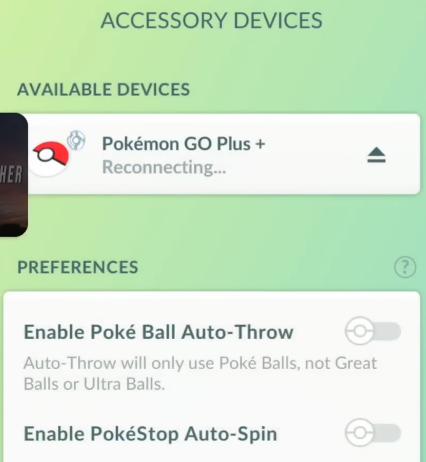
Step 5. Press the main button on the Pokémon GO Plus + device.
Step 6. Select the device when it appears on your phone screen.
Step 7. Press the main button and the top button at the same time to complete pairing.
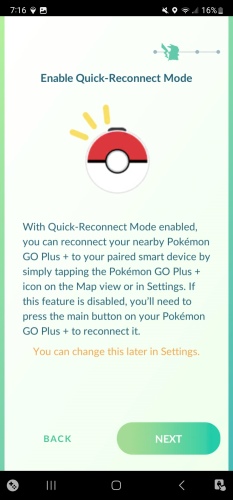
After the device connects, it should remain connected for play. If it fails, go back through the connection process again. For easier daily use, turn on Quick Reconnect Mode when the device is connected. Then you can reconnect from the Pokémon GO Plus + icon on the map screen.
Pokémon GO Plus + Silent Mode, Battery, and Charging Explained
Pokémon GO Plus + has sounds, vibrations, and button lights. Silent mode can mute Pikachu’s cries and lullabies, but it does not turn off everything.
To enable or disable silent mode, hold the top button and press the main button for at least one second. The device vibrates briefly to confirm the change. When silent mode is on, alarms and notifications are also suspended.
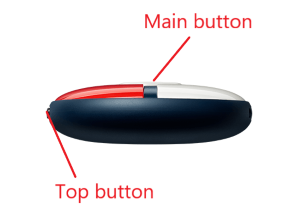
Silent mode does not disable LED lights or all vibration behavior. The button lights cannot be turned off, and vibration for Pokémon and PokéStop notifications cannot be disabled directly in Pokémon GO, although the notifications themselves can be turned off.
Battery Life and Charging
Battery life depends on how you use the device. If connected to Pokémon GO for about two to three hours per day, the estimated battery life is around one week. The device charges through USB Type-C using the included cable, and the battery cannot be removed.
You can check the battery by pressing the top button:
- Blinking red means low battery.
- Yellow means reduced battery.
- Steady green means mostly charged.
For users searching pokemon go plus plus battery replacement, the key point is that the battery is not designed to be removable. If the battery or device stops working normally, official troubleshooting or warranty support is safer than DIY repair.
Pokémon GO Plus + vs Pokémon GO Plus vs Poké Ball Plus
Pokémon GO Plus + is the most complete official accessory of the three for Pokémon GO players who also want sleep tracking.
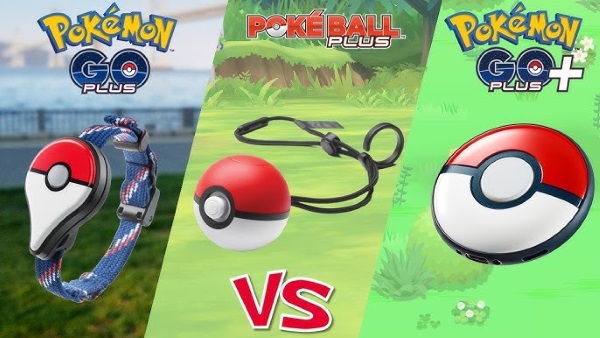
The original Pokémon GO Plus focuses mainly on basic Pokémon GO interactions, such as alerts, catching attempts, and PokéStop interactions. Poké Ball Plus has a more toy-like design and also works with Pokémon GO, but it was originally tied more closely to Pokémon: Let’s Go gameplay. Pokémon GO Plus + is more modern because it combines Pokémon GO convenience with Pokémon Sleep support and automatic Poké Ball throwing.
Simple Comparison Table
| Device | Best For | Main Limitation |
|---|---|---|
| Pokémon GO Plus | Basic Pokémon GO catching and spinning | Older and more limited |
| Poké Ball Plus | Players who like the Poké Ball design | Less focused on sleep tracking |
| Pokémon GO Plus + | Auto-spin, auto-throw, sleep tracking | Still limited by your real-world location |
If you want a physical accessory for walking, Pokémon GO Plus + is the best of the three. If you want to change where your GPS appears, simulate routes, or move with a joystick, none of these accessories solve that problem by themselves.
Common Pokémon GO Plus + Problems and Fixes
Even when the device works well, connection and behavior issues are common enough that every buyer should know the basics.
Pokémon GO Plus + Won’t Connect
Start with the simple checks. Make sure the battery is charged, Bluetooth is enabled, the device is near your phone, and Pokémon GO is updated. If the connection still fails, restart Pokémon GO, restart your phone, refresh your internet connection, and move away from possible radio interference such as microwaves or crowded Bluetooth environments.
If the device previously paired with another phone, unpair it from that device first.
Pokémon GO Plus + Is Not Catching Pokémon
Check whether you have enough Poké Balls and storage space. Auto-throw requires regular Poké Balls, and the device will not automatically throw at Pokémon you have never caught before. If your Pokémon storage is full, catching attempts will fail.
This is especially important during Community Day, Spotlight Hour, or large events when storage fills quickly.
Pokémon GO Plus + Is Not Spinning PokéStops
If auto-spin is not working, check whether the auto-spin setting is enabled and whether your item bag is full. If your bag is full, the device cannot collect more items from PokéStops.
Pokémon GO Plus + Has No Sound
The device may be in silent mode. Toggle silent mode by holding the top button and pressing the main button for at least one second. Silent mode also suspends alarms and notifications, so check this setting first before assuming the speaker is broken.
Pokémon GO Plus + Sleep Tracking Failed
A failed sleep session may be caused by short sleep duration, low battery, incorrect device placement, app issues, or an unstable tracking environment. Sleep sessions shorter than 90 minutes will not be recorded successfully.
Want More Control Than Pokémon GO Plus + Offers? Try PoKeep Location Changer
Pokémon GO Plus + is a helpful accessory, but it is still built around your real-world movement. If your nearby area has few PokéStops, weak spawns, or limited raids, the device can only automate what is already around you.

That is where PoKeep Location Changer fits naturally.


PoKeep is designed to change GPS location on iPhone and Android without jailbreak or root. It supports Pokémon GO and other location-based games, and it offers features such as 1-click location change, 360° GPS joystick, custom speed, two-spot movement, multi-spot movement, jump teleport, cooldown timer, route history, and GPX route import.

With PoKeep, you can simulate more realistic movement instead of only jumping from place to place. The joystick mode is useful when you want to move around a park, follow a route, or approach nearby PokéStops gradually. Route modes are better for hatching eggs, farming items, or repeating productive paths. The cooldown timer helps players manage waiting periods between location changes more carefully.
PoKeep does not replace Pokémon GO Plus + sleep tracking or physical button-catching. Instead, it solves a different problem: GPS control.
Pokémon GO Plus + vs PoKeep: Which Problem Are You Solving?
| Need | Better Option |
|---|---|
| Auto-catch nearby Pokémon while walking | Pokémon GO Plus + |
| Auto-spin nearby PokéStops | Pokémon GO Plus + |
| Track sleep for Pokémon GO/Pokémon Sleep | Pokémon GO Plus + |
| Change Pokémon GO location | PoKeep |
| Use GPS joystick movement | PoKeep |
| Simulate walking routes | PoKeep |
| Import GPX routes | PoKeep |
| Play from more locations without jailbreak/root | PoKeep |
For many players, the best choice depends on their play style. Pokémon GO Plus + is best when you are physically moving through good areas. PoKeep is better when your local area limits your gameplay and you want more control over GPS movement.
FAQs About Pokémon GO Plus +
Does Pokémon GO Plus + work with Pokémon GO?
Yes. Pokémon GO Plus + connects to Pokémon GO through Bluetooth and can help catch Pokémon, spin PokéStops, collect items, work in the background, and sync sleep data for rewards when sleep sharing is enabled.
What is the difference between Pokémon GO Plus and Pokémon GO Plus +?
Pokémon GO Plus + is newer and more capable. It supports automatic Poké Ball throwing, PokéStop auto-spin, Great Ball/Ultra Ball selection for button throws, and sleep tracking with Pokémon GO or Pokémon Sleep. The older Pokémon GO Plus is more limited.
Can Pokémon GO Plus + use Great Balls and Ultra Balls automatically?
Not in the same way as regular Poké Ball auto-throw. You can select Great Balls or Ultra Balls for button throws, but the automatic throw setting is for regular Poké Balls.
Can Pokémon GO Plus + catch new Pokémon automatically?
No. If the Pokémon has never been caught before, the device will not automatically throw at it. You need to press the main button or catch it manually on your phone.
Can Pokémon GO Plus + work when the phone screen is off?
Yes. It can work when the phone screen is asleep or while Pokémon GO is running in the background. You can check the Journal later to see caught Pokémon and collected items.
How long does the Pokémon GO Plus + battery last?
Battery life depends on usage, but if it is connected to Pokémon GO for two to three hours per day, the estimated battery life is about one week.
Can you replace the Pokémon GO Plus + battery?
The battery is not removable, so battery replacement is not an official user-level feature. If charging or battery behavior fails, use official troubleshooting or support instead of opening the device yourself.
What does Pokémon GO Plus + silent mode do?
Silent mode turns off device sounds, including Pikachu cries and lullabies. It does not disable LED lights, and it does not fully remove all vibration behavior.
Does PokeGo++ still work?
PokeGo++ is not the same thing as Pokémon GO Plus +. Pokémon GO Plus + is an official hardware accessory. PokeGo++ refers to an old modified Pokémon GO app, which is a different and risky category. If you are looking for the official device, search for Pokémon GO Plus + or Pokemon Go Plus Plus, not PokeGo++.
Should I buy a modded Pokémon GO Plus +?
Modded devices are unofficial and may involve hardware changes, warranty issues, or uncertain compatibility. If you want better GPS movement or route control, it is safer to use a dedicated location tool like PoKeep rather than modifying hardware.
Final Verdict: Is Pokémon GO Plus + Still a Good Buy?
Pokémon GO Plus + is a good buy for players who want easier catching, automatic PokéStop spinning, background play, and sleep-related bonuses. It is especially useful if you walk through active Pokémon GO areas and want to play with less screen time.
But it is not a complete Pokémon GO solution.
If your biggest problem is that you cannot reach better spawn areas, cannot walk enough routes, live far from PokéStops, or want joystick-style GPS control, PoKeep Location Changer is the more relevant tool. Pokémon GO Plus + helps you interact with what is nearby. PoKeep helps you decide where “nearby” appears to be. 🚀
 Related Articles



 Leave Your Comment