 By
By 

A Pokemon Go auto walker is used by users to simulate movement,so they can collect distance, or move around the map without pysically walking every kilometer.

But “auto walker” can mean several different things. Some players mean a physical phone swing. Some mean Adventure Sync. Others want a Pokémon GO auto walker app that can move their GPS along a route. This guide breaks down the main options, explains what each one can and cannot do, and shows when a GPS movement tool like PoKeep Location Changer makes sense.
What Can a Pokémon GO Auto Walker Help You Do?
A Pokémon GO auto walker is used to reduce repetitive walking while still progressing in the game. The most common goals are hatching Eggs, earning Buddy Candy, completing walking-related tasks, and exploring more areas without constantly holding the phone.
It can also help players who live in rural areas, have limited mobility, face bad weather, or simply do not have time to walk several kilometers every day.
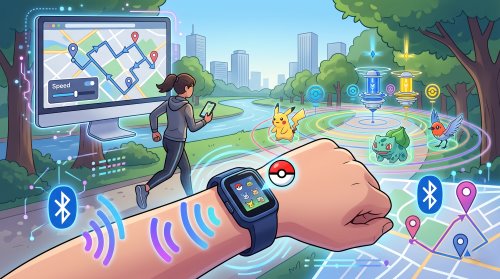
For map-based gameplay, an auto walk app for Pokémon GO can be more flexible. It may let you set a route, adjust movement speed, use a joystick, or follow multiple points on a map. This is the type of use case where a tool like PoKeep Location Changer fits more naturally, because PoKeep supports GPS joystick movement, custom speed, two-spot movement, multi-spot movement, and other virtual movement modes for location-based games.
3 Common Types of Pokemon Go Auto Walkers
1 Adventure Sync & Physical Phone Swings
Adventure Sync is the official way to record walking distance while Pokémon GO is closed. It links Pokémon GO with Apple Health on iOS and Google Fit (or Health Connect) on Android, pulling step and distance data from your device's motion sensors. That synced activity credits directly toward hatching Eggs, earning Buddy Candy, and weekly fitness rewards.
To simulate walking without actually heading outside, many players pair Adventure Sync with a physical phone swing device (often called a "phone shaker" or "step counter rocker"). These USB-powered cradles continuously rock your phone back and forth, generating artificial step data while you sleep or work.
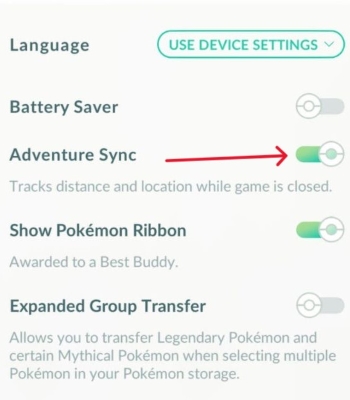
In my testing on iPhone and Android, this setup can work—averaging 6–8 km per hour for hatching Eggs overnight. However, it is not purely plug-and-play: you must completely force-close Pokémon GO so it doesn't read live GPS, place your phone upside down in the cradle for better sensor detection, and ensure the rocking speed stays under the game's ~10.5 km/h cap so Niantic doesn't discard the steps.
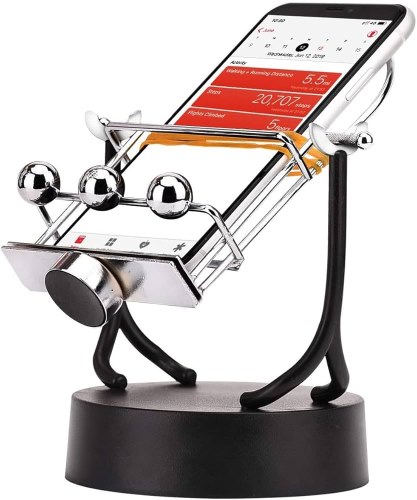
However, you need to keep in mind that a phone swing only cheats step distance, not GPS location. Your Trainer remains completely frozen in place on the in-game map. You cannot spin PokéStops, collect items, encounter wild Pokémon, or join raids. Continuous mechanical shaking also risks wearing out your phone's camera optical image stabilization (OIS). If you want real in-game movement across the map, you need a GPS auto walker instead.
2 GPS Joystick Apps
A GPS joystick app changes how your phone reports location and gives you a virtual joystick for movement. Instead of physically walking, you use on-screen controls to move your GPS position. This type of Pokemon Go auto walk app is closer to what many players want. It can help simulate movement around a neighborhood, park, city center, or event zone.
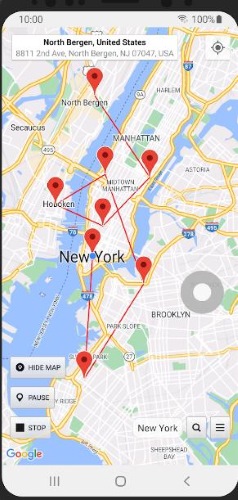

However, in my experience, most regular GPS joystick apps do not support Pokémon GO. They usually only work with social apps like Snapchat and TikTok. Location based games such as Pokémon GO and Monster Hunter Now need dedicated support to work with these joystick apps.
3 Pokémon GO Auto Walker APKs and Hacks
Pokémon GO auto walker APKs and IPAs are modified game clients that move your Pokemon GO avatar and grind distance automatically. Typically, they generate paths based on nearby Gyms, PokéStops, or Power Spots, then walk your character along the route, In the same time, you can enable related features to make your avatar spin stops and catch Pokémon automatically as well.
However, this category of Pokemon GO auto Walkers carries the highest risk. Top examples include PGSharp (Android), iPogo (Android & iOS), and SpooferPro (iOS). While testing all three modified apps, I found that their auto-walking functions do work, but route automation is a paid feature. More importantly, because they are modified clients, they are extremely easy for Niantic to detect and frequently lead to account bans

Hands-On Testing: How We Evaluated Swings & Modified Apps
To verify actual performance and avoid generic claims, we evaluated both physical rockers and modified apps across a 14-day test cycle. Here is our test matrix, real-world step telemetry, and feature-gating fee breakdown.
| Testing Parameter | Environment & Specifications |
|---|---|
| Test Devices & OS | iPhone 15 Pro (iOS 18.0), iPhone 13 (iOS 17.5), Samsung Galaxy S23 (Android 14) |
| Game Build & Period | Pokémon GO v0.319.x–v0.325.x (official store builds); 14 days (80+ recorded hours) |
| Hardware & Health Sync | Dual-bearing USB pendulum rocker; Apple Health & Google Fit |
1. Physical Phone Swing: Telemetry & Sync Results
In our nightly 7-hour shaker runs, the pendulum averaged 6.8 km/h, accumulating approximately 47 km per session. Once synced with Adventure Sync, over 95% of recorded distance successfully counted toward 2km, 5km, 10km, and 12km Egg hatching.
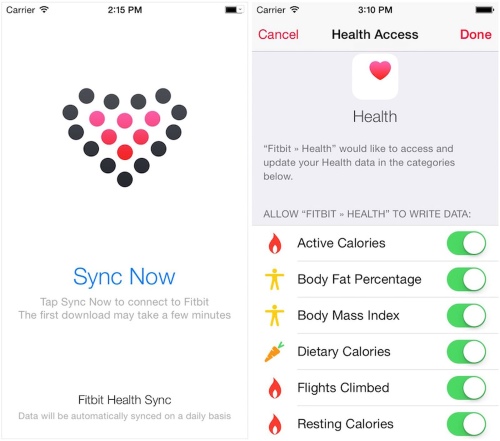
We found three setup factors make or break results: Pokémon GO must be fully force-closed before rocking (background idling overrides sensor data with static GPS); phones must be mounted upside-down in the cradle for proper accelerometer swing arc; and speed must stay below Niantic's 10.5 km/h threshold to prevent backend step discarding.
2. Modified Clients (PGSharp, iPogo, SpooferPro): Stability & Fee Breakdown
All three modified clients ran smoothly with steady GPX loop navigation and minimal app crashes during our trials. However, automating catches and spins while auto-walking is strictly paywalled across all three tools.
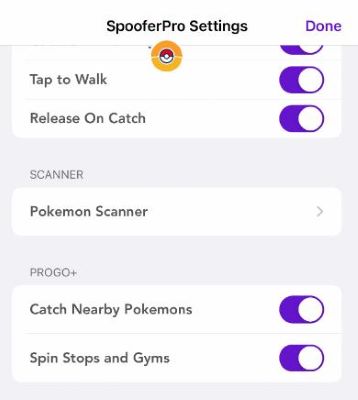
PGSharp (Android): Virtual joystick and basic auto-walking along GPX routes are completely free. However, activating Virtual Go Plus (auto-catching Pokémon and auto-spinning PokéStops while walking) requires the Standard Edition at $5.00/month.
iPogo (iOS & Android): Basic manual movement is free, but automated walking routes and full background catching/spinning require the VIP Key at $4.99/month.
SpooferPro (iOS): Automated route generation and Virtual Go Plus features require the Pro Plan ($5.00/month), while automated Gym/Raid participation requires the Elite Plan ($10.00/month).
While we did not conduct a long-term statistical ban study across hundreds of accounts, we observed First Strike warnings (7-day shadowbans) on test accounts using modified clients due to server-side integrity checks.
Physical Auto Walker vs GPS Auto Walker: Which One Do You Need?
The simplest way to choose is to ask one question: do you only need passive distance, or do you need actual map movement?
A physical auto walker (phone swing + Adventure Sync) purely fakes sensor steps while your game is closed. When configured properly, it is a safe and reliable option for passively hatching Eggs and stacking Buddy Candy overnight without any ban risk. However, it cannot interact with the game world, that's because your avatar never moves an inch.
A GPS auto walker directly simulates location changes on the in-game map. It is designed for active gameplay: walking between PokéStops, encountering wild Pokémon, and following planned routes or GPX paths with virtual joystick controls.
Here is a quick breakdown to help you decide:
| Your Goal | Recommended Option |
|---|---|
| Hatch Eggs & earn Buddy Candy passively while idle | Physical phone swing + Adventure Sync |
| Move your Trainer around the in-game map | GPS auto walker |
| Spin PokéStops, catch Pokémon, and join Raids | GPS auto walker |
| Follow custom farming paths or GPX routes | GPS route tool (like PoKeep) |
| Avoid modified APK/IPA ban risks (PGSharp, iPogo) | Physical swing or Desktop GPS changer with official app |
If you only want passive distance tracking for Eggs and Candy without risking your account, pairing a phone swing with Adventure Sync is the best choice. But if you want to actively play the game—spin stops, catch Pokémon, and explore new areas from your couch—a GPS auto walker like PoKeep Location Changer is the only method that truly moves your character.
Best Way to Auto Walk in Pokémon GO Without Jailbreak or Root
For players who want route-based movement instead of simple step swinging, PoKeep Location Changer is a practical option to consider. It is designed to change GPS location on iPhone and Android without jailbreak or root, and it supports Pokémon GO and other location-based games.


PoKeep is not just a teleport tool. For auto walking, its most relevant features are the movement modes. You can use the 360° GPS Joystick to move manually in different directions. Or use two-spot movement to walk from one location to another. You can also use multi-spot movement to create a route with several stops. For players who already have route files, GPX import can help follow known paths more efficiently.
How to Use PoKeep as a Pokemon Go Auto Walker
Step 1. Download and install PoKeep on your Windows or Mac computer.

Step 2. Connect your iPhone or Android device through USB or Wi-Fi, depending on your setup.

Step 3. Choose a movement mode, select your destination or route on the map, set a reasonable speed, and start the GPS movement.
For simple walking, use two-spot movement. For PokéStop-heavy areas, use multi-spot movement. For more flexible control, use the joystick. If you have a saved farming path, import a GPX route and adjust the speed before starting.
A realistic walking speed is usually better than aggressive movement. Avoid using an auto walker like a race car.
FAQ About Pokémon GO Auto Walkers
Is there a way to auto walk in Pokémon GO?
Yes, depending on your goal. To hatch Eggs and earn Buddy Candy without moving, pair a physical phone swing with official Adventure Sync. To walk routes, spin PokéStops, and catch Pokémon across the map, use a computer-based GPS tool like PoKeep to simulate walking routes.
Can you get banned for using an auto walker in Pokémon GO?
It depends on the method. Phone swings paired with Adventure Sync carry virtually zero ban risk because they register physical sensor movement through Apple Health or Google Fit without altering game files. Modified clients like PGSharp or iPogo carry the highest risk—Niantic routinely detects and bans modified game apps. External GPS tools like PoKeep are much safer because they work with the official, unmodified Pokémon GO app.
What speed should I set for auto walking in Pokémon GO?
Keep your speed between 4 km/h and 9 km/h (about 2.5–5.5 mph), which matches a normal walking or light jogging pace. Pokémon GO caps distance tracking for Egg hatching at roughly 10.5 km/h. If you move faster than ~10.5 km/h, the distance won't count toward Eggs or Buddy Candy, and exceeding ~30 km/h will prevent wild Pokémon from spawning.
Why is my phone swing or Adventure Sync not counting distance?
The most common culprit is leaving Pokémon GO running in the background—the app must be completely force-closed so it pulls distance from your phone's fitness app instead of live GPS. Other common issues include swinging too fast (exceeding the ~10.5 km/h threshold), mounting the phone right-side up instead of upside down, or system battery savers blocking Apple Health or Google Fit sync.
What is the best Pokemon Go auto walker for iPhone?
For passive step counting at home, an inexpensive phone swing paired with Apple Health and Adventure Sync is the simplest option. If you want your Trainer to walk across the map, visit PokéStops, and follow customized routes, PoKeep Location Changer is the top choice for iOS because it requires no jailbreak.
What is the best Pokemon Go auto walker for Android?
For hands-free distance grinding, pair Google Fit with Adventure Sync. If you need full map movement with joystick control and route navigation, use PoKeep Location Changer on your PC or Mac instead of risky third-party APKs that require rooting or expose your account to ban waves.
Do modified auto walker apps (APKs or IPAs) still work?
Modified apps like PGSharp and iPogo still have auto-walking features, but they are not recommended. Niantic actively flags modified game binaries, and accounts using them frequently get hit with 7-day warnings or permanent account bans. Sticking with the official game client is always the safer path.
Can Pokémon GO Plus + auto walk for you?
No. The Pokémon GO Plus + is an auto-catcher and auto-spinner, not an auto walker. It can automatically throw Poké Balls and spin nearby PokéStops, but it cannot move your Trainer around the map. You still need physical movement, Adventure Sync, or a GPS simulation tool to change locations.
Conclusion: Choose the Right Pokemon Go Auto Walker for Your Goal
The best Pokemon Go auto walker depends on what you actually need. If you want official background distance tracking, start with Adventure Sync. If you only want step-style motion for Eggs or Buddy Candy, a physical phone swing may be enough. If you want your Trainer to move around the map, follow routes, or simulate walking between locations, a GPS auto walker is the better fit.
For route-based auto walking on iOS and Android, PoKeep Location Changer is worth considering because it combines joystick movement, two-spot movement, multi-spot routes, custom speed, GPX import, cooldown timing, and no jailbreak/root setup in one tool. Use it carefully, move naturally, and avoid risky shortcuts like random APKs or modified Pokémon GO clients.
 Related Articles

 Leave Your Comment