 By
By 

Taking your mobile gameplay to the next level requires smart tools and efficient strategies. If you want to maximize your auto-catching potential, learning the ins and outs of your hardware is absolutely essential.
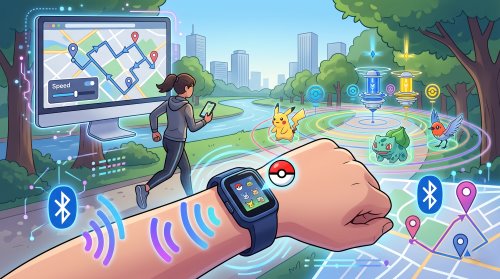
The Go-tcha Evolve has become a staple accessory for players looking to catch creatures and spin stops without staring at their screens constantly. However, getting the device set up and keeping it running smoothly can sometimes feel like a puzzle. This comprehensive guide will walk you through everything from the initial Go-tcha Evolve app configuration to advanced desktop location routing.
The Evolution of Three Go-tcha Generations
As mobile gameplay has continued to advance, the Go-tcha series has undergone three generations of evolution, transitioning from minimalist designs to fully-featured accessories. Each iteration introduces more advanced technology while actively solving common player frustrations. Understanding these key differences can help you select the most suitable device based on your specific gaming needs.
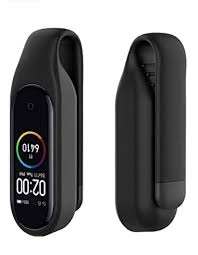
The First Generation (Original Go-tcha) pioneered the auto-catching accessory market, earning player praise for its extreme portability and discreet appearance. However, its primary weakness was the reliance on a proprietary charging cable. This flimsy cord was incredibly difficult to replace, effectively rendering the device completely useless if it was ever lost.
The Second Generation (Go-tcha Evolve) achieved a massive leap in hardware design, utilizing innovation to completely resolve the previous charging dilemma.
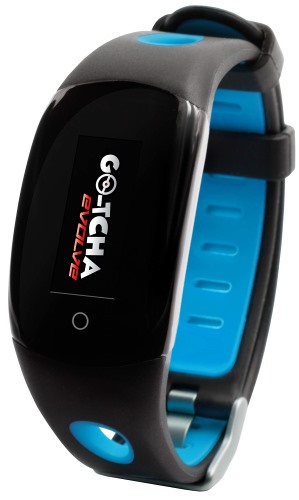
- It integrates a USB plug directly into the wristband, allowing users to connect to power simply by pulling the strap off at a 45-degree angle.
- Beyond hardware optimizations, it also introduced a full-color animated screen, vibration alerts, and practical daily features like a built-in pedometer and clock.
The Third Generation (Go-tcha Evolve Pro+) represents the current pinnacle of the series' technology, designed specifically to provide hardcore players with even stronger performance.
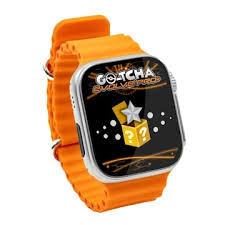
- This model features a massive 1.7-inch touchscreen paired with a rugged aluminum casing, transitioning to a more robust magnetic wireless charging solution.
- It boasts a larger 200mAh battery and adds an innovative accuracy settings dial, allowing users to simulate human behavior by adding randomized catch delays to improve success rates.
When selecting your device, you must carefully weigh the balance between portability and advanced features. The second-generation Evolve remains an incredibly cost-effective choice due to its balanced performance and convenient built-in charging capabilities. However, for players chasing the absolute highest accuracy and longest battery life, the professional-grade specifications offered by the third-generation Pro+ make it the definitive upgrade.
How to Connect the Go-tcha Evolve App and Update Firmware
One of the most frequent hurdles new users face is getting their smartphone to recognize the wristband. The companion application is fantastic for customizing settings, but it often competes with your main game for the Bluetooth connection.
You cannot have the wristband connected to both your game and the companion settings application at the exact same time. Following a strict sequence ensures a stable pairing process.
Step 1. To connect your Go-tcha Evolve to the Go-tcha Evolve App, you must close the main game application completely.
Step 2. Open the companion app on your phone, then press the button on the Go-tcha Evolve to wake the screen and initiate the sync.
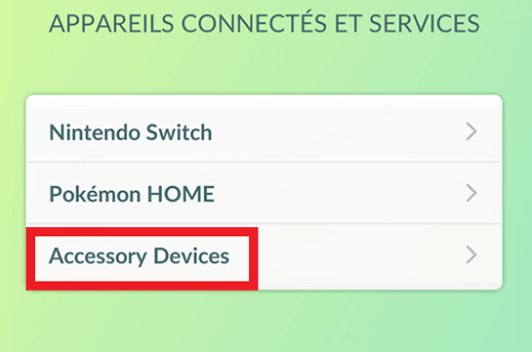
Step 3. Once you have downloaded any necessary firmware updates or adjusted your settings, completely close the companion app before reopening your game to pair the accessory directly in the in-game menus.
Even the best hardware occasionally runs into hiccups. Many issues that appear to be broken devices are actually just simple misunderstandings of how the hardware operates.
Troubleshooting Common Go-tcha Evolve Issues
Even the most reliable gaming accessories can encounter occasional hiccups during daily use. Fortunately, many of the hurdles players face with their auto-catchers stem from simple software quirks or user errors rather than actual hardware failures. Before you assume your wristband is broken, reviewing a few basic settings can usually resolve the problem.
Resolving Charging and Power Errors
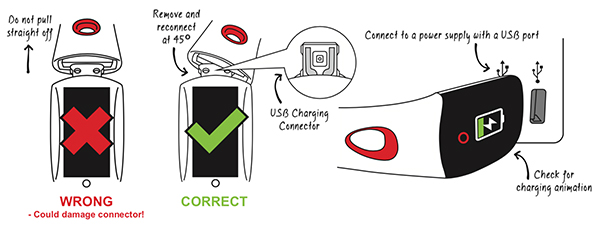
Because the USB connector is integrated directly into the strap, it is remarkably easy to insert the device into a power port upside down. If you plug the wristband into your computer or wall adapter and the screen remains completely dark, it is not actually receiving power. You will know the accessory is successfully charging only when the vibrant battery indicator animation actively displays on the screen.
Fixing Auto-Disconnects and Catch Failures
A frequent point of frustration for new users is the device automatically unpairing itself after exactly sixty minutes of gameplay. This one-hour disconnect is actually a standard limitation hardcoded into the official Pokémon GO application to manage server loads, meaning it is absolutely not a defect with your hardware.
To continue your automated grinding, you simply need to wake the wristband and tap the in-game icon to reconnect.
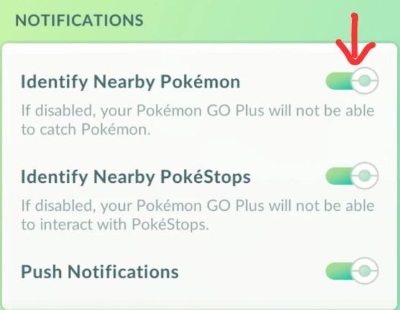
Additionally, if your device is actively connected but completely ignoring nearby targets, you need to verify your in-game permissions. The hardware's automated functions rely on the game telling it what is nearby. You must ensure that both the "Identify Nearby Pokémon" and "Identify Nearby PokéStops" options are actively toggled on within the Pokémon GO settings menu for the accessory to work.
Executing a Complete Pairing Reset
When your wristband absolutely refuses to sync with your smartphone, a clean reset of your wireless connections is the best approach. Following a specific sequence clears out cached Bluetooth data that might be blocking the connection.
Step 1. Navigate to your smartphone's native Bluetooth settings menu and select the option to "Forget" or unpair the Go-tcha Evolve device.
Step 2. Open the Pokémon GO application, navigate to your accessory settings, and eject the wristband from the game's list of recognized devices.
Step 3. Completely close and restart the game application, then attempt the pairing process from scratch directly through the game's menu.
Advanced Strategy: Automating Your Movement
Having a functional Go-tcha Evolve is fantastic, but the device is ultimately useless if you are stuck sitting in one place. Auto-catchers rely entirely on you encountering new spawn clusters and interacting with fresh map locations.
When you are stuck inside due to terrible weather, a busy work schedule, or a lack of local map landmarks, you need a way to safely simulate movement. This is where combining your wristband with a desktop location simulation tool becomes the ultimate grinding strategy.

Pokeep Location Changer is a desktop application designed for changing GPS locations on mobile devices, offering a massive advantage for location-based scenarios. Instead of relying on risky mobile spoofing apps that alter game files, a desktop tool feeds simulated location data cleanly to your connected device.


You can utilize Pokeep Location Changer to maximize your Go-tcha Evolve with these core features:
- Realistic Route Simulation: Create a multi-point movement path through a high-density area.
- Adjustable Speed: Set your simulated movement to a realistic walking pace so the auto-catcher has time to lock on and trigger interactions.
- History and Favorites: Save your best farming routes to quickly repeat your most successful workflows.
FAQs about Go-tcha Evovle
Does the Go-tcha Evolve use Great Balls or Ultra Balls?
No, the device does not have the capability to utilize higher-tier items. It exclusively throws standard red Poké Balls to capture creatures.
You must ensure you maintain a healthy stock of standard red balls in your item bag. If you run out, the wristband will only spin stops and will ignore all spawn encounters until your inventory is replenished.
Is the wristband waterproof for swimming?
The Go-tcha Evolve is designed to be splash-resistant, which makes it perfectly safe for sweaty workouts or walking in light rain. However, the hardware is not fully waterproof.
Submerging the device in a pool or wearing it in the shower can permanently damage the internal components and the touchscreen. Always remove the wristband before heavy water exposure.
Will using an auto-catcher get my game account banned?
Utilizing a physical auto-catching device is completely safe for your account status. The mobile application registers the Go-tcha Evolve exactly like an officially licensed accessory.
Because it relies on the game's native Bluetooth integration rather than modifying the application's code, it does not trigger the developer's anti-cheat systems. You can grind with peace of mind.
Can I connect it to multiple phones at the same time?
You can only sync the wristband to a single smartphone and game account at any given moment.
If you want to use the device on a secondary phone, you need to completely unpair it from the primary device first. This prevents signal confusion and ensures a stable connection when you transition between accounts.
Final Thoughts on Maximizing Your Grind
Mastering your equipment is the secret to a stress-free gaming experience. By understanding how to properly manage your firmware updates and keeping the hardware clean, your Go-tcha Evolve will serve you for countless hours.
When you pair that automated catching power with the precise, privacy-safe route simulation of the Pokeep Location Changer, you create an incredibly efficient, hands-free ecosystem. Set your walking path, ensure your wristband is fully charged, and let the tools do the heavy lifting for you.
 Related Articles




 Leave Your Comment