 By
By 

Have you ever spent time carefully crafting the perfect Pokéstop nomination, only to have it accepted but never actually appear in the game? This common frustration happens because Niantic uses a hidden geographic grid system that governs waypoint creation.

To see this invisible framework, community developers created a powerful map modifier called IITC. Originally designed for Ingress players, the Ingress Intel Total Conversion (IITC-CE) has become the definitive tool for viewing the map and planning your local routes.
Decoding the Hidden Grid: Why S2 Cells Matter in Pokémon GO
The official game map gives you no indication of where new stops can legally be placed. Under the hood, the game world is divided into a geometric grid known as S2 cells. By understanding these specific boundaries, you can strategically predict and control exactly where new Gyms and Pokéstops will spawn in your neighborhood.
To master your local mapping strategy, you need to be aware of three crucial spatial rules.
Step 1. Focus on Level 17 cells, as the strict rule is that only one Pokéstop or Gym can exist within a single L17 square.
Step 2. Check Level 14 cells to trigger Gym promotions. A larger L14 cell follows a strict threshold: reaching 2 total waypoints creates your first Gym, 6 waypoints creates a second Gym, and 20 waypoints generates a third.
Step 3. Respect the 20-meter dead zone, meaning any new submission must be at least 20 meters away from an existing portal to go live.
Tracking these invisible borders and counting waypoints mentally can get complicated quickly. To help you visualize exactly how the L14 promotion mechanic works, we have included an interactive simulator below.
L14 Cell Gym Simulator
Rule: Total waypoints determine Gym count
You can experiment by adding new waypoints to the mock cell and watch exactly when a standard stop transforms into a Gym.
Once you grasp this threshold concept, you need a reliable map to overlay these precise grid lines directly onto the real-world map and start your planning.
The Great Database Split: The 2025 Crisis
For nearly a decade, the Ingress Intel map and IITC plugins were the gold standard for visualizing these hidden grids. However, a massive corporate restructuring in 2025 completely fractured this ecosystem.
Niantic separated its database architectures. Older games like Ingress remained on a new spatial system, while mega-hits like Pokémon GO were transferred to an independent infrastructure overseen by Scopely.
The immediate fallout was the end of automatic data syncing between the two platforms. Submissions approved for Pokémon GO no longer populated the Ingress map. Because the traditional IITC setup is hardcoded to scrape data from Ingress, it became entirely blind to the thousands of new waypoints being generated daily on the new servers.
Using IITC today is like navigating with an outdated compass. You might see an empty cell on the Intel map, only to discover in the real world that the area is already packed with newly approved Pokéstops.
The 2026 Wayfarer Map: Accurate, But Missing the Grid
To fix this massive blind spot, developers launched an official Wayfarer map interface in early 2026. This new tool is embedded directly within the Wayfarer submission portal, granting users API-level precision to view every active waypoint in the Pokémon GO database.
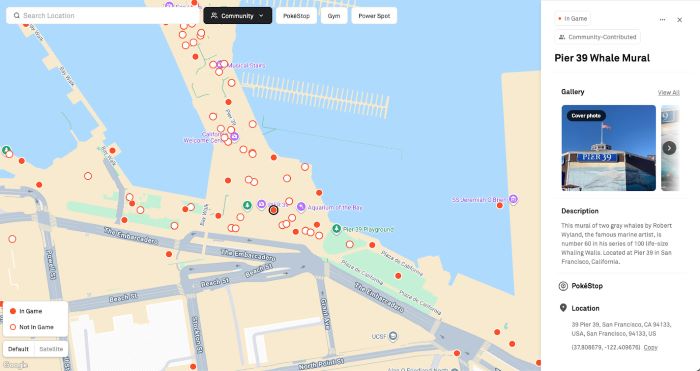
While this official map gives you the exact locations of current Pokéstops, it natively lacks the S2 cell overlays that planners desperately need.
Unfortunately, at this time, we have not found a working or reliable script that successfully injects the S2 grid onto this new official Wayfarer map.
While community hubs like wayfarer.tools exist to direct users toward helpful discussion Discords, a direct, functioning Tampermonkey script to recreate the classic IITC grid experience on the 2026 map is simply not available yet. Planners currently have to rely on cross-referencing the official map's waypoint data with external, manual grid websites.
Legacy Setup: IITC Mobile and Desktop Guides
(Important Note: As explained above, the IITC method is largely obsolete for accurate Pokémon GO planning as of 2025. We are preserving these instructions below for historical reference or for users who still wish to attempt the mobile workaround.)
Transforming your standard intel map into a fully-fledged planning dashboard requires a few initial configuration steps. For desktop users looking to experiment with this legacy setup, follow these core actions:
Step 1. Install the Tampermonkey extension onto your browser.
Step 2. Install the main IITC-CE script to upgrade the standard map interface. Get it from iitc.app, then install it from this raw script URL: https://iitc.app/build/release/total-conversion-build.user.js.
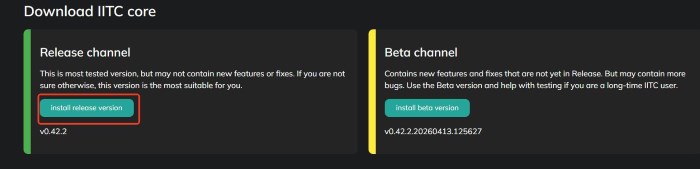
Step 3. Install the dedicated Pokémon GO S2 cell plugin (Pogo Tools). Open the PoGo S2 Plugin project on GitLab, then install it from this raw script URL: https://gitlab.com/NvlblNm/pogo-s2/raw/master/s2check.user.js. Once installed, the "S2 Grid" and "PoGo Opt" options will appear in your Ingress Intel Map sidebar.
Note: This is the standard setup, but during testing, it frequently fails because the scripts are heavily outdated. If the desktop environment does not work, you can turn to the mobile version for help.
If you prefer planning on the go, the mobile workflow is equally effective.
Step 1. Download the IITC-Mobile app (Android) or find it on the App Store (iOS).
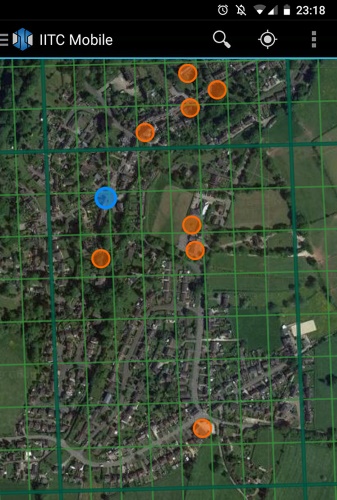
Step 2. Open the app settings to access the plugin menu. You can manually add the S2 cell scripts by pasting this raw URL: https://gitlab.com/NvlblNm/pogo-s2/raw/master/s2check.user.js. Once added, ensure "Pogo Tools" is enabled under the "Layer" settings to activate the S2 cell overlays on your phone.
Executing Your Plan: Simulating Routes with Pokeep Location Changer
Finding the perfect empty S2 cell on your screen is only the first phase of a successful map strategy. The second phase is the actual execution, which often involves verifying the physical location, testing geographical boundaries, or previewing geo-specific content.
Before making a long physical trip to an unfamiliar neighborhood, it is highly beneficial to simulate your planned route first.
This is where the Pokeep Location Changer becomes an invaluable desktop tool for your workflow. It allows you to perform a privacy-safe location simulation, giving you a way to interact with location-based apps and gaming scenarios from your computer.


Instead of driving across town blindly, you can map out your coordinates using your preferred map tool and test them immediately.
Step 1. Copy the exact latitude and longitude of the optimal S2 cell you discovered.

Step 2. Paste those coordinates into Pokeep Location Changer for a one-click teleport to preview the surrounding area.
Step 3. Use the route simulation feature with adjustable speeds to walk the exact path you plan to take, verifying the real-world layout.
Furthermore, the software features a history and favorite locations tab. This means you can save all your carefully researched waypoints directly in the location changer for repeated workflows and long-term planning.
FAQs about IITC MAP
Who actually has access to submit new locations or view the official Wayfarer map?
Not every player can immediately start plotting out new waypoints. Access to the Wayfarer system is gated behind in-game progression to ensure experienced players are contributing. In Pokémon GO, you must reach at least Level 35 before the nomination feature unlocks in your settings.
Once you hit this milestone, you will need to pass a brief online test regarding submission criteria. Only after passing this test will you gain full access to the official Wayfarer portal and its integrated 2026 map interface.
If I hit the Level 14 threshold to create a Gym, can it ever be downgraded back to a standard Pokéstop?
Yes, Gym status is not always permanent. The system continuously monitors the total number of valid waypoints within the L14 boundary.
If property owners request the removal of a nearby stop, or an invalid waypoint gets reported and deleted, the cell's total count might drop below the required threshold (e.g., dropping from 6 back to 5). When this happens, the game will automatically demote the newest Gym in that cell back to a regular stop during the next server update.
What exactly is the S2 grid system, and why do location-based games use it?
The S2 geometry library was originally developed by Google to map the Earth as a perfect sphere rather than a flat, distorted projection. It works by mathematically wrapping a cube around the globe and dividing the faces into progressively smaller squares.
Game developers chose this framework because it is incredibly efficient for calculating distances on a massive scale. It allows mobile servers to instantly load your immediate surroundings without having to render data from the entire city, making real-time AR gaming possible.
Once my nomination is approved, how long does it take to appear on the official Wayfarer map?
While the legacy cross-game database syncing is dead, the internal servers still operate on a daily batch schedule. Approvals do not instantly pop up on the map the second you receive your confirmation email.
Instead, the system gathers all newly approved points and pushes them to the live game and the Wayfarer map once every 24 hours. This global sync traditionally occurs around 11:00 AM to 2:00 PM Pacific Time.
Are there specific safety rules to keep in mind when using Pokeep to simulate a route?
When using location simulators to test your newly mapped coordinates, respecting "cooldown" periods is the most critical rule. If your GPS location jumps across town or to another state in a matter of seconds, game servers will immediately flag this as physically impossible travel.
Always factor in realistic travel times between your actual physical location and the coordinates you plan to simulate. Wait an appropriate amount of time before teleporting long distances, and utilize Pokeep's walking speed simulation to mimic natural human movement.
 Related Articles







 Leave Your Comment