 By
By 

For years, iSpoofer was the undisputed king of iOS location changers until its abrupt shutdown in 2020, but in 2026, the name has resurfaced. A revived version is back, promising features like joysticks and auto-walking, yet it leaves returning players and newcomers alike asking the most critical question: is this Pokemon GO spoofer actually safe to use today?

In this article, we’ll investigate the current state of iSpoofer and the heightened risks of using modified apps in the modern anti-cheat era. We will also explore why veteran players are shifting toward safer, stable alternatives like PoKeep to avoid bans and ensure their account remains secure.
The State of iSpoofer Today: Is It the Real Deal?
First, let’s clear up the confusion. The original team behind iSpoofer officially ceased operations years ago. The version you see today at ispoofer.app is widely considered a revival or a "spiritual successor" likely developed by a different team.
It operates as a modified app (or "tweak"). This means you cannot download it from the official Apple App Store. Instead, you have to side-load a hacked version of the Pokémon GO client that has the spoofing overlay baked into it.
Current Features
The modern iteration of iSpoofer for iOS packs a heavy punch in terms of features:
-
Joystick Control: Move around the map without walking.
-
IV Preview: See Pokémon stats before catching them.
-
Fast Catch: Skip the catch animation to grind XP faster.
However, despite these flashy features, the reality of actually using iSPoofer in 2026 is far less glamorous.
The Reality of Using iSpoofer: Crashes & Bans
When you try to use a modified app today, you are fighting a war on two fronts: technical instability and account safety.
The Installation Headache (Sideloadly Crashes)
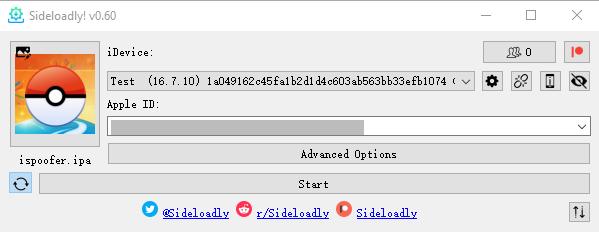
Getting iSpoofer iOS to actually run is often the first hurdle. Since it isn't on the App Store, users typically try to install the IPA file using tools like Sideloadly or AltStore.
If you’ve tried this recently, you might have experienced a frustrating result: the app installs, but when you tap to open it, it instantly flashes and crashes. This is a common issue with free certificates and newer iOS versions detecting tampered code. I personally attempted to install the latest iSpoofer download via Sideloadly to test it for this review, and it refused to launch—a common complaint among users right now.
The Ban Risk

Even if you manage to get it running without crashing, the safety risk is massive. Niantic’s anti-cheat system has evolved to detect client-side modifications.
-
The Detection: It doesn't matter if you "respect the cooldown". If you log in using a modified client (like iSpoofer or iPogo), you are flagging your account.
-
The Consequences: Recent years have seen massive ban waves targeting specific modified iOS apps.
Because of the high crash rate and the even higher ban risk, most veteran spoofers have moved on to a different method.
The Safer Evolution: Desktop-Tethered Pokemon Go Spoofing
If the risk of a modified app sounds too high (or you simply can't get it to open), there is a safer "evolution" in the spoofing market: Desktop-Tethered GPS Override.
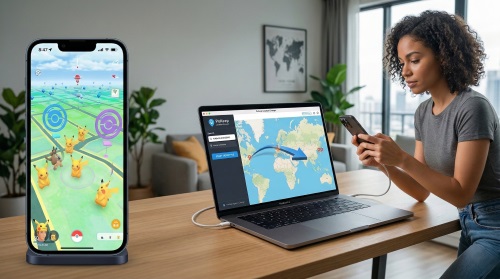
This method involves using computer software to alter the GPS location of your phone at the system level. The beauty of this approach is that you continue to use the OFFICIAL Pokémon GO app downloaded from the App Store or Play Store. Because you aren't modifying the game code, Niantic’s client-side detection measures are much less likely to trigger.
One of the leading tools in this category for 2026 is the PoKeep Location Changer.


:Why PoKeep is the "Smart Choice" for 2026
PoKeep was designed to solve the safety and stability issues that plague apps like iSpoofer.
-
No Crashes: Since you are using the official app, you don't have to worry about Sideloadly errors or certificate revokes. It just works.
-
Official App Support: You play on the legit game app. This is the single biggest safety factor against bans.
-
360° Joystick & Teleport: You get the same movement freedom. You can use your computer's keyboard (WASD) or an on-screen joystick to walk around the virtual world.
-
Fluctuation Mode: To make your movement look human, PoKeep can slightly fluctuate your speed and position, preventing the "robotic" behavior patterns that anti-cheat systems look for.
How to Spoof Safely with PoKeep
Getting started is arguably easier than dealing with IPA files:
Step 1. Download & Install: Get PoKeep on your PC or Mac.
Step 2. Connect: Plug your phone in via USB (you can switch to WiFi after the first time).

Step 3. Go: Choose "Teleport Mode" to jump to best Pokemon Go locations like Pier 39, or "Joystick Mode" to walk around your local neighborhood.

The "Abundance" List: Other iSpoofer Alternatives
While I strongly recommend the desktop method for safety and stability, it’s important to know the full landscape. Here are other tools you might run into during your search.
1 iPogo (iOS & Android App)

iPogo is the direct competitor to iSpoofer. It offers a very similar feature set (built-in shiny scanner, auto-catch).
 Pros:
Pros:
- Extremely convenient; runs entirely on the phone.
 Cons:
Cons:
- High ban risk similar to iSpoofer; suffers from the same installation/crash issues on iOS unless you pay for expensive signing services.
2 SpooferPro (iOS App)

Spooferpro is a newer player in the modified app space, only available on iOS, just like iSPoofer. It has gained popularity for its clean interface.
Pros:
- Good feature set for iOS users.
Cons:
- Still a modified client, carrying the same detection risks.
3 Bluetooth Dongles (Hardware)

Devices like the iTools BT dongle.
Pros:
- Very safe as they use the native iOS location framework.
Cons:
- Expensive (often $60-$80+) and hard to ship physically; limited joystick functionality compared to software.
Conclusion: Don't Gamble with Your Account
The nostalgia for iSpoofer is real, but the reality of 2026 is that Niantic is smarter, faster, and stricter. Between the frustration of the app crashing on launch via Sideloadly and the looming threat of a permanent ban, it is simply not worth the headache anymore.
For the majority of players who want to catch regionals, hatch eggs without walking, or raid in different time zones without losing their account, the desktop-tethered method is the way to go.
Tools like PoKeep offer the perfect balance: powerful location changing features combined with the stability of using the official game app. If you are ready to upgrade your setup, ditch the modified apps and control your GPS the professional way.
 Related Articles




 Leave Your Comment