 By
By 

If you’ve sought ways to catch rare Pokémon without the trek, you’re likely familiar with iPogo, a long-time favorite in the spoofing community for turning Pokémon GO into a couch-gaming experience. However, the landscape has shifted drastically; with Niantic’s anti-cheat systems becoming smarter and bans faster, the pressing question for players is no longer just how to download the app, but whether it is actually safe to use.
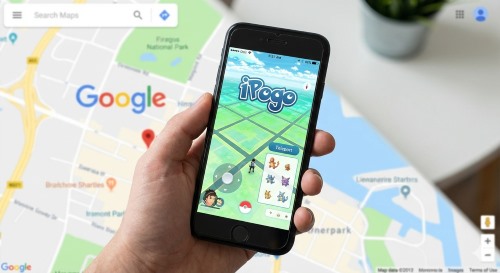
In this article, I’ll break down everything you need to know about iPogo for iOS and Android, including standout VIP features like the Shiny Scanner and the harsh reality of current ban risks. Most importantly, I’ll show you how to protect your hard-earned progress by utilizing safer alternatives that don't rely on risky modified apps.
iPogo Free vs. Paid (VIP)
At its core, iPogo is a modified version of the Pokémon GO app. This means developers have taken the original game code and injected their own tools directly into the screen overlay. This "all-in-one" approach is why it's so popular—you don't need to switch between apps to teleport or check IVs.
While the free version is surprisingly generous, the VIP key ($4.99/month) unlocks the powerful automation tools that make the game play itself.
Here is the complete breakdown of features for 2026:
| Feature Category | Free Version | VIP Version ($4.99/mo) |
|---|---|---|
| Movement | Teleport & Sniper: Instantly jump to any coordinates globally. Joystick: Manual movement control overlay. Auto-Walk: Create GPX routes or walk randomly to hatch eggs. |
All Free Features Included |
| Shiny Hunting | Shiny Scanner: Shows a notification if a shiny Pokémon is nearby on the map (Alert only). | Block Non-Shiny: Prevents you from tapping on a Pokémon unless it is shiny (huge time saver). |
| Catching Aids | Enhanced Throws: Forces every throw to be an "Excellent Curveball" for max XP. Freeze Pokémon: Stops the Pokémon from moving or attacking during the catch screen. |
Release on Catch: Automatically transfers the Pokémon immediately after catching it if it’s trash. Block Non-100IV: Prevents encounters with anything that isn't a perfect 100 IV. |
| Automation | None. | Virtual Go Plus: Emulates a physical Go Plus device to auto-catch and auto-spin stops in the background. Instant Rocket Win: Defeat Team Rocket Grunts instantly with one tap. |
| Quality of Life | Feeds: See lists of nearby Raids, Quests, and Nests. Cooldown Timer: Tracks your safe interaction time. |
One-Click Bag Cleaner: Instantly deletes selected spam items (Potions, Revives) to clear space. Spawn Booster: Increases the radius of visible Pokémon on your map. |
Is iPogo Safe?
Here is where I need to be completely honest with you. As of 2026, using iPogo carries a significant risk, specifically if you value your main account.
The "Modified App" Problem
The biggest flaw with iPogo (and its Android counterpart, PGSharp) is that it is a modified client.
-
You are not playing the official Pokémon GO app found on the App Store or Play Store.
-
You are playing a hacked version.
-
Niantic’s security software can easily detect when a login request comes from a modified client, regardless of how "human-like" your behavior is.
If you browse the iPogo Discord or Reddit communities, you will see a common pattern: users on non-jailbroken iOS devices or non-rooted Android devices face "Red Warnings" (7-day bans) and 30-day suspensions much more frequently than in the past.
 Note:
Note:
Never, under any circumstances, log into your main Level 40+ account on a modified app like iPogo. The risk of a permanent ban is simply too high.
A Safer Alternative to iPogo
If reading about ban waves made you nervous, you’re smart. The good news is you don’t have to give up spoofing Pokemon Go; you just need to change how you spoof.
The safest method is using a desktop-based location changer or a Bluetooth hardware spoofer. These tools manipulate the GPS signal of your phone externally, allowing you to use the official, legitimate Pokémon GO app. Since you aren't using a hacked app, Niantic's modified client detection cannot flag you.
Recommended Solution: PoKeep Location Changer
For those looking for a balance of safety and powerful features, PoKeep Location Changer is the standout choice for iOS and Android users. It connects to your device (via USB or WiFi) and overrides the location data at the system level.


-
Official App Support: You play on the real Pokémon GO app. No modified code means no "modified client" strikes.
-
No Jailbreak/Root Needed: Unlike the "safer" versions of iPogo that require complex jailbreaking, PoKeep works on standard devices (supports iOS 27 & Android 17).
-
Bluetooth Connection: You can connect your iOS device via Bluetooth to spoof without the need to download cracked software, adding an extra layer of security.
-
Cooldown Timer: It has a built-in cooldown calculator to help you avoid soft bans by telling you exactly when it's safe to catch again.
If you want the joystick experience without the modified app risk, PoKeep offers a 360-degree Joystick mode that lets you use your keyboard (WASD) to walk around the map naturally.
Step 1. Download and install PoKeep on your PC or Mac.
Step 2. Connect your phone and select "Teleport Mode" or "Joystick Mode".

Step 3. Choose your destination (like Pier 39 or Tokyo) and click "Start Moving". Your phone's GPS will instantly shift, and the official game will follow.
How to Install iPogo on iOS & Android
If you have a secondary "alt" account and you are willing to accept the risks to enjoy the VIP features, here is how you can currently install iPogo.
1 How to Install iPogo on iOS
Note:
iPogo on iOS is not working for now(2026-01-23), they may fix it in the future, you can join their Discord for the latest iPogo state on iOS.
1 Via Signulous
The easiest way for iOS users is using a signing service like Signulous, though it costs roughly $20/year.
Step 1. Register your device UDID with a signing service (e.g., Signulous).
Step 2. Browse their app library and find "iPogo for Pokémon GO".
Step 3. Click "Sign App" and then "Install".
Step 4. Trust the certificate in your iPhone settings (Settings > General > VPN & Device Management) if prompted.
Note: Free methods using Sideloadly require a computer and re-installing the app every 7 days.
2 Via Sideloadly
If you prefer a free method and don’t mind using a computer, Sideloadly is a reliable alternative. However, you will need to refresh the app every 7 days.
Step 1. Download and install Sideloadly (from sideloadly.io) and the latest iPogo IPA (from ipogo.app) on your Windows or Mac computer.

Step 2. Connect your iPhone to your computer via USB. Open Sideloadly and ensure your device appears in the "iDevice" field.
Step 3. Drag and drop the iPogo IPA file into the Sideloadly window.
Step 4. Enter your Apple ID in the "Apple ID" box and click Start.
Step 5. Enter your Apple ID password when prompted (this sends the app to your phone).
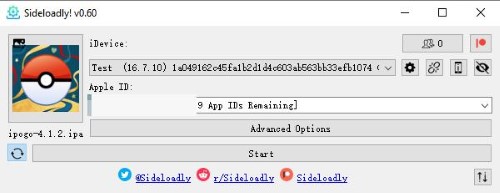
Step 6. Once installed, go to Settings > General > VPN & Device Management on your iPhone and "Trust" your Apple ID certificate to launch the game.
 Tips:
Tips:
Free Apple ID certificates expire every 7 days. You must reconnect your phone to the computer and repeat Steps 3-6 weekly to keep the app working.
3 Via Jailbreak (Most Stable & No Revokes)
For advanced users with a jailbroken device (using Dopamine or Palera1n), this is the preferred way to run iPogo because it injects the tool into the official app rather than replacing it. This method avoids the "Unable to Verify" certificate errors common with Sideloadly.
Step 1. Open your package manager (Cydia, Sileo, or Zebra).
Step 2. Go to Sources > Edit > Add and enter the official repo: https://ipogo.app/repo.
Step 3. Search for and install the iPogo tweak.
Step 4. (Crucial) Install a bypass tool like vnodebypass or KernBypass from the same repo to hide your jailbreak status from Niantic’s detection.
Step 5. Open the bypass app, select "Start", and then launch Pokémon GO.
Tips:
If you have a device compatible with TrollStore (typically iOS 14.0 - 17.0), you can install the iPogo IPA directly through TrollStore. This gives you a permanently signed app that never expires, without needing a full jailbreak environment.
2 How to Install iPogo on Android
For Android users, you have two distinct paths. The Rooted method is significantly safer and more stable than the standard APK, but it requires technical know-how.
1 Non-Rooted (High Risk, Easy Install)
Step 1. Uninstall the official Pokémon GO app from your device (essential!).
Step 2. Go to the official iPogo website and download the latest iPogo APK.
Step 3. Allow "Install from Unknown Sources" in your browser settings when prompted.
Step 4. Install the APK and launch the game to see the iPogo floating menu.
2 Rooted Device (Medium Risk, More Stable)
If your device is already rooted with Magisk, this method injects iPogo into the official app, which is slightly harder for Niantic to detect than a modified APK.
Step 1. Download the official Pokemon Go software from Google Play and the Custom Launcher from the iPogo website.
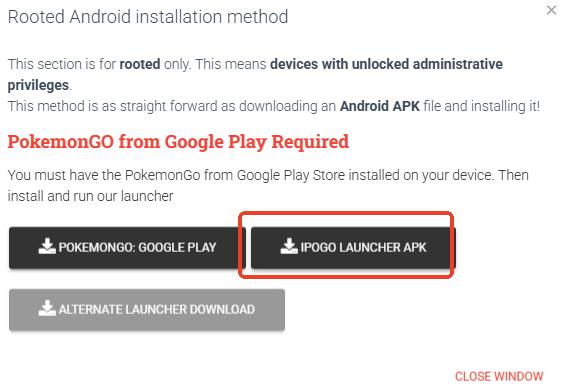
Step 2. Install the iPogo Launcher APK.
Step 3. Open your Magisk Manager and go to Settings. Enable Zygisk and Enforce DenyList.
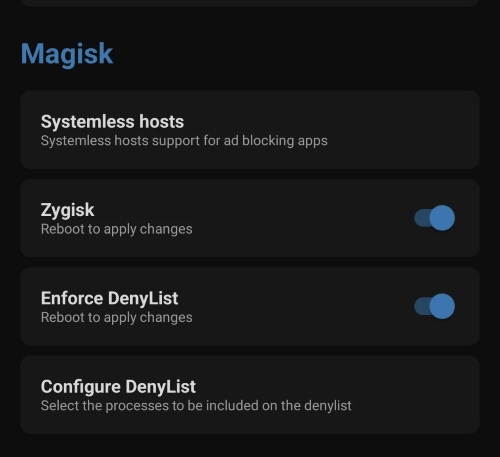
Step 4. Tap "Configure DenyList" and check the boxes for Pokémon GO and Google Play Services to hide your root status.
Step 5. Reboot your device.
Step 6. Launch the game using the iPogo Launcher (do not open the official app directly).
FAQs about iPogo
Is iPogo free?
Yes, the basic version is completely free and includes core features like Teleporting, Snipe, and the Joystick. However, advanced automation features like the Shiny Scanner, Virtual Go Plus, and "Block Non-Shiny" require a VIP key subscription ($4.99/mo).
Can I use iPogo without a computer?
Yes. On Android, you can simply download and install the APK directly to your phone. On iOS, you can use paid direct install services (like Signulous) to install it without a PC.
How do I fix the "Untrusted Enterprise Developer" error on iOS?
This is a common error when sideloading apps. To fix it:
Go to Settings > General > VPN & Device Management.
Find the developer profile associated with the app (it will be an email address).
Tap on it and select Trust.
Why does the app crash immediately upon launch?
If the app opens and instantly closes, it usually means Niantic has updated Pokémon GO, and the current version of iPogo is outdated.
Fix: You must wait for the iPogo developers to release an update. Do not play or try to force it to work until the new version is available. Check their official Discord for status updates.
What should I do if I get the "Unable to Authenticate" error?
This error message is often a server-side flag or a temporary soft ban.
Android: Clear your app cache in Settings.
iOS: Uninstall and reinstall the app.
If the error persists after these steps, your account may be temporarily suspended (30-day ban).
What is the best speed for walking in Pokemon Go?
To avoid triggering speed-lock (which prevents you from spinning stops), keep your walking speed under 10 km/h when hatching eggs. If you are using PoKeep, we recommend enabling "Realistic/Fluctuation Mode", which naturally varies your movement speed to mimic human behavior and reduce detection risks.
Final Verdict
iPogo remains a feature-rich tool that makes Pokémon GO incredibly convenient, especially for shiny hunters. However, the reliance on a modified app makes it a "ticking time bomb" for your account's safety.
If you want to protect your progress, collections, and account standing, I highly recommend switching to a solution that allows you to keep the official app installed. PoKeep offers that peace of mind, giving you the power of teleportation and joystick movement without the constant fear of the next ban wave.
 Related Articles







 Leave Your Comment