 By
By 

For years, Pokemon Go players have relied on background fitness apps to maximize their Adventure Sync rewards and hatch eggs without leaving the house. However, recent updates to Google Fit fitness data protocols have left many players staring at empty incubators.
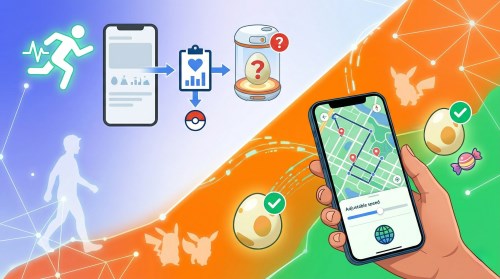
If you are struggling with DeFit Pokémon GO integration this year, you are certainly not alone. Let's break down exactly why these synchronization issues are happening, how to fix them, and what modern tools can offer a more reliable experience.
How DeFit Actually Works with Pokémon GO
DeFit serves as a digital bridge between your phone's built-in pedometer and the game's Adventure Sync feature. Instead of altering the game client, it generates simulated walking data and feeds it directly into your Google Fit database. When your game is closed, Adventure Sync pings Google Fit to check for new activity, downloading those simulated kilometers as if you had been physically walking.
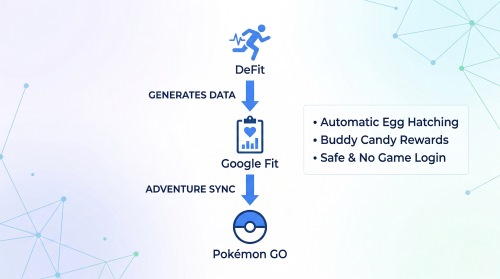
This passive injection method is exactly why the app became so popular in the first place.
Setting Up DeFit Safely for Pokémon GO on Android
Installing a fitness sync tool is simple, but configuring it correctly is crucial to avoid triggering Niantic's anti-cheat systems. Before starting, ensure both Pokémon GO and Google Fit are installed.
The Standard Android Setup Process
Step 1. Download DeFit from the Google Play Store.
Step 2. Log into DeFit and Google Fit using the exact same Google account linked to your Pokémon GO profile.
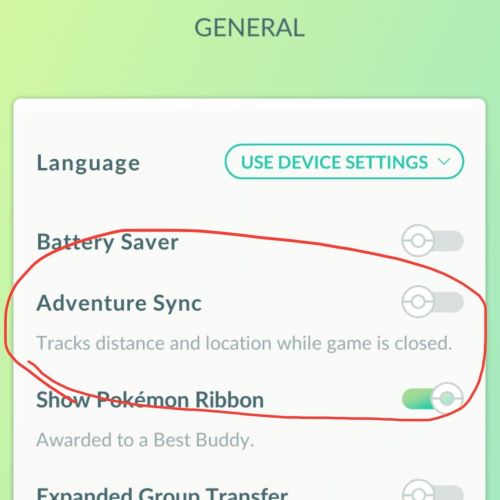
Step 3. Open Pokémon GO settings and turn on Adventure Sync to allow the game to pull the background data.
How to Connect Without Triggering Red Flags
Leaving DeFit running constantly at maximum speed is the fastest way to get your account flagged. Your simulated data must reflect a realistic human routine.
Follow these guidelines to keep your account secure:
- Simulate a jog, not a sprint: Set your speed between 9 and 10.5 kilometers per hour.
- Simulate sleep: Turn the synchronization off for 8 to 10 hours daily.
Troubleshooting "DeFit Pokémon GO Not Working" in 2026
The most common reason your distances aren't registering anymore comes down to backend API changes. Android devices have largely transitioned from the legacy Google Fit system to the new Health Connect architecture. Unfortunately, this creates a bottleneck where DeFit's simulated steps successfully reach your fitness tracker but fail to pass the final security check to reach your game.
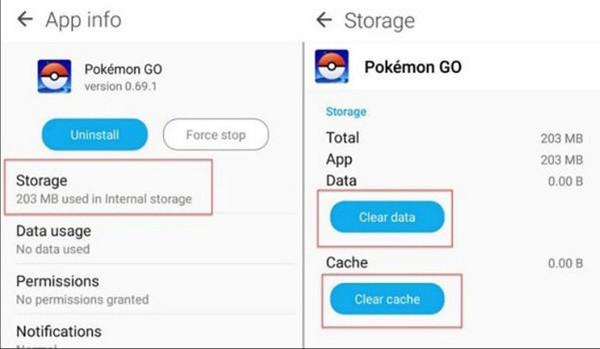
If you are caught in this syncing loop, a complete cache reset is usually the most effective solution.
Step 1. Force close the Pokémon GO app, DeFit, and Google Fit entirely, then navigate to your phone's settings to clear the application cache for all three.
Step 2. Temporarily disable your device's location services to force the system to rely strictly on raw step-count data rather than GPS triangulation.
Step 3. Re-enable your location services and immediately reopen your game to pull the freshly synced data through the Health Connect pipeline.
Will Using DeFit Result in a Pokémon GO Ban?
One of the most frequently asked questions in the community is regarding the risk of a DeFit Pokémon GO ban. Because the fitness app never directly interacts with or modifies the game's code, traditional anti-cheat scanners cannot detect its presence on your phone.
However, Niantic's detection methods have evolved to focus heavily on behavioral analytics and humanly impossible statistics.
If your account suddenly jumps from walking five kilometers a week to logging hundreds of kilometers overnight, the server will almost certainly flag your account for suspicious behavior. To protect your account, you must keep your simulated distances within realistic human limits.
The iOS Reality Check: Is There a DeFit Pokémon GO iOS Version?
If you are an iPhone user searching for this app, you are unfortunately going to hit a wall. DeFit is exclusively built for the Android ecosystem because it relies entirely on the open nature of Google Fit. Apple Health utilizes a strictly locked-down, proprietary environment that prevents third-party apps from easily injecting background fitness data.
Because of these strict limitations, iOS users cannot utilize DeFit. They must instead look toward physical phone rockers or desktop-based location modification software to simulate their movement.
A Safer, Universal DeFit Alternative for Pokémon GO
While fitness syncing apps were once the gold standard, the constant battle against Health Connect bugs and the strict iOS lockout have pushed many players toward more reliable, cross-platform solutions. Desktop-controlled movement simulation offers a much safer and highly consistent alternative to background step generators.

This is where tools like Pokeep Location Changer come in as a comprehensive upgrade to your strategy.


Unlike DeFit, which only feeds blind step data, Pokeep allows you to create realistic, customizable routes right from your computer. By simulating actual GPS movement with adjustable walking speeds, it bypasses the behavioral red flags that often lead to account strikes.
Here are a few reasons why players are making the switch to this desktop tool:
- Cross-Platform Reliability: It works for both iOS and Android devices, completely bypassing the messy Health Connect API.
- Realistic Route Simulation: You can set up multi-point movement paths that mimic natural walking, jogging, or biking speeds to keep your account safe.
- Advanced Controls: Features like history and favorite locations make repeated workflows incredibly simple.
Ultimately, if you are tired of wondering why your eggs aren't hatching or worrying about the latest API update breaking your setup, upgrading to a dedicated location simulator is the most logical next step.
 Related Articles







 Leave Your Comment