 By
By 

Finding a reliable Pokémon GO spoofer has become increasingly difficult. In the early days, almost any GPS tool could trick the game without consequence. However, as we move into 2026, Niantic has drastically tightened security, turning the search for a working solution into a complex challenge for even the most experienced players.
This guide covers the current state of Pokemon Go location modification, examining how detection algorithms have evolved, comparing the top Pokemon Go spoofing methods available, and providing updated solutions for the persistent "Error 12" on iOS and Android.
The Landscape of Safe Pokemon Go Spoofing
The definition of a "safe" spoofing strategy has shifted. It is no longer just about avoiding sudden jumps in location; it is about how the spoofer interacts with Pokemon Go client itself.
Niantic’s Anti-Cheat Evolution
Niantic has moved beyond simple cooldown checks. The game now employs advanced behavioral analysis to identify "non-human" movement patterns. Algorithms now flag accounts that walk in perfectly straight lines for hours or traverse terrain that doesn't align with actual roads.
The Danger of Modified Clients
The biggest trap for new users is the modified client. Third-party apps like PGSharp and iPogo, which were once the most popular choices, are now the number one cause of bans. Because these tools modify the official Pokemon Go APK or IPA code, Niantic can detect them immediately upon login. Sideloading methods like "Signulous" are no longer considered safe; utilizing the official game app is now a requirement for security.
Strict Cooldown Adherence
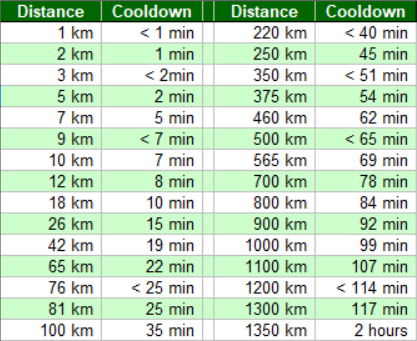
Despite new technology, the golden rule remains: strict adherence to cooldowns. Whether you are using a desktop Pokemon Go spoofer or a rooted device for spoofing, jumping 1,500km still requires a two-hour wait. Violating this triggers an immediate soft ban, rendering even the best spoofing methods useless.
Comparison of Top Pokémon GO Spoofer Methods
With the crackdown Pokemong Go spoofers using modified apps, the market has split into three distinct categories. Choosing the right method depends on your willingness to risk your account versus your desire for convenience.
Modified Apps
While modified apps carry a higher risk of detection than desktop methods, they remain the most popular choice to spoof Pokemon Go due to their incredible convenience and feature sets. Unlike tethered methods, these run entirely on your phone.
Here is a detailed breakdown of how to install and use the three market leaders, which I’ve tried myself and found actually functional.
1 PGSharp
PGSharp is the most dominant Pokémon GO spoofer for Android users. It works by replacing your official game with a modified version that includes a built-in joystick and overlay menu.
Step 1. You must uninstall the official Pokémon GO app from the Google Play Store. PGSharp cannot be installed if the original game is still on your device. Ensure your Facebook or Pokémon Trainer Club (PTC) account is linked, as Google login sometimes fails on modified apps.

Step 2. Visit the official PGSharp website and download the latest APK file. Once downloaded, tap the file to install it. You may need to allow "Install from Unknown Sources" in your Android security settings.
Step 3. Open the app. You will see a small "Star" icon floating on the screen.
-
Tap the Star icon to open the Settings menu.
-
If you have a paid Standard Edition key, enter it in the "Activate" section.
-
If you are a free user, you can still use the core features like Teleport, Joystick, and Auto-Walk immediately.
Step 4. Use the Map feature to teleport to specific coordinates or hot spots. Enable "Cool Down Timer" in the settings—this is vital, as it adds a timer to your screen showing how long you must wait before catching a Pokémon after teleporting.
 Pros:
Pros:
- No computer required for installation.
- Includes powerful auto-catch features.
- Free version offers basic spoofing.
 Cons:
Cons:
- Only available for Android devices.
- Extremely high risk of account bans.
- Google Login often fails (requires PTC/Facebook).
2 iPogo
iPogo is the direct competitor to PGSharp and is a good choice for iOS users, though it now supports Android as well. It offers a highly polished interface with a "Shiny Scanner" that notifies you if a Pokémon on the map is shiny before you even click it.
Step 1. Download the iPogo IPA or APK file from their official site to your computer.
Step 2. Open Sideloadly (a PC tool) and connect your iPhone via USB.
Step 3. Drag the IPA file into Sideloadly, enter your Apple ID, and click "Start".
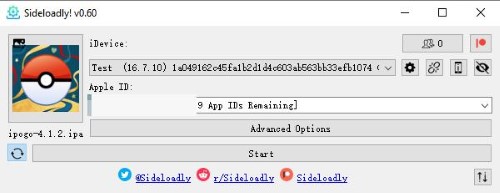
Step 4. Once installed, go to your iPhone Settings > General > VPN & Device Management and "Trust" your Apple ID to run the app.
Step 5. Then you can open the app, log into your account and start playing.

 Note:
Note:
You must repeat this process every 7 days.
Pros:
- "Shiny Scanner" feature is best-in-class.
- Beautiful, user-friendly interface.
- Supports both iOS and Android.
Cons:
- Requires a PC to install (Sideloadly).
- Must be re-installed every 7 days (iOS).
- High ban rate due to modified client detection.
3 Spooferpro
SpooferPro is a popular choice for iOS users because it is lightweight and updates quickly. Since Apple does not allow this app on the App Store, you cannot simply download it. Instead, you must use a free computer tool called Sideloadly to install it on your iPhone.
Step 1. Download Sideloadly on your computer and the latest SpooferPro IPA file from their official website.
Step 2. Connect your iPhone via USB, open Sideloadly, drag the IPA file into the window, enter your Apple ID, and click "Start".

Step 3. On your iPhone, go to Settings > General > VPN & Device Management, tap your Apple ID, and select "Trust".
Step 4. For iOS 16+, enable Developer Mode in Settings > Privacy & Security. Restart your phone and tap "Turn On" in the popup.

Step 5. Open the app and enable the "Cool Down Timer" in settings immediately to avoid soft bans.
Pros:
- Lightweight app consumes less battery.
- Fast map loading for snipe checks.
- Handy features like auto-catch
Cons:
- Requires a PC to install (Sideloadly).
- Must be re-installed every 7 days (iOS).
- High ban rate due to modified client detection.
Desktop & Hardware Pokemon Go Spoofing
If you want to avoid the high ban risks of modified apps, using a computer or hardware device to alter your GPS is the gold standard. This allows you to use the official, legitimate Pokémon GO app.
1 3uTools
3uTools is a comprehensive iOS management suite that includes a basic GPS tool. It is often the first tool players try because it is free.
Step 1. Download and install 3uTools on your Windows PC.
Step 2. Connect your iPhone to the PC via USB and unlock the screen.
Step 3. Click on the "Toolbox" tab at the top, then select "VirtualLocation".

Step 4. Enter your desired coordinates (latitude/longitude) in the text box.
Step 5. Click "Modify Virtual Location". Your phone will instantly jump to that spot.

Pros:
- Completely free to use.
- Easy "one-click" teleporting.
- Useful for one-time distance trading.
Cons:
- No joystick for movement (teleport only).
- Cannot simulate walking routes.
- High risk of "Error 12" on iOS 18 (USB detection).
2 iTools BT (The Hardware Dongle)
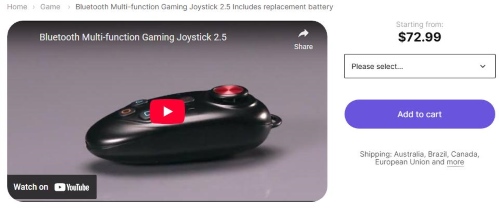
The iTools Bluetooth dongle for Pokemon Go is a physical device that overrides your GPS at a hardware level. It is widely considered the safest method in history but is difficult to acquire.
Step 1. Purchase the iTools BT dongle (device) and wait for shipping.
Step 2. Download the TestFlight app from the App Store.
Step 3. Use the invitation link provided by the seller to install the "iTools Mobile" app via TestFlight.
Step 4. Turn on the Bluetooth dongle and pair it within the iTools app settings.
Step 5. Use the joystick inside the iTools app to move your character in Pokémon GO.
Pros:
- Safest method available (Hardware spoofing).
- Uses the legitimate Pokémon GO app.
- Bypasses "Error 12" via Bluetooth.
Cons:
- Very expensive ($70+ USD).
- Requires carrying a physical device.
- Stocks are often sold out worldwide.
3 PoKeep (The Modern Standard)
PoKeep has emerged as the premier recommendation for 2026. It combines the software convenience of 3uTools with the connection safety (Bluetooth) of iTools BT, without the expensive hardware.
Step 1. Download & Install PoKeep Location Changer on your Windows PC or Mac.


Step 2. Launch the software and choose Game mode, it will connect though Bluetooth to bypass the “Error 12” warning.

Step 3. Choose "Teleport Mode" to jump to a specific location, or "Multi-Spot Movement" to create a realistic walking route along roads.

Step 4. Click "Start Moving" on your computer. Your character in the official game app will move accordingly.
Pros:
- Solves "Error 12" using Bluetooth connection.
- Supports realistic walking routes (GPX).
- Fully compatible with iOS 27 and Android 17.
- Safer than modified apps (Uses official client).
Cons:
- Requires a computer to operate.
- Paid license required for full features.
- Cannot use without the PC nearby.
FAQs about Pokemon Go Spoofer
What does "GPS Signal Not Found" (Error 11) mean?
This usually indicates a simple disconnection or incorrect phone settings. To fix this, ensure your location mode is set to "High Accuracy". You can often resolve the glitch immediately by toggling Airplane Mode on and off or clearing the Pokémon GO app cache to reset the connection.
Why do I keep getting the "Failed to Detect Location" (Error 12) warning?
This error occurs when the game detects a discrepancy between your GPS coordinates and other sensors on your device, such as Wi-Fi or Bluetooth. It is essentially the game realizing that your physical location does not match your digital location, and it is the most common reason for soft bans.
How can I fix Error 12 specifically on an iPhone?
You should first try temporarily disabling the "Find My iPhone" feature in your settings. If that does not work, the issue is likely your connection method. Standard USB tethering is easily detected on modern iOS versions. The most effective solution is to switch to a Bluetooth-based tool like PoKeep to bypass these sensor checks entirely.
How do I resolve Error 12 on an Android device?
On Android, this error usually means your "Mock Location" masking is failing. You may need to refine your Mock Location settings in Developer Options. However, the easiest fix is often switching to a desktop tool that handles the signal masking externally, removing the burden from the phone itself.
Can rooting or jailbreaking my device ensure a successful Pokemon Go spoofing?
Rooting has become significantly more difficult on Android 17 due to Google's new "Strong Integrity" API. This feature exposes root access to apps more aggressively than before. And detecing jailbroken iOS device is easy too. Consequently, many users are abandoning root/jailbreaking methods in favor of non-root, desktop-based solutions to avoid the constant struggle of hiding their root status.
Community Resources and Coordinates
Once you have your Pokémon GO spoofer set up, you need to know where to go. Random teleporting is inefficient; relying on community intelligence is the key to success.
-
Pokedex100: The premier Discord for finding 100IV coordinates to plug into your tool.
-
PokeXperience: Essential for locating raids and specific quests.
-
PoGo Raids: A dedicated community for remote raiding invites.
-
Cooly's Shiny Pokemon: A vital resource for shiny hunters looking for nests.
-
NYCPokeMap: The best map for users who set their location to New York City for high-density spawns.
 Related Articles





 Leave Your Comment