 By
By 

For years, PGSharp has been the go-to tool for Android users needing to play Pokémon GO from home, but the landscape has changed drastically. With Niantic tightening anti-cheat measures, the pressing question for players isn't just how to download the app, but whether it remains safe to use.
In this guide, we’ll cover everything you need to know about PGSharp’s current status and the reality of recent ban waves. We will also explore vital solutions for iPhone users—who are completely blocked from using PGSharp—and safer alternatives to PGSharp for anyone looking to protect their main account while enjoying the game freely.
What is PGSharp and Why is it So Popular?

At its core, PGSharp is a modified version of the Pokémon GO app. Unlike traditional spoofing methods that required rooting your Android phone (which can be a technical nightmare), PGSharp acts as a plug-and-play solution. You simply uninstall the original game, install the PGSharp APK, and suddenly you have a joystick overlay on your screen.
PGSharp Free vs. Standard Edition
One of the reasons for its popularity is its generous free version. However, for serious grinders, the paid "Standard" edition offers automation that changes the game entirely.
| Feature Category | Free Version (The Essentials) | Standard Edition (The "Lazy" Pro Mode) |
|---|---|---|
| Core Spoofing | Joystick & Teleport: Move freely or jump anywhere globally. Auto Walk: Create GPX routes to hatch eggs. Speed Control: Adjust walking/running speeds. Custom Shortcuts: Quick access to tools. |
All Free Features Included 3 Device Limit: Use one license on up to 3 phones simultaneously. |
| Catching Aids | Enhanced Throws: Always land "Excellent" & "Curveball" throws. Caught Preview: See if you caught the Pokémon before the ball shakes. Encounter IV: See stats before catching. Block Non-Shiny: Prevents tapping on non-shiny Pokémon to save time. |
Quick Catch: Skips the catch animation for faster grinding. Shiny Scanner: Detects shiny Pokémon on the map & notifies you. |
| Battling | (No automated battle features) | Raid & Gym Battle Assistant: Auto-battles in gyms and raids. Dynamax Battle Assistant: Auto-battles for Max Particles (New 2026 feature). Instant Beat Team Rocket: One-hit win for grunt battles. |
| Automation | Auto Incubator: Automatically places eggs in incubators. | Virtual Go Plus: Auto-spins stops and auto-catches while you walk. Buddy Assistant: Auto-feeds, plays, and snapshots your buddy. Quest Assistant: Auto-completes tasks like "Take a Snapshot". Auto Discard: Deletes trash items to save bag space. |
| Quality of Life | Cooldown Timer: Helps track safe interaction times. Gift Assistant: One-click send/open gifts & skip animations. Inventory IV: View IVs directly in your bag. |
Name Assistant: Auto-renames Pokémon with IV/Lvl. Quick Load Map: Loads map data faster. Spawn Booster: Increases radius of visible Pokémon. |
Is PGSharp Safe in 2026?
I need to be brutally honest with you here: The safety of PGSharp has declined significantly.
In the past, using a modified app was relatively low-risk if you respected cooldown times (waiting 2 hours before interacting with the game after teleporting). However, starting with the massive ban waves in July and August 2025, Niantic’s behavior detection system has become much smarter.
Here is the current reality:
-
Modified Client Detection: Niantic can now detect that you are not logging in from the official app store version of the game. This puts a target on your back the moment you log in.
-
Behavioral Flags: Even if you don't teleport, features like "100% Excellent Throws" or impossible travel speeds are instant red flags.
-
The "Rooted" Myth: Many users thought rooting their Androids would hide PGSharp. Recent reports from the community indicate that even rooted users running PGSharp are receiving 7-day strikes and 30-day suspensions.
If you value your main account (the one with your shiny collection and years of progress), think twice before logging into a modified app like PGSharp directly.
PGSharp iOS Support and Monster Hunter Now
While PGSharp is powerful, it has two massive limitations that frustrate millions of players.
1 The "PGSharp iOS" Myth
If you search for "PGSharp for iOS" or "PGSharp iPhone", you will find dozens of websites claiming to have a download link. Do not click them.
PGSharp is, and always has been, Android only. Due to Apple's strict "sandboxing" of apps, a modified version like this cannot exist on iOS without a jailbreak, and the developers have never released an iOS version. Those "download" buttons are often scams, surveys, or malware.
2 No PGSharp for Monster Hunter Now
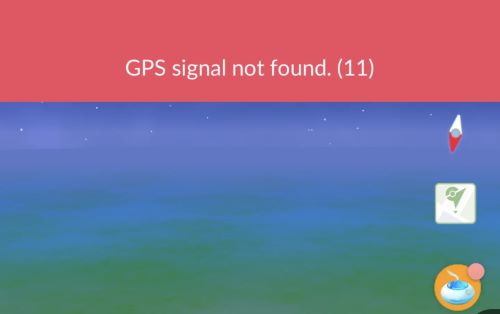
With the rise of Monster Hunter Now (MHN), many players hoped to use PGSharp to hunt monsters from home. Unfortunately, PGSharp does not support MHN. The anti-cheat detection in MHN is even more aggressive than in Pokémon GO, often causing "GPS Signal Not Found" errors immediately upon launch if a modified app is detected.
Best Alternative to PGSharp on iOS & Android
If you are an iOS user feeling left out, a Monster Hunter Now player, or an Android user terrified of losing your account to a "modified app" ban, there is a different approach: Desktop-based Location Changers.
This is where PoKeep Location Changer becomes the logical solution.


Unlike PGSharp, PoKeep does not modify the game file itself. Instead, it runs on your computer and sends a GPS signal to your phone (connected via USB or Wi-Fi). This means your phone believes it is physically in a different location, allowing you to use the official, legitimate Pokémon GO app from the App Store or Play Store.
-
No Modified APK: You are playing on the official iOS app, so you bypass the "modified client" detection that bans most PGSharp users.
-
iOS & Android Support: It works perfectly on the latest iOS 27 and Android 17.
-
Game Compatibility: Because it changes the device's GPS, it works for Pokémon GO, Monster Hunter Now, Jurassic World Alive, and even dating apps.
How to Use PoKeep (No Jailbreak/Root Needed)
Step 1. Download and install PoKeep on your Windows or Mac computer.
Step 2. Connect your phone to the computer using a USB cable. (Once trusted, you can switch to Wi-Fi).

Step 3. Select "Teleport Mode" to jump to a specific coordinate, or use the Joystick Mode to walk around virtually using your keyboard.

Step 4. Open the official Pokémon GO app on your phone and start catching.
PGSharp Installation & Troubleshooting
If you still want to use PGSharp—perhaps on a secondary burner account to trade Pokémon to your main account—here is how to get it running and fix common errors.
Since PGSharp is not on the Google Play Store, you need to install it from PGSharp official website.
Step 1. Go to the official PGSharp website.

Step 2. Download the latest APK file.
Step 3. Crucial Step: Uninstall the official Pokémon GO app from your phone. You cannot have both installed at the same time.
Step 4. Open the downloaded APK and click "Install". (You may need to allow "Install from Unknown Sources" in your Android settings).
Fixing Common PGSharp Installation Errors
Error: "App Not Installed"
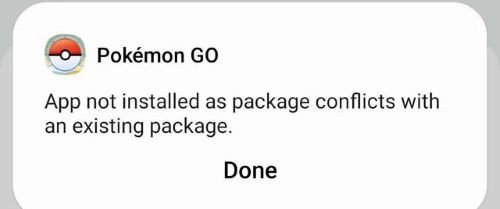
This is the most common issue. It almost always means you didn't uninstall the original Pokémon GO app, or you have a leftover file from a previous install. Ensure the official app is completely removed before trying again.
Error: "Authentication Failed" / "Unable to Authenticate"
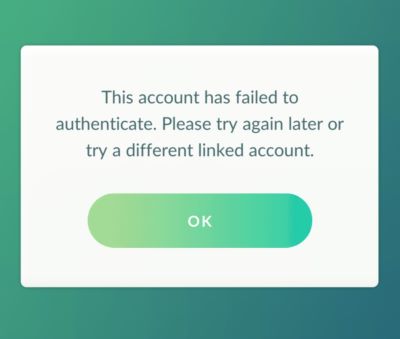
This can happen for two reasons:
-
Outdated Version: Niantic forces updates frequently. If PGSharp hasn't updated their APK to match the official game version, you can't log in. Check the website for a newer version.
-
Server Issues: Sometimes the specific login server (Google/Facebook/PTC) is down.
-
Ban Indicator: If you can log in on the legit app but not PGSharp, your account might be flagged.
Final Verdict
In 2026, the days of carefree spoofing with modified apps are largely behind us. PGSharp remains a feature-rich tool for Android users, but the risk of detection is higher than ever. It is best suited for "alt" accounts that you don't mind losing.
For those who need PGsharp on iOS, want to play Monster Hunter Now, or simply want to prioritize the safety of their main account by using the official game app, PoKeep is the superior, more versatile choice.
 Related Articles







 Leave Your Comment