 By
By 

For years, the iTools BT (Bluetooth) dongle has been considered the "Holy Grail" of Pokemon Go spoofing—a hardware solution that allows you to play with the official Pokémon GO app, drastically reducing the risk of bans compared to modified apps (e.g. iPogo, PGSharp, Spooferpro).
But with stricter iOS location policies and the release of Android 17 and iOS 27, is spending over $70 on a iTools BT still the smartest move for Pokemon Go Trainers?
This article breaks down the current state of iTools Pokémon GO hardware, exposes the hidden limitations that most sellers won't tell you, and explores whether modern software alternatives like Pokeep Location Changer might offer a better balance of safety and freedom.


 Note:
Note:
Understanding the iTools ecosystem: iTools (the brand), iTools Dongle (the general hardware category), and iTools BT (the specific Bluetooth model).
Part 1. What is iTools BT / iTools Dongle?
To understand why this device is so popular, you first need to distinguish it from software. Unlike standard Pokémon GO spoofer apps that modify the game's code—which Niantic detects easily—iTools BT is a physical hardware device. It acts as an external GPS receiver for your phone. It connects to your iPhone via Bluetooth + companion-app and tricks your entire phone’s system-level GPS module into thinking it is somewhere else.
Because you are using the official, legit Pokémon GO app from the App Store, the game's anti-cheat software sees you as a legitimate player.
-
Safety Record: It has historically survived many "ban waves" that wiped out users of modified clients because it doesn't touch the game's internal files.
-
Physical Joystick: The device features a real, tactile joystick button, allowing you to navigate the map with precision without ever touching your phone screen.
-
Hardware Level Spoofing: By providing GPS data at the hardware level, it bypasses many of the detection methods used to flag software-only spoofers.
Part 2. How to Use iTools BT to Spoof Pokémon GO
Setting up an iTools dongle for Pokemon Go requires a specific sequence to ensure the hardware correctly communicates with your phone.
Step 1. Download the TestFlight app from the App Store. You will then need to use the invitation link provided by the iTools support team (usually via email) to install the iTools Mobile companion app.

Step 2. Power on your iTools BT device. On your iPhone, go to Settings > Bluetooth and look for a device name starting with "iToolsBT-80xxx-MFI" or similar to pair it.
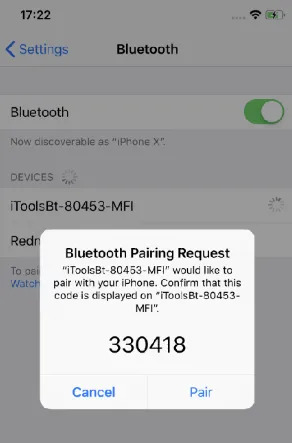
Step 3. Open the iTools Mobile app you installed. Tap the Bluetooth connection icon; if successfully paired, the icon will turn green, indicating the dongle is ready to override your GPS.
Step 4. Use the map within the iTools app to search for a location or coordinates. Once you have selected a spot, tap "Go" to teleport.
Step 5. Open the official Pokémon GO app. Your character will instantly appear at the spoofed location, and you can use the physical joystick on the dongle to walk around.
Part 3. The "Hidden" Problems with iTools Pokemon Go
While the safety reputation is well-earned, the user experience has deteriorated significantly due to updates in mobile operating systems. If you are planning to buy an iTools dongle today, here are three major hurdles you must know about.
1 The "15km Radius" Trap (iOS 13 - iOS 27)
This is the biggest deal-breaker that catches new buyers off guard. Due to Apple's location security updates, the iTools Bluetooth device cannot teleport you globally on its own anymore.
If you connect the device to a modern iPhone, you are strictly limited to a 7km to 15km radius from your actual physical location. You cannot jump from New York to Tokyo. You can only walk around your local town.

To bypass this, you are required to buy an additional NextDNS setup or RJ45 Ethernet Adapter and tether your phone to a wall outlet via a LAN cable to reset your location. This completely destroys the "mobile" aspect of the game.
2 High Cost and Shipping Delays
The iTools BT 2.5 typically retails for $72.99 USD, not including shipping. Since these devices are often shipped from overseas manufacturers, delivery times to the US or Europe can take anywhere from 2 to 4 weeks. In a game driven by limited-time events, waiting a month to play is often not an option.
3 Complexity for Beginners
Setting up iTools isn't "plug and play". It requires configuring TestFlight apps (which often get revoked by Apple) and navigating a complex interface just to get the joystick working.
Part 4. Best Alternative to iTools BT for Pokémon GO
If you want the safety of a joystick and the ability to travel globally without being tethered to an Ethernet cable or waiting a month for shipping, software solutions have evolved to fill this gap. PoKeep Location Changer is a desktop-based tool that offers the flexibility that iTools lacks. It allows you to change your location globally on both iOS and Android instantly, without being restricted by a hardware-imposed radius.
-
No Physical Distance Limits: PoKeep allows you to bypass the standard iOS radius restrictions that cripple hardware dongles.
-
Instant Access: There are no shipping wait times; you can download the software and start playing in minutes.
-
Built-in Safety Features: PoKeep includes an automatic Cooldown Timer to help you avoid "soft bans" by calculating the necessary wait time between jumps.
-
Cost-Effective: It costs a fraction of the hardware dongle's price and supports up to 10 devices, whereas iTools typically only supports one.
Comparison: iTools Hardware vs. PoKeep Software
| Feature | iTools BT 2.5 (Hardware) | PoKeep Location Changer (Software) |
|---|---|---|
| Price | ~$72.99 + Shipping | Free Trial / Subscription |
| Delivery Time | 2–4 Weeks | Instant Download |
| Teleport Range | Limited (15km) unless wired | Unlimited (Global) |
| Platform | iOS Only | iOS & Android |
| Safety | High (Physical GPS override) | High (Cooldown protection) |
| Difficulty | Hard (TestFlight/RJ45 Setup) | Easy (Plug & Play) |
How to Spoof Pokémon GO Safely Without iTools BT
If the restrictions of a hardware dongle are too much, here is how you can set up a global joystick system using PoKeep.
Step 1. Download and install PoKeep Location Changer on your computer. Connect your iPhone or Android device via a USB cable; Wi-Fi connection is supported after the first successful tether.

Step 2. Launch the program and select your device. For iOS users wanting to go further than 20km, remember to temporarily disable your Location Services and network connections as prompted by the software to ensure the jump is successful.
Step 3. Select "Teleport Mode" (the third icon in the top right corner). Enter your desired coordinates or destination (e.g., "Pier 39, San Francisco") and click "Start Modifying".

Step 4. To walk around and hatch eggs, select the "Joystick Mode" icon. You can now use your keyboard (WASD keys) or the virtual joystick on the screen to move your character in real-time.

Part 5. FAQs about Spoofing Pokemon Go with iTools BT
Does iTools BT still work for Pokémon GO in 2026?
Yes, the iTools BT hardware still works, but its functionality is heavily restricted by current mobile operating systems like iOS 27. While it remains a favorite for veterans due to its physical joystick and safety record, it is no longer a simple "plug and play" solution for global travel.
Why can't I teleport further than 15km with my iTools dongle?
This is known as the "15km Radius Trap". Due to location security updates implemented by Apple (affecting iOS 13 through iOS 27), external GPS hardware is often restricted to a small radius around your actual physical location. To go further, you must use cumbersome workarounds like a wired RJ45 Ethernet Adapter or specific NextDNS configurations.
What is the difference between iTools BT and an iTools Dongle?
In the community, "iTools Dongle" is a general category term for all physical GPS spoofing hardware from the brand. iTools BT (specifically the BT 2.5) is the current Bluetooth-enabled model that connects wirelessly to your iPhone, replacing the older wired versions.
Do I need to jailbreak my phone to use iTools BT?
No, iTools does not require a jailbreak. However, it is not a "plug and play" setup. It requires you to install the iTools Mobile companion app via an invitation link through Apple's TestFlight platform.
Can I use iTools BT 2.5 on an Android device?
No, the iTools BT 2.5 hardware is designed exclusively for iOS and will not work with Android devices. The device relies on specific Apple MFi (Made for iPhone) protocols and a companion app that is only available through iOS TestFlight. If you are looking to spoof Pokémon GO on an Android 17 device, the iTools hardware will not be able to establish a connection or override your GPS signals.
Part 6. Final Verdict
The iTools BT 2.5 remains a legendary piece of kit for the hardcore, tech-savvy spoofer who doesn't mind spending nearly $100 and dealing with ethernet cables to maximize safety.
However, for 95% of players who just want to catch regional Pokémon, participate in raids abroad, or play from home without complex setups, the hardware limitations are simply too frustrating in 2026.
Pokeep Location Changer offers the best middle ground: it eliminates the 15km leash, saves you money, and gets you into the game instantly.
 Related Articles








 Leave Your Comment