 By
By 
Use PoKeep Location Changer to move smoothly across the map, respect cooldowns automatically, and play smarter.
Many players want a reliable Pokémon go joystick to explore the game without leaving home. A joystick for Pokémon GO makes it easier to visit new regions, hatch eggs, and join remote raids from anywhere. However, things have changed. Niantic has strengthened its anti-cheat system, making modified apps far riskier than before. Using unsafe tools can now lead to warnings, suspensions, or even permanent bans.
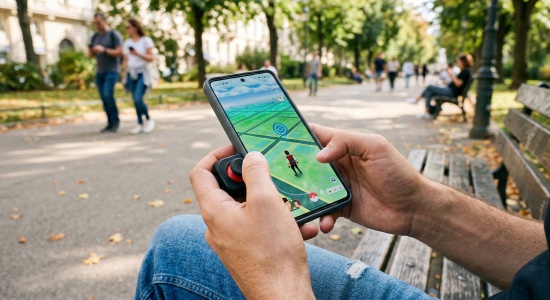
If you're looking for how to get joystick for Pokémon GO, account safety should always come first. Instead of risky hacks, choose a secure and stable solution to protect your progress while enjoying the game. And this guide get you covered!
Choosing the Right Joystick for Pokémon GO
If you're wondering how to get joystick for Pokémon GO on Android or iOS, it's important to look beyond heavily promoted modded apps. Many of them modify the original game files — which significantly increases ban risks. A safer joystick for Pokémon GO should simulate realistic GPS movement without altering the official app. This helps reduce detection while keeping your account secure.
When comparing tools, focus on three key factors: device compatibility, simple setup, and built-in safety features like cooldown timers. Let's break down the top tools currently available and weigh their pros and cons.
1. PoKeep Location Changer (Best Overall for Safety)
If account safety is your top priority when using a Pokémon GO joystick, desktop-tethered tools are currently the safest option. PoKeep Location Changer works externally, modifying your device's GPS signal without installing a modified version of Pokémon GO. That means you can use the official app while minimizing ban risks.

PoKeep Location Changer
Install PoKeep Location Changer, control your movement in real time, and enjoy safer, stress-free gameplay in just a few clicks.
It supports both iOS and Android, making it a versatile joystick for Pokémon GO users on any device. The built-in 360-degree joystick allows smooth, natural movement, and the integrated cooldown timer helps you avoid risky actions by calculating exactly how long to wait after changing locations.
To start using it, the process is straightforward:
Step 1. Download and install PoKeep Location Changer. Connect your iPhone or Android device to your computer using a USB cable or Bluetooth.
Step 2. Open the software, select the Joystick mode from the top menu, and adjust your desired movement speed.

Step 3. Use the on-screen directional buttons or your keyboard to start walking naturally in the game.
 Pros:
Pros:
- Works with the official Pokémon GO app to greatly reduce ban risk.
- Supports both iOS and Android without root or jailbreak.
- Includes a 360° joystick and cooldown timer for safer gameplay.
 Cons:
Cons:
- Requires connection to a PC or Mac.
- Premium software.
2. iTools BT 2.5 (Best Hardware Solution for iOS)
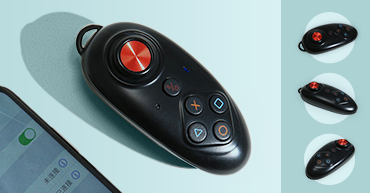
For iPhone users looking for a safer joystick for Pokémon GO, hardware-based spoofing is often considered a reliable option. The iTools BT 2.5 is a small Bluetooth dongle that functions as an external GPS antenna for your iPhone or iPad.
Because it modifies location data at the hardware level while you continue playing on the official Pokémon GO app, it maintains a relatively low ban risk compared to modded apps. However, it's not perfect.
The device costs $70+ and only works with iOS - there's no Android support. On top of that, newer iOS restrictions limit spoofing to around 15–20 km on Wi-Fi unless you use more advanced DNS workarounds, which can be complicated for beginners.
To get started with this hardware:
Step 1. Purchase the dongle and install the companion app via Apple's TestFlight program.
Step 2. Pair the dongle to your iPhone via Bluetooth settings.
Step 3. Input your desired coordinates into the companion app and toggle your device's location services to simulate movement.

Pros:
- Works with standard iOS devices without jailbreaking.
- Portable and allows on-the-go spoofing without a PC.
- Lower ban risk compared to modified game apps.
Cons:
- High upfront cost ($70+).
- iOS only — no Android compatibility.
- Limited spoofing radius without advanced setup.
3. Fake GPS JoyStick by The App Ninjas (Best Free Android Option)
If you are strictly looking for a free joystick for Pokémon GO on Android, GPS JoyStick by The App Ninjas is one of the most popular community options.
This app works by using Android's built-in Developer Options to send mock GPS data to your device. Since it doesn't modify the official Pokémon GO app, it's generally safer than fully hacked or modded clients.
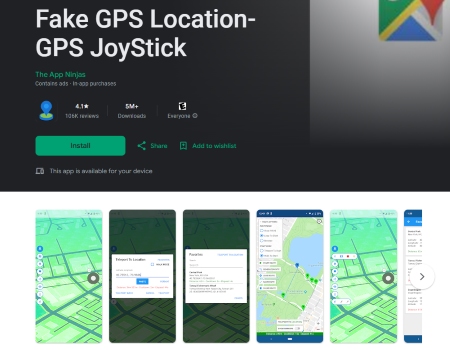
However, setup isn't completely beginner-friendly. You'll need to properly configure Developer Options and mock locations to avoid GPS keeping snapping back to your real location.
It's also important to note that this tool doesn't include advanced safety features. There's no built-in cooldown timer, so you must manually track cooldowns yourself to avoid soft bans.
Pros:
- Completely free to download and use.
- Doesn't require a modified Pokémon GO app.
Cons:
- Setup can be technical for beginners.
- No built-in cooldown timer or advanced safety features.
4. PGSharp (Feature-Rich but High Risk)
PGSharp is widely known among players who want a built-in Pokémon GO joystick directly on their phones. This Android-only modified version of Pokémon GO comes with preloaded features like an on-screen joystick, auto-walking, enhanced throws, and quick catch options.
With so many tools packed into one app, it's easy to see why it's popular.

However, the risk level in 2026 is extremely high. Because PGSharp is a modified game client, Niantic's detection systems can quickly flag and suspend accounts. If someone insists on using it, it's strongly advised to avoid logging into a main account and instead use a secondary account only.
Pros:
- Loaded with advanced features like auto-walk and quick catch.
- No PC or complicated setup required.
- Built-in joystick for instant use.
Cons:
- Very high ban risk due to modified game code.
- Only available for Android users.
5. iPogo (Popular iOS Alternative)
Finding a a free joystick for Pokémon GO on iPhone is notoriously difficult, but iPogo has long been the popular app. Similar to PGSharp, it is a modified version of the game that provides a built-in joystick and teleportation features.

However, installing iPogo isn't simple. It requires sideloading through third-party platforms, and Apple frequently revokes certificates, meaning the app may suddenly stop working and require reinstallation.
More importantly, the ban risk is extremely high. Since it's a modified client, Niantic can detect abnormal behavior quickly. Unless your device is jailbroken (which introduces its own risks), using iOS modded apps is one of the fastest ways to receive a red warning or account suspension.
Pros:
- Built-in joystick and instant teleportation.
- Designed specifically for mobile gameplay.
Cons:
- Frequent certificate revocations make installation frustrating.
- Very high ban risk due to modified client.
How to Avoid Bans While Using a Pokémon GO Joystick
No matter which joystick for Pokémon GO you choose, following spoofing best practices is essential.
Always respect cooldown timers before interacting with gyms, stops, or Pokémon after moving a significant distance. Avoid erratic behavior, such as jumping across the globe multiple times in a single day. Additionally, keep your walking speeds realistic. Simulating a standard walking or cycling pace is much safer than darting across the map at driving speeds while trying to hatch eggs.
Final Verdict
Using a Pokémon GO joystick can completely transform your gameplay, letting you explore new regions, join more raids, and play comfortably from home. But safety should always come first.
If you're wondering how to get joystick for Pokémon GO with minimal risk, a desktop-based solution like PoKeep Location Changer is the safest long-term choice. Because it works with the official Pokémon GO app and doesn't rely on modified clients, it significantly reduces ban potential.
 Related Articles








 Leave Your Comment