 By
By 
Pokemod is often mistaken for a Pokémon GO GPS spoofer, but it isn't one on its own. Developed by The Pokemod Group, it is a rooted Android tool that injects features directly into the official Pokémon GO app from Google Play. Instead of replacing the game, Pokemod overlays quality-of-life modules on top of it: IV checking, shiny alerts, animation skips, auto-transfers, a virtual GO Plus, and optional GPS integration if paired with a separate joystick app.

This guide covers what Pokemod is, who it actually fits, how it compares with PGSharp and PC GPS tools, and where the risk sits.
What Pokemod actually is
The Pokemod Group started in 2019. The first public build was called Espresso, then HAL, then just Pokemod. The pitch has stayed the same: skip the boring chores in Pokémon GO without installing a patched copy of the game.

A few common misconceptions are worth clearing up first. Pokemod is not a modified game APK, so you do not download a cracked version of Pokémon GO. You keep the official app from Google Play, and Pokemod runs alongside it to inject extra features and menus. Because of how it hooks into the system, it requires root access on Android (typically using Magisk). It cannot run on unrooted phones, and there is no version for iPhone.
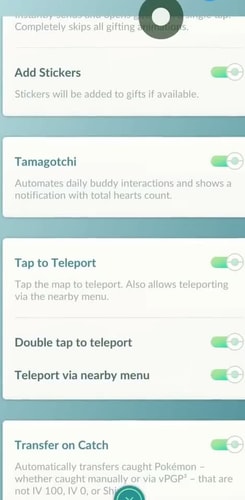
It also has nothing to do with the old 2016 XDA module "PokeMod EX." That was an unrelated Xposed mod from 2016. Today's Pokemod was created by The Pokemod Group, which formed in 2019, though Google search results sometimes mix the two up because their names are almost identical.
Can Pokemod change your location in Pokemon GO? On its own, no. Pokemod is purely an in-game assistant that automates repetitive gameplay—like checking IVs, alerting you to shinies, and skipping catch animations—while you walk around in the real world.
If you want to teleport or move around with an on-screen joystick, you have to install a separate spoofing app (specifically GPS Joystick by The App Ninjas), which Pokemod hooks into. If you choose not to install any GPS spoofer, you can still use Pokemod locally. However, using it without spoofing does not make it safe: injecting code into the official game still violates Niantic's Terms of Service and can still trigger account warnings or bans.
Who is Pokemod for
People usually want one of four things from Pokemod. It only covers the first.
| You want | Pokemod fits? | Better starting point |
|---|---|---|
| Shiny scanner, IVs, skip animations on the official app | Yes, if the phone is already rooted | Pokemod |
| Joystick and teleport, no root | No | PGSharp or iPogo patched APKs |
| iPhone, no jailbreak, change GPS | No | SpooferPro, or a PC GPS tool such as PoKeep |
| Feed a community spawn map | Not the player overlay | Pokemod Atlas or Aegis on throwaway accounts only |
If the phone is still under warranty and you do not want to root it, stop here. Pokemod is not a sideload-and-go app.
Pokemod features, grouped by job
The official Pokemod homepage lists 20-plus Pokemod modules. They offer a free APK, but advanced features are paid. Pro is $7 a month on Patreon, and that paid tier is for the newest build, more control over which modules you turn on, and extra Discord rooms. Official pages tag some modules as Lite (free) and some as Pro (paid), but that split changes after updates. So below we group them by what they do, not by which ones are free this week.
Pokemod hunting and IV tools
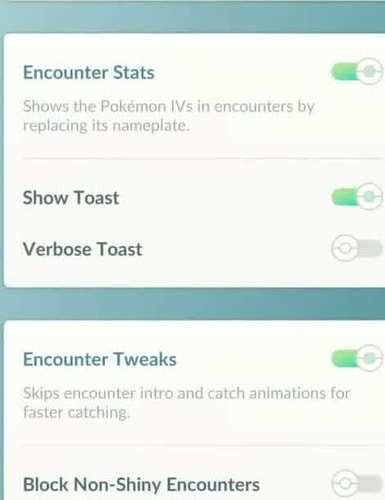
For shiny hunters, Shiny Scanner (Shiny On Map) shows shinies directly on the map, plus hundos, nundos, XXL/XXS spawns, Ditto, and some Galarian birds from Daily Incense. It can even ping you and copy the coordinates once Galarian birds appear. You can pair it with Block Non-Shiny Encounters to skip every encounter that is not shiny, while Spawn Booster / Instant Loading shows more Pokémon from farther away and loads them faster when you move.
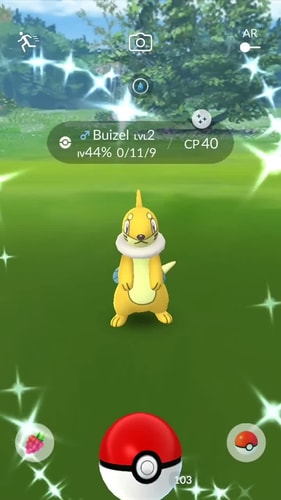
For stat checking, IV readouts show IVs in a popup when you encounter a Pokémon, on the catch screen, and in your inventory, along with PvP stats during encounters. Before a raid starts, Boss Movesets also shows the raid boss's moves up to two minutes before the egg hatches.
A common question is: I only want the shiny scanner, I do not want to spoof. Yes, Pokemod can run without GPS Joystick. You are still modifying the official game. PGSharp and iPogo also have scanners, but those need a patched APK instead of root.
Pokemod catching, chores, and raids
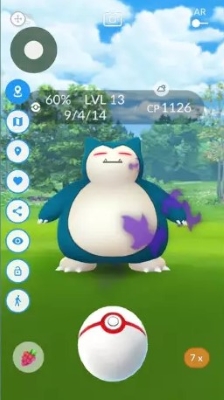
- Perfect Throw / Headshot: Makes curveballs hit the center. Can freeze the Pokémon so it does not attack or dodge. Recovers missed balls. Can fake AR+ XP.
- Instant Catch / Skip Encounter Intro: Skips the catch animation. Skip Encounter Intro skips the zoom-in so the next Pokémon is already on screen.
- Virtual GO Plus: Auto-catches, auto-spins, and auto-reconnects inside the app. This is a bot, not a shortcut.
- Pinap Master / Transfer on Catch: Feeds a Pinap to every encounter, then can transfer junk. You can specify certain criterias, for example, you can ask it don't transfer hundos, nundos, shinies, shadows, raid or quest catches, or Zorua.
- Speed Mode: Skips evolution and hatch screens. One tap for Kecleon. Auto-collects Zygarde cells.
- Magic Bag: Sets item caps and deletes extras.
- Inventory Tweaks: Mass transfer, evolve, and purify. Heal everything in one tap.
- Mass Gift / Swift Gift: Send and open gifts in bulk and skip the animations.
- Eggspresso: Auto-incubates and hatches eggs with infinite incubators.
- Tamagotchi: Auto-feeds your buddy, opens souvenirs, takes snapshots, and battles with it.
- Quest Tweaks: Auto-claims research, shows hidden rewards, and opens encounters from limbo storage.
- Raid Pack: Auto-attacks and dodges in raids, and skips raid animations.
- Account Manager / Incognito / Performance Mode: Switch accounts, hide your trainer name on most screens, and lower graphics to cut heat.
You used to skip Team Rocket battles and go straight to the catch. Niantic blocked that. You have to fight them now. PGSharp still has auto-attack and auto-shield. Pokemod does not.
Pokemod location modules need a separate GPS app
Pokemod does not include a joystick. "Tap to Teleport" only works if you also install GPS Joystick by The App Ninjas. "Cooldown Tracker" puts a red dot on the Poké Ball in your bag, can stop you from throwing, saves the last five cooldown actions, and can send you back to your last spot. "Integrated Mock Locations Patch" is Pokemod's fix for Error 12. You do not need Smali Patcher or TaiChi for mock location.
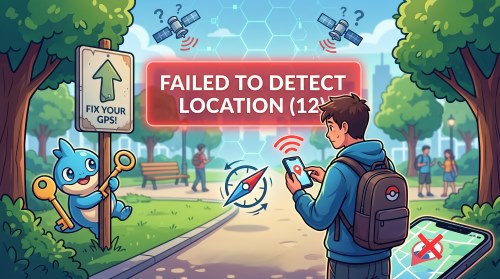
If you only wanted teleport, Pokemod is extra work. You still have to root the phone, hide root, install a third-party joystick, and pay for modules you may never use.
Pokemod vs PGSharp vs iPogo vs PC GPS
Choosing between these tools usually comes down to two things: whether your phone is rooted, and whether you want in-game automation or just GPS movement. Here is how they compare:
| Aspect | Pokemod | PGSharp / iPogo | PC GPS (PoKeep and similar) |
|---|---|---|---|
| What it is | Overlay on the Play Store app | Patched Pokémon GO APK | Computer app that moves the phone's GPS |
| Root / jailbreak | Root required | No root needed | Not required |
| Shiny scanner, IVs, auto-throw | Yes | Yes | No |
| Built-in joystick | No; needs GPS Joystick | Yes | Yes, from the computer |
| iOS | No | iPogo has an iOS version. PGSharp is mainly Android. | Yes |
| Typical paid tier | $7 / month Pro | About $5 / month Pro | One-time purchase. It only changes GPS. |
Some people launch Pokemod on top of PGSharp's no-root APK so they get PGSharp's map plus Pokemod's IV overlay. It's compeletely meaningless, PGsharp already has almost every function which Pokemod offers, and it can increase the risk of account ban.
What you need before Pokemod will run
Pokemod requirements and setup

Pokemod requires an Android device rooted with Magisk (Google Pixels are popular choices because their bootloaders are easy to unlock). You will need the official Pokémon GO app from the Play Store, the Pokemod APK downloaded directly from pokemod.dev, and superuser permission granted in Magisk so the overlay can attach to the game. If you plan to spoof location as well, you must also install GPS Joystick by The App Ninjas with mock locations enabled.
Step 1. Confirm root and a working Magisk install before you download anything else.
Step 2. Install Pokémon GO from the Play Store, then the official Pokemod APK. Allow unknown sources if Android asks.

Step 3. Open Pokemod, create or log into a Pokemod account, and approve the Superuser prompt.
Step 4. Turn on the modules you actually need. Leave Virtual GO Plus and mapping tools off if you are only testing the overlay.
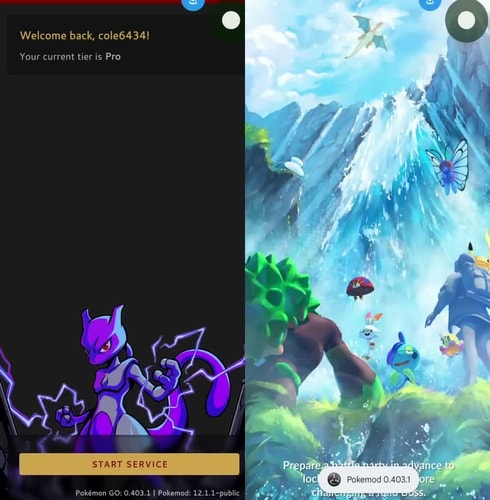
Step 5. Start the service. Pokemod should launch the official game with the overlay attached.
Common Pokemod setup issues
The most common issue is tapping Start Service, having Pokémon GO launch, and immediately getting kicked back to Pokemod. This usually happens if root is not properly hidden from Pokémon GO, if Play Integrity fails, or if a recent game update broke compatibility with your current Pokemod build. Reinstalling the app will not fix this; you will need to update your root hide settings or check the Pokemod Discord for compatibility updates.
Atlas and Aegis are a different download. They scan for community maps (RDM or Unown Stack). They are not the player overlay. Do not buy an Atlas license if you only wanted shiny-on-map.
Pokemod ban risk by feature, not by slogan
Pokemod changes the official game. That is enough for a strike. Skipping animations is still a violation. What changes is how obvious it looks.
| What it is | Examples | Ban risk |
|---|---|---|
| On-screen helpers | IV popup, speed mode, inventory tweaks | Still against the rules. Quieter than a bot, not safe. |
| Throw and catch cheats | Perfect Throw, frozen Pokémon, 100% excellent | Looks like impossible play. Some people miss on purpose to look more normal. |
| Automation | Virtual GO Plus, auto-spin, raid auto-fight | This is what detection usually watches first. |
| Mapping | Atlas / Aegis scanner accounts | Official FAQ: level an alt to 30, then scan. It will most likely get deleted. |
Ban risk mostly depends on which modules you use. Heavy automation like auto-spinning and instant catch flags accounts much faster than passive visual overlays. However, because injecting code violates Niantic's Terms of Service, you should never use Pokemod on an account you care about.
If you decide to try it, stick to a secondary account. Never use an account that holds valuable shinies, lucky Pokémon, or paid event tickets.
Pokemod price, download, and Discord
You can download Pokemod directly from pokemod.dev, with the free APK available at discovery.pokemod.dev—skip random "pokemod apk" mirrors. The Pro tier costs $7 per month on patreon.com/pokemod (or through alternative checkout options at pokemod.dev/payment) and unlocks the newest build, extra Discord rooms, and extra Discord permissions. For setup help and status updates, support runs through the official Pokemod Discord, while community mapping signup sits on a separate site at mapping.pokemod.dev with its own device tokens and Stripe licenses.
After subscribing on Patreon, link your Discord account to claim your Pro role through the Professor Willow bot. If your Pro features do not activate right away, making sure this Discord role is assigned is usually the fix.
If you want GPS, not Pokemod modules
Pokemod only works on rooted Android phones. It will not run on iPhones, unrooted devices, or phones with locked bootloaders. If you only want to change your GPS location without rooting your phone or injecting code into the game, a desktop location tool is a better fit.

PoKeep Location Changer does that job. It is not a Pokemod clone. It does not add a shiny scanner. It moves the official app's GPS from Windows or Mac.

PoKeep Location Changer
Plug in, choose your destination, and start virtual travel instantly to hunt regionals, farm events, and level up faster - no root or jailbreak required.
It works on iOS and Android with no root or jailbreak. For Pokémon GO it has a cooldown timer, a 360° joystick, and route modes. The official game stays on the phone, so the risk is different from injecting modules. It is still not ban-proof. Jump continents and you can still get a softban.
Step 1. Install PoKeep on the computer and connect the phone with USB.
Step 2. Finish the first-run setup for that phone.
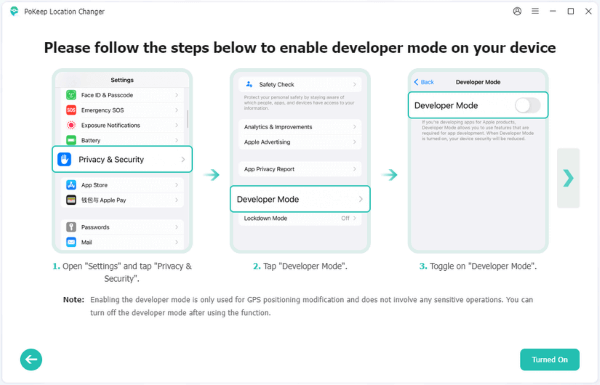
Step 3. Choose Pokémon GO or Game Mode when asked, so the map opens and the official app launches on the phone.

Step 4. Use Teleport, joystick, or a route. Drop a pin or paste coordinates in the search bar.

Use Pokemod if the phone is already rooted and you want the overlay. Use PoKeep if you only need GPS.
FAQs about Pokemod
Does Pokemod work on iPhone or unrooted Android?
No. You need a rooted Android phone. A jailbroken iPhone is not enough. If you only need GPS without root or jailbreak, use a PC location changer.
Is Pokemod free?
Yes. There is a free APK on the official site. Pro is $7 a month on Patreon. Pro gets you the newest build, more module control, and extra Discord access. You can also pay at pokemod.dev/payment.
Can I use Pokemod's shiny scanner without spoofing?
Yes. You do not need GPS Joystick to use the scanner while you walk. It still changes the official game, so it still breaks the Terms of Service.
Is Pokemod safer than PGSharp?
No. Neither is ban-proof. Pokemod uses the official Play Store app on a rooted phone. PGSharp is a patched APK and does not need root. Running Pokemod on top of PGSharp is not safer. Use a throwaway account if you try it.
Where do I download Pokemod?
Download from pokemod.dev. The free APK is at discovery.pokemod.dev. For setup assistance and root compatibility troubleshooting, check the official Pokemod Discord.
 Related Articles




 Leave Your Comment