 By
By 

Few things in Pokémon GO are more frustrating than finishing a long five-kilometer walk, checking your eggs, and finding out your 10 km Egg barely registered a single meter. Most trainers immediately blame the speed limit—and they are usually right.
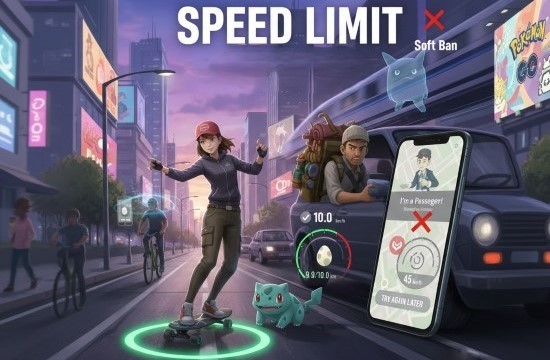
The tricky part is that Pokémon GO doesn't have just one speed limit. Niantic has never shared official numbers, but the game actually enforces different speed cutoffs depending on what you are doing. The speed cap for hatching eggs is much lower than the limit for spinning PokéStops, catching wild Pokémon, or attracting spawns with Incense.
In this guide, we break down each verified speed limit, explain how the game measures distance behind the scenes, and share practical ways to make sure every kilometer you walk actually counts toward your goals.
 Quick Rule of Thumb
For hatching eggs, keep your pace around 8.0 to 9.5 km/h (5.0 to 6.0 mph). Staying slightly below the 10.5 km/h cap leaves a buffer for minor GPS drift so you never lose distance to sudden speed spikes.
Part 1. All Pokémon GO Speed Limits at a Glance
Pokémon GO doesn't have just one speed limit—it uses separate cutoffs for eggs, stops, and wild spawns. That explains why your eggs might stop tracking while you can still see wild Pokémon on the map and spin nearby PokéStops.
| In-Game Activity | Speed Limit | Pace Equivalent | What Happens When You Go Over |
|---|---|---|---|
| Egg Hatching & Buddy Distance | 10.5 km/h (6.5 mph) | ~175 meters / min | Distance during that segment is dropped completely (0 km gained) |
| Daily Adventure & Regular Incense | ~15 km/h (9.3 mph) | ~250 meters / min | Spawns slow to stationary rate (~1 Pokémon every 5 minutes) |
| "I'm a passenger" Warning | ~30 km/h (18.6 mph) | ~500 meters / min | Warning pop-up appears; clicking it does NOT remove limits |
| PokéStop & Gym Spin Lock | ~35 km/h (21.7 mph) | ~580 meters / min | Disc spins blankly with no items, or shows "Try again later" |
| Wild Pokémon Spawns & Catch Lock | ~40 km/h (25 mph) | ~660 meters / min | Map spawns vanish; tapped Pokémon flee after the first ball |
| Auto-Catchers (GO Plus / Plus +) | Up to ~70–80 km/h (45–50 mph) | Variable | Can often spin and catch at suburban driving speeds |
| Travel Soft Ban (High-Speed Lock) | ~100 km/h (62 mph) | >1,600 meters / min | 100% flee rate, zero PokéStop item drops, Gym errors |
| Adventure Sync (App Closed) | ~15–18 km/h cadence cap | Steps & sensors | Workouts flagged as cycling or driving are ignored |
10.5 km/h (6.5 mph) — Egg Hatching & Buddy Distance
This is the most important number for egg hatching. When you play with Pokémon GO open on your screen, distance tracking for Pokémon GO eggs and Buddy candy stops at 10.5 km/h (6.5 mph), which works out to about 175 meters per minute.
If your movement between GPS checks averages higher than this cutoff, the game throws that entire segment away. You do not get partial credit—you get zero meters for that stretch. While the game originally launched in 2016 with a slightly higher 13.5 km/h cap, Niantic lowered it to 10.5 km/h shortly after release to stop car-based hatching, and that ceiling has remained unchanged ever since.
15 km/h (9.3 mph) — Best Speed for Incense
When you stand still, regular Incense only spawns one Pokémon every five minutes. If you start walking, it speeds up to roughly one spawn every 30 to 45 seconds (or about every 200 meters). For the 15-minute Daily Adventure Incense, keeping a steady pace is essential if you want any chance of encountering the Galarian Legendary birds (Articuno, Zapdos, and Moltres).
Moving at around 15 km/h (9.3 mph) is the sweet spot: fast enough to get spawns as frequently as possible, but safely below the speed where Pokémon stop appearing.
30 km/h (18.6 mph) — "I'm a Passenger" Warning
Once you travel faster than roughly 30 km/h, Pokémon GO pops up a full-screen alert: "You're going too fast! Pokémon GO shouldn't be played while driving."
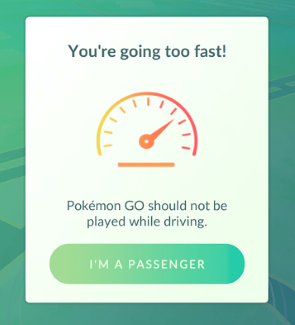
A common myth is that tapping "I'm a passenger" turns off the speed limit. It does not. The button is just a safety disclaimer to protect Niantic from distracted driving liabilities. Tapping it clears the pop-up so you can see your screen, but the game still enforces every speed limit in the background.
35 km/h (21.7 mph) — PokéStop & Gym Spin Lock
At speeds above roughly 35 km/h, PokéStops and Gym photo discs lock up. If you try spinning one from a moving bus or car, the photo disc will spin endlessly without dropping items, or show the message "Try again later."
40 km/h (25 mph) — Wild Spawn Visibility & Catch Lock
Above 40 km/h, wild Pokémon disappear from your map, and your Nearby radar goes completely blank. If you tap a Pokémon right before reaching this speed, throwing a Poké Ball almost always fails: the Pokémon will break out on the first shake and immediately run away.
~70–80 km/h (45–50 mph) — Auto-Catcher Accessory Exception
Official Bluetooth devices like the Pokémon GO Plus, Poké Ball Plus, and Pokémon GO Plus + (as well as third-party auto-catchers) handle movement differently. Because they talk to the game through background Bluetooth commands, they can often spin stops and attempt catches at driving speeds up to 70–80 km/h (~45–50 mph)—well above the on-screen limit. You will miss more catches because auto-catchers only throw standard Poké Balls without curveball bonuses, but they are still the best way to play from the passenger seat.
~100 km/h (62 mph) — Travel-Based Soft Ban Lockout
Traveling at highway or train speeds (80–100+ km/h) triggers an automatic Pokémon GO soft ban. The game recognizes that you are moving too fast for normal play. Every wild Pokémon will break out and flee on the first throw, PokéStops will refuse to give items, and Gym battles will kick you out with an error.
Part 2. How Pokémon GO Calculates Speed and Distance
Understanding how the game tracks you is the best way to stop losing distance you actually walked.
Straight-Line GPS Checks (Why Corners Cut Your Distance)
Pokémon GO doesn't track every single step continuously—doing so would drain your phone battery and burn through mobile data. Instead, it checks your position in short intervals:
Location Check: Every 15 to 30 seconds, the app notes your current GPS coordinates (Point A).
Straight-Line Distance: At the next check, it records your new position (Point B) and draws a straight line between the two points to measure distance.
Egg and Buddy Update: Every 4 to 8 minutes, the game adds up those straight-line segments and updates your egg and Buddy progress on the server.
Because the game draws a straight line between check-ins, walking in curves or tight loops works against you. If you jog around a circular track or walk through winding park paths, the game only measures the shortcut between each snapshot, ignoring the curve you actually walked. You can easily lose 20% to 40% of your real distance this way. Walking along long, straight roads will always give you the most accurate distance credit.
Rolling Averages and the "Cool-Down" Delay
Have you ever pulled up to a red light next to a PokéStop, come to a full stop, and still had the disc refuse to spin? That happens because Pokémon GO doesn't use a live speedometer. It averages your speed over a rolling window of time.
If you just drove at 60 km/h for two minutes, your average speed is still well above the 35 km/h limit the second you step on the brakes. You need to wait about 15 to 60 seconds at a stop for that average to cool down before the game lets you spin. On the other hand, if you've been parked for ten minutes and suddenly drive off, you can sometimes spin a stop in the first few seconds because your recent average is still near zero.
Part 3. Real-World Travel: Biking, Transit and Running
Here is how your everyday travel methods actually affect distance tracking and gameplay:
Cycling & E-Scooters
Biking is probably the most frustrating activity for Pokémon GO players. Even a relaxed bike ride usually sits between 16 and 24 km/h (10 to 15 mph). If you leave the game open on your phone while riding, practically none of that distance will count toward your eggs or Buddy candy because you are well over the 10.5 km/h cap.
To get distance credit while cycling, you either have to pedal at a slow walking crawl (under 10 km/h), or keep the game completely closed and rely on Adventure Sync with your phone in your pocket.
City Buses & Streetcars
Public transit can actually be surprisingly good for hatching eggs. Because city buses and trams frequently stop at red lights, sit in traffic, and pause to pick up passengers, their average speed stays low. On an 8 km bus ride through a busy city, you can often rack up 3 to 5 km of egg distance while spinning stops along the route.
Highways & Trains
Driving on the highway or taking a train shuts down almost everything in the game: wild spawns disappear, PokéStops won't spin, and distance stops counting entirely. A big warning: never turn on your Daily Adventure Incense on the highway or a train. Pokémon will still pop up every 30 seconds, but because of the speed lock, every single one—even a rare Galarian bird—will run away on the very first ball.
Treadmills & Indoor Walking
If you walk on a treadmill or elliptical indoors, regular GPS tracking won't register anything because your location never changes. To log indoor steps, completely close the Pokémon GO app and let Adventure Sync track your movement using your phone's built-in step sensors.
Part 4. How to Hatch Eggs Faster Under the Speed Limit
Here are a few ways to hatch eggs faster without going over the speed limit:
1 Simulate Walking Pace with PoKeep
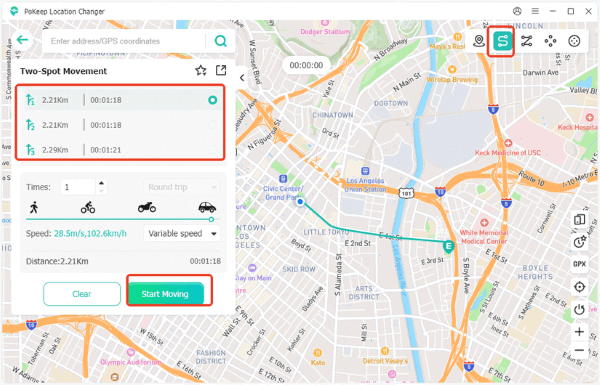
If bad weather, a busy schedule, or limited mobility keeps you from walking kilometers outside every day, PoKeep Location Changer lets you simulate natural walking on iOS and Android straight from your computer.
The secret is the speed slider: keep your speed set between 8.5 km/h and 9.0 km/h. This stays comfortably below the 10.5 km/h egg cap while giving you the maximum possible distance per hour (around 8.5 km of credited progress every 60 minutes).
Realistic Fluctuation Mode: Varies your speed naturally instead of holding an unnatural, rigid pace that looks suspicious.
Multi-Spot & GPX Routes: Follows actual roads and walking paths rather than cutting straight through buildings or across water.
Joystick Control: Lets you guide your trainer in real time to reach nearby PokéStops and Gyms smoothly.
Step 1. Download and launch PoKeep Location Changer on your computer.


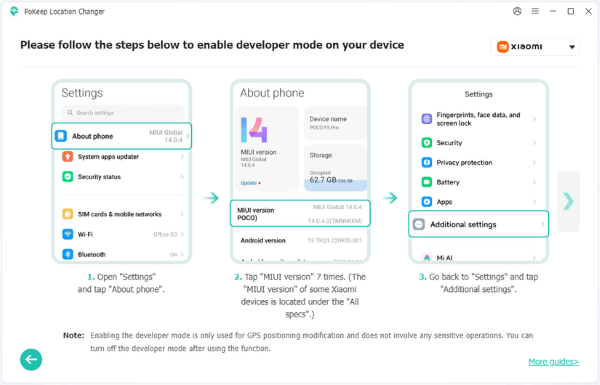
Step 2. Click Start and connect your iPhone or Android phone to your computer. Follow the on-screen instructions to enable Developer Mode if prompted.
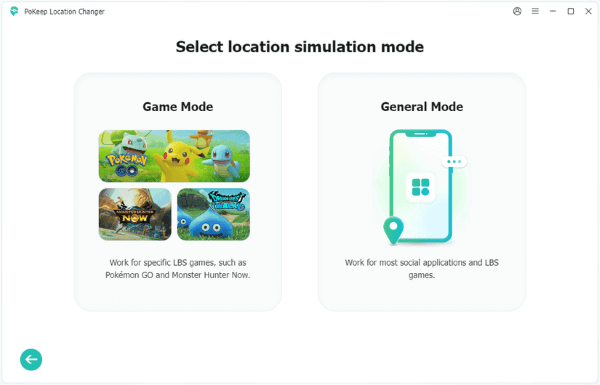
Step 3. In the game selection menu, select Pokemon GO under Game Mode to activate the dedicated simulation protocol.
Step 4. Select Two-spot or Multi-spot mode in the upper-right corner. Set your target walking speed to 8.5 km/h, toggle on Realistic Mode (fluctuation), and click Move to begin accumulating egg distance automatically.
2 Configure Adventure Sync Properly
When jogging or using an indoor treadmill, keeping the game open often loses distance from GPS drift or quick speed spikes. Closing Pokémon GO entirely and using Adventure Sync is much more reliable.
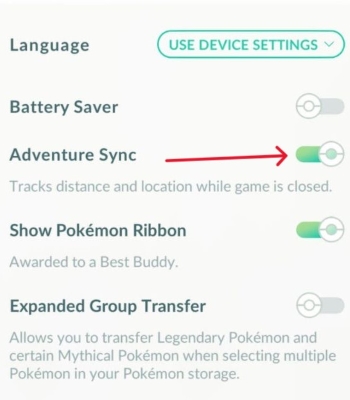
To make sure your steps reliably sync with the game, check these essential device settings:
Trainer Level 5+: Your account must be at least Level 5 to unlock Adventure Sync.
Location Permission: On iOS, set location access to "Always" (not "While Using the App"). On Android, allow background location.
Turn Off Low Power Mode: Battery saver modes often pause background sensors and stop your fitness app from syncing with Pokémon GO.
No Manually Logged Steps: Niantic's servers reject manual step or distance entries added by hand in Apple Health or Google Fit.
Expect a Short Delay: Background steps don't show up right away; it can take anywhere from 15 minutes to a couple of hours for synced distance to appear on your eggs.
3 Strategic Incubator Stacking
Don't just put eggs into whichever incubator is free. Veteran players use this simple rule to save money and hatch eggs faster:
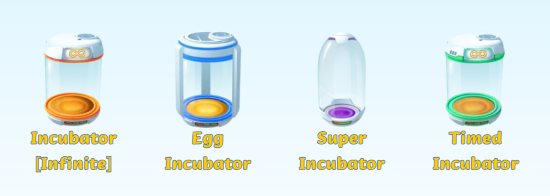
Infinite (Orange) Incubator: Use only for 2 km Eggs. Because 2 km eggs hatch quickly, using your free incubator clears egg space fast without burning through limited-use incubators.
Standard (Blue) Incubators: Best for 5 km and 7 km Eggs.
Super Incubators (Purple): Save these for 10 km and 12 km Strange Eggs. Super Incubators cut distance by 33%. That saves you 3.33 km on a 10 km egg and 4.0 km on a 12 km egg. Using a paid Super Incubator on a 2 km egg only saves 0.67 km, which wastes your PokéCoins.
4 Take Advantage of Distance Events
Look out for in-game events with 1/2 Hatch Distance or 1/4 Hatch Distance bonuses during Community Days and seasonal events. Putting a 10 km Egg in a Super Incubator during a 1/4 distance event drops the requirement all the way down to 1.67 km. Keep in mind that the speed limit is still 10.5 km/h during these events—only the required distance changes.
Part 5. Frequently Asked Questions
What is the fastest speed you can travel and still hatch eggs in Pokémon GO?
With the game open on your screen, the hard limit for egg and Buddy distance is approximately 10.5 km/h (6.5 mph), or about 175 meters per minute. Moving faster causes the game to discard that portion of your walk entirely. For the best tracking, aim for a steady pace between 8.0 and 9.5 km/h.
Does tapping "I'm a passenger" turn off speed limits?
No. Tapping "I'm a passenger" only closes the pop-up warning so you can see your map. It does not turn off or raise any speed limits. If you travel over 35 km/h, PokéStops will still lock up, and above 40 km/h, Pokémon will still flee or stop spawning.
Why do PokéStops say "Try again later" or spin without dropping items?
This happens when your rolling average speed is above roughly 35 km/h (21.7 mph). If you just slowed down from driving speed, your average is still high for the first 15 to 60 seconds after stopping. Wait at the stop for about half a minute, and the disc will spin normally.
Why do all Pokémon immediately run away in a car or train?
Once you travel above 40–50 km/h, the game triggers an automatic flee lock. At highway speeds (80–100+ km/h), the game issues a temporary travel soft ban. Any wild Pokémon you try to catch will break out on the very first throw and instantly run away.
Does Adventure Sync have the same speed limit as walking with the app open?
No. When Pokémon GO is completely closed, Adventure Sync tracks your steps and motion sensors through Apple Health or Google Fit instead of live GPS. It handles jogging or treadmill runs up to roughly 15–18 km/h, but fast bike rides (over 20 km/h) or manual distance entries will be rejected.
Can auto-catchers like Pokémon GO Plus + spin stops and catch Pokémon while driving?
Yes, to an extent. Accessories like the Pokémon GO Plus + run through a background Bluetooth service that isn't restricted by the normal on-screen UI limits. They can often catch Pokémon and spin stops at speeds up to 45–50 mph (~70–80 km/h), though catch rates will be lower since they only throw standard Poké Balls.
Part 6. Conclusion
Getting the most out of Pokémon GO comes down to knowing the limits: stay under 10.5 km/h for eggs, under 35 km/h for PokéStops, and under 40 km/h if you want wild Pokémon to show up.
When you cannot go outside for a long walk, PoKeep Location Changer offers a straightforward way to keep your eggs moving. Set your route to a steady 8.5 km/h with natural speed changes, and you can hatch eggs and collect Buddy candy reliably without leaving your home.
 Related Articles





 Leave Your Comment