 By
By 

Quick Verdict
Pokemon Go Routes help players follow preset walking paths to earn Route rewards, find Zygarde Cells, meet Mateo, and make daily exploration more rewarding.
Who It's For
This guide is for Pokémon GO players who want to find nearby Routes, complete them correctly, collect Zygarde Cells, and fix Route tracking problems.
Key Takeaways:
- Main Uses: Follow Routes for Zygarde Cells, Route Badges, Buddy Candy, Mateo Gift Exchange, and extra exploration rewards.
- Best Tips: Start from the blue flag, stay close to the path, and check near the end before completing the Route.
- Location Tip: If local Routes are limited or GPS movement feels unstable, PoKeep can help simulate smoother route-style movement.

Pokemon Go Routes can feel confusing the first time you use them. You may see a research task asking you to follow a Route, hear other players talking about Zygarde Cells, or notice the Routes tab in the Nearby menu without knowing what to do next. Sometimes the Route does not start, sometimes progress pauses, and sometimes you reach the end but still do not get the rewards you expected.
This guide explains how Pokemon Go Routes work, how to find Routes near you, how to follow and complete them correctly, what rewards you can get, and how to fix common Route problems. You will also learn how PoKeep Location Changer can help when you want more control over GPS movement, route planning, and simulated walking in Pokémon GO.
What Are Routes in Pokemon GO?
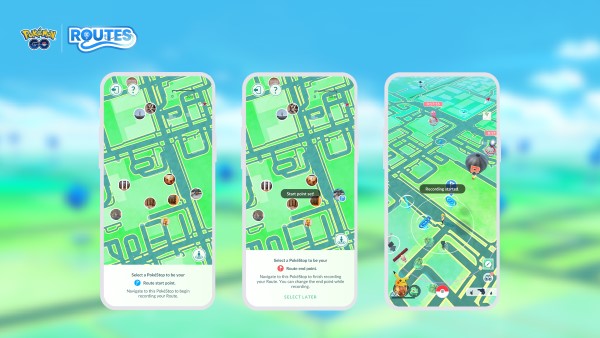
Routes in Pokemon GO are preset paths that Trainers can follow while exploring the real world. A Route usually starts and ends at a PokéStop or Gym, then guides you along a specific walking path. Instead of simply wandering around the map, you follow a defined line from the starting point to the ending point.
Routes are useful because they add extra goals to normal walking. While following a Route, you may earn a Route Badge, receive completion rewards, make progress with your buddy, encounter Pokémon, meet Mateo for Gift Exchange, or find Zygarde Cells. For players working on Zygarde or Route-related Special Research, Routes are one of the most important exploration features in the game.
In simple terms, a Route is not just a walking path. It is a guided gameplay feature that connects movement, rewards, exploration, and Zygarde progress.
How to Find Pokemon GO Routes Near You
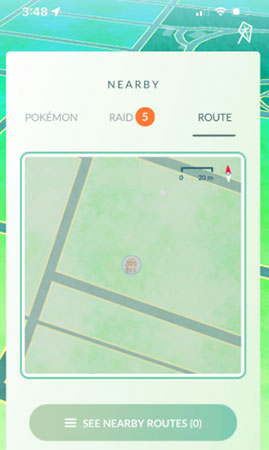
The easiest way to find Pokemon GO Routes near you is through the in-game Nearby menu. Tap the Nearby bar at the bottom-right of the screen, switch to the Route tab, and check whether any local Routes are available. If there are Routes around you, you can tap one to view its path, distance, start point, end point, and other details.
If you do not see any Routes, it does not always mean the feature is broken. Some areas simply have fewer submitted or approved Routes, especially rural places, quiet neighborhoods, or locations with fewer PokéStops and Gyms. Try checking parks, downtown areas, university areas, shopping districts, or places with dense Pokémon GO activity.
You may also see players mention a Pokemon GO routes map. Community maps can help you discover possible Routes, but they are usually based on player submissions and may not be complete or fully updated. The in-game Route tab should still be your first choice when checking active Routes nearby.
How to Follow a Route in Pokemon GO
Following a Route is easy once you understand the correct order. The Route does not truly begin just because you selected it from the Nearby menu. You need to get close enough to the Route’s starting point first.
Step 1 Open the Nearby menu and tap the Route tab
Choose a Route that looks suitable for your location, walking time, and distance.
Step 2 Tap Follow and move to the start point
The start point is usually marked by a blue flag above a PokéStop or Gym.
Step 3 Walk along the highlighted Route path
Keep an eye on the Route line and your progress. If you move too far away from the path, the Route may pause or stop tracking properly.
Step 4 Reach the end point and complete the Route manually
After arriving at the end, open the active Route menu and tap Complete Route. Do not assume that reaching the final point automatically finishes everything.
This last step is important. Many players walk to the end of a Route and think they are done, but Routes may require manual completion. If you are hunting Zygarde Cells, it is also smart to look carefully near the end before completing the Route, because Cells may appear close to the final section.
Pokemon GO Route Rewards: What Can You Get?
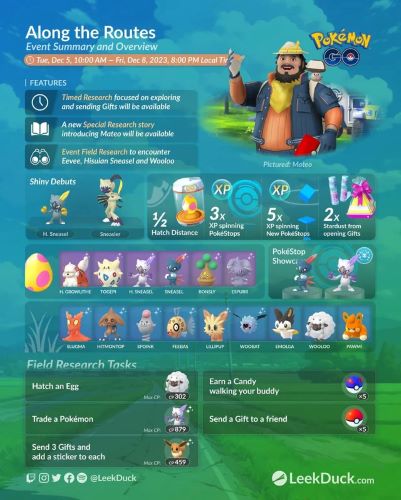
Pokemon GO Route rewards can include several different benefits. The exact rewards may vary, but Routes are generally worth doing because they connect multiple systems: walking, buddy progress, exploration, badges, Mateo, and Zygarde Cells.
One of the most visible rewards is the Route Badge. When you complete a Route for the first time, you can receive a badge for that specific Route. Completing the same Route multiple times can help level up that Route Badge, making Routes feel more collectible.
Routes can also help with buddy-related progress. Players may earn Buddy Candy more quickly while following Routes, and Routes can also help with buddy interaction goals. If you are walking a buddy for Candy, hearts, or evolution requirements, Routes can make normal movement feel more purposeful.
Mateo is another Route-related feature. He may appear near the end of your first Route of the day and allow you to exchange Gifts with other Trainers. This is especially useful for players who collect Postcards, work on Vivillon patterns, or simply want extra items from Gift Exchange—see our Pokémon GO Postcards guide for pinning and Scatterbug tips.
Pokemon GO Routes and Zygarde Cells

One of the biggest reasons players care about Pokemon Go Routes is Zygarde Cells. Zygarde Cells are collected through Routes and stored in the Zygarde Cube. They are used for changing Zygarde into different formes, making Routes essential for players who want to progress with Zygarde over time.
Zygarde Cells usually appear as small glowing green sparkles on the map while you are following a Route. They are not guaranteed on every Route, and they may be easy to miss if you are walking quickly or not watching the screen. Many players report that Cells often appear near the later part of a Route, so it is worth slowing down and checking carefully before tapping Complete Route.
A practical Route strategy for Zygarde Cells is to follow short, safe, easy-to-repeat Routes and avoid rushing the final section. If you do not see a Cell, try a different Route instead of repeating the same one immediately. Community experience commonly suggests a daily collection limit, so if Cells stop appearing after several successful collections, you may have reached your daily cap.
What Pokémon Appear on Routes in Pokemon GO?
Pokemon may appear while you are following Routes, but Routes should not be treated as a guaranteed rare spawn machine. Route encounters can vary by location, event, season, and the current Pokémon GO spawn pool. In some cases, regional Pokémon may appear more noticeably while following Routes, but this does not mean every Route will produce rare or exclusive Pokémon.
It is better to think of Route spawns as an extra benefit rather than the only reason to use Routes. The main long-term value usually comes from Zygarde Cells, Route Badges, buddy progress, Mateo, and daily walking rewards. During special events, Routes may become more valuable if event bonuses or featured Pokémon are connected to the feature.
Routes also pair well with Incense and regular walking sessions. If you already plan to walk for spawns, eggs, or buddy progress, choosing a Route can make the same walking time more rewarding.
How to Create a Route in Pokemon GO
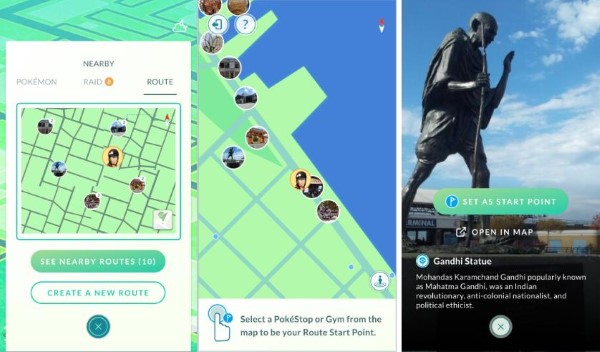
If there are no good Pokemon GO Routes near you, creating your own Route may be the best solution. Route creation is available only to eligible accounts, and the option may not appear for every Trainer. At the time of writing, the Pokémon GO Help Center lists Route creation as available for players Level 30 and above, though players should always check the current in-game interface for the latest eligibility.
To create a Route, open the Route section from the Nearby menu or your Trainer Profile. Choose a nearby PokéStop or Gym as the starting point, then choose an ending point. You can also create a loop-style Route by using the same location as both the start and end point.
After choosing the points, walk the path you want the Route to follow. Pokemon GO records your movement as the Route path. When finished, you can add details such as the Route title, description, and tags before submitting it for review.
Pokemon GO Route Length and Approval Tips
A Route should be long enough to feel meaningful but not so long that most players avoid it. Current Route guidance allows Routes from 0.5 km to 20 km, but shorter Routes are usually more practical for daily use. A Route around a park, campus, walking trail, or PokéStop-heavy area is often more useful than a very long path that only a few players will complete.
For better approval chances, choose a path that is safe, public, and easy to follow. Avoid private homes, restricted areas, dangerous roads, school zones, sensitive locations, adult venues, or places where walking may be unsafe. The Route should be continuous and realistic, not a messy path that jumps across roads or inaccessible spaces.
The title and description matter too. Keep them clear, neutral, and helpful. Avoid spam, personal information, offensive wording, cheating references, or promotional language. A simple name like “Central Park Loop” or “Downtown PokéStop Walk” is usually better than a confusing or exaggerated title.
Pokemon GO Routes Not Working? Common Fixes
If Pokemon GO Routes are not tracking, pausing, or completing correctly, the issue is often related to GPS accuracy, permissions, connection quality, or moving too far from the Route line. Start with the simple fixes before assuming the Route itself is broken.
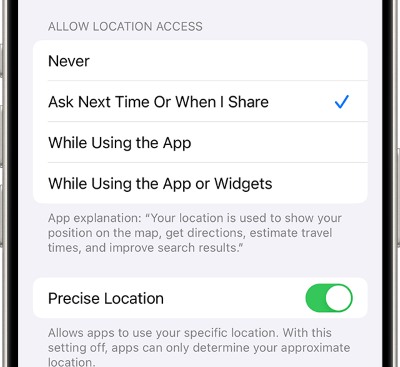
First, check your location permissions. On iPhone, make sure Pokémon GO has location access and that Precise Location is enabled. On Android, check that location accuracy is turned on and that Pokémon GO can access your location while you are playing.
Second, check your internet connection and GPS environment. Tall buildings, tunnels, indoor spaces, crowded urban areas, and unstable mobile data can cause location drift. If your avatar jumps away from the Route path, the Route may pause or fail to count progress correctly.
Third, restart the app and update Pokémon GO if needed. Outdated app versions, cached data, or temporary connection issues can affect Route tracking. If the Route pauses, return close to the pause location before trying to resume.
Why Your Pokemon GO Route May Not Complete
A Route may fail to complete even if you physically reached the end point. This usually happens when the game thinks you did not follow enough of the required path, moved too far away from the Route line, paused too long, or did not manually tap the completion button.
Before quitting the Route, check the active Route menu. If it shows that the Route is still in progress, move closer to the end point or back toward the highlighted path. If you are trying to collect Zygarde Cells, look around the final area before completing the Route.
Also remember that Routes are designed around stable movement. If your GPS drifts heavily or your avatar jumps around, the game may not count your movement as clean Route progress. This is why good signal, clear outdoor space, and steady walking speed matter.
How PoKeep Helps with Pokemon GO Routes and GPS Movement

Routes work best when your GPS movement is smooth, steady, and easy to control. But not every player has convenient local Routes, safe walking conditions, or stable GPS performance. This is where PoKeep Location Changer can be a helpful option for players who want more control over location-based gameplay.


PoKeep supports iOS and Android location changing without jailbreak or root, and it is designed for location-based apps and games including Pokémon GO. For Routes, the most useful features are joystick movement, custom speed, two-spot movement, multi-spot movement, favorite routes, history records, and GPX route support.
For example, joystick mode can help you control movement direction more precisely. Custom speed can make movement feel closer to normal walking. Multi-spot movement can simulate a planned path with several waypoints, which is especially useful if you want to move along a park loop, PokéStop cluster, or repeated farming path.
Pokemon GO Routes FAQ
How do I find Routes in Pokemon GO?
Open the Nearby menu, switch to the Route tab, and check available Routes around your current location. If none appear, try moving to a busier Pokémon GO area such as a park, downtown street, or PokéStop cluster.
Why are there no Pokemon GO Routes near me?
Your area may not have many submitted or approved Routes. Rural areas and low-activity neighborhoods often have fewer Routes. You can check other areas, ask local players, or create your own Route if your account is eligible.
Do Routes guarantee Zygarde Cells?
No. Zygarde Cells are connected to Routes, but they are not guaranteed on every Route. Watch carefully while following the Route, especially near the end, and avoid completing the Route too quickly.
Can I follow the same Route more than once?
Yes, you can follow the same Route multiple times. Repeating a Route can help level up its Route Badge, though some rewards and special encounters may be limited by daily rules or Route-specific mechanics.
Can I create a Route in Pokemon GO?
Eligible players can create Routes through the Route section of the Nearby menu or Trainer Profile. If the option does not appear, your account may not meet the current requirements, or Route creation may not be available for your account type.
What is the best Route length in Pokemon GO?
A practical Route is usually short enough to complete regularly. While longer Routes are possible, many players prefer Routes around 0.5 km to 2 km because they are easier to repeat and fit into daily play.
Final Thoughts on Pokemon GO Routes
Pokemon Go Routes are one of the most useful features for turning normal walking into structured progress. They help with Zygarde Cells, Mateo Gift Exchange, Buddy Candy, Route Badges, and exploration rewards. The key is learning how to start them correctly, follow the highlighted path, check for Cells, and complete the Route manually at the end.
If Routes near you are limited or GPS movement feels hard to control, PoKeep Location Changer can make route-style gameplay more flexible with joystick movement, custom speed, multi-spot movement, GPX support, and saved route features. Use it as a movement-control tool, not as a shortcut that guarantees rewards.
 Related Articles







 Leave Your Comment