 By
By 

Catching Pokémon and spinning PokéStops manually can become a tedious grind, especially during major events or busy workdays. Whether you are stuck at your desk or just want to farm Stardust while running errands, finding a reliable Pokemon Go auto catcher is an absolute game-changer. These clever accessories allow you to interact with the game in the background without constantly staring at your screen.
Let's explore the safest and most effective ways to automate your gameplay this year.
Hardware vs. Software: Are Pokémon GO Auto Catchers Allowed?
A common question popping up on Pokemon Go auto catcher Reddit threads is whether using these tools will get your account banned. The answer depends entirely on whether you are using a physical Bluetooth device or a modified software application. Official and third-party physical auto catchers simply mimic the Bluetooth signals of Nintendo's own peripherals. Because they operate within the game's intended mechanics, they are completely safe and officially allowed by Niantic.
On the other hand, searching for a "Pokemon Go auto catcher app" usually leads you to modified game clients or shady mobile spoofing applications. Using these third-party mobile apps carries a massive risk of triggering Niantic's anti-cheat system. You could easily face a seven-day warning, a thirty-day suspension, or even a permanent account ban.
Sticking to physical hardware is the only way to protect your account while automating your catches.
Exploring Pokémon Auto Catcher Software Apps
If you look beyond physical hardware, the market is flooded with software-based auto catchers. Programs like SpooferPro, iPogo, and desktop-tethered apps like iAnyGo offer built-in "Virtual GO Plus" capabilities. These software options emulate the Bluetooth signals of an official device entirely within their code, tricking the game into thinking you have a physical catcher connected.
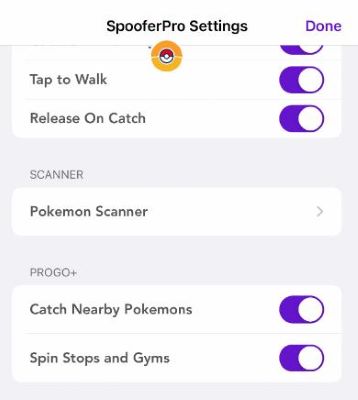
The main draw of these apps is their advanced filtering. Unlike physical devices that blindly throw standard red Poké Balls at everything, premium software versions often let you set strict rules. You can instruct the software to exclusively catch 100 IV Pokémon, ignore common spawns, or focus solely on hunting shiny variants.
However, the convenience comes with severe risks. Logging into modified mobile clients like iPogo on your phone is highly dangerous and frequently detected by Niantic's security updates. If you insist on using software automation, you must tread carefully and prioritize tethered desktop solutions over directly modified mobile apps to minimize your chances of a permanent ban.
Top Picks: Finding the Best Pokémon GO Auto Catcher
If you are looking for the best Pokemon Go auto catcher in 2025 and beyond, the market offers several fantastic hardware options. The official Pokemon GO Plus Plus is heavily favored because it integrates directly with Pokémon Sleep and officially supports different ball types.
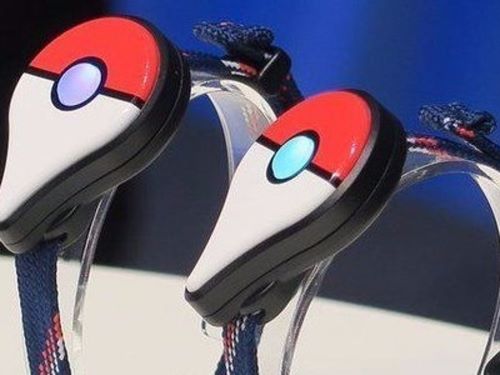
However, a common misconception is that it will fully automate your entire inventory. It will automatically throw standard red Poké Balls, but you must manually press the device's physical button to use Great or Ultra Balls.
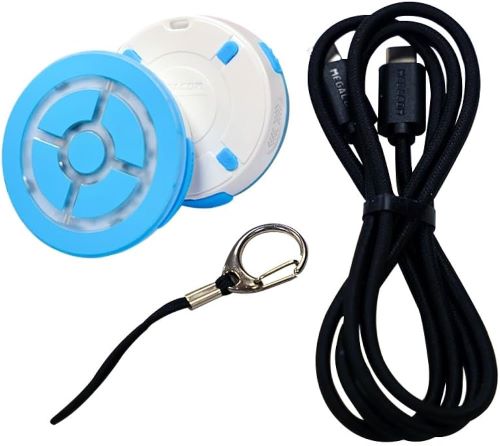
For those seeking a completely hands-free experience without any manual button pressing, third-party options remain incredibly popular. The DuoMon 3 is an excellent premium choice that supports two accounts simultaneously and features a fast auto-reconnect function.
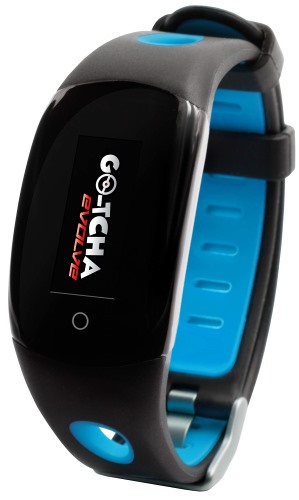
Alternatively, devices like the Go-tcha Evolve act like a smartwatch with an OLED screen, offering completely silent operation without the loud vibration motors found in official gear.
 Tips:
Tips:
-
Official Safety: Choose the Pokemon GO Plus Plus for first-party reliability and sleep tracking features.
-
Dual Accounts: The DuoMon 3 is perfect for hardcore players managing multiple accounts at the same time.
The Big Limitation: What If You Have No PokéStops Nearby?
Even the most advanced Pokemon Go auto catch device has one fundamental flaw: it relies entirely on your immediate physical location. Auto catchers are notorious for burning through your inventory of standard Poké Balls at an alarming rate. If you live in a rural area or are stuck at a desk with no PokéStops nearby, your expensive device will quickly become useless once you run out of items.
You essentially need a constant stream of new locations to keep the device fed and functioning properly. Walking around all day isn't always feasible, and as established earlier, using a mobile "auto catcher app" to spoof your GPS is a fast track to a banned account. This creates a frustrating bottleneck for dedicated players trying to maximize their daily grind safely.
Enter Pokeep Location Changer: Your Pokémon Auto Catch Companion
To solve the location problem without risking your account on dangerous mobile apps, desktop-based tethered GPS software is the ideal bridge. Pokeep Location Changer allows you to securely modify your GPS location by simply plugging your phone into your computer. By creating a simulated walking route on your PC, you can trick Pokémon GO into thinking you are safely strolling through a densely populated park in another city.


This pairs flawlessly with any physical auto catch Pokemon Go device. While Pokeep handles the movement at a realistic human walking speed, your Bluetooth catcher automatically spins new PokéStops and catches Pokémon along the route. It completely solves the issue of running out of items, ensuring your inventory stays full and your stardust keeps multiplying.
How to Set Up the Ultimate Auto-Catching Combo
Combining a secure location changer with your physical hardware creates the ultimate, risk-free grinding setup. Follow this simple procedure to get everything running smoothly and efficiently.
Step 1. Connect your physical auto-catcher to your smartphone via Bluetooth and ensure the auto-throw and auto-spin settings are enabled in the Pokémon GO app's accessory settings.
Step 2. Launch the Pokeep Location Changer software on your computer and connect your smartphone using a secure USB data cable.

Step 3. Use Pokeep's multi-spot routing feature to set a realistic, slow walking speed (around 4 km/h to hatch eggs) through an area packed with PokéStops.

Step 4. Leave the game running on your phone's screen while the desktop software simulates your movement and your physical device safely hoovers up the rewards.
This smart combination guarantees you will never miss out on a Community Day or run out of Poké Balls again.
FAQs about Pokémon GO Auto Catcher
Can an auto catcher automatically throw Great or Ultra Balls?
Standard hardware devices exclusively throw regular red Poké Balls. The official Pokémon GO Plus+ does allow the use of Great and Ultra Balls, but it will only auto-throw standard red ones; for the higher-tier balls, the device will vibrate, and you must physically press its center button to attempt the catch.
Why does my auto catcher disconnect after exactly one hour?
This is not a defect with your device; it is an intentional game mechanic programmed by Niantic. The Pokémon GO app automatically severs the Bluetooth connection to any auto-catching accessory after 60 minutes of continuous use. You simply need to tap the Poké Ball icon on your screen to instantly reconnect it for another hour.
Does shaking my phone or tapping the screen help the auto catcher?
No, physical movement does not influence the device's catch rate. Auto catchers operate on a fixed algorithm based on the Pokémon's base catch rate and the fact that a standard red Poké Ball is being used with a "straight" throw (no curveball bonuses). Shaking the phone will not improve your odds.
Are auto catchers worth it if the catch rate is lower than manual throwing?
Absolutely. While the flat catch rate of an auto catcher is roughly 50% on average, the true value lies in volume. It attempts to catch Pokémon while you are driving, working, or otherwise not looking at your screen. Earning Stardust, XP, and the occasional shiny Pokémon passively is always better than earning nothing at all.
 Related Articles

 Leave Your Comment