 By
By 

Managing multiple accounts while constantly dealing with the standard one-hour connection limit can quickly turn a fun location-based game into a frustrating chore. Players are always looking for reliable ways to keep their gameplay active throughout the day without staring at their screens continuously. The Photofast 247 Dual Catcher has emerged as a highly popular hardware solution designed to tackle exactly these common problems.
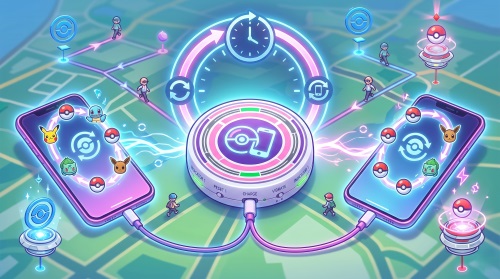
It allows you to connect two different accounts simultaneously while cleverly bypassing the game's strict timeout restrictions.
How the 247 Dual Catcher Bypasses the 1-Hour Limit
Unlike software modifications that might put your account at risk of being banned, this device utilizes a purely physical mechanism to keep you connected safely. It includes a specialized suction cup attached to an auto-tap cable that you place directly over your mobile screen.
If the app forcefully disconnects your session after an hour, the cable simulates a physical finger tap on your display every fifteen seconds. This continuous tapping ensures the device automatically reconnects without requiring your manual intervention. You just have to ensure your phone screen remains turned on, disabling any battery-saving features that might darken the display.
How to use 247 Dual Catcher stay connected 24 hours?
First-Time Setup: Your 247 Dual Catcher Manual
Getting your device ready for action only takes a few minutes, provided you know exactly where to place the physical components. The process is straightforward and relies on ensuring the physical tapper maintains excellent contact with your device's glass.
 Tips:
Tips:
Amazon product page of 237 Dual Catcher usually has a detailed description of this product, you can reference them for details.
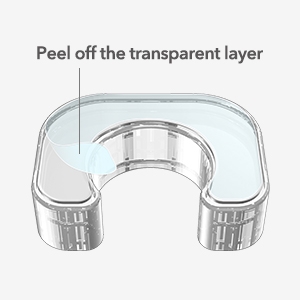
Step 1. Carefully peel the protective transparent layer off the nano sticker located on the auto-tap holder.
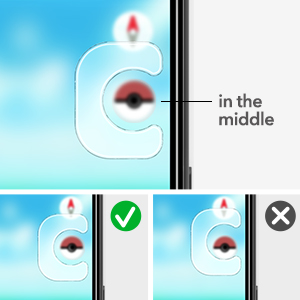
Step 2. Secure the suction cup onto your phone screen so that it perfectly centers over the in-game connection icon.
Step 3. Insert the connector cable, ensuring the text reading "247" is facing upward to activate the auto-reconnect feature.
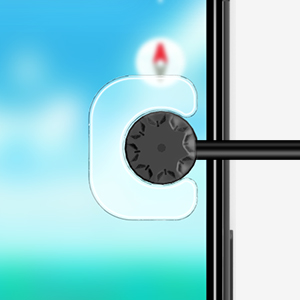
If you are heading into a raid or gym battle and want rapid screen tapping, simply flip the cable so the "RAPID" text faces up.
How to use 247 Dual Catcher to connect dual accounts?
The Missing Piece for Full Automation: Simulating Movement
While an auto catcher perfectly handles throwing items and spinning stops, it fundamentally relies on your character encountering new objects on the map. If you are sitting still at your desk, your device will quickly run out of things to interact with. You still face the physical limitation of needing to walk outside continuously to make the auto-catcher worthwhile.

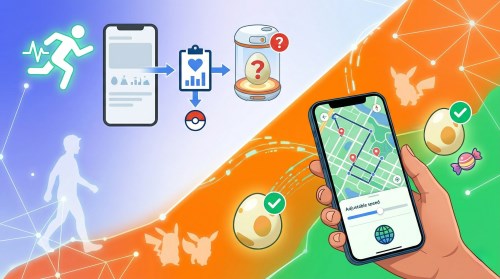
This is where a desktop tool like Pokeep Location Changer becomes the ultimate companion for your automated setup. Pokeep is designed to change the GPS location on mobile devices, making it an incredibly useful, privacy-safe simulation workflow for location-based apps and gaming strategies. You can easily set up a route simulation with multi-point movement, allowing your avatar to walk around the map while you stay comfortably indoors.


By combining the physical tapping of your 247 Dual Catcher with Pokeep's adjustable speed for realistic movement paths, you create a completely automated, hands-free experience.
Troubleshooting: 247 Dual Catcher Not Connecting or Charging
Even the best hardware occasionally runs into hiccups, and pairing issues are the most common hurdle users face during daily use. If you find your 247 Dual Catcher not connecting to your smartphone, you will need to perform a clean slate reset.
Step 1. Open your phone's system settings and delete the paired Bluetooth connection entirely.
Step 2. Open your mobile game app settings and remove the paired connection from within the application's menu.
Step 3. Press and hold the physical reset button on your catcher for three seconds to perform a hard reset.
How to Reset / Pair | 247 Catcher
Another frequent issue users search for is the device mysteriously failing to charge properly.
The internal 1000mAh battery charges via a standard USB-C port, but it is highly recommended to use the specific cable provided in the original box. Using third-party, high-wattage fast chargers intended for laptops can sometimes cause the device to reject the charge to protect its internal components.
FAQs about 247 Dual Catcher
How long does the battery actually last during active gameplay?
The 247 Dual Catcher is equipped with a robust 1000mAh internal battery designed for hardcore players. On a single full charge, you can expect approximately 120 hours of continuous active usage.
If you leave the device idle, it boasts a standby time of roughly 15 days. You will know the device is fully charged when the LED indicator light changes from red to green.
Will using a third-party hardware auto-catcher get my account banned?
Account safety is always a top priority for players considering automation tools. Historically, the game's developers target players who use modified software apps or inject unauthorized code into the game client.
Hardware devices like the 247 Dual Catcher operate differently. They strictly mimic the official Bluetooth Low Energy (BLE) protocol used by the official Pokémon GO Plus accessories. Because it acts as a standard Bluetooth peripheral and uses a physical screen tap rather than software manipulation, it is generally considered safe for everyday use.
Does the auto-reconnect function work if my game is running in the background?
This is a very common point of confusion for new users. Standard catching and PokéStop spinning will absolutely continue to work while your app is minimized in the background.
However, the signature auto-reconnect feature will not function in the background. Because the device relies on a physical suction cup physically "tapping" the on-screen reconnect icon, the game must be actively displayed on your screen, and your phone must remain unlocked.
Can I connect the device to two entirely different smartphones at the same time?
Yes, this is exactly what the "Dual" in the product name refers to. The device features two independent Bluetooth channels, allowing you to pair it with two completely separate mobile devices simultaneously.
Alternatively, if you are using an Android phone with a "Dual App" or "Secure Folder" feature, you can run two separate instances of the game on a single phone and connect the catcher to both accounts at once.
Maximizing Your Auto Catcher Strategy
Investing in a reliable tool like the Mcbazel Photofast 247 Dual Catcher can completely transform how you approach your daily gameplay. It eliminates the frustration of constant timeouts and makes managing two accounts a breeze. When you pair this hardware with smart location simulation tools like PoKeep, you unlock an entirely new level of efficiency.
Just remember to keep your screen awake, keep your device fully charged, and let the automation do the heavy lifting for you.
 Related Articles



 Leave Your Comment