 By
By 
Grindr sorts everyone on your screen by physical distance. That works well when you want to meet people nearby, but it gets in the way if you are packing for a trip, moving somewhere new, or simply don't want strangers knowing how close you live to them.
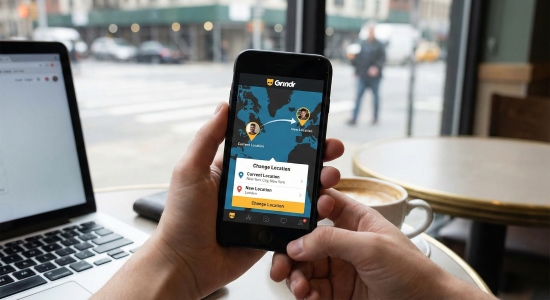
What you should do depends on what you actually need: browsing a city before you travel, getting your profile seen on a different grid, hiding your exact coordinates for privacy, or clearing a glitch like "Mock locations are prohibited." Between official features like Roam and Explore, built-in privacy toggles, and system-level GPS tools, we will talk about how each changing Grindr location method works in 2026 in this guide, and which one makes sense for you.
Part 1. What Happens When You Change Location on Grindr?
To choose the right method, you first need to understand how Grindr calculates where you are. Grindr is a location-based services (LBS) application that communicates directly with your mobile operating system's location manager (Apple CoreLocation on iOS, Google Location Services on Android).
Your phone calculates coordinates by blending multiple hardware and network inputs: global satellite constellations (GPS, GLONASS, Galileo), assisted GPS from cellular towers, nearby Wi-Fi router BSSIDs, and local Bluetooth beacons. Grindr receives this numeric latitude and longitude from your phone, measures the mathematical distance between you and every other active user, and sorts the grid in ascending order of proximity.
Because of this architecture, "changing location" means two completely different things in practice:
- View-Only Exploration: You instruct the app to display a feed of profiles from another coordinate cluster, but your personal account remains pinned to your true physical location. Remote users cannot see your face on their local grid, and any direct messages display your actual distance thousands of miles away.
- Active Grid Placement: Your coordinates are modified at the hardware or account level. Your profile physically appears on the destination city's grid, allowing local users to discover you, check your profile, and initiate chats as if you were standing down the block.
Confusing these two concepts is the primary reason why many users try free mock apps or VPNs and wonder why nobody in their target city is responding.
Part 2. Quick Comparison: 5 Ways to Manage Your Grindr Location
Depending on whether your goal is travel planning, expanding your dating pool, safeguarding residential privacy, or fixing a software error, here is how the top five methods compare in 2026:
| Method | Official Feature | Visible in Destination Grid | Modifies Device GPS | Cost / Requirements | Best Used For |
|---|---|---|---|---|---|
| Grindr Explore | Yes | No (View-only) | No | Free (1 Tap/day) / Paid tiers | Previewing profiles before a trip |
| Grindr Roam | Yes | Yes (with Visiting badge) | No | $5.99 per hour | Legitimate short-term travel planning with arrival dates |
| Native Privacy Settings | Yes | Local grid only (no distance) | No | Free (Incognito on Unlimited) | Preventing stalking & triangulation at home |
| PoKeep Location Changer | No (System-level) | Yes (standard profile) | Yes (system-wide) | Free trial / PC or Mac required | Active cross-city dating without per-hour fees |
| VPN (Nord, Express, etc.) | No (Network-level) | No (grid stays local) | No (IP only) | Subscription | Bypassing ISP blocks in censored regions |
Part 3. Browse Other Cities with Grindr Explore (Official)
If you only want to scout another city's dating scene, look at local profiles, or initiate a conversation before getting on a plane, Grindr's built-in Explore feature is the safest native solution. It requires no third-party software, modifies no system files, and carries zero risk to your account.
How to Use Grindr Explore Step-by-Step
Step 1. Open Grindr and navigate to the main Grid tab.
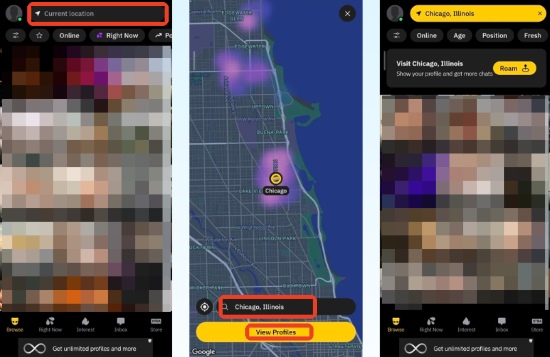
Step 2. Locate and tap the Explore navigation bar positioned at the top of the Grid feed.
Step 3. An interactive map interface will appear. Drag and drop the pin over your desired neighborhood, or type a city name or postal code into the top search bar.
Step 4. Tap the selected location. You will be returned to the main Grid, which will now populate with profiles living in that chosen area.
 The Yellow Explore Banner:
Whenever Explore is active, Grindr's top navigation bar turns yellow and displays the destination city name. If no recognized municipality exists for that spot, exact latitude and longitude coordinates appear instead. Remember: this is strictly view-only. Locals in that city do not see your profile on their grids.
Free vs Paid Explore Limits
Grindr has adjusted Explore interaction allowances across account tiers:
- Free Users: Can browse the remote grid and Tap or message up to 1 profile discovered via Explore each day. A banner shows remaining daily interactions.
- Grindr XTRA Users: Can Tap and chat with multiple Explore profiles per day without the single-profile cutoff.
- Grindr Unlimited Users: Enjoy unlimited Explore profile interactions without daily restrictions.
How to Opt Out of Explore Searches
If you live in a popular tourist destination and don't want out-of-town travelers contacting you through Explore, you can opt out in your privacy preferences: tap your Profile icon > Settings > Show Me, and switch the toggle off for Show Me in Explore Searches.
Part 4. Appear in Another Grid with Grindr Roam (Official)
For years, users complained that Explore was purely one-way: you could see locals, but locals couldn't see you. In December 2024, Grindr addressed this by rolling out Roam, an official paid feature specifically designed to place your profile onto another city's grid.
How Grindr Roam Works ($5.99/hr & Visiting Badge)
Roam functions like a digital passport. When activated, your profile actively populates the local grid in your chosen neighborhood, allowing locals to see you, send messages, and tap your profile. However, it incorporates two key transparency safeguards:
- The "Visiting" Badge: A distinct icon appears on your profile photo so locals know you are checking out the neighborhood remotely rather than standing on their street.
- Travel Dates: You can publish your planned arrival dates, giving prospective matches a clear timetable for real-world meetups.
- Hourly Pricing: Roam is billed as an on-demand micro-transaction at $5.99 per hour.
How to Activate Roam Step-by-Step
Step 1. Open Grindr and tap the Sidetray menu from the home screen.
Step 2. Tap the Roam button icon.
Step 3. Search for your target destination (city or neighborhood) and tap Show My Profile Here.
Step 4. Confirm your payment and tap Activate Roam. Your profile will immediately begin broadcasting to users on that target grid.
 When to Use Roam:
Roam is ideal if you have a confirmed weekend vacation next week and want to line up a few authentic dates before departure. However, if you plan to explore a new city for days or weeks, paying $5.99 per hour quickly becomes exorbitant ($70+ for 12 hours), making system-level GPS alternatives far more practical.
Part 5. Hide Exact Coordinates with Built-In Privacy Settings
A significant percentage of users looking to change location on Grindr aren't interested in traveling at all. Instead, they are worried about personal safety, stalking, or workplace privacy. If your goal is staying anonymous at home, you do not need to fake your GPS; you can leverage Grindr's native privacy controls.
Understanding the Triangulation Risk
When you display your distance down to the foot or meter, malicious actors can easily deduce your precise physical address using trilateration. By recording your distance from three different fake or real accounts across town and drawing three circles on a map, the intersection pinpoint mathematically reveals your apartment building or home office. Disabling numeric distance eliminates this attack vector entirely.
Turn Off Show My Distance
Step 1. Tap your profile avatar on the main grid, then select Settings.
Step 2. Scroll down to the Show Me section.
Step 3. Toggle Show My Distance to OFF.
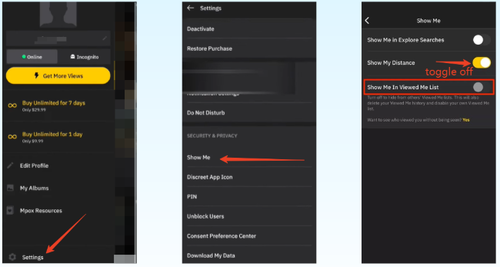
Your profile remains visible to locals and stays roughly in the correct sorted order on their feeds, but no one can see whether you are 50 feet or 2 miles away.
Switch to Approximate Location at the OS Level
Both modern iOS and Android operating systems allow you to grant apps access to approximate rather than precise coordinates:
- iOS: Go to Settings > Grindr > Location and toggle Precise Location to OFF. Grindr receives a generalized boundary zone (roughly 2 to 4 square kilometers) rather than your exact GPS pin.
- Android 12+: Go to Settings > Apps > Grindr > Permissions > Location and select Approximate instead of Precise.
Use Incognito, Discreet App Icon, and PIN Protection
Grindr includes additional privacy tools that keep your app use confidential:
- Incognito Mode (Unlimited): Allows you to browse the entire grid without appearing on anyone else's feed. You only become visible to specific users when you send them a direct message.
- Discreet App Icon: Disguises the Grindr app logo on your smartphone home screen as a generic calculator, camera, notes, or weather utility.
- PIN Code / Biometric Lock: Enforces a 4-digit security PIN or Face ID prompt each time Grindr is opened, preventing housemates or curious colleagues from viewing your chats.
Part 6. Change Grindr GPS with PoKeep (iOS & Android)
If your goal is to appear in another city's grid continuously, connect with locals naturally, and avoid paying $5.99 every hour for Roam, an operating system-level GPS modifier is required. This is where PoKeep Location Changer comes in.
Why Desktop-Assisted GPS Modification Works
Traditional Android mock location apps run directly on your smartphone and register themselves through Developer Options as artificial location providers. Grindr's security engine actively checks system telemetry for mock provider flags and immediately freezes the app with error prompts.
PoKeep works through a secure desktop-tethered architecture. Instead of running a detectable application on your phone, it transmits simulated GPS coordinates over USB or Wi-Fi directly into the device's native operating system location services (CoreLocation on iOS, LocationManager on Android). Because the mobile OS itself believes it is situated at the selected coordinates, Grindr reads the incoming GPS feed as genuine hardware data, bypassing basic mock location detection.

PoKeep Location Changer
Change your Grindr GPS coordinates at the OS level safely on iPhone and Android. Explore any city grid without jailbreak, rooting, or hourly fees.
Step-by-Step Guide to Changing Location with PoKeep
Step 1. Download and install PoKeep Location Changer on your Windows PC or Mac. Launch the program and click Start.
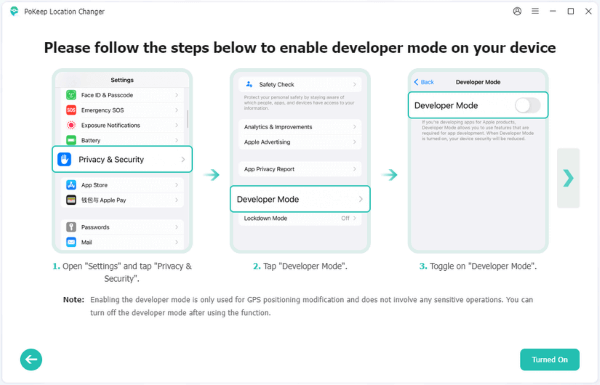
Step 2. Connect your iPhone or Android phone to your computer using a USB cable. Unlock your screen and tap Trust This Computer (iOS) or enable USB Debugging (Android). If prompted on iOS 16+, enable Developer Mode in your phone's Settings > Privacy & Security > Developer Mode.
Step 3. Once the map interface loads, select Teleport Mode (the first icon in the upper-right corner). Type your desired city, neighborhood, or specific GPS coordinates into the search bar, then click search.

Step 4. Click the Start Modifying button. Your phone's device-wide GPS will instantly teleport to the chosen coordinates.
Step 5. Open Grindr on your mobile device. Pull down on the main grid to refresh, and your feed will immediately display local profiles from your new destination.


Part 7. Android Alternatives & Why Mock Apps Trigger Warnings
Android users frequently ask whether they can still use free Play Store apps to fake location on Grindr. While this was standard practice years ago, Grindr's modern client handles location telemetry much more aggressively.
Why Free Mock Location Apps Trigger "Mock Locations Are Prohibited"
When you enable Developer Options on Android and assign an app under Select mock location app (such as Fake GPS Go or Lexa), the Android framework appends an internal metadata flag (`isFromMockProvider = true`) to every coordinate payload broadcast by the operating system.
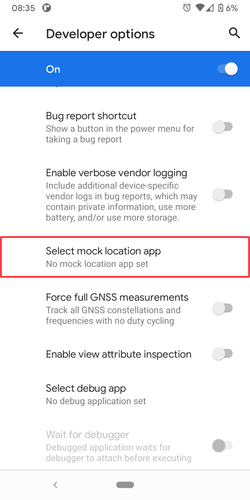
Grindr's anti-fraud system actively inspects this flag. When it detects that location data originates from a mock provider rather than genuine hardware GNSS chips, it blocks grid loading and triggers the familiar warning dialog.
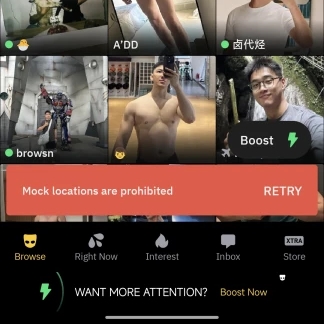
Continuing to force mock locations on Android can cause account flags or temporary shadowbans. If you encounter this message, navigate to Settings > Developer Options > Select mock location app and set it to None, then restart your phone.
Using Grindr via BlueStacks PC Emulator
In community forums like Reddit (r/arco_iris and r/grindr), running Grindr through the BlueStacks Android emulator on a desktop computer is a popular free workaround.
Step 1. Download and install BlueStacks on your Windows PC or Mac from its official website.
Step 2. Open the Google Play Store inside BlueStacks, log into your Google account, and install Grindr.
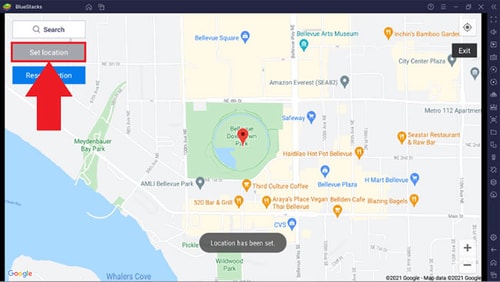
Step 3. Before opening Grindr, click the Location Provider icon in the BlueStacks right-hand sidebar. Search for your target city and click Set Location.
Step 4. Launch Grindr inside BlueStacks and sign into your account.
Limitations of the Emulator Method:
While BlueStacks is free, it ties your Grindr usage to a computer. Push notifications are frequently delayed, camera selfie verification often fails, and emulator hardware identifiers can trigger Grindr's automated account security verification.
Part 8. FAQ About Changing Location on Grindr
Can I fake my location on Grindr?
Yes. While standard free Android mock location apps trigger the "Mock locations are prohibited" error, you can change your location using an OS-level GPS modifier like PoKeep, or use official features like Grindr Explore (to view other cities) and Grindr Roam (to place your profile on another grid).
How do I reset my Grindr location to my real position?
If you used a desktop location changer like PoKeep, click the Reset button on the map or simply disconnect and restart your phone. Then open Google Maps or Apple Maps to recalibrate your hardware GPS before reopening Grindr.
Can someone fake their location on Grindr?
Yes. Users can appear in different locations either through Grindr's official paid Roam feature (which displays a visible "Visiting" badge) or by using system-level GPS changers. For this reason, distance displays should never be treated as foolproof verification of someone's physical presence.
Does Grindr Explore change your actual location?
No. Grindr Explore is strictly view-only. It lets you browse and message profiles in distant cities, but your profile remains pinned to your physical location and local users in the destination city will not see you on their grid.
What is the difference between Grindr Explore and Grindr Roam?
Explore lets you look into other cities without leaving your current grid, whereas Roam places your profile directly onto the destination grid for $5.99 per hour with a "Visiting" badge and optional arrival dates so locals can see and chat with you.
Does a VPN allow you to change location in Grindr?
No. A VPN only encrypts your network traffic and masks your IP address. Grindr determines your grid position using your phone's physical GPS chip, so your grid will not move when connecting to a remote VPN server.
Why does Grindr say "Mock locations are prohibited"?
This error occurs on Android when Grindr detects that Developer Options have a mock location provider selected. To resolve it, disable the mock location app in Developer Options, or use an OS-level desktop GPS changer that does not set mock provider flags.
Part 9. Conclusion: Choosing the Right Grindr Location Method
Managing your location on Grindr in 2026 ultimately depends on what you want to achieve on the platform:
- If you simply want to view profiles in another city before traveling, use native Grindr Explore.
- If you want legitimate, short-term grid placement with arrival dates, activate Grindr Roam for $5.99/hour.
- If you want to protect your privacy at home, toggle off Show My Distance and switch your device permissions to Approximate Location.
- If you want persistent, active grid placement across cities without hourly charges or account badges, use PoKeep Location Changer to modify your GPS at the operating system level safely.
By pairing the right tool with realistic travel cooldowns, you can explore new communities worldwide while keeping your personal privacy and account security fully intact.
 Related Articles
 Leave Your Comment