 By
By 

Planning a trip, moving to a new city, or curious about dating in another country? Tinder usually shows people based on where your device is, which can feel limiting when you want to meet matches somewhere else before you actually arrive.
The good news is that you can change location on Tinder. The best method depends on whether you want the official Tinder option, a GPS-level location change, an Android mock location setup, or a browser-based workaround on PC.
This guide explains what works, what does not, and which method makes the most sense for iPhone, Android, Tinder Web, and users who want to change location on Tinder without paying for Passport.
Can You Change Your Location on Tinder?
Yes, you can change your location on Tinder, but there are two different meanings behind that question.
The official way is Tinder Passport™ Mode, which lets you search by city or drop a pin on the map to connect with people in a selected city. Passport is available as a standalone purchase and is also included with Tinder Plus, Tinder Gold, and Tinder Platinum.
The unofficial way is to change the location your device reports to Tinder. This usually means using a GPS location changer like PoKeep, Android mock location apps, or browser geolocation settings. These methods do not work the same as Passport, and they may be affected by Tinder updates, device settings, and app permissions.
So the real question is not only “Can I change my Tinder location?” but also:
Which method changes the location Tinder actually uses?
How Tinder Location Works Before You Change It
Tinder needs access to your device location to work. On iPhone, Tinder’s recommended permission is While Using the App. On Android, the recommended permission is Only While Using the App. Tinder.com also needs browser location permission on desktop or mobile browsers.
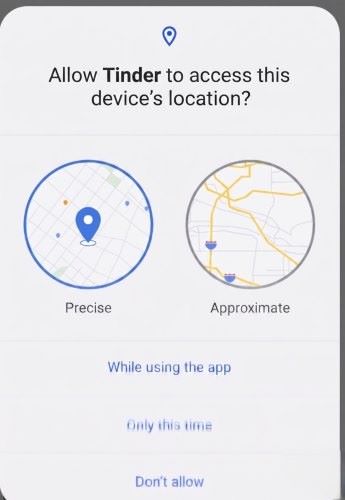
That matters because Tinder is not only looking at your public IP address. Its privacy policy explains that, with permission, it can collect geolocation data such as latitude and longitude from your device. It also collects technical data such as IP address, device type, operating system configuration, network information, device movement and sensor data, app settings, and other identifiers.
This is why changing your Tinder location is different from simply changing your internet region.
A VPN may change your IP address, but Tinder on mobile can still rely on GPS-level location data.
Method 1: How to Change Location on Tinder with Passport Mode
Tinder Passport is the cleanest official method if you do not mind using a paid feature. It is built into Tinder, does not require changing your device GPS, and is designed for users who want to browse and match in another city.
Passport is useful when you are moving soon, planning travel, checking the dating scene in another city, or trying to meet people before you arrive.
Steps to Change Location on Tinder with Passport
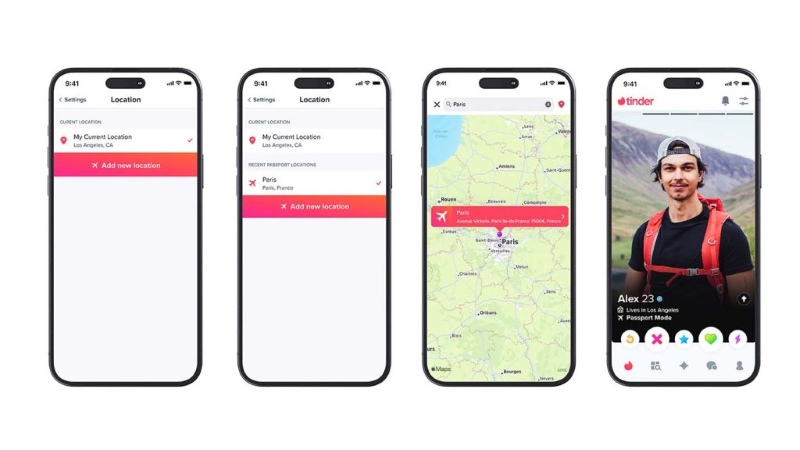
Step 1. Open Tinder.
Step 2. Tap the profile icon.
Step 3. Tap the Settings icon.
Step 4. Scroll down and tap Location.
Step 5. Add a new location.
With Passport, you can virtually be in one city at a time, but you can change your location as many times as you want. People you have liked while using Passport may still see your profile for up to 24 hours after you change locations.
Best for
Passport is best if you want the safest in-app method and do not mind paying for Tinder’s official location-changing feature. It is also a good choice if you want to avoid device-level GPS changes.
Limitations
Passport is not the best fit for users searching for “change location on Tinder free” or “change location on Tinder without paying.” It changes your Tinder browsing location, but it does not change the GPS location of your whole phone.
Method 2: How to Change Location on Tinder Without Passport Using a GPS Location Changer
If your goal is to change location on Tinder without Passport mode, a GPS location changer is usually more relevant than a VPN. Instead of only changing your IP address, it changes the location your phone reports to location-based apps.
This method is especially useful for users who want to change location on Tinder on iPhone or Android but do not want to rely on Tinder Passport.

One option is PoKeep Location Changer, PoKeep is designed to change GPS location on iPhone and Android without jailbreak or root, works through Windows and macOS software, supports dating apps such as Tinder, Bumble, Hinge, and Grindr, and offers a free trial for location-changing features.


How to Change Tinder Location with PoKeep
Step 1. Download and install PoKeep Location Changer on your Windows or Mac computer.
Step 2. Connect your iPhone or Android device to the computer. Follow the on-screen connection instructions.

Step 3. Search for the city or address where you want to appear on Tinder.
Step 4. Apply the new GPS location.
Step 5. Open Tinder and check whether your Discovery area reflects the selected location.
This method fits users who want a device-level location change rather than a Tinder-only setting. It can also be useful if you want to test location-based apps, protect location privacy, or explore matches in another city before traveling.
Use it responsibly. Avoid misleading people about where you live, and remember that app features, detection systems, and policies can change.
Best for
PoKeep is a strong fit for users who want to change location on Tinder on iPhone or Android without jailbreaking, rooting, or relying on VPN-only methods. It is also useful for users who want to test a GPS-level location change before committing to a paid plan.
Limitations
A GPS location changer is not an official Tinder feature. Results can depend on your phone settings, Tinder’s current behavior, app permissions, and whether your real location is still being reported by another source.
Method 3: How to Change Location on Tinder for Free on Android
Android users have one extra route: mock location. Android Developer Options include Select mock location app, a feature used to fake the GPS location of a device for testing whether apps behave the same in other locations. To use it, you need to install a GPS mock location app first.
This can be a free or low-cost way to change Tinder location on Android, but it is not always smooth. Some apps may detect mock location settings, and Tinder may behave differently depending on updates, permissions, and device models.
How to Use Android Mock Location for Tinder
Step 1. Install a reliable GPS mock location app from Google Play.
Step 2. Open Android Settings and enable Developer Options. On many Android phones, this is done by tapping Build number several times in the About Phone section.
Step 3. Go to Developer Options and choose Select mock location app.
Step 4. Select the GPS mock location app you installed.
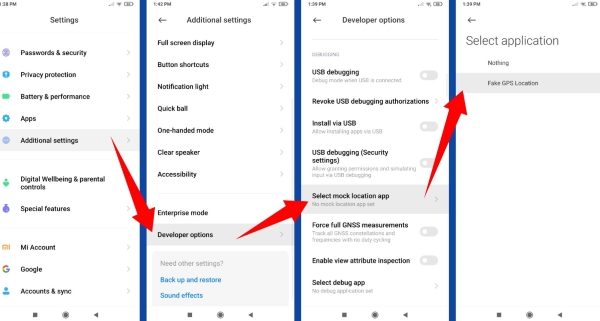
Step 5. Set your target location in the mock location app.

Step 6. Open Tinder and check whether your Discovery area changes.
Best for
This method is best for Android users who want to experiment with a free Tinder location change and are comfortable changing developer settings.
Limitations
Mock location is a developer/testing feature, not a Tinder-supported feature. If Tinder still shows your real area, check app permissions, restart Tinder, clear cache, or try a GPS-level desktop tool instead.
Method 4: How to Change Location on Tinder on iPhone
Changing Tinder location on iPhone is usually more restrictive than Android because iOS does not provide a normal built-in mock location menu for everyday users. That leaves three practical options: Tinder Passport, a computer-based GPS location changer, or limited browser-based location settings through Tinder.com.
For most iPhone users, the cleanest official route is Passport. But if you want to change the GPS location your iPhone reports to Tinder, a desktop location changer such as PoKeep is more practical than a VPN-only setup because it targets device GPS rather than just IP location.
Recommended iPhone Options
Step 1. Use Tinder Passport if you want the official in-app option.
Step 2. Use a GPS location changer if you want to change iPhone GPS location at the device level.
Step 3. Use Tinder Web only if you mainly browse from a desktop browser and understand that browser location permission does not always behave like mobile GPS.
Best for
A GPS location changer is best for iPhone users searching for “change location on Tinder without Passport mode” or “change location on Tinder for free iPhone,” especially if the tool offers a free trial.
Limitations
Avoid jailbreaking your iPhone just to change Tinder location. It can create security issues and may cause problems with normal device use. Also, do not assume that every iOS GPS spoofing method will keep working forever, because iOS and Tinder can both change over time.
Method 5: How to Change Location on Tinder on PC or Tinder Web
Tinder Web uses browser location permission. That means Tinder.com may ask your browser for location access before showing matches.
For Chrome desktop, location access is managed through Settings > Privacy & Security > Site Settings > Location. For Safari desktop, location access is managed through Safari > Preferences > Websites > Location, where Tinder can be allowed.
This can help if Tinder.com cannot detect your location or shows an error. However, allowing location permission is not the same as freely choosing a new city. Browser location may still rely on your real device, Wi-Fi, IP, or system-level location signals.

Can you change Tinder location on computer with browser tools?
Some users try browser developer tools, geolocation extensions, or location permission tricks. These may work temporarily for some websites, but they are not official Tinder methods and may not sync cleanly with the Tinder mobile app.
If you open Tinder on your phone afterward, your phone’s GPS location may overwrite or conflict with your browser-based location.
Best for
Tinder Web is best when you want to fix location permission problems on PC or browse Tinder from a computer.
Limitations
It is not the most reliable way to change Tinder location long-term. For stable location changes, Passport or device-level GPS changing is usually more direct.
Can You Change Tinder Location with a VPN?
A VPN can change your IP address and make your internet connection appear to come from another region. That sounds useful, but Tinder location is more complicated.

Because Tinder can use device geolocation such as latitude and longitude when permission is granted, a VPN alone may not change your Tinder location on mobile. Tinder can also process technical data such as IP address, device data, network information, app settings, and sensor-related data.
So the realistic answer is:
A VPN may help with privacy or network access, but it is usually not enough to reliably change location on Tinder.
If your phone GPS still says you are in Los Angeles while your VPN IP says you are in London, Tinder may continue using your phone’s actual location or show inconsistent results. For Tinder location changing, GPS-level methods are usually more relevant than IP-only tools.
Why Can’t I Change My Location on Tinder?
If Tinder location is not changing, the cause is usually one of these issues.
You are not using Passport or a GPS-level method
Only Tinder subscribers can change their location through Tinder’s built-in location feature. Tinder’s own troubleshooting page also notes that far-away profiles may appear when someone is using Passport, and that only subscribers can change location inside Tinder.
If you are using free Tinder without Passport, changing the Discovery distance slider will not move you to another city. It only expands or narrows the distance around your current location.
Tinder does not have location permission
Check your phone settings. On iPhone, Tinder should have While Using the App location access. On Android, Tinder should have Only While Using the App location permission.
If Tinder.com is the issue, check browser location permission instead.
Your Discovery settings are showing people outside your range
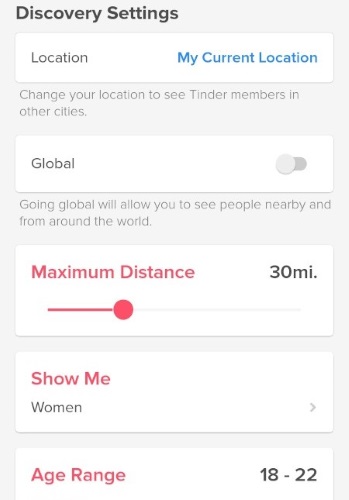
Tinder may sometimes show potential matches slightly outside your distance preferences. You can check this under profile icon > Settings > Discovery > Maximum Distance, including the toggle that controls whether people slightly outside your range can appear.
Tinder is caching or delaying location changes
Log out and back in, then reopen Tinder. If the problem still looks technical, deleting and reinstalling the app is one of the troubleshooting steps listed for location-related Discovery issues.
Your VPN and GPS location do not match
If you are using a VPN, your IP location may change while your phone GPS stays the same. Tinder may still use the GPS location, which makes the VPN appear not to work.
Can People See If You Change Your Location on Tinder?
People may not always see a direct label saying you changed location, but there can be clues.
With Passport, people you liked while using Passport may still see your profile for up to 24 hours after you change your location. Depending on Tinder’s current interface and settings, distance information, missing distance, profile context, or conversation details may also make your location change noticeable.
The safest approach is to be honest when location matters. If you are traveling soon, moving to a new city, or just exploring matches elsewhere, say that naturally in your profile or conversation.
Changing Tinder location can be useful.
Misleading people about where you live is not.
Is It Safe to Change Location on Tinder?
The safest method is Tinder Passport because it is built into the app. GPS location changers and Android mock location methods are more flexible, but they are not official Tinder features.
Tinder’s Terms require users to avoid misrepresenting key identity details, use the service respectfully, and avoid unauthorized or harmful behavior. The Terms also prohibit third-party applications or services that directly interact with Tinder’s services or member content without written consent.
A location changer that modifies your device GPS is not the same as a bot or scraper, but you should still use any third-party tool carefully. Do not use location changes for scams, harassment, spam, or pretending to be someone you are not.
Which Method Should You Use to Change Location on Tinder?
| Method | Best for | Main advantage | Main limitation |
|---|---|---|---|
| Tinder Passport | Official Tinder location change | Built into Tinder | Requires payment or eligible plan |
| PoKeep GPS Location Changer | iPhone/Android GPS-level change | Changes device location without jailbreak/root | Not an official Tinder feature |
| Android mock location | Free Android testing | Can be free | May be detected or unstable |
| VPN | Privacy and IP region change | Easy to use | Usually does not change mobile GPS |
| Tinder Web browser location | PC permission fixes | Useful for Tinder.com | Not a full location-changing method |
For most users, the choice is simple. Use Passport if you want the official method. Use a GPS location changer if you want to change the location your phone reports to Tinder. Use Android mock location if you are comfortable experimenting with developer settings. Use a VPN for privacy, not as your main Tinder location changer.
FAQ About How to Change Location on Tinder
How can I change my location on Tinder for free?
You can try free or limited methods such as Android mock location, a GPS location changer free trial, or browser location settings on Tinder Web. However, Tinder’s official location-changing feature is Passport, which is a paid feature or part of a paid Tinder plan.
Can I change Tinder location without paying?
Yes, but not through Tinder’s official Passport feature. Without paying for Passport, your realistic options are device-level GPS changing, Android mock location, or limited browser-based methods. These alternatives are not official Tinder features, so results may vary.
How do I change country on Tinder?
Use Passport to search by city or drop a pin in another country. You can also use a GPS location changer to set your phone location to a city in another country, then open Tinder and check your Discovery results.
Does Tinder location change if I don’t open the app?
Tinder needs device location permission to work, and its recommended mobile permissions are “While Using the App” on iOS and “Only While Using the App” on Android. Behavior can depend on your device settings, app version, and whether Tinder is running in the background, so check your phone’s location permission settings if privacy is a concern.
Why are Tinder profiles far away?
Far-away profiles may appear because someone else is using Passport, because you recently used Passport in another city, or because Tinder is showing some people slightly outside your Discovery distance preferences. If it seems like a bug, try logging out and back in or reinstalling the app.
Q: Can a VPN change location on Tinder?
A: A VPN can change your IP address, but Tinder can use precise device geolocation when location permission is enabled. That means a VPN alone may not reliably change Tinder location on iPhone or Android.
What is the best way to change location on Tinder on iPhone?
For the official method, use Passport. For GPS-level location changing, use a computer-based iPhone location changer such as PoKeep. Avoid jailbreaking just to change Tinder location.
Q: What is the best way to change location on Tinder on Android?
A: Android users can use Passport, a GPS location changer, or Android mock location through Developer Options. Mock location can be free, but a dedicated GPS location changer is usually easier for non-technical users.
Final Thoughts on Changing Location on Tinder
Changing location on Tinder is useful when you are preparing for travel, moving soon, widening your dating pool, or checking matches in another city. The official method is Tinder Passport. It is simple, stable, and built into the app.
For users who want to change location on Tinder without Passport, the key is understanding the difference between IP location and GPS location. A VPN may change your internet region, but Tinder often depends on device-level location. That is why GPS-focused tools like PoKeep, Android mock location, or other device-level methods are more relevant for iPhone and Android users.
 Leave Your Comment