 By
By 

Protecting your digital privacy has never been more important, especially when it comes to your physical whereabouts. Whether you are trying to hide your location from aggressive marketing trackers or just want to access geo-restricted content, managing your digital footprint is essential.
The Location Guard extension is widely recognized as one of the best tools for masking your geographic coordinates on desktop web browsers. However, many users quickly discover that securing their mobile devices requires a completely different strategy. In this comprehensive guide, we will explore exactly how to master this popular browser extension and uncover the best system-wide GPS alternatives for your iPhone or Android smartphone.
What is Location Guard and How Does It Work?
Location Guard is an open-source browser extension available for Chrome, Firefox, Edge, and Opera. It is designed to protect your privacy by intercepting the HTML5 Geolocation API, which is the specific technology websites use to ask for your physical location. When a website requests your coordinates, this extension steps in to manipulate the data before the site can see it.
Instead of simply blocking the location request entirely—which often breaks website functionality—the extension offers two clever solutions. Its primary feature involves adding controlled "noise" to your real location. This means it creates a randomized offset around your actual position, allowing you to get relevant local search results without giving away your exact home address.
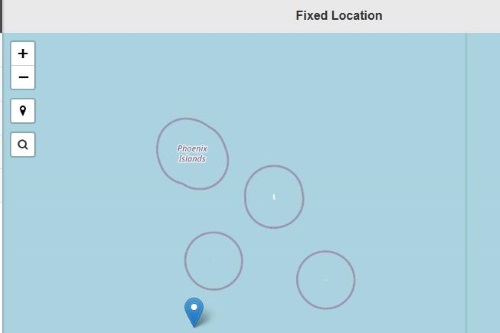
Alternatively, you can use the "Fixed Location" feature. This allows you to drop a pin anywhere on a world map, forcing your browser to report that specific, completely fake coordinate to any website that asks.
How to Setup the Location Guard Extension
Setting up the tool takes just a few minutes and offers incredible flexibility for your daily web browsing. By adjusting the privacy levels, you can tailor your experience to balance strict privacy with basic usability.

Step 1. Install the Location Guard Chrome extension or Firefox add-on from your browser's official web store.
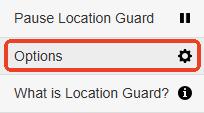
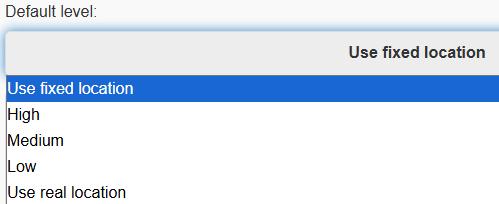
Step 2. Configure your default privacy levels by opening the extension's Options menu. You can choose between Low, Medium, and High privacy, which directly dictates the radius of the randomized "noise" added to your real-world coordinates.
FAQs About Location Guard
Does Location Guard hide my IP address?
No, it does not hide or spoof your IP address. The extension exclusively manages HTML5 browser location requests (the pop-ups asking to "know your location"). It is completely separate from your network connection. If you want to hide your IP address, you will need to use a dedicated VPN service alongside this extension.
Can websites still track me with Location Guard?
Yes, websites can still approximate your location if they rely on IP-based geolocation rather than HTML5 requests. While IP tracking is generally less precise than browser-based GPS requests, it can still pinpoint your general city or region.
Is Location Guard safe to use?
Absolutely. The extension is entirely open-source, meaning its code is regularly reviewed by the developer community. It does not track your data, and it serves solely as a localized shield between your browser and third-party websites.
I see an extension called "My Location Guard" in the store. Is that the same thing?
No, they are two completely different extensions made by different developers. The original "Location Guard (V3)" is an open-source project recognized by its black mask icon. "My Location Guard," on the other hand, is a highly-rated, third-party alternative that features a crossed-out eye icon. Both extensions serve the exact same core purpose—spoofing your browser's HTML5 geolocation—but they have different interfaces. Make sure to check the developer name to ensure you are downloading the specific version you want.
If you are new to geolocation manipulation, you likely have some technical questions about what this tool can and cannot do.
Is There a Location Guard App for iPhone or Android?
A major point of confusion for users is searching for a "Location Guard iPhone" or "Location Guard Android" app. Currently, there is no official system-wide application available for mobile devices.
While you can install the add-on within Firefox for Android to spoof locations inside that specific mobile browser, it is functionally useless for dedicated mobile apps.
Browser extensions cannot reach into your phone's operating system. If you want to change your location on native applications like Pokémon GO, Monster Hunter Now, Tinder, or Life360, a browser-based tool simply will not work. These mobile apps bypass your browser entirely and pull GPS data directly from your phone's internal hardware.
The Best Alternative to Location Guard for Mobile
If your goal is to manipulate the location of mobile games, dating apps, or family tracking software, you need a system-level GPS spoofer. This is where PoKeep Location Changer steps in as the perfect mobile solution.


PoKeep is a powerful desktop software that allows you to safely change the GPS location of your iPhone or Android device without the need for complicated jailbreaking or rooting. Instead of just adding noise to a web browser, it alters the actual GPS coordinates reported by your phone's operating system to every single app you have installed.
Whether you want to bypass geo-restrictions, stop Life360 tracking, or play location-based games from your couch, PoKeep provides total control. It even includes a 360° GPS joystick to simulate realistic movement, and a built-in cooldown timer to help you avoid soft bans in games like Pokémon GO.
You can change your phone's location instantly using this simple process:
Step 1. Download and install PoKeep onto your computer (Windows or Mac).

Step 2. Connect your iPhone or Android device to the computer using a USB cable or via the supported WiFi/Bluetooth connection methods.

Step 3. Select your desired mode—such as Jump Teleport or Joystick movement—pick a destination on the map, and click "Start modifying" to instantly change your device's global GPS coordinates.
Location Guard vs. VPNs vs. GPS Spoofers: Which Do You Need?
To build a complete digital privacy toolkit, it is crucial to understand that no single software covers everything. Depending on what you are trying to hide or spoof, you will need a highly specific type of tool.
Here is a quick breakdown of how these three primary tools differ:
Browser Extensions (Location Guard)
These tools specifically intercept HTML5 location requests made directly inside your web browser. They are completely free and excellent for stopping desktop websites from knowing your exact street address. However, they only work inside the browser and offer zero protection for your IP address or your smartphone's native mobile apps.
Virtual Private Networks (VPNs)

A VPN encrypts your web traffic and routes it through a remote server, effectively hiding your public IP address. This is the absolute best tool for bypassing regional content blocks on streaming platforms or securing your connection on public Wi-Fi. Keep in mind that a VPN does not change your phone's physical hardware GPS coordinates, so location-based apps will still know where you actually are.
System-Level GPS Spoofers (PoKeep Location Changer)
Unlike extensions and VPNs, GPS spoofers modify the core location data generated by your device's internal hardware. If you need to change your location on iPhone or Android for apps like Pokémon GO, Tinder, or Life360, this is the only tool that actually works. It provides a system-wide fake location that every single app on your phone will believe is real.
Conclusion
Taking charge of your geolocation data requires using the right tools for the right environment. For desktop web browsing, the Location Guard extension remains an outstanding, free choice to intercept invasive HTML5 tracking requests.
However, when you need to take that privacy to your smartphone or want to spoof locations inside dedicated mobile apps, browser extensions fall short. By pairing a desktop browser extension with a robust system-level tool like PoKeep for your mobile devices, you can achieve complete control over exactly where the digital world thinks you are.
 Related Articles



 Leave Your Comment