 By
By 
If you recently downloaded Rednote - also known as Xiaohongshu or Little Red Book - you probably wanted to explore viral fashion, beauty, and lifestyle trends from East Asia. But instead of global content, your feed may be filled with posts from your own country. That's because Rednote relies heavily on your GPS and IP address to decide what to show you. Simply editing your profile won't fully change what appears in your feed.
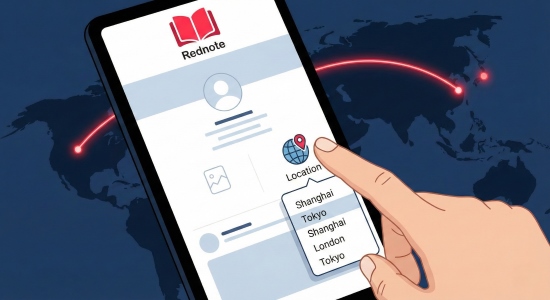
Whether you want to change your profile location to look international or hack your feed to see content from Shanghai or Tokyo, you need to understand how the app's location logic works. This guide will walk you through exactly how to change Rednote location settings to control both what you display and what you see.
Part 1. How to Change Rednote Region on Your Profile
If you simply want to change Rednote region on your public profile, the process is quick and easy. Keep in mind: this update is cosmetic. It changes what other users see on your profile, but it does not automatically change your content feed or algorithm.
Here's how to change Rednote location on your profile:
Step 1. Open the Rednote app and tap on the Me icon in the bottom right corner to access your profile page.
Step 2. Tap the Edit Profile button, which is often a wide button located just next to your bio.
Step 3. Scroll down to the Region field. Tap it to open the selection menu.
Step 4. Select your desired country or region from the list.
Step 5. Tap Save in the top right corner.
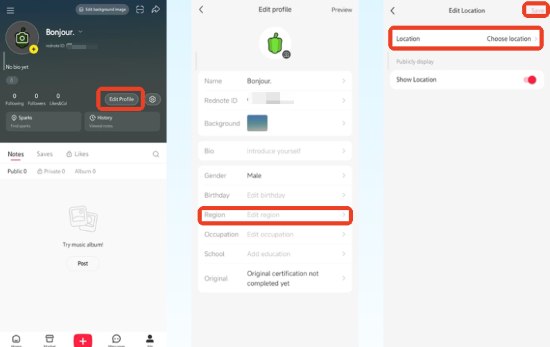
Your profile will now display the new location to anyone who visits your page.
Part 2. How to Change Rednote Location to See Content from Other Countries
If you want to change Rednote location so you can see viral content from China, Japan, or Korea, updating your profile alone won't work. The feed is controlled by the algorithm - not your profile badge. To truly change Rednote region in your Explore feed, you need to retrain the system through language and engagement signals. Here are two effective methods you can try:
Way 1. Switch Your Rednote App Language
The quickest way to signal to Rednote that you want foreign content is to change your app's language settings.
Step 1. Go to Settings, which is the gear icon on your profile page.
Step 2. Select General and then Language.
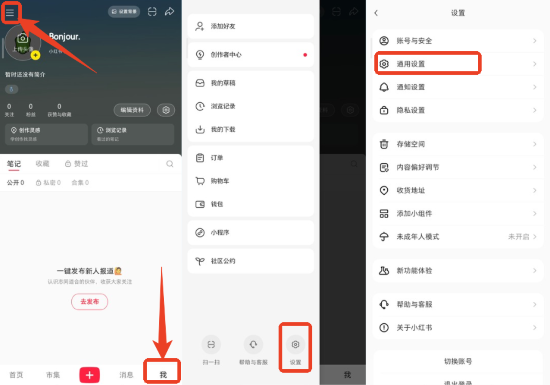
Step 3. Switch the language from English to Simplified Chinese (简体中文) or Traditional Chinese (繁體中文).
Even if you don't read Chinese, this sends a strong signal to the platform that you prefer Chinese content. The Explore feed logic will adjust accordingly. After engaging with enough foreign posts, you can switch the language back to English while keeping your newly trained feed.

Way 2. Use the Search and Save Strategy
If you want to change Rednote country in your feed without using a VPN, engagement is key.
Step 1. Use the search bar to look for specific cities in their native language characters. For example, copy and paste 上海 (Shanghai), 首尔 (Seoul), or 东京 (Tokyo).
Step 2. Do not just scroll. You must click into posts, Like them (tap the heart), and Collect them (tap the star).
Step 3. Leave comments, even if it's just an emoji. This engagement signals high interest in that specific location.
Step 4. Refresh your Explore feed after 10–15 minutes of consistent interaction.
Part 3. How to Change Rednote Location with Geo-Tags
If you're a creator looking to reach users in a specific city, you can change Rednote location on individual posts by adding a geo-tag. This helps your content appear in location-based feeds and increases visibility in your target area.
Step 1. Create your post (upload photo/video) and proceed to the editing screen.
Step 2. Tap the Add Location (标记地点) button.
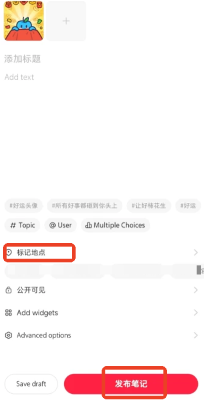
Step 3. Use the search bar to enter the city or landmark you want to target (for example, Los Angeles or Shinjuku).
Step 4. Select the correct landmark from the list. If the specific landmark doesn't appear, try searching for the broader city name.
Step 5. Publish your post.
Once published, your content will appear under that location's feed, helping you reach users in that region. This is a smart way to strategically change Rednote region visibility for better exposure - especially if you're building an international audience.
Part 4. How to Change Rednote Location for the Nearby Tab
Unlike the Explore feed, the Nearby tab is controlled by your phone's real-time GPS. If you want to change Rednote location to browse another city's Nearby feed or tag a precise spot, adjusting profile or language settings won't work. In this case, a GPS-level tool like PoKeep Location Changer is the most effective solution.

PoKeep Location Changer
Switch cities, explore new regions, and access viral content from anywhere - no jailbreak, no hassle, just smooth location control.
With PoKeep, you can instantly change Rednote location to access location-specific Nearby content. It supports both iOS and Android devices without requiring jailbreak or root access. The Joystick Mode is particularly helpful for slightly adjusting your location to find specific landmarks on the Rednote map.
Step 1. Download and install PoKeep Location Changer. Then connect your phone to your computer.
Step 2. Launch PoKeep Location Changer and finish the setup process on your phone.
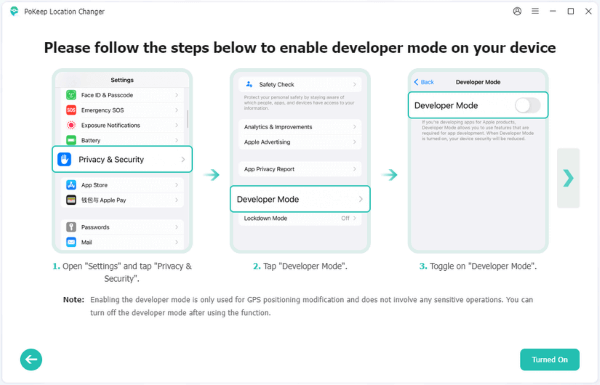
Step 3. Choose General Mode to enter the Map interface.

Step 4. Choose Teleport Mode, enter the city you want to see content from, and click Start Modifying.

Step 5. Now launch your Rednote app and switch to the Nearby tab, you can check content from the changed Rednote location.
Part 5. FAQs on Rednote Location
Will changing my location affect my shop on Rednote?
Can I change my phone number region on Rednote?
Part 6. Conclusion
Learning how to change Rednote location depends on what you want to control - your profile badge, your Explore feed, or the Nearby tab. Simple setting adjustments and engagement strategies can reshape your content feed, while GPS-level tools like PoKeep Location Changer offer full location flexibility.
 Related Articles


 Leave Your Comment