 By
By 

The Game Boy Advance holds a special place in the hearts of gamers, offering an incredible library of strategy, action, and RPG classics. Today, playing these nostalgic titles doesn't require hunting down aging hardware with unlit screens or drained batteries.
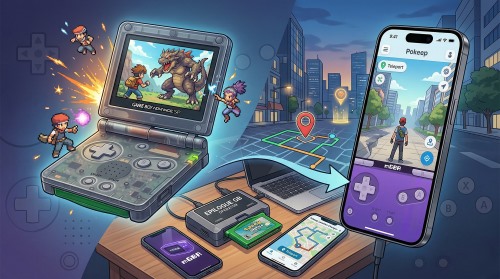
By using a Game Boy Advance emulator, you can experience your favorite childhood games on your high-definition computer or modern smartphone. This comprehensive guide will walk you through choosing the right software, obtaining games legally, and fixing common technical hiccups.
Choosing Your Game Boy Advance Emulator by Platform
Finding the right software is the first hurdle in your retro gaming journey. The emulation community has developed incredible applications tailored to specific operating systems, each offering unique features like save states, cheat code support, and graphical enhancements. Selecting the best Game Boy Advance emulator depends entirely on which device you plan to use for your digital adventures.
Best GBA Emulator for Windows and Mac

For desktop users, mGBA stands out as the undisputed champion of modern emulation. It is highly accurate, receives frequent updates, and demands very little from your system hardware. Whether you are running a custom-built Windows gaming rig or a standard MacBook, mGBA delivers a flawless, stutter-free experience right out of the box.
Top GBA Emulators for Android Devices

Mobile users on the Android ecosystem have a wealth of fantastic options readily available. My Boy! is widely celebrated for its incredibly smooth performance and its unique ability to emulate the GBA link cable, which is essential for certain multiplayer features and trades.

Alternatively, Pizza Boy GBA offers a beautiful, ad-free interface and native 60FPS support for a premium mobile experience.
Leading GBA Options for iOS Users
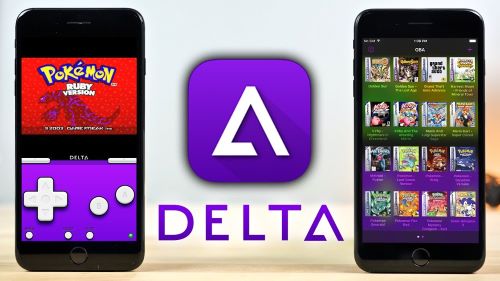
Apple devices have historically been restrictive, but modern app store changes have finally opened the doors for iOS gamers. Delta is currently the premier choice, offering seamless iCloud syncing for your save files and native support for modern console controllers. Other popular alternatives include iGBA and Ignited, both of which provide robust customization features for iPhone and iPad users.
The Legal Guide to GBA ROMs: Playing It Safe
Setting up the emulator is only half the battle; you also need the actual game files, commonly known as ROMs. It is important to understand that while emulators themselves are completely legal to download and use, downloading copyrighted game files from random websites violates copyright law. The only legally recognized method to acquire these digital files is to extract them from physical game cartridges that you already own.
Protecting yourself legally ensures your retro gaming hobby remains stress-free and legitimate.
Fortunately, extracting your own games has become incredibly accessible thanks to modern hardware tools. Devices like the Epilogue GB Operator or the Retrode allow you to plug your old cartridges directly into your PC via USB. Once connected, you can easily copy the unencrypted game files straight to your computer's hard drive for permanent safekeeping.
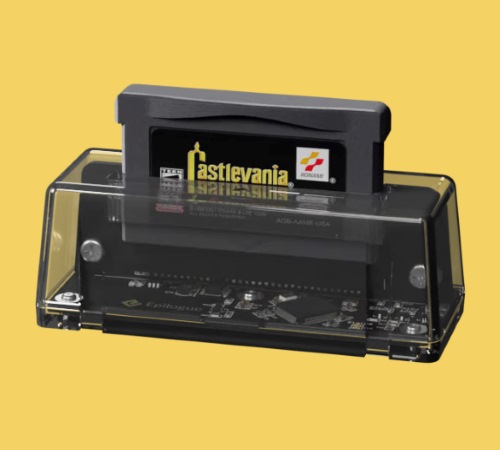
Here is how the general extraction process works:
Step 1. Connect your cartridge dumping hardware to your computer's USB port.
Step 2. Insert your legally owned Game Boy Advance cartridge firmly into the device slot.
Step 3. Use the companion software to read the cartridge data and save the ROM file to your designated games folder.
Troubleshooting Common Game Boy Advance Emulator Issues
Even with the best software, you might occasionally run into technical roadblocks during your initial setup. A very common issue is launching a game only to be met with a blank white or black screen, accompanied by silence. This is typically caused by incorrect display drivers, and can usually be fixed by opening the emulator's settings and switching the video backend rendering from Vulkan to OpenGL.
Another frequent hurdle involves missing system files, specifically the gba_bios.bin file. Many emulators require this original BIOS file to achieve accurate frame rates and prevent annoying audio glitches during gameplay. Additionally, Windows users often experience game save errors if their emulator is installed in a heavily restricted directory.
To prevent save file errors, follow these simple guidelines:
- Move your emulator application and game folders out of the "Program Files" directory.
- Store your ROMs in an unprotected directory with full read/write access, such as your "Documents" folder.
The Modern Leap: From Retro Classics to Real-World Gaming
Playing a Game Boy Advance emulator is a fantastic way to enjoy classic, stationary RPGs and strategy games from the comfort of your couch. However, gaming habits naturally evolve, and many players eventually transition from managing digital characters to engaging with modern, location-based mobile games. These contemporary titles require players to physically explore the real world to interact with game mechanics, capture objectives, or trigger events.
While real-world exploration is engaging, it introduces a whole new set of challenges that retro gamers never had to face.
Modern mobile apps demand physical movement, which is not always feasible or desirable for every player. Bad weather, physical accessibility issues, or the simple desire to keep your real-time travel location private can severely limit your ability to enjoy these games. Furthermore, content creators and app testers often need a reliable way to simulate movement scenarios without actually traveling across the city.
Managing Modern Play with Pokeep Location Changer
When you encounter the limitations of physical movement in modern mobile apps, you need a reliable desktop solution to regain control of your gaming environment. Pokeep Location Changer is a powerful desktop tool designed specifically for changing the GPS location on mobile devices. It allows users to manage location-based apps, gaming scenarios, and privacy-safe simulation workflows directly from their personal computer.

Instead of being restricted by weather or privacy concerns, Pokeep Location Changer offers a one-click teleport feature to instantly transport your device to any location globally. For a more dynamic testing or gaming experience, the software features robust route simulation with multi-point movement. You can easily set up complex travel paths while maintaining complete control over the entire process.


Here are a few ways Pokeep enhances modern location workflows:
- Utilize adjustable speeds to create highly realistic movement paths for accurate app testing.
- Save your history and favorite locations to streamline your repeated gaming or simulation workflows.
Whether you are diving back into nostalgic adventures via a Game Boy Advance emulator or navigating the complex mechanics of modern location-based apps, having the right tools makes all the difference. By legally sourcing your retro games and properly configuring your emulation software, you guarantee hours of seamless entertainment. And as you transition to the modern era of mobile gaming, utilizing smart desktop utilities ensures your experience remains safe, private, and fully customized to your needs.
 Related Articles


 Leave Your Comment