 By
By 

You sit down to watch a highly anticipated show, but instead of the opening credits, Netflix says "this title is not available in your current region". This frustrating roadblock happens to millions of viewers who just want to enjoy their favorite entertainment. Streaming platforms rely heavily on your network's IP address to determine your physical location and enforce strict regional licensing agreements. When there is a mismatch between your perceived digital location and the content's approved broadcasting area, the platform automatically blocks access.

Fortunately, resolving this issue is usually a straightforward process once you identify the root cause.
Decoding Why Netflix Says This Title is Not Available in Your Region
Not all location errors on streaming platforms are triggered by the exact same problem. The system typically flags your connection for one of two distinct reasons, often accompanied by specific numerical error codes. Understanding the difference between a network block and a download mismatch is the first step toward getting your content back on screen.
Error 10013 and VPN Detection
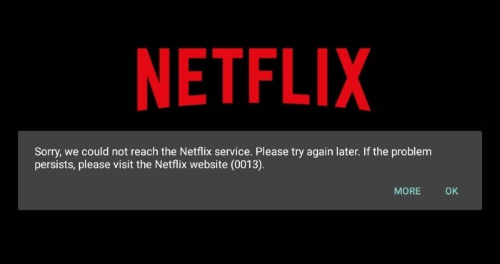
If you encounter Error 10013, the platform has likely detected that your device or network is connecting through a Virtual Private Network (VPN) or proxy service. Streaming companies maintain extensive, constantly updated lists of known VPN IP addresses and block them aggressively to protect regional copyright licenses. Even if you are simply using a privacy tool to secure your internet connection at a local cafe, the app will restrict your access to its global catalog until the proxy is disabled.
Error 22004 and Downloaded Content Mismatches
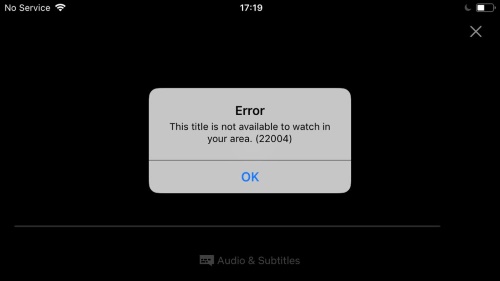
Another common scenario involves Error 22004, which specifically affects offline viewing and downloaded media. This typically indicates that you have physically traveled to a country where the platform does not currently offer the title you previously downloaded at home. Because the app briefly checks your current IP address when you launch it, it will immediately lock the downloaded files if they are not licensed for your current physical area.
Proven Solutions When This Title is Not Available in Your Current Area
Fixing these streaming roadblocks requires adjusting how your device communicates its location to the streaming network. Whether you are dealing with a strict VPN block, a traveler's download lock, or a completely false positive on your home network, there are several reliable ways to restore your access.
1 Disable Active VPNs and Hidden Proxies
The most immediate fix for proxy-related errors is to ensure all location-altering network tools are completely turned off. This includes dedicated VPN apps, browser extensions, and even built-in security features in modern antivirus software that automatically route your traffic through private servers.
2 Utilize Airplane Mode for Downloaded Media

If you are traveling abroad and want to watch shows you downloaded back home, you must prevent the app from pinging local network servers. Turn on Airplane mode or completely disable your Wi-Fi and cellular data before launching the streaming application.
- Enable Airplane mode from your device's quick settings.
- Launch the app and navigate directly to your offline downloads folder.
3 Clear Corrupted App Cache and Network Data
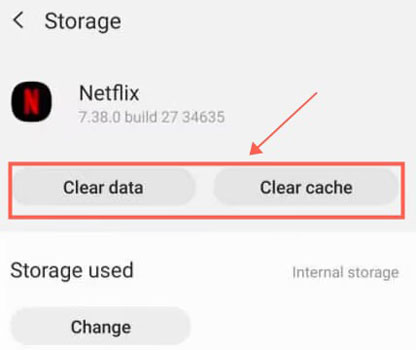
Sometimes, users experience these errors even when they are not using a VPN or traveling internationally. This is often a false positive caused by a stale DNS cache, corrupted app data, or temporary ISP routing anomalies. Clearing the application's cache forces it to pull fresh location data from your network, which frequently resolves unexplained regional blocks.
4 Restart Your Home Router
If the streaming service still thinks you are in a different country without a VPN active, your router might be holding onto an outdated IP configuration. Unplug your router from the power source for roughly sixty seconds before plugging it back in. This simple power cycle prompts your internet service provider to assign a fresh IP address, clearing out temporary location mismatches.
Taking Control of Your Digital Location Safely
While managing your IP address is essential for fixing Netflix ythis title is not available in your region errors, your digital location involves much more than just your network connection. Modern mobile applications, gaming platforms, and social media tools rely heavily on your device's internal GPS data rather than your internet routing. If you want comprehensive control over your digital footprint, managing your GPS coordinates is just as critical as managing your IP.

This is where a dedicated utility like Pokeep Location Changer becomes incredibly valuable. Pokeep Location Changer is a desktop tool for changing GPS location on mobile devices, useful for location-based apps, gaming scenarios, and privacy-safe simulation workflows. It features a one-click teleport to any location, allowing you to instantly alter your device's perceived physical whereabouts.


It is important to note that while this tool will not bypass IP-restricted streaming catalogs, it perfectly complements your overall digital privacy toolkit. Content creators use it for content planning and geo-specific preview. Meanwhile, players utilize its adjustable speed for realistic movement paths in gaming-related location strategy scenarios.
FAQs About "Netflix This Title is Not Available in Your Region" Error
Why does Netflix say this title is not available in my region even if I’m not using a VPN?
This often happens due to a "false positive" where the platform misidentifies your location. It can be caused by a stale DNS cache, corrupted app data, or temporary routing anomalies from your Internet Service Provider (ISP). In these cases, clearing your app cache or restarting your home router to refresh your IP address usually resolves the issue.
How do I fix Netflix Error 10013?
Error 10013 indicates that Netflix has detected a VPN or proxy service on your network. To fix it, you must ensure all location-altering tools are disabled, including dedicated VPN apps, browser extensions, and even "web shield" features in some antivirus software that route traffic through private servers.
Can I watch my downloaded Netflix shows while traveling abroad?
Yes, but you may encounter Error 22004 if the title isn't licensed in your new location. To bypass this, turn on Airplane Mode or disable all network data before opening the Netflix app. This prevents the app from checking your current IP and allows you to access your offline downloads folder directly.
Does changing my GPS location with tools like Pokeep fix Netflix region errors?
No, Pokeep Location Changer is designed to modify your device's internal GPS data, whereas Netflix determines your region based on your IP address. While Pokeep is an essential tool for privacy, gaming, and app testing scenarios that require GPS simulation, you still need to manage your network's IP (by disabling VPNs or resetting your router) to fix Netflix-specific regional blocks.
Why did some titles suddenly disappear from my "Continue Watching" list?
If a title is no longer available in your current region, Netflix may hide it or display an error if you try to launch it from your history. This happens because regional licensing agreements can change, or the platform may have updated its detection of your current network location.
Final Thoughts on Navigating Content Availability
Encountering a "this title is not available in your current region" message can certainly ruin a cozy movie night, but it is rarely a permanent problem. By understanding how platforms use IP addresses to enforce licensing rules, you can quickly troubleshoot VPN blocks, rescue your downloaded content, and clear out stubborn network caches.
Mastering your digital location—both through network management and GPS simulation tools—ensures you remain in full control of your privacy and digital experience.
 Related Articles



 Leave Your Comment