 By
By 


You might want your phone to appear somewhere else for a dozen practical reasons. Maybe you want to browse local dating profiles before arriving in a new city. Maybe you want to participate in regional in-game events from your living room, test how an app behaves in another market, or stop location-sharing trackers from monitoring your real-time movements.
The challenge is that most tools marketed as location changers only solve half the problem. Some alter your IP address but leave your satellite coordinates untouched. Others require risky system modifications like rooting or jailbreaking. And many basic apps immediately trigger location-mismatch warnings in sensitive apps.
Selecting the right GPS spoofing app comes down to understanding how modern mobile operating systems verify location, why iPhone and Android require completely different setups, and how to simulate movement without raising red flags.


1. How GPS Spoofing Works (and Why VPNs Fall Short)
When an app on your phone requests your location, it rarely relies on a single data point. Both Android and iOS run a unified location framework that continuously blends multiple hardware and network signals:
First, the phone's GNSS receiver tracks signals from GPS, GLONASS, Galileo, and BeiDou satellites to calculate precise latitude, longitude, and elevation. Second, the operating system scans nearby Wi-Fi routers, compiling their unique hardware MAC addresses (BSSIDs) and comparing them against global location databases. Third, the cellular modem registers connections to nearby cell towers. Finally, onboard motion sensors measure real-time acceleration and step counts.

This multi-layered process explains why a virtual private network cannot fake your GPS location in mobile apps. A VPN routes your internet connection through an encrypted tunnel to a remote server. When you open a mobile web browser, a website reads that remote server's IP address and assumes you are in that region.
However, native apps like Tinder, Life360, Google Maps, and mobile games do not rely on your IP address for physical placement. They request location data directly from the operating system's location manager. If your VPN gives you an IP address in London while your phone's satellite receiver and Wi-Fi scans place you in Chicago, the app spots the contradiction immediately. Some apps drop back to hardware coordinates, while others flag the account for suspicious activity.
A true GPS spoofing app operates at the system level. Instead of touching your network traffic, it supplies custom coordinates directly to the phone's location subsystem. When configured correctly, every app requesting location data receives the simulated coordinates as if they came from the handset's internal sensors.
2. Four Types of Location Spoofing Tools
Location-changing tools differ significantly in architecture, convenience, and risk profile. Understanding these distinctions ensures you pick a method suited to your device and purpose.
On-Device Android Mock Apps
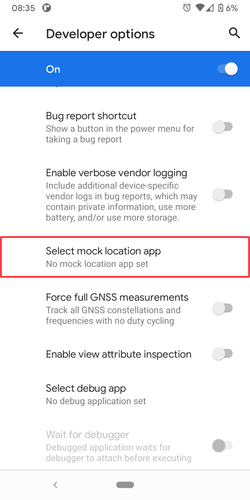
Available directly on the Google Play Store or F-Droid, these apps run directly on your handset. They leverage Android's built-in developer framework to feed virtual coordinates into the system. While lightweight and portable, Android marks every coordinate update with an internal flag indicating it originated from a simulation tool.
Desktop-Tethered Location Changers
Software installed on a Windows PC or Mac connects to your phone via USB cable or local Wi-Fi. It streams coordinates using official developer communication protocols. Because the simulation occurs at the system level without altering OS files, this approach works seamlessly on both iPhone and Android without requiring jailbreak or root access.
Browser-Only Overrides
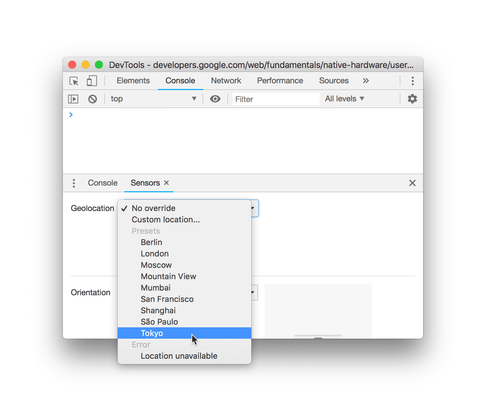
Browser extensions and developer inspection tools can alter the HTML5 Geolocation API within desktop or mobile web browsers. While useful for web scraping or viewing localized search engine results, they have zero effect on native mobile applications installed on your phone.
Modified Game Clients
Third-party modified applications inject custom location-spoofing code directly into cracked game installation packages. While offering convenience like on-screen joysticks without a computer, they break application signature integrity. Server-side anti-cheat systems routinely detect modified packages and issue permanent account bans.
| Tool Category | Supported Devices | System Modifications | Best For | Trade-offs |
|---|---|---|---|---|
| On-Device Mock Apps | Android only | Developer Options enabled | Quick location testing, basic social check-ins | Flagged by Android mock provider checks |
| Desktop Location Changers | iOS and Android | None (No jailbreak, no root) | Location games, dating, device-wide privacy | Requires a computer for initial setup |
| Browser Overrides | Desktop and mobile browsers | Browser extension or DevTools | Web testing, localized web searches | Does not affect native mobile apps |
| Modified Game Packages | Android (APKs) / iOS (IPAs) | Sideloading or enterprise certs | Casual gaming without tethering | Extremely high risk of account bans |
3. iPhone vs. Android: Why the Experience Differs
The experience of spoofing your location depends almost entirely on your phone's operating system. Android and iOS approach location security with fundamentally opposite philosophies.

Android has included an accessible simulation system for over a decade. By unlocking Developer Options in the system settings, any user can designate a chosen application as their mock location provider. Once enabled, that app can broadcast coordinates to the entire operating system. You can explore our breakdown of the top mock location app for Android options to see how standalone apps behave on Google's platform. However, because Android tags these coordinates with an internal identifier, sensitive apps can easily identify when a mock provider is active.
Apple approaches iOS with a strict security sandbox. No standard App Store application is permitted to interact with or modify the location data of another application. An app downloaded from the App Store can read its own permissions, but it cannot feed fake coordinates to Apple Maps, Find My, or third-party apps.
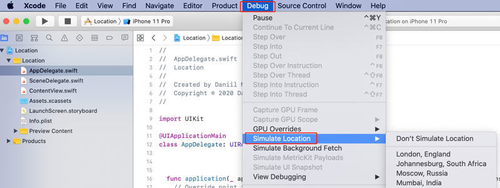
To change coordinates system-wide on an iPhone without jailbreaking, software must interact through Apple's developer communication protocol—the same interface software engineers use when testing apps in Xcode. Tools like the popular 3uTools guide demonstrate how desktop-assisted utilities bridge this gap. Modern desktop location tools establish a secure connection with the iPhone over USB or local Wi-Fi, instructing iOS to adopt simulated coordinates across all native services simultaneously.
One challenge unique to iOS is signal rubberbanding. When an iPhone receives strong satellite or Wi-Fi beacon data while simulating a distant location, the operating system can momentarily snap back to your physical coordinates. Proper desktop simulation software overcomes this by continuously maintaining the location state and buffering background coordinate streams.
4. How Apps Detect Fake Locations in 2026
A few years ago, simple location spoofers worked across almost every app without resistance. Today, app developers and anti-fraud platforms use sophisticated multi-signal telemetry to spot synthetic location data.

The Mock Provider Flag
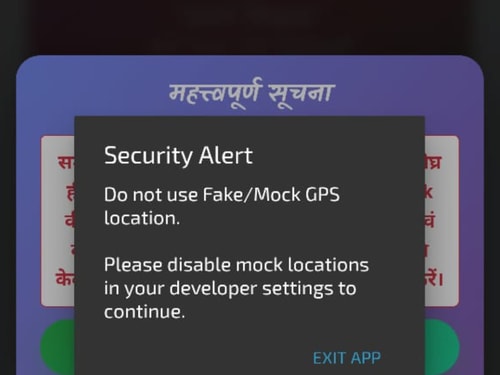
On Android devices, the operating system maintains a clear programmatic flag whenever coordinates originate from a mock location provider. Banking apps, ride-hailing services, and security-conscious games query this flag. If the flag returns true, the app blocks the session immediately.
Zero-Variance Telemetry (The Flatline Trap)
Physical GPS satellite chips are subject to atmospheric interference, orbital drift, and multipath signal reflections. As a result, genuine location data always displays tiny, natural micro-drifts in precision and elevation. Basic spoofing apps feed mathematically static data: altitude stuck at 0.00 meters, speed frozen at an exact decimal, and horizontal accuracy pinned at 1.0 meter. Modern security algorithms flag this zero-variance flatline within seconds.
Unrealistic Kinematic Behavior
Moving across a city in an unbroken, perfectly straight line through buildings and bodies of water is impossible in the physical world. Automated systems analyze movement trajectories, identifying unnatural directional shifts, instantaneous 90-degree turns at driving speeds, and teleports between distant cities that violate physical travel constraints.
Environmental Signal Conflict
If your simulated coordinates claim you are strolling through Central Park in New York, but your phone's background scan detects French Wi-Fi network names or connects to a European cellular tower, the app recognizes the fraud immediately. Apps combine Wi-Fi BSSID mapping with GPS data to catch crude location overrides.
5. Is GPS Spoofing Illegal? The Real Rules
Many users wonder whether changing their phone's location breaks federal law. The answer depends entirely on the technology used and the intent behind the action.
There is a massive legal boundary between radio frequency transmission and handset software simulation. In the United States and most international jurisdictions, broadcasting counterfeit radio frequencies over the air using software-defined radio (SDR) hardware is a federal crime under communications regulations. Over-the-air spoofing disrupts public satellite spectrums, endangering aviation, maritime vessels, and emergency response infrastructure.
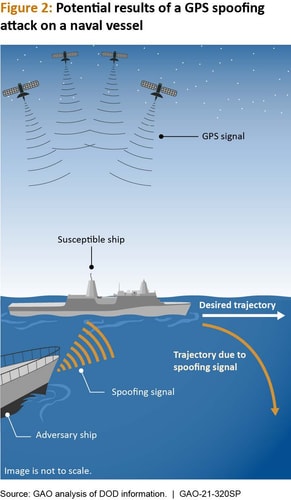
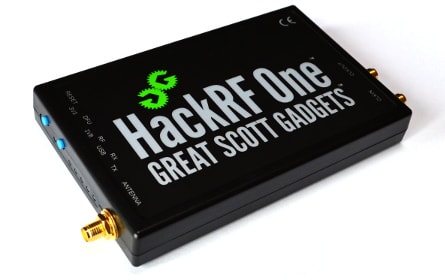
In stark contrast, modifying coordinates locally on your personal smartphone via developer settings or software simulation violates zero radio spectrum laws. You have the legal right to manage data and software on hardware you own.
Where legal liability actually enters the picture is intent and fraud. Using a fake location to falsify hourly remote-work timesheets constitutes payroll fraud. Using fake coordinates to evade court-mandated geo-tracking or submit fraudulent insurance claims can lead to criminal prosecution. Falsifying residency to evade local sales tax is tax fraud.
For everyday use cases—such as exploring virtual worlds in Pokémon GO spoofer tools, hunting monsters in Monster Hunter Now, playing Ingress Prime, or browsing distant dating matches—you are not violating any civil or criminal laws. However, commercial apps outline strict acceptable-use policies in their Terms of Service. Violating those terms will not land you in court, but it can result in warnings, temporary suspensions, or permanent account bans.
6. How to Change GPS Location with PoKeep
If you need an iPhone solution that bypasses sandbox restrictions without jailbreaking, or an Android setup with natural movement simulation, a dedicated desktop utility is the most dependable option. That is where PoKeep Location Changer comes in.
PoKeep talks to the phone's location service over a developer session instead of patching a game client or rooting the device. Pick a point on the map and every installed app sees those coordinates. A 360° joystick, road-following two-spot and multi-spot routes, and slightly variable walking or cycling speed keep the path from looking like a laser-straight teleport. A cooldown timer flags jumps that would be physically impossible, GPX files load saved trails, and after the first USB pairing you can keep controlling the phone over Wi-Fi.
Step 1 Download and launch the software
Download PoKeep Location Changer on your Windows PC or Mac. Run the installer and launch the application to reach the main dashboard.
Step 2 Connect your phone via USB or Wi-Fi

Plug your iPhone or Android phone into your computer using a USB cable. On iPhone, tap "Trust This Computer" when prompted. On Android, enable USB Debugging in your Developer Options. Once paired, future sessions can connect wirelessly over local Wi-Fi.
Step 3 Pick a destination and movement mode

Type an address or GPS coordinate into the search bar, or click directly on the interactive world map. Select your preferred mode: instant teleport, two-spot route, multi-spot path, or real-time joystick. Click "Move" to update your phone's coordinates instantly. When you finish, click the reset button or restart your handset to restore physical GPS accuracy.
7. Frequently Asked Questions
Is it possible to spoof a GPS location?
Yes. Mobile operating systems allow location simulation, but the methods differ by device. Android lets users select a mock location app inside Developer Options. iPhone enforces a strict app sandbox, requiring a computer connection with developer simulation tools to modify coordinates system-wide without jailbreak.
Is GPS spoofing illegal?
Changing coordinates on your personal smartphone using developer settings or software tools is completely legal. In the United States, federal radio laws only prohibit transmitting counterfeit over-the-air radio signals that interfere with public satellite frequencies. Legal issues with phone spoofing only arise if someone uses fake locations to commit fraud, cheat payroll, or violate court orders. Using a spoofer in mobile games or dating apps is not illegal, but it can violate their terms of service and lead to account bans.
What is the best fake GPS app for Android?
For free on-device testing, apps like GPS JoyStick or FakeTraveler work well through Android's built-in Developer Options. For users who need route simulation, custom speed control, or want to manage both iPhone and Android devices from a desktop interface without modifying system files, PoKeep Location Changer provides a more comprehensive tool.
Can you spoof GPS on iPhone without a computer?
Standard iOS App Store applications cannot alter system-wide GPS coordinates for other apps due to Apple's security sandbox. Browser-based tools can change geolocation inside Safari, but location-aware mobile apps will continue seeing the iPhone's real hardware location. Changing system-wide GPS on modern iOS without jailbreak requires a desktop tool that communicates through Apple's developer simulation protocol.
Can apps tell if you are using a fake GPS location?
Yes. Sensitive apps look well beyond raw coordinates. Android tags simulated locations with a mock provider flag. Anti-fraud systems also analyze telemetry: real GPS hardware has natural signal drift and altitude fluctuations, while basic spoofers produce flatline speeds, zero-meter elevations, and laser-straight trajectories. Inconsistent environmental data—such as mismatched Wi-Fi network scans or conflicting timezones—can also expose simulated locations.
Is a VPN enough to change GPS location in mobile apps?
No. A VPN encrypts your internet traffic and changes your public IP address, which works for website geolocation and region-locked web content. However, mobile apps with location permissions query your phone's GPS receiver, nearby Wi-Fi router BSSIDs, and cellular towers. If your IP address shows one country while your device GPS reports another, apps immediately detect the discrepancy.
8. Final Takeaway: Which Setup Fits Your Needs?
Selecting the most effective GPS spoofing app comes down to matching your hardware with your specific goals. If you use an Android device for basic app testing or casual social check-ins, a free mock location app from Developer Options offers an easy starting point.
However, if you are on an iPhone, need to move naturally along real roads, or want to protect gaming and social accounts from telemetry detection, a desktop-tethered location changer is the most reliable approach. It delivers full joystick control, variable walking speeds, and distance-based cooldown protection without compromising device security.
With cross-platform support for both iOS and Android, PoKeep Location Changer gives you complete control over your mobile coordinates with a clean, reversible setup.
 Related Articles



 Leave Your Comment