 By
By 

Quick Verdict
Monster Hunter Now spoofing changes your GPS location to reach more monsters and hunt from home, but it is not officially allowed and carries account risk. The best approach is controlled movement with joystick, custom speed, and route planning—not instant teleporting or VPN-only methods.
Who It's For
This guide is for Monster Hunter Now players in low-activity areas who want to understand GPS spoofing on iPhone and Android, compare methods without jailbreak or root, and learn the risks before using joystick or route tools.
Key Takeaways:
- Main Idea: Spoofing changes GPS coordinates, but VPNs alone cannot fake in-game location.
- Best Tool Features: Joystick movement, custom speed, route planning, and cooldown support beat one-click teleport tools.
- Practical Option: PoKeep Location Changer offers iOS/Android GPS control without jailbreak, root, or modified APKs.

Monster Hunter Now is built around real-world exploration. You walk, find monsters nearby, collect materials, and use those materials to forge and upgrade weapons and armor. The official game site highlights a growing monster roster, material collection, and equipment forging as core parts of the experience.
But real-world hunting is not always convenient. Some players live in rural areas with fewer active spots. Others deal with bad weather, unsafe walking routes, limited time, or events that feel easier to enjoy in busier locations. That is why many players search for ways to spoof Monster Hunter Now, use a Monster Hunter Now GPS spoofer, or control movement with a joystick instead of physically walking everywhere.
What Does Spoofing Monster Hunter Now Mean?
To spoof Monster Hunter Now means changing the GPS location your phone reports to the game. Instead of appearing at your real physical location, your hunter may appear in another area on the map. Players usually do this to reach more monsters, explore better hunting zones, or simulate movement without walking outdoors.
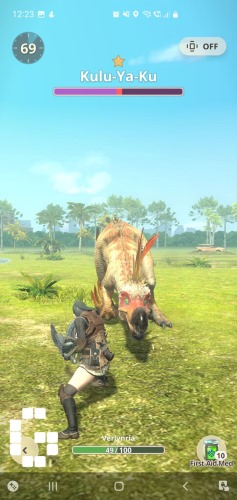
There are several forms of Monster Hunter Now spoofing. Some tools let you teleport to a location instantly. Others provide a GPS joystick, so you can move around the map in a more controlled way. More advanced location changers may also support two-point routes, multi-point routes, custom speed, GPX route import, and cooldown reminders.
A simple fake GPS pin is usually not enough for a location-based game. Monster Hunter Now depends on movement, distance, map interaction, and hunting activity, so the better experience usually comes from a tool that can simulate movement rather than only change your location once.
Is Spoofing Allowed in Monster Hunter Now?
No. GPS spoofing is not officially allowed in Monster Hunter Now.
Niantic’s Monster Hunter Now discipline policy covers cheating behavior and uses a three-strike system that can escalate from warnings to harsher account action. The official gameplay-fairness notice also warns players to avoid actions prohibited by Niantic’s Terms of Service, Player Guidelines, and Three-Strike Discipline Policy.
That means no Monster Hunter Now spoofer can honestly promise “zero ban risk.” If you use location-changing software, you should understand that account penalties are possible. A reliable location changer can help you control movement more carefully, but it cannot make spoofing officially approved or completely risk-free.
The practical goal is not to pretend risk does not exist. The better approach is to understand the rules, avoid reckless movement patterns, and use tools that give you more control over speed, routes, and cooldown timing.
Common Ways to Spoof Monster Hunter Now
There are several ways players try to change location in Monster Hunter Now. Each method has different setup difficulty, device support, and risk level.
1 iOS Location Changer Without Jailbreak
For iPhone users, a desktop-based location changer is one of the most common options. These tools usually run on Windows or Mac, connect to the iPhone, and modify the GPS location without jailbreaking the device.
This method is popular because jailbreaking can be complicated and may affect device security or system stability. A no-jailbreak setup is generally easier for casual users who only want to change GPS location for Monster Hunter Now, Pokémon GO, or other location-based apps.
PoKeep Location Changer fits this category because its product information highlights iPhone and Android location changing without jailbreak or root, along with Monster Hunter Now support.


2 Android GPS Spoofing Without Root
Android users often search for Monster Hunter Now spoof no root because rooting a phone is not ideal for everyone. No-root spoofing usually depends on mock location settings, developer options, or desktop software that changes the phone’s GPS signal.

The main advantage is easier setup. The downside is that not every no-root method is stable across devices, Android versions, or game updates. Some free fake GPS apps may work for basic map testing but feel limited for Monster Hunter Now because they lack joystick movement, route planning, cooldown support, or realistic speed control.
3 Rooted Android Spoofing
Rooted Android setups can offer more control, but they are not beginner-friendly. Rooting can void warranties, create security concerns, and require extra configuration. It may also become unstable after system updates or game updates.

This method is usually more appealing to advanced Android users who already understand rooting. For most players who simply want a Monster Hunter Now location spoofer, a no-root location changer is easier to recommend.
4 Monster Hunter Now Spoof APK or Mod App
Some users search for spoof Monster Hunter Now APK or modified game clients. This is one of the riskier directions. APK files from unknown sources may contain malware, outdated code, invasive permissions, or modified game behavior that is easier to detect.
A modified APK also creates a trust problem. You are not only changing GPS location; you may be running an unofficial version of the game or an unknown third-party app. For most users, this is not worth the risk compared with using the official Monster Hunter Now app and a separate location changer.
5 VPN for Monster Hunter Now
A VPN changes your IP address, not your phone’s GPS coordinates. That means a VPN alone usually cannot spoof Monster Hunter Now location. The game relies on GPS-based positioning, so your map location will not properly change just because your internet traffic appears to come from another city.

A VPN may be useful for privacy in other contexts, but it is not a complete Monster Hunter Now GPS spoofing method.
What Makes a Good Monster Hunter Now Spoofer?
A good Monster Hunter Now spoofer should focus on control. Location-based games are not only about where you appear; they are also about how your movement looks over time.
Look for these features first:
- GPS joystick: Move in any direction without constantly changing coordinates manually.
- Custom speed and routes: Simulate walking, cycling, or planned movement more naturally.
- Cooldown timer: Reduce the chance of making obvious mistakes after long-distance movement.
Device support is also important. If you use an iPhone, look for a no-jailbreak method. If you use Android, look for no-root support unless you are comfortable with advanced setup. A good tool should also make it easy to stop spoofing and restore your real location when you are done.
Why PoKeep Location Changer Is a Practical Option for MH Now

PoKeep Location Changer is a strong fit for players who want a more controlled way to spoof Monster Hunter Now without relying on risky APK files, jailbreak setups, or root-heavy methods. Its page presents PoKeep as a GPS location changer for iPhone and Android, with support for Monster Hunter Now and other location-based games.
The most relevant PoKeep features for Monster Hunter Now include 360° GPS joystick, custom speed, cooldown timer, two-spot movement, multi-spot movement, jump teleport mode, GPX import, favorite routes, historical records, and realistic/fluctuation mode. These features are useful because Monster Hunter Now gameplay depends on movement, route choices, and repeated hunting rather than a single static location.
PoKeep also supports location changing without jailbreak or root, which is especially helpful for users searching for Monster Hunter Now iOS spoof, Monster Hunter Now Android spoof, or MH Now spoof no root. Instead of modifying the game itself, PoKeep works as a location changer that helps you control where your device appears.
How to Spoof Monster Hunter Now with PoKeep
Using PoKeep for Monster Hunter Now is designed to be straightforward. The general process is simple enough for beginners while still offering movement tools for users who want more control.
Step 1 Download and install PoKeep
Install PoKeep Location Changer on your Windows or Mac computer. Open the program and prepare your iPhone or Android device for connection.
Step 2 Connect your device

Connect your phone to the computer using USB, Wi-Fi, or the supported connection method shown in the software. Follow the on-screen instructions to complete setup.
Step 3 Choose your Monster Hunter Now location
Search for a destination on the map or select a hunting area manually. You can teleport to a location, but route movement is often more practical for Monster Hunter Now.
Step 4 Use joystick or route mode

Use the 360° GPS joystick for manual movement, or choose two-spot or multi-spot movement to simulate a route. Adjust speed so movement looks closer to real walking or travel.
Step 5 Watch cooldown timing

After moving a long distance, avoid interacting immediately. Use cooldown timing as a reminder to slow down and avoid unrealistic location jumps.
Step 6 Restore your real location when finished
When your session is over, stop the location change and restore your real GPS position. PoKeep’s product information notes that location changes are temporary and reversible.
FAQs About Monster Hunter Now Spoofing
Can you spoof Monster Hunter Now?
Technically, yes. Players use GPS location changers, joystick tools, Android mock location methods, and other spoofing setups to change where they appear in the game. However, spoofing is not officially allowed and can lead to account penalties under Niantic’s discipline policy.
What is the best spoofer for Monster Hunter Now?
The best Monster Hunter Now spoofer should support joystick movement, custom speed, cooldown timing, route simulation, iOS and Android compatibility, and no jailbreak/root setup. PoKeep is a practical option because it combines these movement features with Monster Hunter Now support.
Can I spoof Monster Hunter Now on iOS?
Yes, iPhone users can use a desktop-based iOS location changer to modify GPS location without jailbreaking. This is usually easier than jailbreak-based methods and safer than downloading unknown modified apps.
Can I spoof Monster Hunter Now on Android without root?
Yes, some tools support Android location changing without root. No-root options are easier for beginners, although features and stability vary by tool. PoKeep’s page highlights Android support without root, which makes it relevant for users searching for MH Now spoof no root.
Is a Monster Hunter Now spoof APK safe?
A spoof APK or modified app can be risky. Unknown APKs may contain malware, unstable code, or unofficial modifications that put your device and account at risk. A separate GPS location changer is usually a cleaner option than installing a modified Monster Hunter Now app.
Does a VPN work for Monster Hunter Now spoofing?
A VPN alone is not enough. It changes your network IP location, but Monster Hunter Now depends on GPS location. To change your in-game position, you need a GPS location changer rather than only a VPN.
Final Thoughts on Spoofing Monster Hunter Now
Spoofing Monster Hunter Now is popular because the game depends heavily on where you live, how safe your walking routes are, and how much time you can spend outside. For players who feel limited by their real location, a GPS spoofer can make the game more flexible.
For users who want a cleaner iOS and Android option, PoKeep Location Changer is worth considering. Its joystick, route simulation, custom speed, cooldown timer, and no jailbreak/root setup make it especially suitable for Monster Hunter Now players who want practical GPS movement control without relying on risky APKs or complicated device modifications.
 Related Articles



 Leave Your Comment