 By
By 


Pikmin Bloom looks like a relaxing, cozy walking companion, but its core progression is strictly tied to real-world movement. Between harvesting seasonal flower petals, growing rare Decor Pikmin, joining competitive Mushroom Battles, and completing time-sensitive event challenges, players in rural communities, high-rise apartments, or harsh climates face significant bottlenecks.
This friction is why players look for Pikmin Bloom spoofing in the first place. But Instant teleports and a static location pin backfire: you consume precious petals without planting flowers, fail to hatch seedlings, and risk rapid account penalties.
To use location simulation effectively, you must understand how the game's multiple tracking systems work together and how to simulate natural human walking.
How Pikmin Bloom Tracks GPS Movement and Step Count
The single most common mistake players make when exploring how to spoof Pikmin Bloom is assuming the app relies entirely on one GPS signal. In reality, Pikmin Bloom evaluates three independent data streams to verify player activity.
Physical Step Count (Hardware Pedometer)
Physical step count is used to hatch seedlings in your planter pack, increase player level, and unlock walker badges. On iOS, the game reads Core Motion and Apple Health; on Android, it queries device motion sensors, Google Fit, or the newer Health Connect API. Crucially, raw GPS coordinates do not generate physical steps. If an app alters your latitude and longitude while your phone sits motionless on a desk, your step counter will not advance.
Map Displacement & Flower Planting (GPS Route Trajectory)
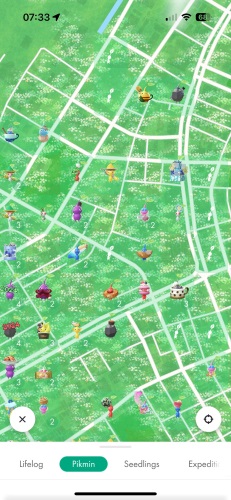
Flower planting requires continuous geographic movement across the game's plantable map grid. Each map cell has a flower capacity limit. If you walk on a treadmill or swing your phone in a mechanical rocker, you can log 10,000 steps, but you will plant zero flowers because your coordinate never moved. Conversely, jumping across cities instantly triggers a speed lockout that immediately stops flower planting.
Static Coordinates (Points of Interest)
Static coordinates dictate nearby Mushroom Battles, Big Flowers, Postcard origins, and Decor Pikmin types (such as Airport, Beach, Forest, or Art Gallery). This system relies directly on your device's reported GPS coordinates.
 Important Distinction:
Hatching seedlings requires steps. Planting flowers requires displacement across the map. Finding rare Decor seedlings requires specific coordinates. No single static "fake GPS pin" solves all three.
Comparing Pikmin Bloom Spoofing Tools and Step Shakers
Before testing any tool, compare how different methods interact with Pikmin Bloom's tracking layers:
| Method | Changes Location | Plants Flowers | Adds Steps | Ban Risk | Best Used For |
|---|---|---|---|---|---|
| Outdoor / Large Indoor Walking | Physical only | Yes | Yes | None (Official) | Standard gameplay, daily exercise |
| Desktop System-Level GPS (PoKeep) | Yes (Global) | Yes (via Route) | Route-dependent | Low (No Root/Jailbreak) | Flower planting, Big Flowers, regional Decor |
| Android Mock Location (GPS JoyStick) | Yes (Global) | Yes (Manual) | Rarely | Moderate (Mock flag visible) | Local exploration without a PC |
| Physical Phone Shakers / Rockers | No (Stationary) | No | Yes (Hardware sensor) | Very Low (Hardware only) | Hatching 10,000-step Huge Seedlings |
| Manual Google Fit / Health Entry | No | No | No (Rejected by server) | None | Ineffective; blacklisted by Niantic |
| Modified Clients (Modded APKs) | Yes | Unstable | Unstable | Extremely High | Avoid; triggers immediate account strikes |
Notice the row for manual fitness entries: according to official support documentation, step data manually entered into Google Fit or Apple Health is not added to your total steps in Pikmin Bloom. The game's backend strictly inspects timestamped sensor logs to reject fabricated entries.
Furthermore, Android users must note the ongoing 2026 fitness migration: with legacy Google Fit APIs facing deprecation, Pikmin Bloom has shifted Android tracking toward Health Connect and native "Track with your phone" settings in Settings > Privacy & Steps > Step Count. Configuring these properly is essential when syncing simulated routes with step logs.
Why Fake GPS Teleporting Fails to Plant Flowers
Flower planting is one of the primary reasons players look for a Pikmin Bloom spoofer. However, planting is governed by strict mathematical and safety parameters enforced by Niantic:

Movement Speed & Stationary Limits
Pikmin Bloom automatically pauses flower planting whenever movement exceeds approximately 15–20 km/h (9–12 mph). Teleporting between coordinates, driving, or fast transit shuts down planting instantly. Remaining stationary inside one map cell also halts progress once local flower capacity is reached. In that state, petals continue draining from your jar even when zero flowers are planted, triggering warning notifications after 3 and 15 minutes of inactivity.
Squad Size & Planting Efficiency
The number of Pikmin in your active squad scales how many flowers you lay down over distance. A full squad of 40 Pikmin delivers the highest planting density per step, but it also consumes petals faster. When planning any virtual walk, keeping your squad completely full ensures you get the most floral coverage out of your jar.
Restricted Surfaces & Privacy Zones
The game's map engine restricts planting across designated highways, train tracks, bodies of water, and user-defined Privacy Zones. If a simulated path cuts across a lake or unpaved restricted terrain, petals burn continuously while the flower count remains frozen.
Big Flower Blooms & Daily Coins
Blooming a Big Flower requires 300 flowers of compatible colors within its radius. Once open, it stays in bloom for 23 hours, offering a sparkling aura and rare nectar fruit expeditions during its first hour. Continuous planting sessions also reward 1 Bonus Coin per 250 flowers planted (up to 60 coins daily), making steady looping routes through urban parks the most economical approach.
Pikmin Bloom Spoofing Ban Risks and the Three-Strike Policy
Before using any location-altering tool, every player should understand the real account risks and the state of game enforcement.
The Official Three-Strike Policy
Pikmin Bloom's discipline policy explicitly categorizes "falsifying location (GPS location spoofing)" and "accessing Pikmin Bloom clients or backends in an unauthorized manner" as cheating. The enforcement framework follows a graduated disciplinary structure:
-
Strike 1 (Warning): An in-game warning notification appears upon opening the app. Gameplay is monitored, but functionality is largely preserved. The warning lasts approximately 7 days.
-
Strike 2 (Suspension): The account is temporarily locked. When attempting to log in, a suspension screen blocks access for approximately 30 days.
-
Strike 3 (Termination): Continued violations result in permanent account termination. All Pikmin, Decor badges, and in-game items are lost.
Keep in mind that Niantic explicitly states offenders are not guaranteed three chances: severe violations or automated bot activities can result in immediate termination without warning.
2026 Community Friction: Why Spoofers Get Reported
Community friction and player reports rarely stem from someone quietly walking around a park at odd hours. Instead, conflict arises when virtual players crowd out shared, zero-sum community assets:
Mushroom Battle Lockouts & Big Flower Monopolies
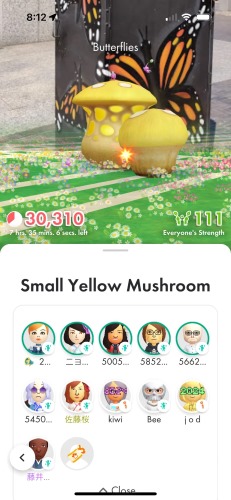
Standard Mushroom Battles only offer five free entry slots. Teleporting into local battles blocks nearby residents unless they spend paid Mushroom Recharge Tickets. In smaller communities, automated looping scripts that continuously bloom 30 or 40 Big Flowers with a single common nectar prevent local players from harvesting the specialized seasonal nectar required for limited-time event badges.
Visible Geometric Trails & Bot Radar Services
Floral trails remain etched onto the public map for up to five days. When coordinate tools draw perfectly straight paths through multi-story buildings, freeways, or bodies of water, the physical impossibility is obvious to anyone walking nearby. Commercial bot services that crawl live mushroom coordinates and broadcast automated bullhorn summons distort local economies and draw immediate scrutiny from Niantic's server telemetry.
If you choose to simulate location, practice ethical simulation: stay on marked walking trails, simulate human speeds (5-8 km/h), avoid monopolizing rural Big Flowers, and never interfere with local player communities.
How to Spoof Pikmin Bloom on iOS and Android
Depending on your device operating system and whether your primary goal is flower planting, mushroom raiding, or step farming, several methods are available:
Method 1: Desktop Route Simulation (Recommended for iOS & Android)
A desktop-tethered location changer connects your phone to a computer via USB or Wi-Fi to modify the system location service at the OS developer level. Because this approach communicates through native developer debugging channels rather than tampering with internal application packages, it works seamlessly with the official Pikmin Bloom app downloaded directly from the Apple App Store or Google Play without requiring jailbreak or root access.
The core advantage for Pikmin Bloom is automated route simulation. Instead of manually maneuvering a virtual joystick for hours, desktop route tools let you map multi-point walking circuits along real city sidewalks at steady, pedestrian-friendly velocities (such as 6 km/h). This enables continuous flower planting, reliable Big Flower blooms, and safe expedition discovery without raising red flags in server logs.
Method 2: Android Mock Location (GPS JoyStick by The App Ninjas)
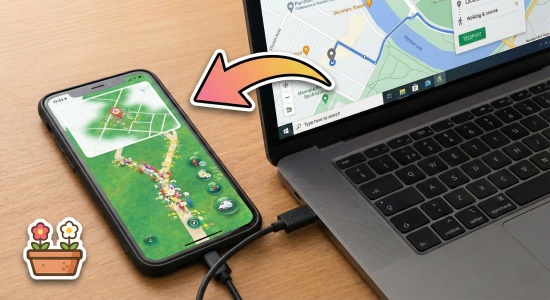
For Android users who prefer an on-device tool, Android's native Developer Options include a "Select mock location app" setting. Apps like GPS JoyStick allow users to control a virtual joystick overlay.
 Android Mock Limitations:
While functional for basic coordinate shifting, Android mock providers set an internal system flag (isFromMockProvider) that location-based apps can read. Additionally, GPS JoyStick will generally not register pedometer steps unless paired with advanced motion injection, and running both apps simultaneously can cause mid-range phones to overheat.
Method 3: Physical Step Shakers (Hatching Steps Only)
If your sole bottleneck is accumulating 10,000 steps to hatch Huge Seedlings, mechanical phone shakers (swingers) are an effective hardware workaround. These devices physically rock your smartphone back and forth, activating internal gyroscopes and accelerometers to record genuine motion in Apple Health or Google Fit.
Remember: a step rocker keeps your device stationary on a table. It will hatch seedlings, but it cannot move your coordinate, will not reach mushrooms, and will plant zero flowers.
The Myth of "PGSharp Pikmin Bloom" and Modded APKs
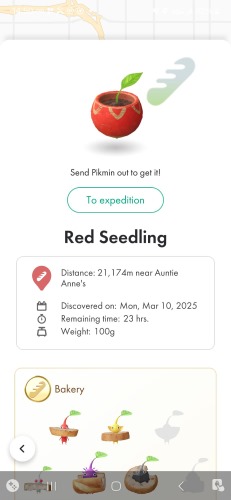
Due to high search volume for terms like "PGSharp Pikmin Bloom", many players assume a modified game client exists for Pikmin Bloom. This is completely false.
Security Warning:
PGSharp is built exclusively for Pokémon GO. There is no legitimate PGSharp release for Pikmin Bloom. Any website offering a "Pikmin Bloom Mod APK" is serving cracked or repackaged software loaded with adware, spyware, or credential-stealing Trojans. Modified game binaries are also instantly detected by server-side signature verifications.
Simulating Safe Walking Routes with PoKeep Location Changer

For players who want a reliable, controlled Pikmin Bloom GPS spoof that aligns with the game's walking mechanics, PoKeep Location Changer is the top desktop solution for iOS and Android. Because Pikmin Bloom penalizes erratic teleportation, PoKeep focuses on realistic route planning and precision motion control.
Simulate Natural Walking for Pikmin Bloom
Change GPS location on iOS & Android without jailbreak or root. Plan custom walking routes at 5-10 km/h to plant flowers and explore mushrooms smoothly.

Because Pikmin Bloom binds core progression to spatial trajectory rather than static pins, location tools must support realistic navigation physics. PoKeep Location Changer fits these constraints through several core capabilities:
-
Sidewalk-Aligned Multi-Spot Routes: Rather than drawing straight vectors that cut across private property or waterways, PoKeep automatically routes paths along real pedestrian trails and streets, generating believable floral trails for other players on the map.
-
Pedestrian Velocity Control (5–9 km/h): A fine-grained speed slider keeps movement inside the planting window, well beneath Niantic's 15 km/h lockout. Realistic Mode adds slight atmospheric drift so the path looks like real GPS reception.
-
Precision Joystick & System-Level Integration: The 360° directional joystick lets you sit inside the 300-flower bloom perimeter of Big Flowers. It runs through system developer protocols rather than modded APKs, so no jailbreak or root is required on iOS or Android.
How to Set Up a Safe Walking Route with PoKeep
Follow this step-by-step procedure to plant flowers along virtual routes safely:
Step 1 Connect Your Device
Download and launch PoKeep Location Changer on your PC or Mac. Connect your iPhone or Android phone via USB cable. Once recognized, unlock your device and tap "Trust This Computer" if prompted.
Step 2 Plan a Multi-Spot Route
Switch to Multi-Spot Mode in the top-right toolbar. Select an area with dense Big Flower clusters, such as a major urban park. Click along walkable pedestrian paths to establish a looping route. Avoid placing waypoints over lakes, motorways, or unmapped zones.
Step 3 Configure Natural Speed
Adjust the speed slider to a natural walking pace between 6.0 km/h and 8.0 km/h. Enable "Realistic Mode" to allow slight natural variations in walking speed across route segments.
Step 4 Start Flower Planting
Click "Start Moving" in PoKeep. Open Pikmin Bloom on your phone, open your petal jar, and tap "Start Planting". Monitor your screen for 2-3 minutes to verify that flower count increases steadily while petals decrease. When finished, stop flower planting before disconnecting your phone.


Frequently Asked Questions About Pikmin Bloom Spoofing
Can you get banned from Pikmin Bloom for spoofing?
Yes. Under the official Three-Strike Discipline Policy enforced by Niantic, GPS spoofing is explicitly classified as cheating. Strike 1 carries an in-app warning lasting around 7 days; Strike 2 suspends account access for roughly 30 days; Strike 3 results in a permanent ban. Severe violations can trigger immediate termination without prior warnings.
Does GPS spoofing increase steps in Pikmin Bloom?
Not automatically. Step tracking in Pikmin Bloom relies on native hardware motion sensors, Apple Health, or Android pedometer services (such as Health Connect). A GPS spoofer alters your map coordinates to enable flower planting and mushroom access, but it does not directly add physical sensor steps unless you use route simulation combined with motion data or a separate step device.
Is there a PGSharp for Pikmin Bloom?
No. PGSharp is a modified client built exclusively for Pokémon GO. There is no legitimate "PGSharp Pikmin Bloom" app. Any website offering a modded Pikmin Bloom APK claiming to be PGSharp is distributing unverified third-party software that presents security and account termination risks.
Why are my flower petals being consumed without planting flowers?
Pikmin Bloom will drain petals without planting flowers if: (1) your virtual speed exceeds approximately 15-20 km/h, (2) you remain stationary in an area that has reached its flower density limit, or (3) your route crosses non-plantable surfaces such as waterways or restricted roads. The game sends push notifications at 3 and 15 minutes if petals continue burning while you are stopped.
Can I use a physical step shaker to plant flowers?
A physical step shaker increases your hardware step count to pluck seedlings and level up Pikmin, but it cannot plant flowers. Flower planting requires geographical displacement across the map grid. Pacing in place or shaking your device keeps your coordinates stationary, consuming petals without generating flower trails.
How to spoof Pikmin Bloom without jailbreak or root?
The safest approach is using a desktop-tethered location simulator like PoKeep Location Changer. It modifies your device's system-level location framework through official developer protocols without modifying game APKs, bypassing root detection and client signature checks on both iOS and Android.
Can location spoofing be detected in Pikmin Bloom?
Yes. Anti-cheat systems can detect spoofing via Android mock-location flags, modified client signatures, instant intercontinental teleports without cooldowns, and erratic movement patterns like walking straight through buildings or waterways. Simulating realistic walking speeds (5-10 km/h) along marked roads significantly reduces anomaly flags.
Final Recommendations for Spoofing Pikmin Bloom Safely
Successful Pikmin Bloom spoofing comes down to understanding the distinction between step counting and map displacement. While mechanical shakers handle seedling step quotas, growing Big Flowers, completing event challenges, and collecting regional Decor Pikmin require realistic geographical motion.
Avoid risky modified game APKs or erratic teleport jumps that waste petals and trigger Three-Strike penalties. Instead, use a system-level tool like PoKeep Location Changer to simulate gentle, road-following walking routes at 6-8 km/h. By respecting realistic movement physics and avoiding disruption to local player communities, you can progress smoothly through every seasonal event from home.
 Related Articles




 Leave Your Comment