 By
By 
If you are a fan of retro RPGs, Orna: The GPS RPG delivers a unique mix of classic turn-based combat and real-world exploration. However, not everyone has the time or ability to walk miles each day just to find dungeons or compete for Dukedoms. As a result, many players start wondering how to GPS spoof Orna or search for an Orna GPS RPG joystick to move around more freely.
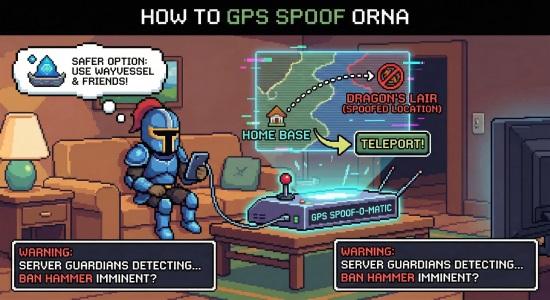
In this guide, we'll break down the popular tools players are using in 2026, and introduce a safer, smarter alternative that lets you enjoy the game without spoofing at all.
Part 1. What Is Orna GPS RPG
Orna: The GPS RPG is a location-based mobile game that turns your real-world map into an 8-bit fantasy adventure, emphasizing character progression, class building, and territory control rather than simple collecting like Pokémon GO.

To progress, players must physically move to encounter monsters, bosses, and dungeons, but this design can be challenging, especially for players in rural area, where maps feel empty and key content is far apart. Because of these limitations, many players start looking into GPS spoofing Orna or searching for an Orna GPS RPG joystick to fake their location, teleport to active areas, and compete for Dukedoms without constant travel.
Part 2. How to GPS Spoof Orna 2026 [iOS/Android]
As Orna continues to evolve, many players look for reliable ways to explore more of the map without constant real-world travel. Below are the most commonly used methods for GPS spoofing Orna in 2026, covering both software- and hardware-based solutions for iOS and Android.
1 Use PoKeep Location Changer on iOS & Android
PoKeep Location Changer has gained significant popularity in 2026 as a desktop-based GPS spoofing solution. Unlike mobile spoofing apps that are easier for games to detect, desktop tools work by overriding the GPS signal at the system level before it reaches Orna, making them a more stable option.
PoKeep supports both iOS and Android devices and offers five movement modes, including Teleport, Jump Teleport, Two-Spot, Multi-Spot, and Joystick mode. These modes allow you to plan routes flexibly, simulate natural movement, and explore the Orna world at your own pace. You can also freely adjust your movement speed to better match in-game limits.

PoKeep Location Changer
Teleport, explore dungeons, and conquer territories without leaving home - all in just a few clicks.
To help reduce the risk of account bans, PoKeep includes a built-in cooldown timer that alerts you if you change locations too quickly. It also lets you save routes for quick reuse, which is especially useful for farming dungeons or revisiting high-activity areas. Overall, PoKeep Location Changer is a powerful and user-friendly option for GPS spoofing Orna in 2026.
Here's how to GPS spoof Orna on iOS or Android devices:
Step 1. Install PoKeep Location Changer on your PC or Mac, then connect your iOS or Android device via USB.
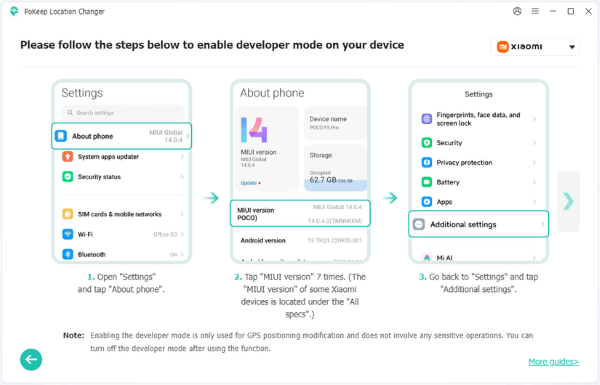
Step 2. Follow the on-screen instructions to enable Developer Options and complete the initial setup. Once your device is detected, click Next.
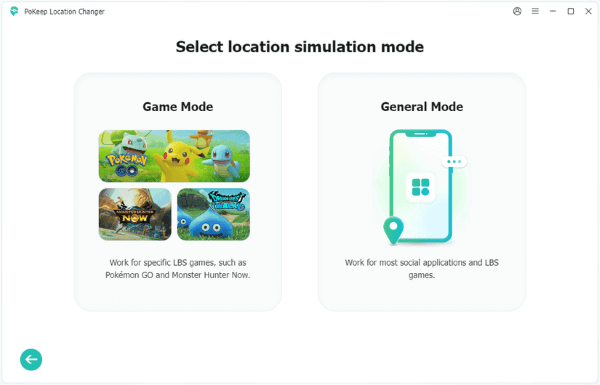
Step 3. Choose General Mode when prompted.
Step 4. Choose Joystick or Multi-Spot mode from the top-right corner, set your movement speed in the left panel, and click Start Moving to begin GPS spoofing in Orna.

2 Use Gfaker Dongle on iOS
For iOS players who prefer not to stay connected to a computer, hardware solutions like the Gfaker Dongle are another option. This physical device plugs directly into your iPhone's Lightning or USB-C port.
The dongle works as an external GPS receiver, overriding the iPhone's built-in GPS module and supplying fake coordinates to the entire iOS system. Because it operates at the hardware level, it can be more stable than mobile app-based spoofing methods and it's more convenient. However, it comes with a higher price of $299 and a long shipping wait.
Here's how to use Gfaker for GPS spoofing Orna.
Step 1. Install the companion app using the TestFlight link provided after purchasing the dongle.

Step 2. Plug the Gfaker dongle into your iPhone and connect it via Bluetooth.

Step 3. Open the companion app, choose your desired location on the map, and tap Lock Location.
3 Use Mock Locations App on Android
On Android devices, GPS spoofing typically relies on the system's Mock Location feature, which was originally designed for developers to test location-based apps. When paired with a Fake GPS app from the Google Play Store, it becomes a popular method for GPS spoofing in Orna. One widely used option is Mock Locations by Dvaoru.
Here's how to GPS spoof Orna with the Fake GPS app.
Step 1. Install Mock Locations app from Google Play Store.
Step 2. Go to Settings > About Phone, then tap Build Number seven times to enable Developer Options.
Step 3. Open Developer Options, find Select mock location app, and choose Mock Locations.
Step 4. Launch the app, place the pin on your desired location, and tap Play. You can also enable its Joystick mode to move around using on-screen controls.

Part 3. The GPS-Free Alternative to Orna: Heroes of Aethric
If your interest in GPS spoofing comes from a genuine inability to move, whether due to a disability, unsafe conditions, severe weather, or other real-life limitations, you may simply be playing the wrong version of the game.
Heroes of Aethric is a separate title released by Northern Forge that delivers nearly the same experience as Orna. It features the same classes, combat system, items, progression, and pixel-art style, making it feel instantly familiar to Orna players.

The key difference lies in movement. Instead of relying on real-world GPS data, Heroes of Aethric is designed around a virtual joystick and a traditional RPG map. This isn’t a simplified version, it’s the full Orna experience, reworked specifically for stationary play.
By switching to Aethric, you can enjoy the grind, explore freely, and progress at your own pace without worrying about GPS spoofing risks or potential account bans.
Part 4. FAQs on GPS Spoofing Orna
Can You Use VPN to GPS Spoof Orna?
No. A VPN changes your IP address, not your GPS coordinates. If your VPN places you in Japan while your GPS still shows New York, this mismatch can easily flag your account and raise red flags in Orna.
How Can I Play Orna Without Walking?
There are a couple of options. First, you can use the Wayvessel building in your Origin Town, which lets you legally teleport to the towns of your party members anywhere in the world. Alternatively, you can choose tools like PoKeep Location Changer for GPS spoofing Orna and explore the map without physical movement.
Is It Safe for GPS Spoofing Orna?
There is no method that is 100% safe when it comes to GPS spoofing in Orna. To reduce risk, it’s important to follow cooldown timers and avoid jumping long distances in a short period of time. As for the tools themselves, most reputable options, such as PoKeep Location Changer, are generally safe to install and use, but gameplay risks still exist.
Part 5. Conclusion
This is all about GPS spoofing Orna in 2026. Orna: The GPS RPG delivers a rich and rewarding experience, but its location-based design isn’t practical for every player.
In 2026, options range from Android mock location apps and iOS hardware dongles to desktop tools like PoKeep Location Changer, which offers joystick control, flexible movement modes, speed adjustment, and cooldown reminders. For a completely risk-free alternative, Heroes of Aethric provides the full Orna experience without GPS requirements.
 Related Articles





 Leave Your Comment