 By
By 

Stepping out into pouring rain at midnight just to recharge a dying L8 portal farm or block an opposing cross-link is where most Ingress agents hit their limit. But firing up Ingress Prime after tweaking your device only to get hit with the red "Scanner Disabled: Location Inaccurate" banner is even more frustrating.
Playing Ingress remotely is fundamentally different from other location games. Ingress is not a casual collector game where you sit on the couch catching monsters in private. It is a persistent territorial war where every resonator deployed, burster fired, and link thrown is broadcast to the public regional COMM feed and logged permanently on the Intel Map. Niantic has also tightened device-level security, turning traditional rooting tools and mock location apps into instant dead ends.
Playing safely from home requires understanding both the server-side mechanics and the social rules of the game. Here is how modern GPS simulation works on stock iOS and Android devices, how the 60 km/h dynamic speed bubble really functions, and how to operate without getting caught by automated filters or opposing faction scouts.
Why Rooting, Emulators & Modded APKs Fail
The old playbook for Ingress spoofing relied on rooting an Android phone with Magisk, installing custom ROMs, and using modules like Smali Patcher or LSPosed to hide mock locations. Today, that setup is completely obsolete.
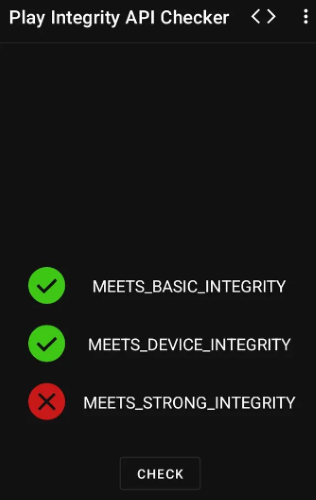
Niantic made Ingress Prime the proving ground for Google's strictest security check: MEETS_STRONG_INTEGRITY. When the scanner launches, it queries the hardware-backed Keystore inside your phone's processor. If the bootloader is unlocked, or if a custom recovery or root framework is detected, the phone fails hardware attestation. The scanner refuses to load and locks your account out before the map even appears.
Modded APKs are an even bigger trap. Agents sometimes look for a modified client like PGSharp, hoping for a simple sideloaded app with a built-in joystick. No safe or working equivalent exists for Ingress Prime. The game verifies its cryptographic client signatures against official app store releases on every login handshake. Sideloading a cracked APK from an online forum usually delivers malware or triggers an immediate permanent ban.

On-device mock location tools and desktop emulators hit similar brick walls. Enabling "Select mock location app" in Android Developer Options flags location updates in the operating system. The Ingress scanner reads that system flag directly and throws the red "Scanner Disabled: Location Inaccurate" error on the spot. Meanwhile, running Ingress on desktop Android emulators like BlueStacks triggers an immediate crash or device incompatibility block because emulators lack ARM hardware attestation and genuine sensor feeds.
| Method | Scanner Response | Risk Level | Verdict |
|---|---|---|---|
| Desktop Emulators (BlueStacks, Nox) | Immediate crash or "Device Not Compatible" | Critical | Fails Google Play Integrity at startup; unusable. |
| Modded Clients ("PGSharp Ingress", cracked APKs) | Signature mismatch detected on handshake | Critical | High malware risk; fast permanent account termination. |
| On-Device Mock Location (Play Store Fake GPS) | "Scanner Disabled: Location Inaccurate" error | High | Android mock location provider flag trips scanner security. |
| Root + Magisk / LSPosed (Unlocked Bootloader) | Fails MEETS_STRONG_INTEGRITY check |
High | Hardware Keystore blocks access; constant cat-and-mouse. |
| Desktop-Tethered GPS (PoKeep) | Fully functional official scanner | Low | Genuine app on stock, locked-bootloader devices. |
The Safe Solution: Desktop-Tethered GPS Simulation
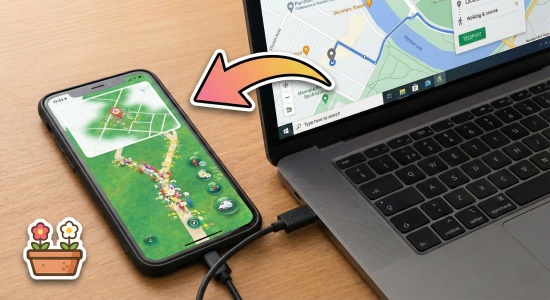
Desktop-tethered GPS simulation bypasses these anti-cheat barriers because it leaves your phone and the game client completely untouched. You connect your standard iPhone or Android device to a computer using a USB cable (or local Wi-Fi once paired). The computer communicates directly with the phone's operating system through official developer channels, feeding simulated GPS coordinates to the device before apps read them.
Because the phone remains 100% stock with a locked bootloader, it passes Google Play Integrity and Apple security checks without friction. The official Ingress Prime app downloaded from the App Store or Google Play runs unaltered, and no mock location provider is selected in Android settings. To the scanner, your device is simply receiving standard satellite coordinates.
Precision Movement Controls for Ingress Agents
Ingress requires far more physical precision than other augmented-reality titles. A capable tool like PoKeep Location Changer provides specific navigation features tailored to real portal interactions.
The Safest Way to Change Location in Ingress Prime
Spoof your GPS on iOS & Android without compromising device security. Includes a built-in Cooldown Timer to keep your account safe.

Several features are essential during live fielding sessions:
360° Joystick Micro-Positioning: Ingress rewards positioning down to the exact meter. To destroy hardened Aegis Shields, you need to stand squarely on the center of the portal. To place resonators with maximum defensive spread, you must walk the outer perimeter. The on-screen joystick lets you make these micro-adjustments effortlessly.
Natural Walking Speeds: Moving in straight lines at 40 km/h triggers automated speed flags. PoKeep lets you dial in realistic walking speeds between 5 and 9 km/h, generating plausible movement telemetry between adjacent street portals.
GPS Fluctuation: Real satellite signals never sit dead still; they wander by a few feet due to atmospheric noise and tall buildings. PoKeep includes built-in signal fluctuation that adds natural micro-drift, preventing your avatar from displaying a frozen, robotic coordinate lock.
Compatibility Across Modern Systems: It works seamlessly on factory-stock iPhones (including iOS 17 and iOS 18) and standard Android devices (up through Android 15 and Android 16), preserving your personal device warranty and daily security.
Step-by-Step: Setting Up Your Remote Scanner
Setting up your computer and phone takes less than two minutes.
Step 1 Establish the Connection

Launch PoKeep on your PC or Mac and connect your phone with a USB cable. Follow the on-screen prompt to trust the computer on your mobile screen. Once paired, iOS devices can switch to local Wi-Fi connection for cordless convenience during long fielding sessions.
Step 2 Grab Target Coordinates from the Intel Map
Open the official Ingress Intel Map in your desktop browser. Locate the portal cluster, remote farm, or anchor you want to visit. Click the portal, open the link menu, and copy the latitude and longitude coordinates.
Step 3 Teleport and Let Coordinates Settle

Paste the portal coordinates into the PoKeep search bar and click Move. Before opening the scanner or interacting with the portal, ensure you have honored the travel cooldown from your last active location.
Step 4 Navigate Portals with the Joystick

Once your position is updated, use the joystick mode on your keyboard or mouse to guide your avatar around the portal cluster. Set the movement speed to walking pace (under 9 km/h) to collect XM and hack keys naturally.
 Pro Tip:
Always close the Ingress Prime app before performing a long-distance teleport. Reopen the scanner only after your coordinates have shifted and your travel cooldown window has passed.
Ingress Cooldown Physics: The 60 km/h Dynamic Speed Bubble
Ingress Prime enforces a strict physics model. Unlike games that apply a generic two-hour cooldown table regardless of how far you traveled, Ingress calculates whether your displacement is physically plausible based on straight-line speed.
1 The 60 km/h Dynamic Speed Bubble
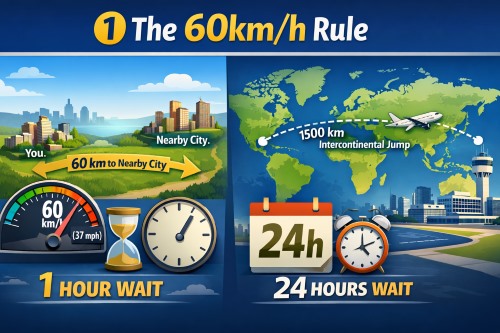
The Ingress server tracks the timestamp and coordinates of your last recorded interaction. From that point, an invisible "speed bubble" expands outward across the globe at approximately 60 km/h (around 37 mph). If you attempt an action outside that expanding radius, the server triggers a Speed Lock (often called a softban).
For example, if you hack a portal in downtown, and then jump to another portal 30 kilometers away, you must wait at least 30 minutes before performing another action. If you jump 120 kilometers to an adjacent metropolitan area, you must wait at least two full hours. Attempting to interact ahead of the expanding bubble causes the scanner to reject your actions silently.
A Speed Lock exhibits distinct symptoms on your screen:
Hacks return "Hack acquired no items," yielding zero gear and zero AP. Resonators appear to deploy on your screen for half a second, then immediately bounce back into your inventory. Fired XMP Bursters and Ultra Strikes display full animations but inflict 0% damage on opposing resonators. Links fail to establish with network errors. The speed lock clears automatically once the required travel time has elapsed.
2 Location-Logging vs. Safe Actions
Not every tap inside Ingress Prime contacts the server with GPS coordinates. Knowing which actions update your server-side location anchor is crucial for planning your route.
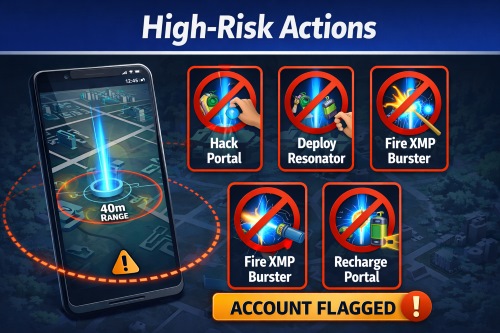
Any action that changes the game state on the world map updates your location anchor and starts a new speed bubble. This includes normal hacks, glyph hacks, deploying or upgrading resonators, firing XMP Bursters or Ultra Strikes, deploying mods (Shields, Heat Sinks, Multi-Hacks), creating links, and completing control fields.
Dropping or picking up items is also an active location check. A common misconception claims that dropping items is safe because it does not affect a portal. In reality, dropping a capsule or a portal key submits an encrypted transaction containing your exact GPS coordinates to Niantic's servers. Dropping gear immediately after a long teleport triggers the speed limit just like firing a burster.
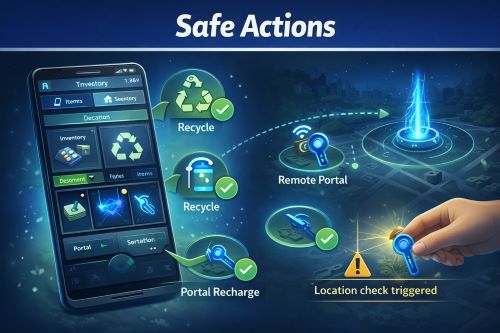
Actions that interact only with your personal inventory or cached profile data do not update your geographic anchor. You can safely recycle gear for XM, organize capsules, browse your agent badges and statistics, check the Missions tab, and read the regional COMM feed. You can also remotely recharge portals using Portal Keys from your inventory without resetting your physical location anchor.
The Social Anti-Cheat: Dodging COMM Alerts & Faction Reports
Most account bans in Ingress Prime do not originate from automated bot filters. They come from veteran agents submitting manual tickets with hard evidence. Ingress broadcasts nearly every field action to the public COMM feed with your agent handle, the target portal name, and a precise timestamp. Dedicated faction coordinators watch the Intel Map around the clock, and impossible real-world movements stand out immediately.
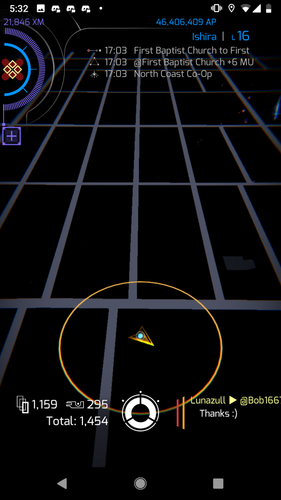
Surviving in Ingress requires respecting four iron rules of stealth.
1 Respect Park Closing Hours
Many prime portals sit inside municipal parks, historical forts, botanical gardens, and cemeteries that lock their gates at sundown. Neutralizing a farm at 2:30 AM in a park enclosed by an eight-foot locked fence is an immediate giveaway. Local agents will drive by, take a picture of the padlocked gate, and submit a ticket to Niantic with the COMM timestamp. Always check local venue operating hours before attacking.
2 Avoid Extreme Anchor Portals
Isolated portals located on mountain peaks, lighthouses on unpopulated islands with no night ferry, or restricted weather stations are heavily guarded. The agents who originally captured them know exactly how difficult they are to reach. When an unreachable anchor drops on a rainy weekday with no hiking traffic or boat charters, both factions immediately scrutinize the attacker's profile.
3 Honor Real-World Travel Times
While the mathematical speed bubble allows traveling 1,000 kilometers in 16 hours, making repeated cross-country jumps between breakfast and dinner leaves an unmistakable trail in your transaction history. When moving across continents to participate in an anomaly or major farm, close the scanner and let your account rest for realistic flight durations—including airport layovers—before your next hack.
4 Maintain COMM Silence in Unfamiliar Zones
When operating far from your home city, resist the urge to chat in faction COMM or taunt the opposition in all-COMM. Posting messages attracts local attention, prompts agents to inspect your profile stats, and leads to questions about who you are and where you are staying.
Tactical Micro-Movement: 0m Ultra Strikes & Resonator Spread
Playing Ingress from a desktop allows you to execute precise tactical maneuvers that are often difficult to pull off when walking down crowded sidewalks in the real world.
1 Zero-Meter Ultra Strike Sniping
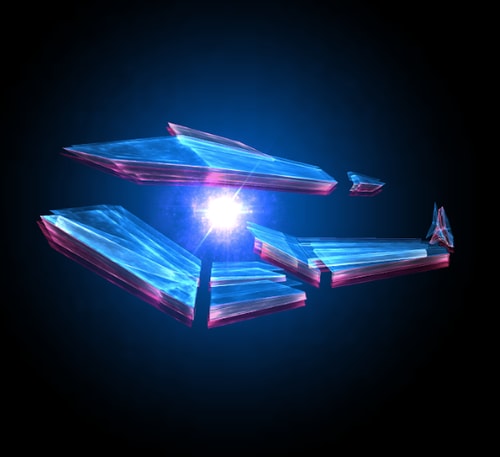
High-level enemy portals are frequently fortified with multiple Aegis Shields, which deflect up to 70% of XMP Burster damage. Ultra Strikes deal intense damage but have a tiny blast radius. The damage formula falls off sharply the farther you stand from the center of the portal. Using your joystick, guide your avatar until you stand directly on top of the portal's center point (0 meters). Firing Ultra Strikes from dead center focuses maximum critical-hit probability directly onto the mods, popping hardened shields in two or three strikes before you burn through your valuable Level 8 XMP inventory.
2 Maximum Resonator Dispersion
When agents deploy resonators while standing on the portal center, all eight resonators bunch together in a tight cluster. An enemy attacker can destroy the entire portal with just a couple of low-level bursters. To build a resilient portal, use your joystick to walk outward until you reach the 35 to 40-meter perimeter circle. Deploy resonators as you circle the portal so that each resonator sits at maximum octant distance from the center. Attackers will be forced to walk from resonator to resonator to finish off the portal.
3 The Stop-and-Play Movement Pattern
Never leave the joystick running continuously in a straight line for miles across rivers and building blocks. Real pedestrians stop at crosswalks, pause at doorways, and change directions naturally. When navigating a portal cluster, move to a portal, bring your avatar to a complete stop for several seconds, perform your hacks and deploys, and then walk to the next target. This stop-and-play rhythm creates realistic movement telemetry that blends in with genuine foot traffic.
Frequently Asked Questions
Can I use a VPN to change my location in Ingress Prime?
No. A VPN only encrypts your internet connection and changes your public IP address. Ingress Prime reads physical coordinates directly from your device's GPS hardware. Changing your IP does not move your scanner avatar, and having an IP address from another country while your GPS remains local can trigger account security flags.
What causes the "Scanner Disabled: Location Inaccurate" error in Ingress Prime?
This error occurs when the Ingress scanner detects that Android's mock location provider is enabled in Developer Options, when device bootloader integrity checks fail, or when your phone loses physical GPS lock. Using a desktop-tethered location simulator on an unrooted device replaces coordinates at the system level without tripping mock provider flags, clearing the error.
Can I play Ingress Prime on PC using emulators like BlueStacks?
No. Niantic strictly blocks Android emulators on Ingress Prime. Emulators lack ARM hardware attestation and fail Google's Strong Integrity verification, causing the scanner to crash or block login immediately.
Does dropping items or keys trigger a location check?
Yes. Dropping any item—including capsules and portal keys—submits a server-side transaction with your current GPS coordinates and timestamp. Dropping items immediately after a long-distance teleport triggers the speed limit and can cause a speed lock.
Why does my scanner sometimes jump back to my real location?
This is called "rubber-banding". It occurs when your mobile device momentarily locks onto real GPS satellite signals and overrides the simulated coordinates. To avoid this, keep your phone away from open windows and let desktop-tethered GPS hold the simulated coordinates steadily.
Does Adventure Sync track distance for Kinetic Capsules while spoofing?
No. Adventure Sync reads background pedometer step data from Apple Health or Google Fit when the game is closed. To complete Kinetic Capsule programs remotely, keep Ingress Prime open in the foreground and use simulated joystick walking speeds between 5 and 9 km/h.
Conclusion
Spoofing Ingress Prime in 2026 demands far more discipline than other augmented-reality games. Unlocked bootloaders and modified APKs are immediate ban triggers under Google's Strong Integrity enforcement, and the public COMM channel ensures that reckless jumps never go unnoticed.
By using a desktop-tethered tool like PoKeep on an unmodified device, your scanner runs on genuine, unrooted system software. Pair that clean setup with a strict adherence to the 60 km/h dynamic speed bubble, realistic venue hours, and tactical joystick micro-movement, and you can defend your faction's portals and farm AP safely from home.


 Related Articles

 Leave Your Comment