 By
By 

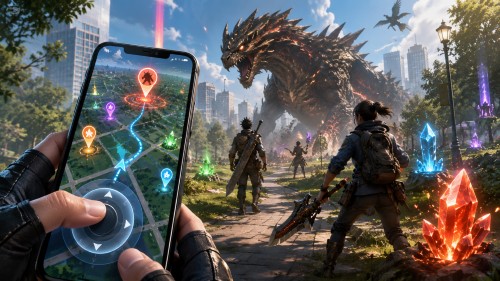
You reach the 5-star Diablos urgent quest, open the forge menu, and see you still need six Monster Bone+, four Earth Crystals, and a pile of Carpenterbugs to upgrade your weapon. You zoom out on the map. The nearest Swamp and Desert gathering points are three blocks away across a busy road, and it is pouring rain outside. To move your hunter toward a distant Hunt-a-thon point or collect materials from home, you need a virtual Monster Hunter Now joystick that changes your phone's GPS location.
How Monster Hunter Now Tracks Map Movement (And Why Standing Still Hurts)
In September 2026, players on the official Monster Hunter Now forum asked Niantic and Scopely to add an official on-screen joystick for short walks around the neighborhood. The game still does not have one. Right now, you can only zoom out with two fingers into Wide View to see what monsters are nearby. To actually tap a monster or gathering point, it has to be inside the small circle around your hunter—unless you pay for a Wander Droplet (15 minutes) or Wander Orb (30 minutes) to make that circle 50% wider.
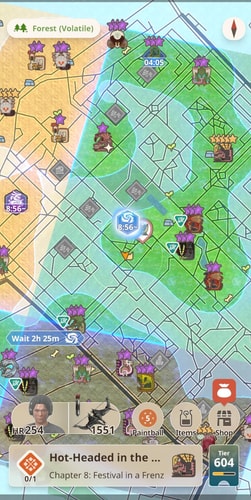
Because that interaction circle is so small, simply teleporting to one spot and standing still does not work well in Monster Hunter Now. Even if you put your GPS pin right in the middle of a busy park, staying in one place causes three problems:
First, small monsters stop appearing if you do not move. Upgrading weapons from Grade 6 to Grade 10 takes dozens of Sharp Claws and Wingdrake Hides from small monsters. If your GPS stays on the same street corner, you will clear the first few small monsters and then wait a long time for more to show up.
Second, Driftsmelting and Palico Paintballs only count real walking distance, not instant teleports. A normal Driftstone needs 5 km of walking (or 2.5 km during events) to add a bonus skill like Critical Eye or Weakness Exploit to your armor. If you teleport 5 km down the road and wait, your Driftstone progress stays at 0.0 km. You have to move steadily below the game's speed limit of about 15 to 20 km/h. Move faster than that and the "I am not a driver" warning pops up, blocks gathering points, and stops counting your walking distance.

Third, large monsters and gathering points take hours to come back. Large monsters on the map refresh once an hour, and big gathering points take about three hours to reset after you collect from them. Once you clear the spot you are standing on, you have to move down the street to find new ones. Also, Hunt-a-thons and Elder Dragon Interceptions keep checking your location while you are in the lobby, if your GPS jumps away, you get kicked out of the group.

2026 Monster Hunter Now Joystick Methods Compared
Not every GPS joystick works with Monster Hunter Now's location checks. Here is a quick comparison of the five main ways players set up a joystick on iOS and Android.
| Joystick Method | Platform | Jailbreak / Root Needed? | What Happens on Screen | Driftsmelting & Hunt-a-thon Support |
|---|---|---|---|---|
| Computer GPS Joystick (PoKeep) | iOS & Android | No | Official app loads habitats, monsters, and gathering points without errors | Full support (360° joystick + 9 km/h auto-walk routes) |
| Play Store Mock Location Apps (GPS JoyStick) | Android | No (Developer Options) | Shows "Getting location information now" and a blank map unless turned off | Does not count Driftsmelting distance; fails in Hunt-a-thons |
| iTools BT 2.5 Hardware Dongle | iOS | No ($73–$120+ dongle) | Physical Bluetooth joystick moves your hunter within a ~15–50 km range | Good for manual local hunts; harder to run automatic walking routes |
| VMOS Virtual Android App | Android | Virtual Root inside VM | Blocked by the Sept 2026 update on Android 16; heavy lag during fights on older phones | Unreliable; often crashes in group lobbies |
| Rooted Android (Magisk / KernelSU + LSPosed) | Android | Yes (Unlocked Bootloader) | On-screen joystick works when paired with Hide Mock Location and Location Accuracy OFF | Full support, but requires changing settings and restarting to walk outside normally |
Best iOS & Android Joystick Without Root or Jailbreak: PoKeep Location Changer

If you want a Monster Hunter Now joystick that works on your regular iPhone or Android phone without rooting, jailbreaking, or dealing with blank maps, PoKeep Location Changer is the easiest option. Instead of putting a fake GPS overlay app on your phone that the game can easily block, PoKeep runs on your Windows PC or Mac and updates your phone's system GPS location over USB or Wi-Fi.


Because you still play on the official Monster Hunter Now app from the App Store, you do not need Android's mock-location setting turned on. The game treats your movement like a normal walk outside. Habitats, large gathering points, Dimensional Links, and Elder Dragon Interceptions all load normally without the "Getting location information now" error.
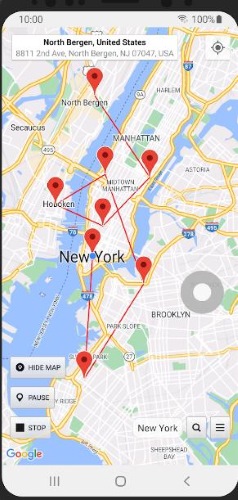
PoKeep also gives you two ways to move. When you are actively hunting, you can use the 360° GPS Joystick with your mouse or W, A, S, D keys to walk from monster to monster. When you just want to finish a 5 km Driftstone, you can switch to Two-Spot, Multi-Spot, or GPX Route Mode at 9 km/h and let your hunter walk a path automatically while your phone sits on your desk.
Step-by-Step: How to Use PoKeep's Joystick & Route Mode in MH Now
Step 1 Connect Your iPhone or Android to PoKeep

Install and open PoKeep Location Changer on your Windows PC or Mac. Plug your iPhone or Android phone in with a USB cable for the first connection (after that, you can connect over the same Wi-Fi network) and choose Game Mode or General Mode on screen.
Step 2 Pick a Nearby Hunting Spot Before Opening the Game
Keep Monster Hunter Now closed while you pick your starting spot. Instead of jumping to another country, choose a busy park, college campus, or downtown area in your own city, or just start from your own neighborhood. Once your pin is set, open Monster Hunter Now and let the map load.
Step 3 Move with the 360° GPS Joystick for Nearby Nodes & Hunts

Click the Joystick Mode icon (the fourth button in the top-right toolbar). Set the speed slider to a normal walking speed, around 8 to 10 km/h, and use your mouse or W/A/S/D keys to walk your hunter up to large gathering points, 8-star monsters, or Hunt-a-thon lobbies.
Step 4 Set an Automatic Walking Route for Driftsmelting
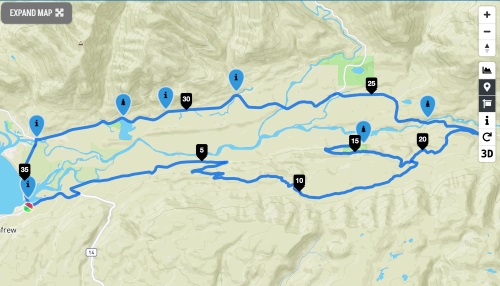
When your Driftstone slots are full, switch to Multi-Spot Mode or import a GPX route file. Set the speed to 9 km/h and turn on Realistic Fluctuation. Your hunter will walk along the road automatically, spawning small monsters along the way and finishing a 5 km Driftstone in about 35 minutes without triggering the high-speed warning.
Other Joystick Setups on Android and iOS (And Why Most Break)
If you have tried using a free joystick app on Android or looked into hardware dongles on iOS, you have probably run into blank maps, update errors, or fake download links. Here is what actually happens with each option in 2026.
1. Play Store Mock Location Apps & The "Pause-and-Tap" Trick
Android lets you install free Play Store apps like Fake GPS Location – GPS JoyStick (by The App Ninjas) and select them under Settings > Developer Options > Select mock location app. That floating joystick works fine in Google Maps. If you open Monster Hunter Now with that setting turned on, however, a red bar appears at the top of the screen saying "Getting location information now" or "Searching for GPS signal." The map stays completely blank. You will not see habitats, gathering points, or monsters.

To get around that blank screen without rooting, some Android players use a quick switching trick called Pause-and-Tap. First, you open Monster Hunter Now on your real GPS so nearby monsters and gathering points load on the map, lock the game in your Recent Apps list, and set its battery usage to Unrestricted. Next, you switch to the mock joystick app, move the pin onto a monster you could already see in Wide View, immediately turn the mock location off, and switch right back to Monster Hunter Now. As the red warning disappears, you have about half a second to tap the monster before your character snaps back to your real house.
This trick only works on monsters that have already loaded near your house. If you move the pin two kilometers away, the new map area will not load at all. Switching too fast also triggers the "I am not a driver" warning, it adds zero distance to your Driftstones, and it kicks you out of Hunt-a-thons and Elder Dragon Interceptions because the lobby checks your location again before the fight starts.
2. VMOS Virtual Machines After the September 2026 Security Patch
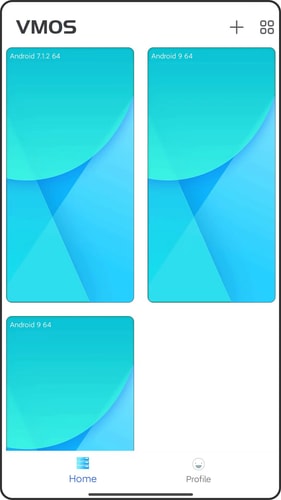
For a while, Android players used VMOS Pro to run a virtual Android system ("a phone inside a phone") so they could hide mock locations without rooting their real phone. That method stopped working for many players after the September 1, 2026 Android security update. On updated Android 16 phones, including recent Pixel and Samsung Galaxy models, VMOS fails to open and shows a permanent starting failed error.
Even on older phones that have not installed the September 2026 update, running Monster Hunter Now inside a virtual app makes the game lag badly. In tough 8-star fights, that screen stutter makes it hard to dodge on time and wastes your First-Aid Meds.
3. Rooted Android (Magisk / KernelSU Next + LSPosed)

If you have a spare Android phone with an unlockable bootloader, and at least a Snapdragon 865 processor with 6 GB of RAM so fights do not lag. Then your rooted phone can run an on-screen joystick directly. You root the phone with Magisk (v28.1 or v30.1, since Magisk v29 has module issues) or KernelSU Next with ReZygisk, install LSPosed, and turn on the Hide Mock Location module so Monster Hunter Now cannot tell that GPS JoyStick is running.
The trade-off is that Rooting voids your warranty and can break banking or Google Wallet apps. It also comes with an annoying daily hassle: while using the joystick, you must turn Google Location Accuracy OFF in your Android location settings, or your hunter will keep jumping back and forth between your real house and your spoofed park. Every time you want to use Google Maps in your car or play normally outside, you have to turn off the LSPosed module, turn Google Location Accuracy back on, and restart your phone.
4. iTools BT 2.5 Hardware Dongle on iOS

Some iPhone players buy the physical iTools BT 2.0 or 2.5 Bluetooth controller ($72.99 to $120+ USD depending on shipping and stock). It pairs to your iPhone over Bluetooth and uses a TestFlight companion app to change your iPhone's GPS location without a jailbreak.
But besides the high price and frequent out-of-stock waits, iOS limits standalone Bluetooth dongles to a range of about 15 to 50 km unless you connect extra Ethernet adapters and change your DNS settings. It works fine for walking around your own town, but it is much less convenient than a computer tool when you want to run automatic 5 km walking routes for Driftsmelting.
5. The "PGSharp Monster Hunter Now APK" Myth
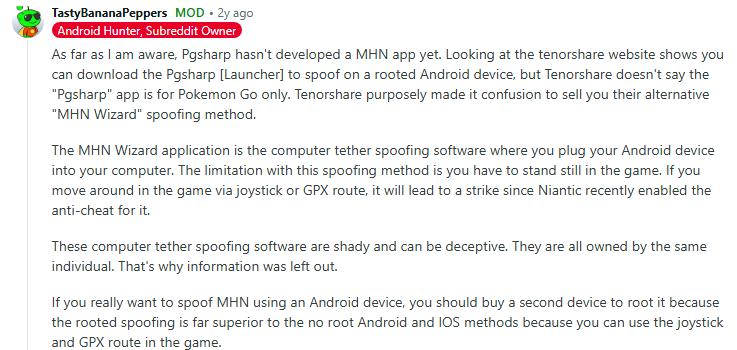
While looking for an Android joystick, you will likely see websites offering a "PGSharp Monster Hunter Now APK" or a modified "MHN Wizard" app with a built-in joystick. Do not download them. The teams behind PGSharp, iPogo, and SpooferPro have all confirmed on their official Discord servers that they only make tools for Pokémon GO and do not have a Monster Hunter Now app.
Any website offering a "PGSharp MH Now mod APK" is fake. Those downloads are either ad scams, modified game files that get your account banned right away, or unsafe apps trying to steal your Google or Apple login. Always use the official Monster Hunter Now app from the App Store and change your GPS location from outside the game.
Monster Hunter Now Joystick FAQ
Does Monster Hunter Now have an official virtual joystick or controller support?
No. Players asked for an official on-screen joystick on the Monster Hunter Now community forum in September 2026, but the game still does not have one. Physical Bluetooth controllers like the PS5 DualSense or Switch Pro Controller are made for console games like Monster Hunter Wilds and Rise. They cannot walk your character across the Monster Hunter Now map.
Why does Monster Hunter Now say "Getting location information now" with a free GPS joystick?
When you pick a free spoofing app under Select mock location app in Android Developer Options, Monster Hunter Now can see that setting is turned on. The game shows "Getting location information now" or "Searching for GPS signal" and leaves the map blank until you turn off the mock-location setting or use a computer-based location changer instead.
Can I use PGSharp for a Monster Hunter Now joystick on Android?
No. Both the PGSharp and iPogo teams have confirmed on their official Discord servers that they only make tools for Pokémon GO and do not have a Monster Hunter Now app. Websites offering a "PGSharp Monster Hunter Now APK" are fake and can put your game account and login details at risk.
What joystick speed should I use for Driftsmelting in Monster Hunter Now?
Set your GPS joystick or automatic walking route between 8 km/h and 10 km/h. Instant teleports do not count toward 5 km Driftstones, and moving faster than 15 to 20 km/h triggers the "I am not a driver" warning, which blocks gathering points and pauses your Driftstone distance.
Does a VPN work as a Monster Hunter Now location spoofer?
No. A VPN only changes your internet IP address. Monster Hunter Now uses your phone's actual GPS coordinates, so turning on a VPN will not move your hunter or load new monsters on the map.
Will using a GPS joystick get my Monster Hunter Now account banned?
Using any GPS spoofer goes against the game's Terms of Service and carries some account risk. To stay as safe as possible, always play on the official game app with a computer-based tool like PoKeep instead of modified APKs, keep your walking speed under 10 km/h, and avoid jumping between distant countries in the middle of a session.
Final Thoughts
In Monster Hunter Now, steady walking matters much more than one-click teleporting. Whether you need Monster Bone+ nodes to upgrade your weapon, want to join an 8-star Hunt-a-thon a few blocks away, or need to walk 5 km for your Driftstones, you need a joystick that moves at a natural walking speed without triggering Android's blank-map error.
Skip the fake PGSharp APK downloads and laggy virtual-phone apps. Using the official game with PoKeep Location Changer gives you a smooth 360° GPS joystick and automatic walking routes on both iPhone and Android, with no root, no jailbreak, and no blank maps.
 Related Articles



 Leave Your Comment