 By
By 
Tired of endless real-world trekking just to hatch a few eggs or earn some Buddy Candy in Pokémon GO? You're not alone. That's why you may wonder how to fake walking in Pokémon GO and enjoy the game from the comfort of your homes.

This comprehensive guide will show you how to move your avatar, hatch eggs, and rack up Buddy Candy without taking a single step, focusing on methods that prioritize your account's safety.
Part 1. The Golden Rules: Staying Safe While Faking Movement
Before you start to fake walking in Pokémon GO, it's crucial to understand a few safety basics. Ignoring them can lead to soft bans or even permanent account suspension.
Respect the Pokémon GO Speed Limit
Pokémon GO is designed for real walking. If your speed stays above 10.5 km/h, the game may treat you as if you're driving, which can stop egg hatching, distance tracking, and Pokemon GO spawns. So, to safely fake walking in Pokemon GO, keep your speed between 5–9 km/h for natural, reliable progress.

Understand the Cooldown Timer
Niantic uses cooldowns to detect sudden location changes. After spoofing your location, wait before interacting with the game:
-
Short Distances (e.g., 1-5 km): Wait 1-5 minutes.
-
Medium Distances (e.g., 50-100 km): Wait 15-20 minutes.
-
Long Distances (e.g., 500+ km): Wait a full 2 hours.
Avoid catching Pokémon, spinning PokéStops, or battling during this time, or you may trigger a soft ban.
Part 2. How to Fake Walking in Pokemon GO Safely via PoKeep
If you want full control over your in-game movement—such as following specific routes to spin multiple PokéStops—professional software is the most reliable option. PoKeep Location Changer is one of the leading tools for this purpose.

PoKeep Location Changer
PoKeep lets you walk virtually, hatch eggs faster, and explore anywhere without leaving your seat.
It works smoothly on both iOS and Android and offers built-in features that simulate natural walking speeds and routes, helping reduce the risk of detection while you fake walking in Pokémon GO.
Step 1. Download the PoKeep software to your computer (PC or Mac).
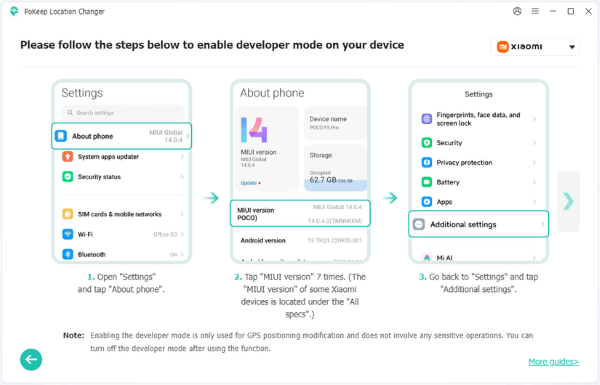
Step 2. Launch PoKeep and connect your iOS or Android device to your computer using a USB cable. You might need to enable "Developer Options" and "USB Debugging" on Android, or "Developer Mode" on iOS.
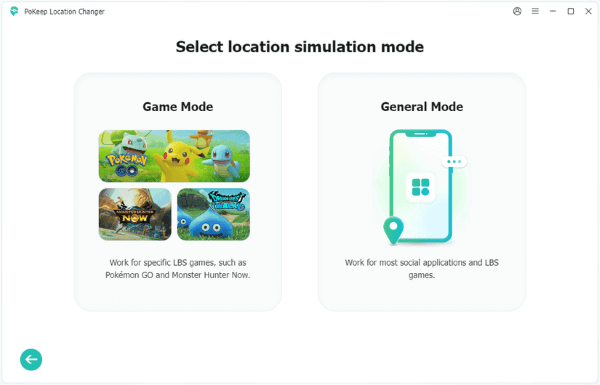
Step 3. Choose Pokemon GO under Game Mode. Then, you'll enter the Map view.
Step 4. Choose Teleport, Jump Teleport, Two-Spot, Multi-Spot, or Joystick Mode at the top-right corner. Set your walking speed in the left panel, then click Start Modifying.

Part 3. Pokemon GO Walking Hack via Adventure Sync
The Adventure Sync feature is a great option for players who want to fake walking in Pokémon GO with minimal risk. Instead of relying on GPS, it counts steps using your phone's motion sensors and health apps (like Google Fit or Apple Health), making this method much harder for Niantic to detect.
1 Use a Phone Swing [iOS/Android]
A phone swing (or pedometer shaker) is a small device that gently moves your phone to simulate walking. It's simple, affordable, and very effective.
How it Works:
Step 1. Enable Adventure Sync in your Pokémon GO Settings > General.
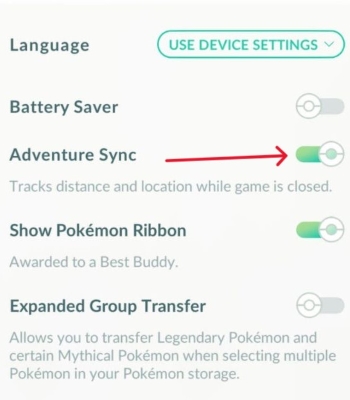
Step 2. Close Pokémon GO completely (ensure it's not running in the background).
Step 3. Place your phone securely in the swing.
Step 4. Turn on the swing and let it run.
Step 5. After some time, open Pokémon GO, and your accumulated distance will be added.
2 Use Adventure Sync Injection Apps [Android]
For Android users, certain apps like DeFit can directly inject step data into Google Fit, which Adventure Sync then reads.
However, keep in mind that in 2026 this method may be less reliable, since Google now uses Health Connect instead of the old Google Fit API, which can sometimes interrupt syncing with Pokémon GO.
Here's how to use DeFit as an example:
Step 1. Download DeFit from the Google Play Store.
Step 2. Allow access to your Google Fit data (you need to watch ads to earn minutes).
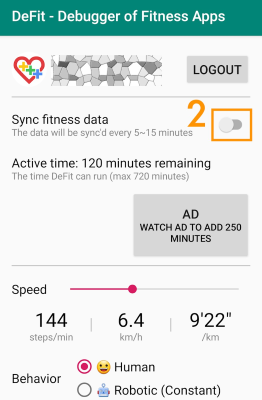
Step 3. Set a desired walking speed and duration within the app.
Step 4. Start the "activity" in the app, and it will generate steps for you.
Step 5. Close the app, then open Pokémon GO after a few minutes to see your distance update.
Part 4. How to Fake Walking in Pokemon GO via iTools BT Dongle
For iOS players who value safety and accuracy, the iTools BT Dongle (and similar hardware devices) is a premium way to fake walking in Pokémon GO. Since it changes your location at the hardware level instead of using software-based mock locations, it's generally harder for Niantic to detect.

Here’s how to use iTools BT dongle:
Step 1. Install the iToolsBT app through TestFlight using the invitation link sent to your email after purchasing the dongle.
Step 2. Pair the dongle with your iPhone via Settings > Bluetooth.
Step 3. Open the iToolsBT app and complete the in-app Bluetooth pairing.

Step 4. Use the built-in joystick to move around (up to 20 km). If you exceed this limit, additional setup is required to remove the restriction.
Part 5. More Tips to Reduce Walking in Pokemon GO
Besides learning how to fake walking in Pokémon GO, you can also use smart in-game tricks to cut down the distance you need to travel. Here are three easy ways to progress faster with less real-world movement.
1 Optimize Your Buddy Choice and Mood
One of the most efficient ways to reduce the walking requirement is to use the Excited Mood mechanic. Feeding your buddy a Poffin immediately makes it "Excited", which cuts the distance required for a Buddy Candy by 50%. For example, a Legendary Pokémon that usually requires 20km per candy will only require 10km.
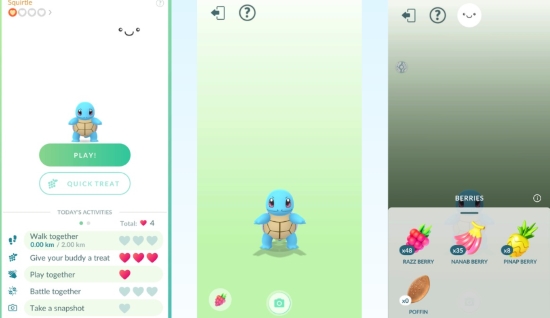
If your goal is specifically to finish "Earn X Candy with your Buddy" tasks, switch to Pokémon like Magikarp, Caterpie, or Swablu. They only require 1km per candy (0.5km when Excited).
2 Put Your Phone at The Robot Vacuum
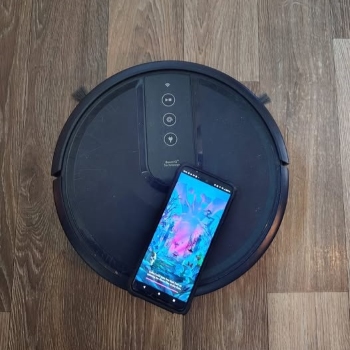
This is a quirky but effective method that leverages Adventure Sync. Secure your phone to a robot vacuum cleaner like a Roomba. As the vacuum navigates your home, your phone's accelerometer will register steps, and Adventure Sync will log the distance. This is a low-effort way to accumulate kilometers while cleaning!
3 Use Lure Modules and Incense Strategically
While these don't "fake walking," they bring the Pokémon to you, reducing your need to move around searching.
-
Lure Modules: Place a Lure Module on a PokéStop to attract Pokémon to that specific location for 30 minutes (or longer for special lures). If you're near a PokéStop, this is an excellent way to catch Pokémon without moving.
-
Incense: Activate an Incense, and Pokémon will appear near your avatar, regardless of your location. During special events, Incense can be incredibly potent, sometimes attracting Pokémon without you needing to move at all.
Part 6. Conclusion
Learning how to fake walking in Pokémon GO has changed the way many trainers enjoy the game. Whether you choose powerful software like PoKeep for precise route control, rely on the low-risk Adventure Sync methods such as a phone swing, or invest in hardware like the iTools BT Dongle for maximum iOS safety, there's a solution for every playstyle.
With the right approach, you can hatch eggs, earn Buddy Candy, and explore the Pokémon world efficiently—no long walks required.
 Related Articles







 Leave Your Comment