 By
By 

If you are a fan of location-based RPGs, Dragon Quest Walk is likely on your radar. Often described as the "deeper, RPG-focused cousin" of Pokémon GO, it combines the classic turn-based combat of the Dragon Quest franchise with real-world exploration. However, there is a massive barrier for international fans: the game is strictly region-locked to Japan.

Attempting to play Dragon Quest Walk outside Japan typically results in a desolate, empty map devoid of monsters, but thousands of international fans have found a way in. This guide details exactly how to bypass these restrictions on Android and iOS, showing you how to install the game and spoof Dragon Quest Walk to transport yourself to the bustling streets of Tokyo from the comfort of your home.
Part 1: How to Download Dragon Quest Walk Global Version
Before you can worry about Dragon Quest Walk spoofing, you need the game on your device. Since there is no official "English version" or global release on the standard App Stores, you must bypass the regional restrictions to get the Japanese client.
For Android Users
There are two main ways to get the game on Android: using a third-party app store (easiest) or changing your official Play Store region.
Option 1: Qooapp App Store
The simplest method—which doesn't require a VPN or account switching—is to use a reputable third-party app store like QooApp.
Step 1. Download and install the QooApp APK from their official website.
Step 2. Open QooApp and search for "Dragon Quest Walk".
Step 3. Download and install the game APK directly through QooApp.
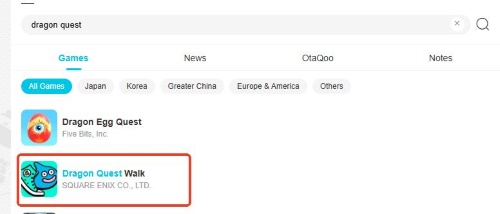
Step 4. Launch the game to ensure it loads (the map will be empty until you spoof).
Option 2: Official Google Play Store
If you prefer downloading Dragon Quest Walk from the Google Play Store directly to ensure automatic updates, you must switch your store region to Japan.

Step 1. Download a VPN app and connect to a Japan server.
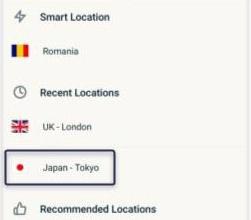
Step 2. Go to your phone’s Settings > Apps > Google Play Store and tap "Clear Storage/Data".
Step 3. Open the Play Store. You may need to create a new Google Account while connected to the Japanese VPN to lock the region to Japan without needing a Japanese payment method.
Step 4. Switch to this new account in the Play Store. You should now see Japanese games in the charts.
Step 5. Search for Dragon Quest Walk and install it officially.
For iOS Users
To play Dragon Quest Walk on iOS, iPhone users face a slightly stricter "walled garden", but the workaround is well-known and safe.
Step 1. Sign out of your current Apple ID in the App Store.
Step 2. Create a new Apple ID and select Japan as your region.
Step 3. Fill in the required information. You can generate a random Japanese address using online tools (no credit card is needed; select "None" for payment).
Step 4. Log in with this new ID, search for Dragon Quest Walk in the App Store, and download it.
If you have Japanese billing method, you can also change the app store directly with exsiting account:
How to Change Apple ID Country Region to Japan
Part 2. Why You Need a Dragon Quest Walk Fake GPS Tool
Once you launch the app, you will hit the second wall: the GPS check. Dragon Quest Walk uses your phone’s physical location to generate the game world. If your GPS puts you in New York, London, or Sydney, the game simply won’t render any monsters, quests, or landmarks.
To actually play, your phone needs to believe it is in Japan.
This is where a dedicated Dragon Quest Walk fake GPS tool becomes essential. Unlike basic mobile spoofing apps that often require rooting your Android or jailbreaking your iPhone—both of which can trigger security alerts in the game—desktop-based solutions offer a safer, non-invasive alternative.
Part 3. Best Dragon Quest Walk Spoofer: Teleport to Japan with PoKeep
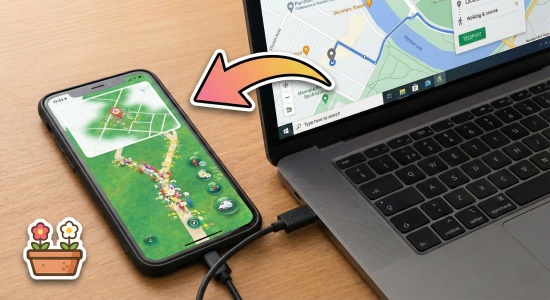
For a seamless experience, we recommend using PoKeep Location Changer. It works by connecting your phone to your computer and virtually overriding the GPS signal at the system level. This allows you to spoof Dragon Quest Walk without modifying the game files or jailbreaking your device, keeping your account much safer.


Here is how to set up your virtual journey:
Step 1. Download and launch PoKeep on your Windows or Mac computer, then click "Start".
Step 2. Connect your iPhone or Android device to the computer using a USB cable (you can switch to Wi-Fi after the first connection).

Step 3. Choose Dragon Quest Walk in Game Mode. Once the map loads, select "Teleport Mode" (the first icon in the upper right corner).

Step 4. Enter a Japanese location in the search bar. Tokyo Tower or Shinjuku Station are great starting points because they are densely packed with monsters and quests.
Step 5. lick "Start Moving". Your phone’s location will instantly shift to Japan, and the Dragon Quest Walk map will suddenly burst to life with slimes and landmarks.
Part 4. Automate "Walk Mode" with GPS Joystick & Routes
One of the best features in the game is WALK Mode (WALKモード). When enabled, your character automatically fights monsters and heals at recovery spots as you move. This is designed for commuters in Japan, but you can replicate this experience at home using PoKeep’s movement simulation.
Standing still in the game is not efficient; you need to move to encounter new monsters and hatch eggs.
Step 1. In PoKeep, select "Multi-Spot Movement" mode.

Step 2. Click multiple points on the map to create a loop or a long path through a city like Osaka or Kyoto.
Step 3. Set your speed. For Dragon Quest Walk, a walking speed of roughly 4km/h to 6km/h is ideal. Going faster (like driving speed) will prevent you from battling monsters and may trigger a "speed lock" where interactions fail.
Step 4. Click "Move" to start the simulation. On your phone, enable "WALK Mode" and watch your character grind XP and Gold automatically while you do other things.
Part 5. How to Collect Omiyage Safely in DQ Walk Without Soft Bans
A major endgame activity is collecting Omiyage (Souvenirs). There are 188 unique landmarks across Japan’s 47 prefectures—like the Golden Pavilion in Kyoto or the Sapporo TV Tower in Hokkaido. Visiting these unlocks special quests and exclusive items.
When using a Dragon Quest Walk spoofer, you can collect these without buying a plane ticket, but you must be careful to avoid "Soft Bans".
Understanding Cooldowns
If you teleport from Tokyo to Sapporo (an 800km distance) instantly and try to interact with a landmark, the game will reject the action. The monsters will flee, and the quest won't trigger. This is a "Soft Ban."
To avoid this, use the Cooldown Timer feature built into PoKeep.
-
Short jumps (1-5km): Wait a few minutes.
-
Medium jumps (100km): Wait about 45 minutes.
-
Long jumps (1000km+): Wait at least 2 hours.
The safest strategy is to "travel" virtually. If you want to hunt in a new prefecture, close the game, teleport to the new location using PoKeep, wait the appropriate cooldown time, and then open the game. This mimics the time it would take to travel in real life.
Part 6. FAQs about Spoofing DQ Walk
Is Dragon Quest Walk available in English?
No, the game is currently only available in Japanese. However, the UI is intuitive for anyone familiar with RPGs or Dragon Quest games. Many international players use screen translation apps (like Google Lens or Tap To Translate) to understand quest objectives and item descriptions.
Why do I get a "GPS Signal Not Found" error?
This error often occurs if your device's location services are not set to "High Accuracy" or if you are indoors with a poor signal. Ensure that:
-
Location Services are turned ON.
-
The game has permission to access your location "While Using the App".
-
If you are spoofing, ensure your location tool is properly connected and not jumping wildly, which can confuse the game client.
What is "WALK Mode" (WALKモード) and how does it work?
WALK Mode is an automation feature designed for safety while walking. When enabled, your character will automatically battle nearby monsters and heal at recovery spots without you needing to touch the screen. It is perfect for grinding XP and Gold hands-free, especially when combined with a simulated walking route.
Why can't I see any monsters or quests on my map?
If you have installed the game but the map is empty, it is likely because your GPS location is physically outside of Japan. The game's servers only populate content within Japanese borders. You must use a location changer to virtually move your device to Japan to see gameplay elements.
Will I get banned for playing outside Japan?
While Dragon Quest Walk is generally considered less aggressive with bans than Pokémon GO, risk is never zero. The most common penalty is a "Soft Ban", which happens if you teleport long distances instantly (e.g., Tokyo to Osaka in 1 second). During a soft ban, monsters will flee immediately, and you cannot interact with quest spots. To avoid this, always wait for a realistic travel time (Cooldown) before interacting with the game after moving.
Conclusion
Dragon Quest Walk is a phenomenal RPG that deserves a global audience. While the developers have kept it locked to Japan, tools like PoKeep Location Changer tear down those borders, allowing you to experience the full game from anywhere in the world.
Whether you are automating your daily grind with simulated walking routes or teleporting across the country to complete your Omiyage collection, remember to spoof responsibly. Keep your movement speeds realistic, respect cooldown times, and enjoy your virtual adventure across Japan!
 Related Articles




 Leave Your Comment