 By
By 
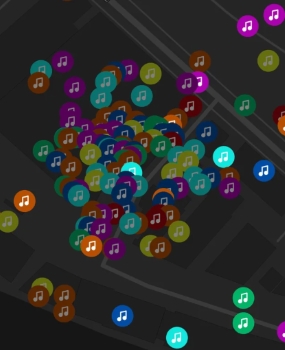
Soundmap has turned everyday commutes into exciting treasure hunts for rare songs and epic drops. However, for players who live in rural areas or can't easily travel to busy cities, the experience can sometimes feel unfairly limited. This is why many players are looking for ways to learn how to spoof in Soundmap.

With a Soundmap spoofer, you can change your GPS location and instantly explore global music hotspots like New York, London, or Tokyo without leaving your couch. In this guide, we will explore the most effective and safe methods to spoof your location in Soundmap while protecting your account from bans.
Part 1. Can You Still Spoof in Soundmap on iOS 27 and Android 17?
As mobile operating systems evolve, Apple and Google have made it harder to manipulate GPS data. However, as of 2026, spoofing is still very much possible. The key is using tools that can bypass the system-level checks implemented in iOS 27 and Android 17.
Unlike older methods that required jailbreaking or rooting, modern solutions now focus on tethered desktop software or sophisticated "Mock Location" protocols. These methods are not only easier to set up but are significantly harder for Soundmap's anti-cheat systems to detect because they simulate a legitimate hardware GPS signal.
Part 2. The Best Soundmap Spoofer Tools in 2026
To successfully change your location, you need a reliable Soundmap spoofer. Not all apps are created equal; some can cause your game to lag, while others might lead to an immediate soft ban. Below are the best and safest Soundmap location spoofer options for 2026, covering both iOS and Android users.
1 PoKeep Location Changer [iOS/Android]
PoKeep Location Changer is currently one of the most balanced and beginner-friendly solutions for both platforms. It solves the core problem of detection by using a "virtual GPS driver" that Soundmap recognizes as legitimate hardware data. This makes it an excellent choice if you're serious about learning how to spoof in Soundmap safely.
-
Joystick Mode: Walk naturally around the map at custom speeds to collect multiple drops in one session.
-
Cooldown Timer: Warns you if you're teleporting too quickly, helping you follow realistic travel times and avoid flags.
-
Full Compatibility: Works smoothly with the latest iOS 27 and Android 17 updates.

PoKeep Location Changer
Connect, click, and teleport to music hotspots worldwide to collect rare tracks, epic drops, and complete your favorite artist’s discography, no travel required.
How to Spoof in Soundmap Without Being Banned
Step 1. Download and install PoKeep Location Changer. Connect your phone to your computer via a stable USB cable.
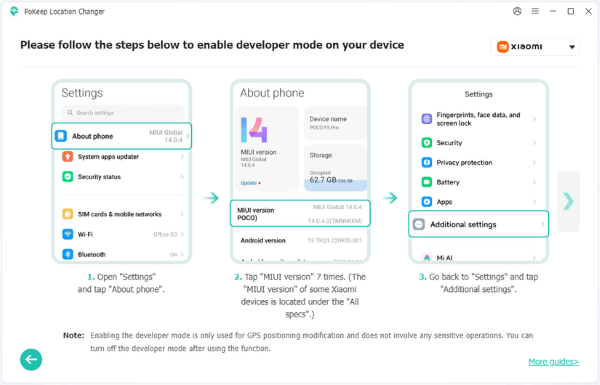
Step 2. Enable Developer Mode by following the on-screen instructions.
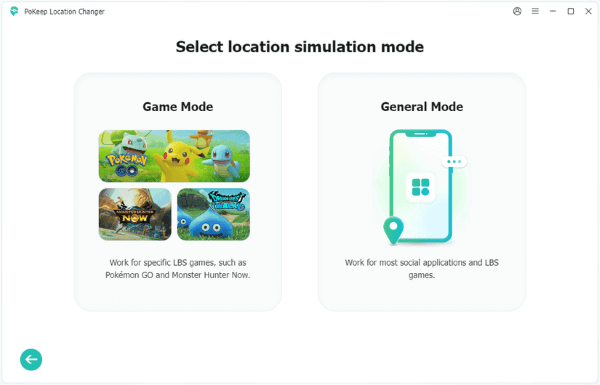
Step 3. Click Next, choose General Mode, and enter the map interface.
Step 4. Choose Joystick Mode or other movement modes in the top-right corner to simulate walking.

Now you can launch Soundmap and your avatar should now appear in the new location, surrounded by fresh drops.
2 Mock Locations App [Soundmap Spoofer Android]
For those looking for a soundmap spoofer android solution that works directly on the device, Mock Locations by Dvaoru is a reliable choice. It requires you to enable "Mock Locations" in your Developer Options. While effective, it lacks the advanced encryption of desktop-based tools, so it is best used for short-distance movements within the same city.
Step 1. Install Mock Locations by Dvaoru from the Google Play Store.
Step 2. Go to Settings > About Phone and tap Build Number seven times to unlock Developer Options, then enable USB Debugging.
Step 3. On Developer Options, scroll to Select mock location app, and choose Mock Locations.
Step 4. Open the Mock Locations app and select Joystick Mode.

Step 5. Now you can use the on-screen Joystick to move around while playing Soundmap.
3 iTools BT Dongle [Soundmap Spoofer iOS]
For serious collectors who want maximum safety, the iTools Bluetooth Dongle is a premium Soundmap spoofer iOS solution. This physical device plugs directly into your iPhone and overrides GPS data at the hardware level. Because it behaves like a real GPS module, it is extremely difficult for Soundmap to detect. It is more expensive than software but offers the highest level of security for high-value accounts.


Part 3. Pro Tips for Soundmap Spoofing
If you want to maximize your collection and consistently land those hard-to-find Shiny or Epic drops, it helps to go beyond basic point-to-point movement. Smart spoofing habits can make a huge difference, both for your results and your account safety.
-
Follow the 2-Hour Rule: If you teleport from Los Angeles to New York, wait at least two hours before opening Soundmap or collecting drops. This mimics realistic flight time (with a little buffer) and dramatically lowers the risk of triggering anti-cheat systems.
-
Target University Campuses: Places like NYU, UCLA, or other large colleges are gold mines for drops thanks to high player activity. They're perfect hotspots when using a Soundmap spoofer.
-
Avoid Speed Caps: If you "walk" too fast (over 20 km/h), Soundmap may stop spawning drops or prevent you from opening them. Keep your movement speed low and steady to stay under the radar, which is similar to Pokemon GO speed limit.
Part 4. Troubleshooting Common Soundmap Spoofing Errors
Even with the best tools, you might encounter issues. Here is how to fix the most common problems:
The "Something Went Wrong" Drop Error
This usually happens if the game detects you are moving too fast or if your GPS is flicking between your real and fake location. To fix this, close the app and ensure your location changer is set to a stable, stationary point before reopening. It's suggested to use smooth movement modes (like joystick walking) instead of frequent teleporting, which can also help prevent this issue in the future.
Drops Not Loading
If you arrive at a new location but no songs appear, the game may still be using cached location data. Close Soundmap completely, toggle your phone's Airplane Mode on and then off, and restart Soundmap. This forces the app to refresh its connection and reload nearby drops based on your new GPS location.
Part 5. FAQs on Soundmap Spoofing
Is it safe to use a spoofer in Soundmap?
Using a reputable spoofer like PoKeep is generally safer than using modified game apps (APK/IPA files), as these tools change the system-level GPS without altering the game's original code. However, no spoofing method is 100% risk-free. To stay safe, always follow cooldown rules and avoid unrealistic teleporting while the game is open.
Do I need to jailbreak my iPhone to spoof in Soundmap?
No. Most modern Soundmap spoofers work via a desktop connection (USB or Wi-Fi) and do not require you to jailbreak your iOS device or root your Android phone. This keeps your device's security intact while still allowing you to change your location.
Part 6. Final Thoughts
Learning how to spoof in Soundmap can completely transform your gaming experience, letting you hunt for rare tracks and complete your favorite artist's discography no matter where you live. By choosing a reliable Soundmap spoofer like PoKeep Location Changer and following the safety tips outlined above, such as respecting cooldown times and using realistic movement, you can explore global music hotspots with confidence.
Whether you're on iOS or Android, smart location spoofing opens the door to more drops, better collections, and a more exciting Soundmap journey, all while keeping your account secure and ban-free.
 Related Articles



 Leave Your Comment