 By
By 

If you have ever felt restricted by iTunes or Finder when managing your iPhone, you are likely looking for a more powerful solution. 3uTools has established itself as one of the most popular all-in-one tools for iOS users, offering features that range from simple data backups to advanced firmware flashing and jailbreaking.
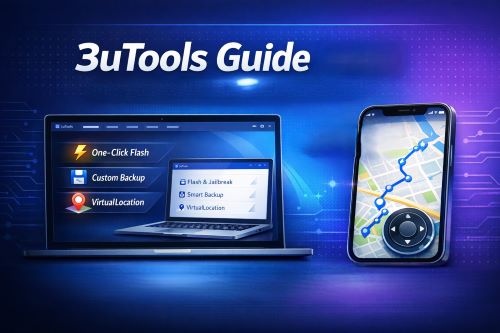
However, with its popularity comes a wave of confusion regarding safety, platform compatibility (especially for Mac and Android users), and specific features like location changing. This guide will walk you through how to safely download 3uTools, utilize its core features, and identify when you might need a more specialized tool for tasks like gaming or GPS simulation.
Is 3uTools Safe? (Read This First)
Before you hit the download button, it is critical to address safety. Because 3uTools is freeware, many unofficial websites distribute modified versions that may contain malware.
Official Source Only
You must download the software only from the official website, www.3u.com. Reports have surfaced of phishing sites mimicking the official domain to distribute harmful software, so always verify the URL in your browser.
Antivirus Flags
You might find that your antivirus software flags the installer. This is often a "false positive" due to the nature of the tool (it modifies system files for jailbreaking and flashing), but you should proceed only if you are comfortable with this risk.
How to Download 3uTools for Windows and Mac
While 3uTools is historically known as a Windows-centric tool, there have been developments for other platforms. Here is the current status for 2026.
For Windows Users (Full Version)
The Windows version is the flagship product containing the complete suite of features, including Flash, Jailbreak, and the Toolbox.
Step 1. Navigate to www.3u.com and click the "Download" button.

Step 2. Run the installer (.exe file) and follow the on-screen prompts.
Step 3. Once installed, connect your iPhone or iPad to your PC using a USB cable. You will need to tap "Trust" on your device screen to allow the connection.
For Mac Users (Limited Version)
Many users search for "3uTools for Mac", and while a version exists, it is significantly different from its Windows counterpart. The Mac version is often lighter and may lack some of the advanced toolbox features found on the PC version.
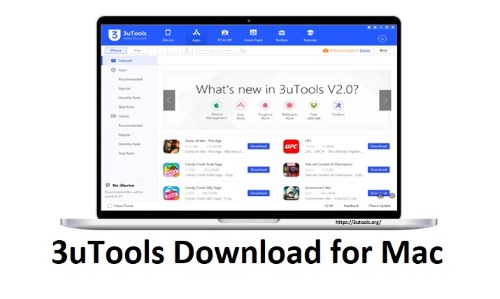
If you are a Mac user specifically looking to change your location or manage advanced settings, you might find the native Mac tools in 3uTools insufficient or prone to errors like "Developer Disk Image load failed". For Mac-specific tasks, especially location spoofing, dedicated alternatives often provide better stability.
What About 3uTools for Android?
There is a common misconception that this tool works for Android devices. 3uTools does not support managing Android OS. You cannot use it to root, flash, or back up Android phones directly. Its only interaction with Android is a feature to help migrate data from an Android device to an iOS device.
Core Features: Why Use 3uTools?
Once you have the software installed, you have access to a powerful suite of utilities.
1 One-Click Flash & Jailbreak
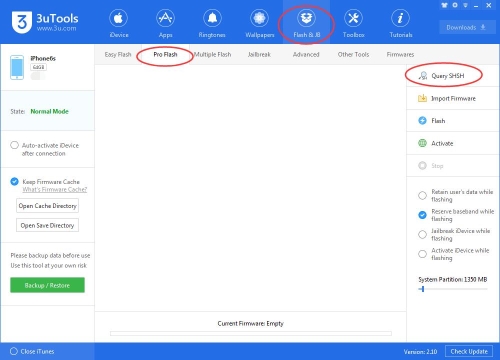
This is the feature that put 3uTools on the map. It automates the complex process of upgrading or downgrading your iOS firmware. The "Smart Flash" feature automatically matches the available firmware for your device, reducing the risk of "bricking" your phone during an update.
2 Smart Data Backup
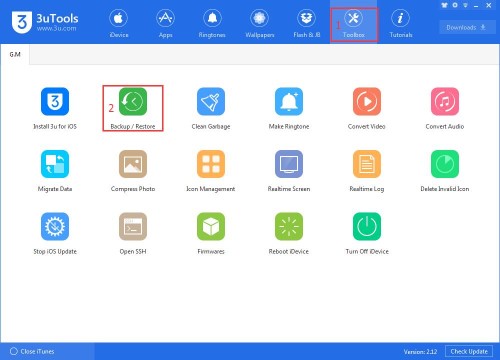
Unlike iTunes, which often requires a full device backup, 3uTools allows for customized backups. You can choose to save only your photos, contacts, or messages. This is incredibly useful when you want to free up space without wiping your entire device.
3 VirtualLocation
Hidden within the "Toolbox" tab is a feature called VirtualLocation. This allows you to modify the GPS coordinates of your iPhone to anywhere in the world.

Step 1. Open 3uTools and click on Toolbox in the top menu.
Step 2. Select the VirtualLocation icon.
Step 3. Enter the coordinates (latitude and longitude) or search for a city name, then click "Modify Virtual Location".
The "Gamer's Dilemma": Limitations of 3uTools Location Changer
While the VirtualLocation feature is free and useful for developers testing apps, it has significant drawbacks for general users, particularly gamers playing Pokémon GO or Monster Hunter Now.
The primary issue is that 3uTools only supports static teleportation. When you move your location, you "jump" instantly from Point A to Point B. In location-based games, this unnatural behavior is instantly detected by anti-cheat systems, leading to soft bans or the dreaded "Error 12".
Furthermore, 3uTools lacks the following essential features for a safe experience:
-
❌No Joystick: You cannot move around the map in real-time.
-
❌No Speed Control: You cannot simulate walking, cycling, or driving.
-
❌No Cooldown Timer: There is no built-in safety guide to tell you when it is safe to jump again.
A Professional Alternative to 3uTools for iOS
If your goal is to change your location safely for gaming, dating apps, or privacy—without the technical errors often associated with 3uTools—PoKeep Location Changer is a purpose-built alternative that addresses these limitations.


Unlike the general-purpose nature of 3uTools, PoKeep is designed specifically for location management. It supports both iOS and Android devices (fixing the "3uTools for Android" gap) and offers a fully featured Mac version that runs without the complex setup errors often found in free tools.
Why Switch to PoKeep for Location Spoofing?
1 360° GPS Joystick & Game Mode
Instead of teleporting and getting banned, PoKeep allows you to use a virtual joystick to walk around the map physically. This simulates natural movement, which is essential for hatching eggs or exploring in Pokémon GO without triggering security flags.
2 Intelligent Route Simulation
You can plan a route with multiple stops. PoKeep will move your GPS pin along this path at a realistic speed (variable walking/driving speeds), making it look like you are actually traveling.
3 Cross-Platform Stability
Whether you are on Windows or Mac, PoKeep provides a stable connection. It eliminates the frequent "Developer Disk Image" mount failures that Mac users often encounter with 3uTools on newer iOS versions.
How to Use Joystick Mode in PoKeep
Step 1. Launch PoKeep and connect your iPhone or Android device, then choose game mode(for games) or universal mode(for social apps) depends on your needs.

Step 2. Select Joystick Mode from the top right corner of the interface.

Step 3. Set your moving speed using the slider (e.g., walking speed at 5km/h).
Step 4. Use the W/A/S/D keys on your keyboard or the on-screen controls to move your character in real-time.
FAQs about 3uTools
Is 3uTools completely free to use?
Yes, 3uTools is entirely free software (freeware). It does not require a subscription for its core features like flashing, jailbreaking, or backing up data. However, be cautious of third-party websites asking for payment or donations to download it, as these are likely scams. Always download from the official site (3u.com).
Can I use 3uTools to manage my Android phone?
No. Despite common misconceptions, 3uTools does not support Android OS management. You cannot use it to root, flash firmware, or install apps on Android devices. It is strictly designed for iOS devices (iPhone, iPad, iPod Touch). If you need to change your location on an Android device, we recommend using PoKeep Location Changer, which fully supports Android GPS simulation without rooting.
Why do I get a "Developer Disk Image load failed" error?
This error typically occurs when your installed version of 3uTools is not compatible with the specific iOS version running on your device (e.g., trying to manage a brand new iOS 18 device with an older version of 3uTools).
To fix this:
Step 1. Check for updates within 3uTools to ensure you have the latest version.
Step 2. If you are on a Mac, this error is more common due to limited support; switching to a Windows PC or using a dedicated tool like PoKeep often resolves connection issues.
Is it safe to use 3uTools for Pokémon GO?
Using 3uTools' VirtualLocation feature for Pokémon GO is risky. Because it lacks a cooldown timer and only allows for instant "teleportation" (jumping from one spot to another without travel time), Niantic's anti-cheat system can easily detect the unnatural movement. This often results in "Error 12" warnings or soft bans. For a safer experience, use a tool with a Joystick Mode and Real-time Speed Control to simulate natural walking.
Why is the map screen blank in 3uTools VirtualLocation?
If the map fails to load, it is usually due to API connection issues in your region. You can try right-clicking on the map area and switching the map source from Google Maps to OpenStreetMap (or vice versa). If it still doesn't load, checking your internet connection or restarting the software usually helps.
Does 3uTools work on macOS?
Yes, there is a version of 3uTools for Mac, but it is not identical to the Windows version. The Mac version is lighter and lacks several advanced features found in the "Toolbox" of the PC version. For advanced tasks like flashing or complex location simulation, the Windows version is superior.
Conclusion
3uTools remains an essential utility for iPhone power users who need to flash firmware or manage files without iTunes. It is free, powerful, and generally safe if downloaded from the official source. However, for users specifically looking to modify their GPS location for gaming or privacy, its limitations are clear.
For static changes, 3uTools is a handy free option. But for dynamic, safe, and realistic movement—especially on Mac or Android—dedicated tools like PoKeep offer the advanced features and stability that modern apps and games demand.
 Related Articles



 Leave Your Comment