 By
By For veteran Pokémon GO players, PokeGo++ was the legendary gold standard that allowed "flyers" to use a joystick and teleport worldwide without leaving home. However, if you are searching for a PokeGo++ download for iOS or Android in 2026, here is the hard truth: the original app is dead, and the files floating around today are often risky fakes or malware.

Fortunately, spoofing technology has evolved significantly. While the original hack is gone, there are now safer, more advanced ways to access those coveted features. This guide will explain the fate of the original app, distinguish it from Nintendo's official Pokémon GO Plus + hardware, and introduce the safest modern solution for simulating movement without triggering a ban.
Why You Can't (and Shouldn't) Download PokeGo++
First, let’s address the elephant in the room. If you type "PokeGo++ 2026" into Google, you will see dozens of websites claiming to have a working download. Do not click them.
The Rise and Fall of Global++
The original PokeGo++ was developed by a group called "Global++." It was a "modified client," meaning the developers took the official game code, injected their own cheating tools (joysticks, IV checkers), and repackaged it. In June 2019, Niantic (the creator of Pokémon GO) filed a massive lawsuit against Global++, citing copyright infringement and violations of the Computer Fraud and Abuse Act.
The legal battle ended in 2021 with a $5 million settlement, forcing the developers to permanently cease all operations and shut down their Discord servers. This effectively killed the authentic PokeGo++ forever.
The "Zombie App" Danger
Because the brand name remains famous, scammers utilize it to bait hopeful players. The "PokeGo++" files you find online today are usually:
-
Malware: Files designed to infect your device or steal personal data.
-
Scams: "Verification" loops asking you to complete surveys or download junk apps to "unlock" the download.
-
Reskinned Clones: Unstable versions of other hacks (like older versions of iPogo) that are highly detectable. Since these apps modify the game client, Niantic’s anti-cheat system can easily flag them, leading to immediate "Red Warnings" or permanent bans.
PokeGo++ vs. Pokémon GO Plus +
To make matters more confusing, in 2023, The Pokémon Company released an official hardware accessory with an almost identical name: the Pokémon GO Plus + (often pronounced "Plus Plus").

I see this question constantly: "Does the Pokémon GO Plus + let me use a joystick?"
The short answer is no.
What the Official Hardware Actually Does
The Pokémon GO Plus + is a physical Bluetooth device, not a software hack. It is designed to help you play the game legitimately without looking at your screen. Its main features include:
-
Sleep Tracking: Connects with Pokémon Sleep to reward you for sleeping.
-
Auto-Catching: It can automatically throw Poké Balls (red balls) at wild Pokémon.
-
Auto-Spin (Automatic PokéStops): It will automatically spin stops to collect items as you walk past them.
-
Button Throwing: You can press a button to throw Great or Ultra Balls.
While it is a fantastic tool for grinding Stardust and XP legally, it has zero location-changing capabilities. It relies entirely on your physical GPS movement. If you want to teleport to Tokyo or walk a route while sitting on your couch, this device cannot help you.
How to Use the Official Pokémon GO Plus +
If you decide to buy the official hardware for legit grinding, here is how to set it up:
Step 1. Enable Bluetooth on your phone and launch the Pokémon GO app.
Step 2. Tap the Main Menu (Poké Ball icon) > Settings > Connected Devices and Services.
Step 3. Select Accessory Devices. Press the main button on your Pokémon GO Plus + to make it discoverable.
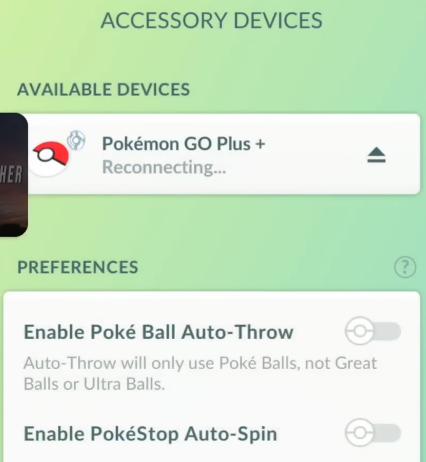
Step 4. Tap the device name when it appears in the list to pair it.
Step 5. Once connected, go back to the Accessory Devices menu to toggle your preferences:
-
Turn on Auto-Throw to catch Pokémon automatically using Red/Greate/Ultra Balls.
-
Turn on Auto-Spin to collect items from stops automatically.
The Difference Between the Modified Software & Official Hardware
| Feature | PokeGo++ (The Old Hack) | Pokémon GO Plus + (Official Device) |
|---|---|---|
| Type | Modified Software (App) | Physical Hardware (Bluetooth) |
| Main Function | Joystick, Teleporting, IV Checking | Sleep Tracking, Auto-Catching, Auto-Spinning |
| Safety | Dangerous (High Ban Risk) | 100% Safe (Official Product) |
| Movement | Could move anywhere in the world | None (Requires you to physically walk) |
The Evolution of Safe Spoofing: From Hacks to Tethering
So, if the old hacked app is dead, and the official device doesn't allow movement, how do you get that "Joystick Experience" back?
The technology has shifted away from "Modified Apps" toward Tethered GPS Location Changers. Modified apps (like the old PokeGo++) hacked the game client directly, which is exactly what Niantic's anti-cheat system is designed to detect. If the app signature doesn't match the official store version, you get flagged.
Tethered GPS tools solve this by running on a computer rather than your phone. They alter the GPS signal at the operating system level (iOS or Android). This allows you to use the official, legitimate Pokémon GO app from the App Store. The game server sees a valid app and a valid GPS signal, significantly reducing the risk of detection compared to using modified APKs or IPAs.
The Modern Alternative: PoKeep Location Changer
If you want the Joystick and Teleport features of the old PokeGo++ but want to use the safer tethering method, PoKeep Location Changer is the current industry standard.


Unlike the old hacks, PoKeep uses your computer to alter your GPS location without jailbreaking your device. Because it works with the official Pokémon GO app, it avoids the "modified client" bans that killed the original PokeGo++.

-
Joystick Movement: Use your keyboard/mouse to walk around the map in real-time.
-
Teleporting: Instantly jump to any location (e.g., specific coordinates for rare spawns).
-
Safety Timers: Built-in cooldown timers help prevent "soft bans" by calculating safe wait times between jumps.
Summary: Which Tool Should You Use?
To wrap this up, let’s look at your options if you want to enhance your Pokémon GO gameplay.
| Method | Best For... | Risk Level | Verdict |
|---|---|---|---|
| "PokeGo++ 2026" Downloads | Getting viruses or scammed. | Extreme | AVOID |
| Modified Apps (iPogo, etc.) | Features directly on the phone. | High (Easy to detect) | Use only on alt accounts. |
| Official Pokémon GO Plus + | Auto-catching and sleep tracking. | Zero | Essential for legit grinders. |
| PoKeep Location Changer | Joystick movement, Teleporting. | Low (Tethered method) | Best PokeGo++ alternative. |
Final Thoughts
I know it’s frustrating to lose a tool like PokeGo++. It changed the way many of us played the game, especially those in rural areas. But the game—and its security—has changed, and our tools need to change with it.
Sticking to the ghost of a dead app will only get your account banned. If you want to keep playing with the freedom of a joystick, switch to a hardware-based spoofer like PoKeep. It’s the safest way to keep catching 'em all without leaving your home.
 Related Articles




 Leave Your Comment