 By
By 

Facebook relies heavily on knowing exactly where you are. From showing you local events and targeted ads to matching you with nearby buyers or dates, your location dictates a massive part of your experience on the platform. But what happens when that system gets it wrong, or when you simply want to expand your digital horizons?
Whether you have recently moved across the country, want to browse out-of-state deals, or are just trying to protect your privacy, figuring out how to change your location on Facebook can be surprisingly frustrating. Because Facebook uses different data points for different features, there is no single "master switch" to update everything at once.
Here is everything you need to know about taking control of your geographical footprint across the app.
Why You Might Need to Change Your Facebook Location
Most users start looking into location settings when they hit a specific roadblock. You might be trying to score a great deal on a used couch in a neighboring city, only to find you are locked into your current zip code. Perhaps you recently moved, but Facebook insists on showing you restaurant ads for a town you left three months ago.
Others want to cast a wider net on Facebook Dating, or simply prefer to keep their real-time whereabouts private from the platform's tracking algorithms. Whatever your reason, understanding how to tweak these settings feature-by-feature is the key to fixing the problem.
How to Change Location on Facebook Marketplace
Marketplace is arguably the feature where users most frequently want to adjust their area. The process differs slightly depending on whether you are shopping or selling.
For Buyers: Browsing Deals in Other Cities
Changing where you shop is incredibly straightforward built right into the Marketplace interface.
Step 1. Open the Facebook app and tap the Marketplace icon at the bottom or top of your screen.
Step 2. Tap on the location pin or the name of your current city listed near the top right of the feed.
Step 3. Enter your desired city, neighborhood, or zip code into the search bar.
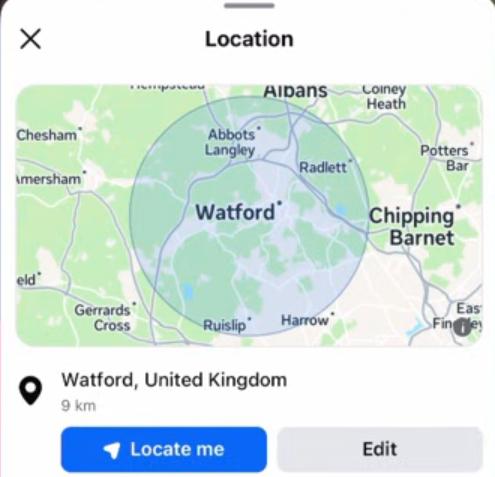
Step 4. Adjust the radius slider to expand or shrink how far out you want to search, then tap "Apply".
For Sellers: Updating Listing Locations
If you are selling an item, things are a bit more rigid. Facebook automatically tags your listing with the location your profile or device is currently associated with.
Unfortunately, if you move or make a mistake, you cannot easily edit the location of an already published listing. The most reliable native workaround is to simply delete the old listing, ensure your device's location is updated, and create a brand new listing with the correct zip code.
How to Change Location on Facebook Dating
Unlike apps that constantly track your movement as you drive around, Facebook Dating uses a static location. It will not update unless you manually tell it to, which is great for privacy but requires manual intervention when you travel.
Step 1. Navigate to your Facebook Dating profile and tap the gear icon to open your Settings.
Step 2. Tap on "Dating Location".
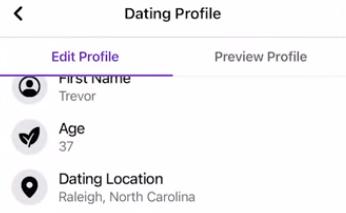
Step 3. Choose "Update Location" to let the app grab your current GPS coordinates, or tap "Add locations" to manually enter a different city.
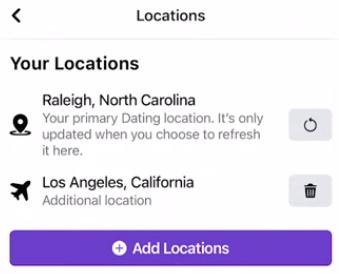
There is a significant limitation here: Facebook Dating generally restricts you from adding cities outside of your default home country. If you are looking to date internationally, the native settings will not let you cross those borders.
Fixing a "Stuck" Primary Location on Facebook
Sometimes, Facebook gets stubbornly stuck on an old address. This "Primary Location" is what dictates your local news, weather, and ads. If it is wrong, it is usually because Facebook is relying on outdated cached data or an old IP address.
To force the system to recognize your new home, you have to do a little digital housecleaning.
Step 1. Go into your phone's main settings and clear the cache for the Facebook app.
Step 2. Log out of your account and completely uninstall the Facebook app from your device.
Step 3. Reinstall the app, log back in, and temporarily set your phone's Location Services for Facebook to "Always Allow" or "High Accuracy".
Step 4. Create a new status update and use the "Check-in" feature to tag a popular restaurant or landmark in your new city.
This sends a strong, fresh signal to Facebook's servers that you have permanently moved.
How to Update Your Facebook Profile's Current City and Hometown
Updating your public-facing profile is the easiest change to make, and it lets your friends know where you are currently based.
Step 1. Go to your main Facebook Profile page → Edit Profile.
Step 2. Scroll down to the "Details" section.
Step 3. Tap the pencil icon or the three dots next to "Current City" or "Hometown".
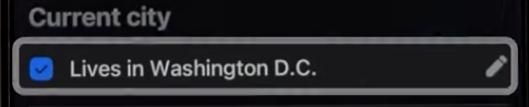
Step 4. Type in your new city, select who can see this information (Public, Friends, or Only Me), and hit save.
The Ultimate Solution to Change Facebook Location
Native settings are helpful, but they have strict limitations. If your primary Facebook location is still stuck after clearing your cache, or if you want to bypass regional restrictions to access international Facebook Dating matches, you need a different approach.
The most effective way to override Facebook's restrictions is to change the actual GPS data your phone broadcasts. This is where a dedicated tool like PoKeep Location Changer comes in handy. It allows you to safely spoof your GPS on both iPhone and Android without needing to jailbreak or root your device. By simulating a new location at the system level, Facebook automatically assumes you are physically there.


Step 1. Download and install PoKeep onto your computer, then connect your mobile device via USB or WiFi, choose Universal mode.

Step 2. Open the software and ensure you are in "Teleport Mode" (the default 1-click setting).

Step 3. Enter your desired global destination into the search bar and select it on the map.
Step 4. Click "Start to Modifying".
Your phone's internal GPS will instantly update. When you open Facebook, Marketplace, or Dating, the app will read your new coordinates and unlock the content for that specific area.
FAQs about Changing Facebook Location
How do I change my Facebook location to another country?
If you just want to update the public display on your profile, you can manually type any country into the "Current City" field. However, native settings will restrict you if you want to access another country's Marketplace or Dating pool. To fully appear in a different nation across all mobile app features, you will need to use a GPS modifier like PoKeep Location Changer to override the system.
Why is my Facebook location wrong on Marketplace or ads?
This frustrating glitch usually happens because Facebook is relying on outdated cached data or an old IP address. If you recently moved or traveled, the system's background syncing might take some time to catch up with your actual whereabouts. Clearing your app cache and forcing a new Check-in with high-accuracy GPS enabled is the fastest way to fix it.
How do I find and change my primary location on Facebook?
Your primary location is determined automatically by Facebook based on where you consistently connect to the internet.
Unfortunately, you cannot just type a new primary location into a settings menu. You either have to physically spend time in the new area with your GPS on, or use a location spoofer to simulate being there until the algorithm updates your profile.
Can a VPN change my Facebook Dating or Marketplace location?
A standard VPN only changes your IP address, which might help if you are strictly using Facebook on a desktop web browser.
The Facebook mobile app, however, heavily prioritizes your phone's actual GPS hardware for its location-based features. To effectively bypass app-level restrictions for Dating and Marketplace, you must alter your GPS coordinates directly rather than relying on a VPN.
Does Facebook notify my friends if I change my location?
It entirely depends on exactly which setting you are tweaking within the app. If you update the "Current City" on your public profile and have your privacy set to let friends see it, Facebook might automatically generate a timeline post announcing the move. On the other hand, privately browsing Marketplace in a different zip code or updating your backend primary location will not trigger any alerts.
 Related Articles

 Leave Your Comment