 By
By 

Telegram’s real-time features go far beyond standard messaging. Whether you are meeting up with friends, keeping an eye on a family member's commute, or trying to protect your privacy, understanding the Telegram live location feature is essential.
However, many users run into frustrating glitches, like the map freezing or not updating in real time. Others wonder about the privacy implications of location trackers or how to spoof their whereabouts entirely. Mastering these settings will ensure you stay connected when you want to, and hidden when you need to.
How to Share Live Location on Telegram (iOS & Android)
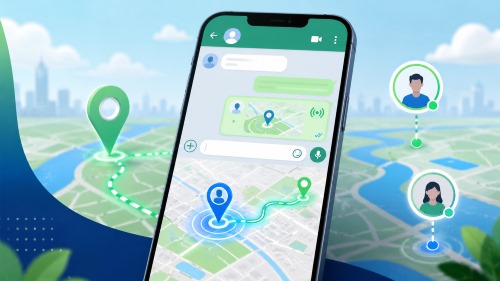
Sharing your dynamic coordinates is straightforward and built directly into the app's chat interface. When activated, a mini-map appears in the chat, tracking your movement as you go.
Step 1. Open the specific individual chat or group where you want to broadcast your whereabouts.
Step 2. Tap the paperclip (attachment) icon located next to the message input field.
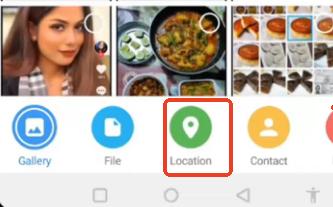
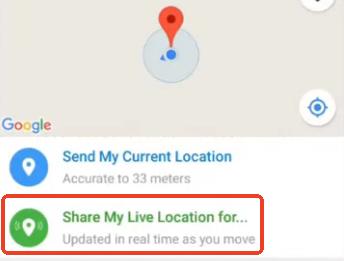
Step 3. Select "Location" from the attachment menu, then tap "Share My Live Location".
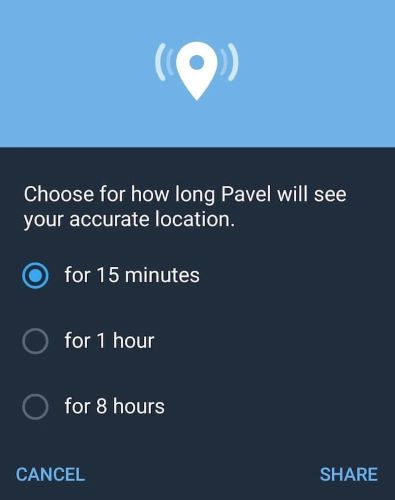
You will be prompted to choose a duration. Telegram offers three specific time limits: 15 minutes, 1 hour, or 8 hours.
A notification bar will remain at the top of your screen to remind you that your location is actively being shared, and you can manually tap it to stop broadcasting before the timer runs out.
Fixed: Telegram Live Location Not Updating
One of the most common complaints on forums is the "Telegram live location not updating" error. Your friend might be waiting for you, but your avatar remains completely frozen blocks away. This usually happens because your phone's operating system is aggressively restricting background activity to save battery.
Adjust Location Permissions
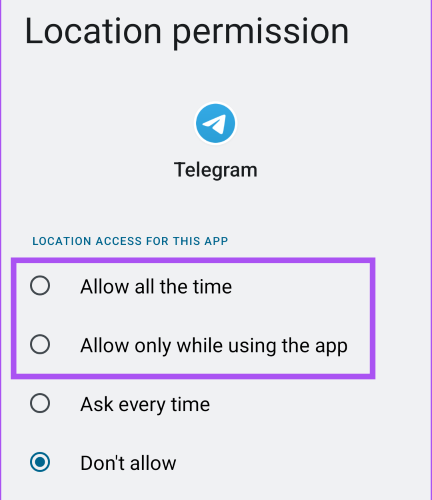
For the feature to track you while your phone is in your pocket, Telegram needs constant access to your GPS.
On iOS, go to Settings > Telegram > Location and change it from "While Using the App" to "Always". Make sure "Precise Location" is toggled on.
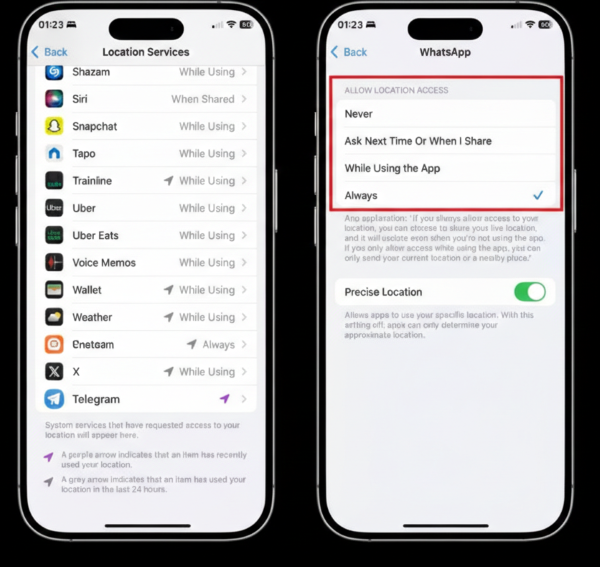
On Android, go to Settings > Apps > Telegram > Permissions > Location and select "Allow all the time".
Disable Battery Savers
Low Power Mode on iPhone or Battery Saver on Android will immediately throttle background GPS updates to conserve power. Turn these modes off temporarily if you need a smooth, continuous location stream.
Enable Background Data
If Telegram cannot use the internet in the background, it cannot ping its servers with your new coordinates. Ensure Background App Refresh (iOS) or Unrestricted Data Usage (Android) is enabled for the app. Sometimes, simply opening another app like Google Maps briefly can force a GPS refresh if the system is stuck.
Telegram Location Privacy: Bots, Tracking, and Strangers
"Can people see where I live on Telegram?" is a frequent and valid concern. The short answer is no, not unless you explicitly allow them to.
Unlike some apps that constantly scrape your data, Telegram requires you to press a button to share your coordinates. If you interact with a Telegram live location bot, the bot cannot automatically harvest your IP address or physical whereabouts. You still have to manually grant it permission through an in-app prompt.
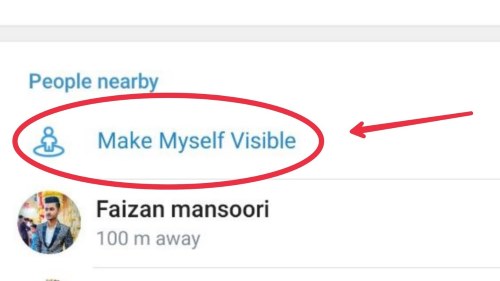
The biggest privacy risk usually comes from the "People Nearby" feature rather than standard chats. If you turn on "Make Myself Visible" in this section, strangers in your vicinity can see your approximate distance, which could potentially expose your home or work address. Always keep this disabled if privacy is a priority.
How to Fake a Live Location on Telegram
Sometimes, you might want to protect your privacy, play a prank on friends, or bypass geo-restrictions without turning off your location entirely. Faking a static pinpoint is easy, but sending a fake live location on Telegram is notoriously difficult.
Why? Because a live location requires simulated movement. If you just use a basic mock location app on Android, your blue dot will often "rubber-band", jumping erratically between your real and fake spot. On iOS, faking GPS usually demands risky jailbreaking or complicated developer tools. Furthermore, standard VPNs only mask your IP address; they do not alter the GPS sensors your phone relies on.
The Safest Solution: PoKeep Location Changer
To fake a live location convincingly, you need a tool that can simulate realistic walking, cycling, or driving speeds without compromising your device's security. This is where PoKeep Location Changer excels.


PoKeep allows you to safely change your GPS on iPhone and Android without any jailbreak or root access. Instead of a frozen dot, PoKeep's 360° GPS Joystick and Multi-spot movement features let you create a dynamic route. The person watching your Telegram live location will see you moving smoothly down the street, completely unaware that you are actually sitting at home.
Step 1. Download and install PoKeep on your computer.

Step 2. Connect your iPhone or Android device via USB cable or WiFi, choose Universal Mode and select your desired movement mode (like the Joystick or Multi-spot movement).

Step 3. Set your speed (walking, cycling, or driving) and click "Start modifying" to begin your virtual journey.
Step 4. Open Telegram and share your live location. Your avatar will seamlessly follow the path you set in PoKeep.
Mastering Telegram's location settings gives you the best of both worlds. You can stay connected with loved ones in real-time, troubleshoot frustrating frozen map bugs, and take absolute control over your digital footprint when privacy demands it.
FAQs about Telegram Live Location
Can I share my Telegram live location in multiple chats simultaneously?
Yes, you can broadcast your whereabouts to several individuals or groups at the same time. When you do this, Telegram displays a single "Sharing Location" bar at the top of your main chat list. Tapping this bar lets you conveniently view all your active sessions and stop them individually or all at once.
Will the other person receive a notification when I stop sharing my location?
No, Telegram does not send a dedicated push notification when you manually end a live location session or when your timer expires.
The interactive mini-map simply turns into a standard, static map showing your last known location, and the blue dot will no longer update.
Does leaving the Telegram live location tracking on drain my phone battery?
Yes. Keeping your device's GPS actively pinging in the background requires significant power. While Telegram tries to optimize background processes, sharing your dynamic coordinates for an extended period (like the 8-hour option) will noticeably reduce your battery life. If your battery dips too low, your OS might kill the process, which is a common reason why a live location stops updating.
 Related Articles


 Leave Your Comment