 By
By 

Dating in the modern age means your potential matches are often dictated by your current physical coordinates. But what if you are planning a move across the country, traveling for work, or simply want to protect your privacy from locals? Changing your location on Bumble allows you to swipe in new cities before you even pack your bags.
While the app heavily relies on real-time location data to function, getting around these geographical limits is entirely possible. Whether you are looking for free workarounds, official features, or advanced privacy tools to change location on Bumble, this guide covers everything you need to know about updating your swiping coordinates.
Changing Bumble Location via Offical Travel Mode
If you want the most straightforward method sanctioned by the app itself, Bumble's Travel Mode is your answer. This feature allows you to drop a pin in any city worldwide and swipe there for an entire week.
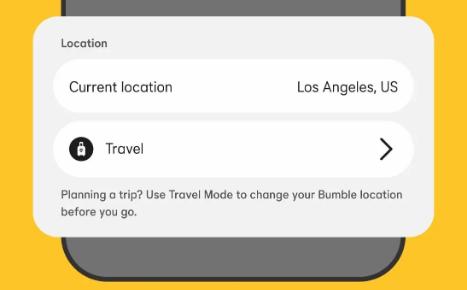
However, it is important to note that this feature is locked behind a Bumble Premium subscription, which can be quite expensive.
Once activated, your profile will immediately start appearing to users in your chosen destination.
Step 1. Open your profile page and tap the settings cog in the top right corner.
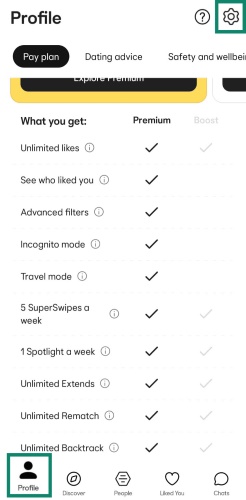
Step 2. Scroll down to the location settings and select "Travel to..." to pick your new city.
The major downside to this official method is the prominent blue "Traveler" badge placed directly on your profile. This instantly alerts everyone that you are not a local, which many users find drastically reduces their match rates and invites unwanted skepticism.
Why a "Change Location Bumble VPN" Approach Fails on the App
A very common misconception is that downloading a Virtual Private Network (VPN) will easily change your Bumble location.

While a VPN is fantastic for changing your IP address and securing your internet connection, it does absolutely nothing to alter the system-level GPS data on your mobile device. Bumble, like most dating apps, relies heavily on your phone's internal GPS coordinates rather than your IP address.
Therefore, when the app requests your location, it bypasses the VPN entirely and reads your true physical whereabouts. If Bumble’s anti-spoofing algorithm detects a glaring mismatch between a VPN’s IP address and your phone's GPS, it might even flag your account for suspicious activity.
3 Workarounds to Change Your Location on Bumble Without Paying
If you want to avoid the costly Premium subscription or bypass the dreaded Traveler badge, you have a few alternative strategies depending on your technical comfort level.
Workaround 1: The Web Browser + VPN Trick
While a VPN fails on the mobile app, it is actually highly effective if you use Bumble Web on a desktop computer. Desktop computers generally lack internal GPS chips, so web browsers rely on your IP address to estimate your location.

By turning on a desktop VPN and selecting a server in your desired city, you can successfully trick the browser version of the application.
Step 1. Connect your desktop VPN to the city you want to swipe in.
Step 2. Open an incognito browser window and log into Bumble Web.
Just remember that the second you open the app back up on your actual smartphone, your coordinates will immediately reset to your real physical location.
Workaround 2: Changing Your "Hometown"
If you only want to signal to potential matches where you are originally from without actually altering your swiping radius, you can easily update your profile text. This is completely free and requires no special tools.
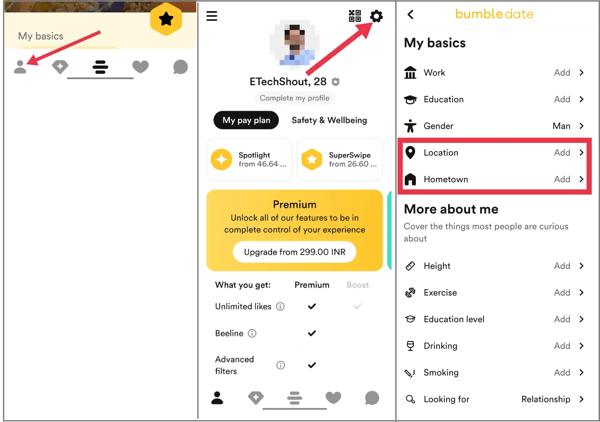
Keep in mind that this will not show you profiles in that city; it merely adds a descriptive tag to your bio.
Step 1. Go to your profile editing screen and scroll to the 'About you' section.
Step 2. Tap on 'Location' or 'Hometown' to type in your desired city.
Workaround 3: Using a Desktop GPS Spoofer
For users who want to safely change their location on the mobile app without paying for Premium or displaying a Traveler badge, a dedicated desktop GPS spoofer is the most effective solution.
Because native GPS spoofing is incredibly difficult on iOS and easily detected on Android, tethering your phone to a PC tool bypasses these limitations. This is where a desktop tool like Pokeep Location Changer becomes incredibly useful for privacy-safe simulation workflows.


Pokeep Location Changer alters your device's system-level GPS through a secure wired connection, meaning Bumble simply reads the new location as authentic. It features a one-click teleport to any location and adjustable speeds for realistic movement paths, ensuring your digital footprint looks completely natural.
Step 1. Connect your mobile device to your computer and open Pokeep Location Changer, choose “Universal mode”.

Step 2. Use the map interface to search for your target city and initiate the teleport feature.
This method is particularly valuable for content planning, privacy-sensitive travel, and gaming-related location strategies, offering complete control over your device's geographical footprint across all your favorite location-based apps.
Warning: Avoid Basic "Fake GPS" Apps
If you are an Android user, you might be tempted to download a free "Fake GPS" app directly from the Google Play Store.
Do not do this if you value your dating profile.

Bumble has integrated advanced detection systems that scan for the developer API used by these basic mock location apps. If the app detects that your location data is originating from a mock provider, you will likely face a shadowban.
A shadowban means your profile becomes invisible to everyone else; you can still swipe, but you will never receive any matches. Always use PC-tethered solutions rather than on-device mocking apps to keep your account safe and active.

FAQs about Changing Location on Bumble
Can I change my Bumble location for free?
Yes, but with limitations. You can change your "Hometown" text for free on your profile, or you can use a free browser VPN combined with the desktop web version of the app to swipe in new areas temporarily.
Does Bumble update location in the background?
Bumble typically only updates your location when you actively open and interact with the application. If the app is fully closed and not running in the background, your coordinates will remain at the last place you opened it.
Why does Bumble sometimes show "~" (a tilde) next to the distance?
The tilde symbol indicates an approximate distance between you and the other user. This usually appears when the Bumble app has not communicated with its servers for several hours. It can happen for a few reasons: the person has not opened the app recently, their phone is turned off, or they are out of internet range.
Generally, it signifies that the app is making a guess based on their last known location because it cannot verify their current whereabouts.
Why did my match's distance disappear entirely?
If you notice that a match's distance has vanished completely, leaving no location data at all, they have likely snoozed their profile or disabled location services for the app.
Alternatively, if you can still see their city but the specific mileage is gone, the app is probably fully closed on their end. When an application is closed, it retains the last known city but drops the active tracking data.
 Related Articles


 Leave Your Comment