 By
By 
In 2026, TikTok is still the world's biggest digital stage, but what you see depends heavily on your location. Many users feel stuck in a local content bubble, unable to explore trends from the US, UK, Japan, and other regions. Whether you're a creator targeting a global audience or a viewer wanting more diverse content, learning how to change location on TikTok can unlock a whole new experience.
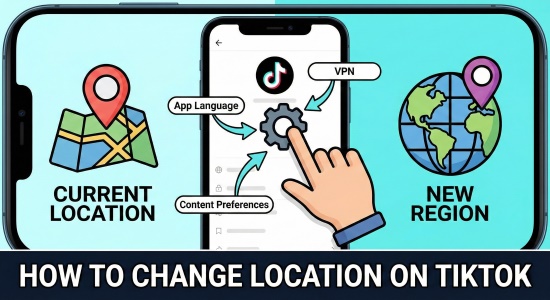
However, changing TikTok location isn't as simple as adjusting a setting. TikTok now uses advanced detection methods, combining IP address, GPS, SIM data, and device information to determine where you are. To successfully change location on TikTok, you need to understand how these layers work — and how to work around them effectively.
Part 1. How Does TikTok Know Your Location
If you're trying to understand why it's difficult to change location on TikTok, it's because the platform uses a multi-layered detection system.
In 2026, TikTok cross-references several data points at once, including your IP address (which reveals your general city or region), your SIM card's Mobile Country Code (a strong signal that locks your country), precise GPS data accurate within 0–200 meters, and even your device's system settings such as language, time zone, and region.
Since TikTok combines all of these signals, simply adjusting one setting isn't enough to successfully change TikTok location.
Part 2. Why Location Matters in TikTok
Changing your location on TikTok isn't just about watching different videos - it can directly impact your reach and growth.
If you're a creator in Europe hoping to go viral in the US, the algorithm needs to recognize you as part of that target market to push your content to the right audience. Location also determines access to key features, as tools like TikTok Shop, the Creator Fund, and certain Live options are often region-locked to countries such as the US or UK.
Most importantly, being able to change TikTok location lets you discover global trends early, giving you a creative edge by seeing what's popular in hubs like Seoul or London before it reaches your local feed.
Part 3. How to Change Location on TikTok [5 Ways]
If you're serious about learning how to change location on TikTok, here are five practical methods you can try in 2026 - from basic tweaks to more advanced solutions.
1 Change TikTok Location Using VPN
A VPN is the most common way to change TikTok location. It works by routing your internet traffic through a server in another country, masking your real IP address.
Step 1. Download a reputable VPN such as NordVPN or ExpressVPN.
Step 2. Connect to a server in your target country (e.g., USA).

Step 3. Clear your TikTok app cache and restart the app.
However, in 2026, a VPN alone may not always work. Many users report on Reddit that TikTok can detect mismatched GPS or SIM data. In some cases, creating a new account while connected to a strong VPN improves your chances.
2 Change TikTok Location via Language Settings
TikTok's algorithm considers your language preferences when recommending content. While this won't fully change location on TikTok, it can influence what appears on your For You page.
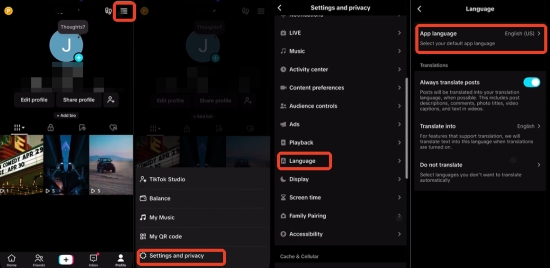
Step 1. Go to your Profile and tap the Menu (☰).
Step 2. Select Settings and privacy > Language.
Step 3. Tap App language and select the languages of the regions you want to explore.
3 Engage with Content from New Region
If your For You page is filled with videos in an unfamiliar language or from the wrong region, you can gradually retrain the algorithm. Manually search for creators from your target country and actively engage with their content by liking, commenting, sharing, and following. Over time, TikTok will recognize your new preferences and start showing you more videos from that region.
Step 1. Use the search bar to find popular hashtags from your target region (e.g., #UKTrends).
Step 2. Like, comment, and follow creators from that area.
Step 3. Over time, your algorithm will shift to favor that region's content.
4 Change Your SIM Card to Update TikTok Location
According to the TikTok's official explanation, the app may use your SIM card information to determine your location when GPS access is unavailable. This means your mobile carrier's country code can influence how TikTok assigns your region. Therefore, if you want to update or change location on TikTok, swapping to a SIM card (or eSIM) from your target country can help reinforce the new regional signal.
Step 1. Purchase an international SIM or eSIM from your target country.
Step 2. Insert the SIM into your phone (or activate the eSIM).
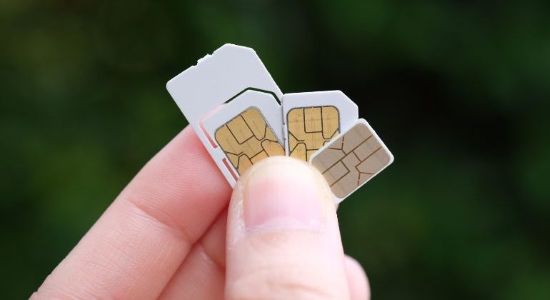
Step 3. Restart your phone and open TikTok; the app should now recognize the new carrier's region.
5 Change TikTok Location via PoKeep Location Changer
Since TikTok now prioritizes precise GPS data, the most reliable way to change location on TikTok in 2026 is to modify your GPS at the system level. PoKeep Location Changer stands out because it changes your device's location directly within the operating system. As a result, every app, including TikTok, receives the new coordinates as if they were your real physical location.

PoKeep Location Changer
Change your virtual location in just a few clicks and start reaching the US, UK, Japan, or anywhere your creativity takes you.
If you want a clean and stable solution, especially to bypass the 60-day or 90-day region lock, follow these steps:
Step 1. Download and install Pokeep Location Changer on your PC or Mac. Connect your iPhone or Android device via a USB cable.
Step 2. Launch PoKeep, finish the setup process, click Next, and choose General Mode.
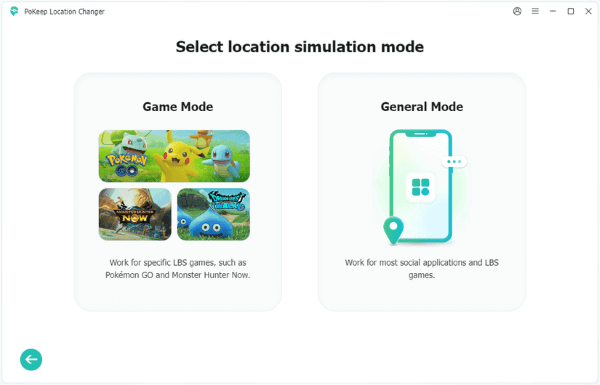
Step 3. Select the Teleport Mode from the top right corner. Enter your target city (e.g., London, UK or Los Angeles, USA) and click Start Modifying.

Step 4. After your GPS updates, remove your physical SIM card or disable your local eSIM to prevent TikTok from detecting conflicting carrier data.
Step 5. Open TikTok. If local content still appears, create a new account while the location is spoofed. This clean account will be associated with your new region, giving you full access to local trends and features like TikTok Shop.
Part 4. Why Can't You Change Location on TikTok?
If you've tried everything and still can't change location on TikTok, several hidden factors may be blocking you. TikTok often detects conflicts between your VPN and your device's GPS, for example, your IP address may show the US while your GPS still reports your real location.
It also prioritizes your SIM card's country code, which can override other regional signals. Most importantly, older accounts are sometimes region-locked based on where they were originally created.
In many cases, fully aligning your GPS, SIM data, and account setup, or creating a new clean account while using a reliable tool like PoKeep Location Changer, is the most effective way to successfully change TikTok location.
Part 5. FAQs on How to Change TikTok Location
Why Is TikTok Location Option Not Showing?
In 2026, TikTok has removed the manual Region toggle for many users to improve data accuracy. If it's missing, you must rely on external methods like GPS spoofing or SIM swapping to force the app to recognize a new location.
Does TikTok Show Videos Based on Location?
Yes. TikTok's Nearby feed and the core For You algorithm are heavily weighted toward your physical location to ensure content is culturally and linguistically relevant.
Part 6. Conclusion
Knowing how to change location on TikTok is about more than just a new feed, it's about unlocking digital freedom. TikTok's 2026 updates have made location detection more precise, but combining a reliable VPN with a system-level GPS tool like PoKeep Location Changer remains the most effective approach.
By aligning your IP address, GPS, and device settings, you can fully take control of your TikTok experience and explore global trends, audiences, and opportunities like never before.
 Related Articles



 Leave Your Comment