 By
By 

People search for a fake running app for various legitimate reasons. Whether you are a developer testing fitness tracking software, an individual seeking location privacy, or someone planning a realistic-looking route for a virtual challenge, having the right tool is essential. In the past, users might just look for a fake running app screenshot to prank their friends. However, modern platforms require actual coordinate data, meaning you need software that generates realistic GPX files or simulates live movement.

Understanding the difference between static file generators and live GPS simulators is the key to choosing the right fake running app. Let's explore the best tools available for safely simulating your activity.
1. Fake My Run: A Flexible GPX Route Generator
Fake My Run is a widely recognized web platform dedicated to quickly generating static running route files. It allows users to draw highly realistic, custom paths anywhere on the globe. This makes it an ideal choice if you need to manually upload a route file to a fitness tracker. It is important to note that this platform is not entirely free; it operates on a "pay-as-you-go" token model, meaning users must purchase tokens to actually download the final GPX files.
However, relying on static GPX files has its drawbacks. Modern fitness apps can sometimes detect imported files that lack real-time sensor data or feature perfectly robotic pacing.
How to Use Fake My Run:
Step 1. Visit the official website and use the map tool to draw your custom running path.
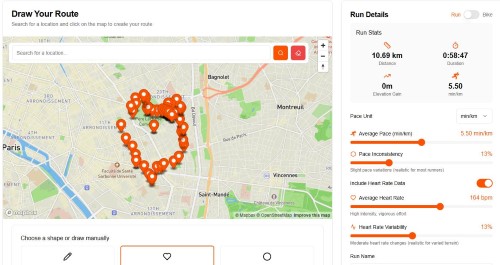
Step 2. Fine-tune the activity details in the settings, such as your average pace and elevation.
Step 3. Purchase the required tokens and save the generated .GPX file to your local device.
Step 4. Manually import the downloaded file into your preferred fitness application.
 Pros:
Pros:
- User-friendly map interface with robust drawing tools that allow you to create routes in any shape.
 Cons:
Cons:
- Requires payment to download the GPX file, and static data carries a higher risk of detection by advanced fitness platforms.
2. GhostRun: A Cross-Platform Mobile Simulation Tool
If you are operating within the Apple ecosystem and specifically using an iPad, GhostRun is an app designed to generate fake runs directly from your device. It is tailored to help users create falsified records without needing to physically move, functioning entirely within its dedicated iOS environment.
Keep in mind that Apple's strict location protocols can make native mobile spoofing challenging. GhostRun is not verified for macOS, so it remains strictly a mobile or tablet utility. It is best suited for casual users rather than developers needing deep system-level simulation.
How to Use GhostRun:
Step 1. Install the app from the App Store on your iPad or iPhone.
Step 2. Set up a virtual challenger by designating a specific running distance and speed.
Step 3. Start the session and let the app's audio coach guide the simulated performance.
Pros:
- Designed specifically for iPad, free to download.
Cons:
- Limited by strict iOS location security, not available for desktop.
3. Pokeep Location Changer: Best for Realistic Live Simulation
When you need absolute reliability and true-to-life movement data, standard mobile apps often fall short due to operating system restrictions. Pokeep Location Changer is a desktop-based tool designed to safely change the GPS location of connected mobile devices. Instead of just creating a static file, it actively manipulates the OS-level GPS coordinates in real-time, making it incredibly useful for location-based apps and privacy-safe simulation workflows.
This software allows for realistic route simulation through multi-point movement, meaning your fake running app data won't look like a straight, robotic line. Furthermore, it features an adjustable speed slider so the movement paths mimic a natural human running pace.
If you are testing apps or need to ensure your location history looks authentic, here is how you might use it:
Step 1. Connect your mobile device to your computer and launch the software.

Step 2. Select the route simulation feature and drop multiple pins to create your running path.

Step 3. Adjust the speed to a realistic jogging pace and begin the simulation.
It even saves your history and favorite locations for repeated workflows, making it ideal for continuous app testing.
Pros:
- Actively manipulates OS-level GPS in real-time.
- Offering adjustable speeds
- Support multi-point routing for realistic simulation
Cons:
- Requires access to a desktop computer and a physical connection to manage the mobile device's location.
4. DeFit: The Background Fake Running Tracker
DeFit is a well-known utility among Android users, specifically designed to add activity data to fitness databases without requiring actual device movement. Instead of simulating a live map location, it directly injects step counts and running data into connected background services.

This is particularly useful if your only goal is to hatch virtual items in games or meet daily activity goals without manually spoofing a GPS path. It bypasses the need for a map interface entirely.
How to Use DeFit:
Step 1. Install the app and log in using the same Google account linked to your target fitness app.
Step 2. Toggle the "Sync fitness data" switch to the on position.
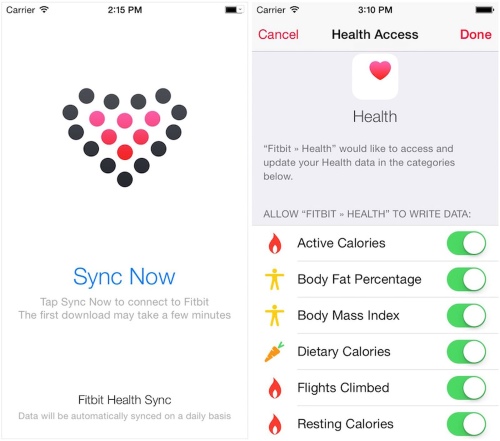
Step 3. Set your preferred running speed or step count, then wait for the data to automatically populate your fitness database.
Pros:
- Automatically injects step counts without needing to shake your phone or spoof a visual GPS map.
Cons:
- Does not simulate actual GPS map movement, making it unsuitable for drawing specific map routes.
5. GPS Fake Running: Best for Android Joystick Control
For those who want granular, real-time control over their digital movement, the GPS Fake Running app for Android is a solid choice. It supports both faking a static location and real-time moving locations.

What sets this app apart is its floating joystick view, which allows you to manually control your movement direction on the fly while other apps are running. It is a very hands-on approach to generating a fake run map.
How to Use GPS Fake Running:
Step 1. Turn on your device's GPS and launch the app to set a starting location.
Step 2. Activate the floating joystick controller view.
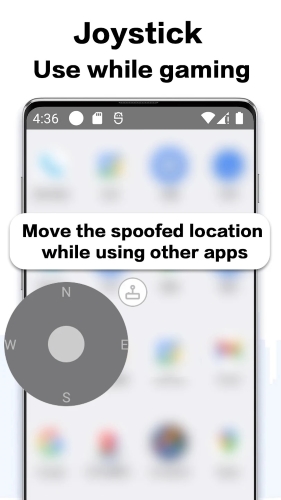
Step 3. Use the joystick overlay to manually steer your direction and control your speed in real-time while using other apps.
Pros:
- Provides granular, real-time control over movement via a highly interactive floating joystick.
Cons:
- Requires manual steering, which can be tedious if you are trying to simulate long-distance runs.
FAQs About Fake Running Apps
Will my account get banned for using a fake running app on competitive leaderboards?
Most major fitness platforms actively monitor their public leaderboards for suspicious activity and irregular data. If you upload manipulated routes to compete for local segment records or top placements, you are directly violating their terms of service. Account suspensions and permanent bans are incredibly common for users who repeatedly disrupt competitive integrity.
Always keep simulated activities set to private if you are simply using them for software testing or personal privacy.
Do these simulation tools automatically sync with my smartwatch?
Mobile and desktop simulators primarily alter the GPS data of the smartphone or computer they are running on. Wearable fitness trackers, like a Garmin or an Apple Watch, have their own built-in GPS chips that operate entirely independently of your phone's spoofed location. Therefore, starting a workout directly from your wrist will usually capture your real physical whereabouts instead of the simulated route.
If you need the data on your wearable's ecosystem, you generally have two options:
- Track the activity exclusively on your smartphone's app while the watch acts solely as a secondary heart rate monitor.
- Manually export the completed route file from your simulation tool and upload it directly to the smartwatch's companion website.
Is it illegal to use location-altering software?
Spoofing your device's location for personal privacy, software development, or casual gaming is completely legal in most jurisdictions. The software tools themselves are simply utilities designed to manage device data.
However, how you use that data can quickly become a legal issue. Utilizing fake activity records to commit fraud—such as claiming physical prizes, exploiting corporate wellness programs for financial payouts, or bypassing regional legal restrictions—crosses the line into illicit activity.
Why do some platforms still flag my activity if the map route looks perfect?
Advanced sports tracking ecosystems look at multiple biological data points beyond just your geographical path. They analyze your cadence, stride length, and cardiovascular effort to verify the authenticity of a strenuous workout.
If you upload a world-class marathon time but the file contains absolutely no heart rate data or an impossibly consistent stride, the platform's algorithm will instantly flag the session as synthetic. Realistic map movement is only one piece of the puzzle when dealing with high-end sports analytics.
Choosing the Right Fake Run App
Selecting the right tool ultimately depends on your specific needs and technical requirements. If you just need a quick GPX file for a web upload, browser-based generators are perfectly adequate.
However, if you require a reliable, undetectable solution that feeds live, realistic movement data to your mobile apps, desktop solutions are the clear winner.


By using a tool like Pokeep Location Changer, you ensure that your location masking is secure, realistic, and fully customizable. Always remember to use these tools responsibly, prioritizing privacy and ethical testing over manipulating public leaderboards.
 Related Articles


 Leave Your Comment