 By
By 

What's the problem you are facing?
Apple makes some of the best hardware in the world, but their Apple media services availability can sometimes be incredibly frustrating. If you live outside of the United States, United Kingdom, or Australia, you have likely encountered the dreaded "Apple TV app - not available in country or region" message on Mac. Similarly, the highly praised Apple News app might not even show up on your machine.
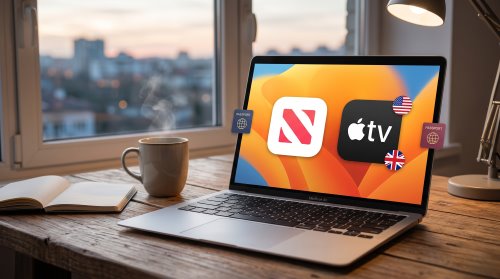
Fortunately, your MacBook or iMac is not permanently locked out of these platforms. Getting around these geo-restrictions requires a systematic approach that addresses your device's system settings, your Apple Account registration, and your network routing. This guide will walk you through the complete blueprint for unlocking these services anywhere in the world.
Phase 1: Unhiding Apple News on Your Mac
Unlike iOS devices where region-locked apps simply cannot be downloaded from the App Store, the Apple News app is actually pre-installed on every modern Mac. Apple simply hides the application interface if your system detects you are in an unsupported location. You can bypass this instantly without downloading any third-party software.
By adjusting a simple toggle in your system preferences, the app will magically appear in your Applications folder and Spotlight search.
Step 1. Open the System Settings app on your Mac and navigate to the General section.
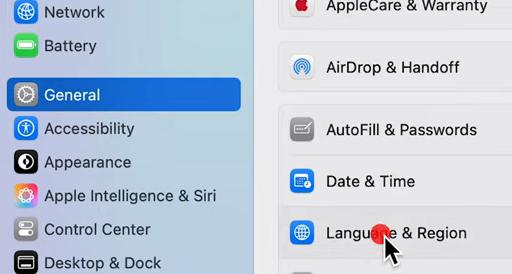
Step 2. Click on Language & Region.
Step 3. Change your "Region" setting to the United States, United Kingdom, or Australia.
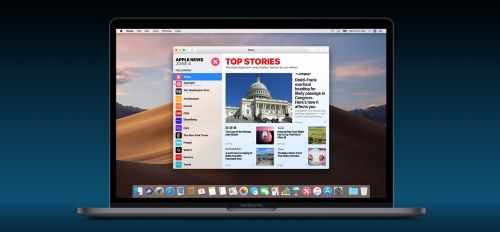
Once you make this change, you might need to restart your Mac or simply relaunch Finder. The Apple News app will now be accessible, allowing you to browse free articles. However, to access the premium Apple News+ tier, you will need to tackle the next phase of account creation.
Phase 2: Bypassing the Apple Account Region Lock
Your physical Mac is not restricted by geography, but your Apple Account is deeply tied to regional licensing agreements. To subscribe to Apple News+ or Apple TV+, you absolutely must have an Apple ID registered to a supported country. Attempting to use a local credit card from an unsupported country on a US Apple ID will immediately result in a rejection.
The secret to bypassing this financial roadblock is creating a brand-new account and relying on digital gift cards instead of traditional banking methods.
Step 1. Open the App Store on your Mac, sign out of your current account, and attempt to download any free application to trigger the "Create New Apple ID" prompt.
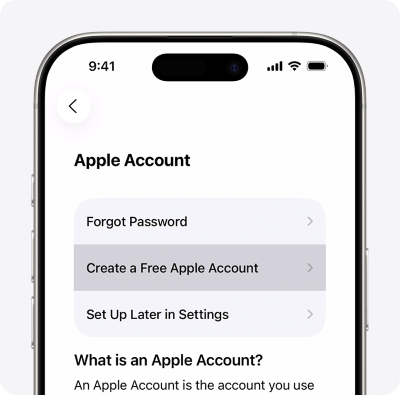
Step 2. Follow the setup process, ensuring you select your desired supported country (like the US) and choose "None" when asked for a payment method.
Step 3. Purchase a digital App Store & iTunes Gift Card from a reputable online retailer using your local PayPal or credit card.
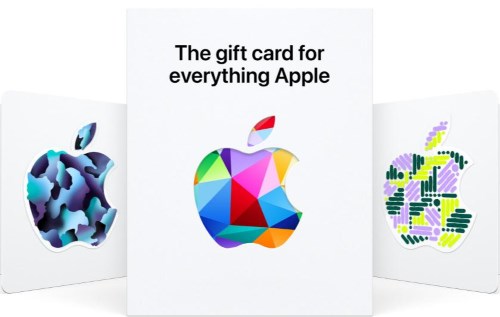
Step 4. Redeem the emailed gift card code directly into your newly created Mac App Store account to establish a wallet balance.
With your wallet funded, you can now successfully subscribe to Apple TV+, Apple News+, or bundle them together if Apple One available countries align with your new account.
Real-Time Cost Estimator
Phase 3: Securing Your Network for Apple TV+ on Mac
While changing your Mac's region is enough for reading Apple News, streaming video is a different story. Apple TV+ actively monitors IP addresses to enforce its broadcasting and entertainment copyright rules. Even with a US Apple ID and a fully funded account, trying to stream a show with a foreign IP address will usually result in a playback error.
To solve this, you need to route your Mac's internet traffic through a supported country. This is where a high-quality Virtual Private Network (VPN) becomes essential.

Connect your Mac to a reliable VPN server located in the same country your new Apple ID is registered to. Streaming platforms are aggressive about blocking known VPN data centers, so you will need a premium service optimized for streaming rather than a free web proxy. Once connected, your Mac's IP address will match your account region, granting you full access to the Apple TV+ library.
Phase 4: Watch Apple News+ & Apple TV+ on Phone
Most Apple users do not exclusively consume media on their desktop computers. After setting up Apple News+ and Apple TV+ on your Mac, you will naturally want to log into that same account on your iPhone or iPad for offline viewing or bedtime reading. However, this is where most users hit a frustrating wall.
While a VPN works perfectly for masking a Mac's IP address, mobile devices are equipped with hardwired GPS chips. These chips provide highly accurate location data that frequently overrides VPN settings. If a media app requests your location, your iPhone's GPS will leak your true physical whereabouts, instantly blocking your access to region-restricted services.

To achieve a seamless cross-device experience, you need to align your mobile device's GPS coordinates with your Mac's VPN location. This is where the Pokeep Location Changer becomes an invaluable part of your digital setup.


Pokeep Location Changer is a dedicated desktop tool designed to manage and simulate GPS locations on connected mobile devices. By plugging your iPhone into your Mac and running Pokeep, you can achieve a one-click teleport to any location in the world.
Here is why this final piece of software ties everything together:
- It safely masks your real-world coordinates, matching your phone's GPS to your US or UK Apple ID.
- It bypasses the hardware location leaks that traditional VPN apps on iOS simply cannot hide.
By combining a macOS region tweak, a foreign Apple ID, a desktop VPN, and Pokeep Location Changer for your mobile devices, you create an airtight, privacy-safe ecosystem. You can finally enjoy global Apple entertainment exactly as it was intended, regardless of where you actually live.
FAQs About Bypassing Apple Region Locks
Will I lose my existing apps and photos if I log out of my local Apple ID?
No, your personal data is safe. When you sign out of your current Apple Account on your Mac, the system will ask if you want to keep a copy of your iCloud data, such as photos and contacts, locally on your device.
Any apps you have already downloaded will remain installed and fully functional on your machine. However, it is important to remember that all purchases are permanently tied to the specific Apple ID used to acquire them. If those apps require an update in the future, you may need to temporarily log back into your original local account to authenticate the download.
Can I share my new Apple TV+ or Apple News+ subscription with my family using Family Sharing?
Unfortunately, cross-region sharing is strictly prohibited by Apple's system architecture. To share active subscriptions or utilize Purchase Sharing, every single member of your Family Sharing group must be registered in the exact same Apple Account country or region.
If you create a new US-based Apple ID to subscribe to Apple TV+, you cannot share that access with family members who are still using Apple IDs registered in your local, unsupported country. If a family member attempts to change their account region to join you, they risk losing access to the past purchases shared by other members in their original region.
Can I switch back and forth between my local Apple ID and the foreign one?
Yes, you can manage two accounts, but it is best to separate your cloud data from your media purchases. Apple does not recommend keeping two active Apple IDs because it can complicate access to your iCloud data and subscriptions.
- Keep your primary, local Apple ID logged into your system settings for iCloud, iMessage, and Photos.
- Only sign into your new, foreign Apple ID within the App Store specifically for Media & Purchases.
This setup allows you to maintain your everyday cloud syncing while securely accessing your region-locked subscriptions through the storefront.
Will Apple ban my account for using a VPN or creating an account in a different region?
Many users successfully maintain a secondary Apple ID in a different country to access region-locked applications and media. While Apple's terms of service allow them to suspend access if a user threatens the service, creating a secondary Apple ID for a different region is a widely used workaround.
As long as you are funding your foreign account legitimately—such as redeeming officially purchased digital gift cards—and not utilizing fraudulent payment methods, simply changing your App Store region or routing your connection through a VPN does not typically result in an account ban.
 Related Articles


 Leave Your Comment