 By
By 

The demand for reliable location modification tools has skyrocketed recently. Users constantly seek ways to protect their privacy, test geofenced applications, and enhance their experiences in location-based games.
Tenorshare iAnyGo has long been a recognizable name in this space, often appearing in searches for a comprehensive iAnyGo review. However, with recent software updates and stricter app detection methods in 2026, many are wondering if it remains the best choice. This detailed review will break down its current performance, safety realities, and overall value.
What is Tenorshare iAnyGo?
At its core, iAnyGo is a desktop application designed to modify the GPS coordinates of your connected mobile device. It bypasses the need for complex jailbreaking or rooting procedures, making it accessible to everyday users. The software includes several movement modes to simulate real-world travel.
Here are its primary capabilities:
- One-click location teleporting to anywhere on the globe.
- Multi-spot route planning for automated movement.
- A virtual joystick feature for manual directional control.
These features have traditionally made it a go-to choice for gaming and social media checking. But an iAnyGo app review isn't complete without looking at how it functions under current 2026 restrictions.
How to Use iAnyGo: A Quick Setup Guide
Tenorshare iAnyGo offers a relatively straightforward interface, with its main features divided into a few core movement modes. Whether you need to instantly change your location or simulate a complex daily commute, you can accomplish this with just a few clicks. We will cover the most common operation methods below to help you get started quickly.
1-Click GPS Location Spoofing
This is the foundational and most frequently used feature of the software. It allows you to instantly transfer your device's GPS coordinates to any corner of the globe. Within seconds, you can complete a cross-country virtual trip right from your desk.
Step 1. Launch the program on your computer, choose Game mode or Universal mode according to your need, and select the default "Change Location" mode on the main screen.
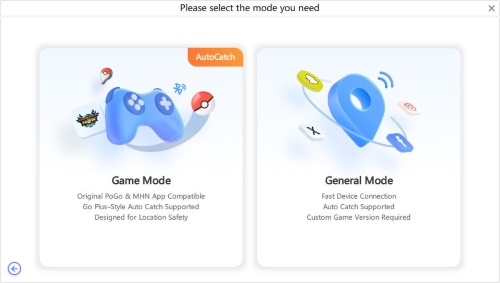
Step 2. Connect your smartphone to the computer using a USB cable or over a shared Wi-Fi network, ensuring you unlock the device and trust the connection.
Step 3. Type your desired address or specific coordinates into the search bar, click the button to modify, and your phone's location will update immediately.
Simulating Route Movement
If you need location-based apps to register that you are physically traveling through the real world, the route simulation feature is highly practical. The system supports simple point-A-to-point-B trips, as well as complex paths with dozens of customized waypoints.
Step 1. Choose either the single-spot movement mode for simple trips or the multi-spot movement mode for complex, customized routes.
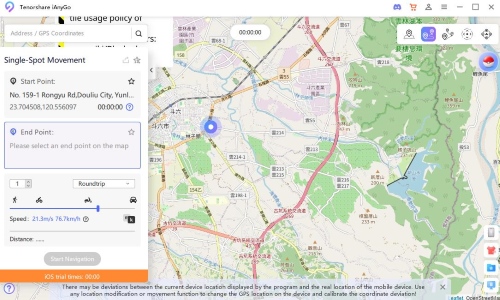
Step 2. Click on the map to pinpoint your destination, or map out multiple specific waypoints you want to pass through.
Step 3. Adjust the speed slider at the bottom to mimic realistic walking, cycling, or driving speeds, set your desired number of round trips, and start the simulation.
Flexible Control with the Virtual Joystick
For users who require real-time directional control, the joystick feature provides a much more immersive and hands-on experience. You can dynamically decide your exact path on the fly, much like playing a video game. This is especially important for making precise movements or reacting to sudden events in location-based applications.
Step 1. Switch to the joystick movement mode and locate the virtual steering wheel in the bottom-left corner of the interface.
Step 2. Set an appropriate travel speed, then drag the center button of the joystick to trigger automatic movement in that specific direction.
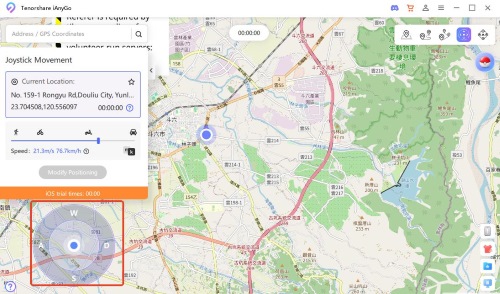
Step 3. During your travel, you can freely adjust your heading a full 360 degrees using either your mouse or your keyboard's arrow keys.
Safety must always be your top priority when utilizing these types of spoofing tools.
Whenever you execute any of these movements, pay close attention to the cooldown rules of your target applications. Frequent and illogical jumps across large geographic distances will easily trigger anti-cheat detection systems, putting your accounts at risk.
Is iAnyGo Safe in 2026?
Safety is the most common concern, especially for those reading an iAnyGo Pokémon GO review. The reality is that location modification is a constant cat-and-mouse game between spoofing tools and app developers. Recently, major augmented reality games introduced aggressive anti-cheat updates that specifically target traditional USB tethering methods.

This has led to the infamous "Error 12" for many users who try to alter their location using older techniques. To combat this, iAnyGo introduced a Bluetooth connection workaround intended to bypass these tethering detection flags. While helpful, this new setup introduces its own set of frustrating connection challenges for the average user.
While the Bluetooth method helps, it is not entirely foolproof. Users must strictly adhere to best practices to keep their accounts safe. If you want to minimize risks, you should follow these essential guidelines:
Step 1. Always wait out the recommended cooldown timer before interacting with an app in a new location.
Step 2. Avoid jumping across continents within minutes; instead, use realistic movement speeds.
Step 3. Close your target applications completely before initiating any GPS coordinate changes.
iAnygo Pricing and Hidden Limitations
When evaluating an iAnyGo review, understanding the somewhat complex, tiered pricing structure is crucial. The software does not offer a permanently free version, and its subscription costs vary significantly based on how many computers and Apple devices you need to connect simultaneously.
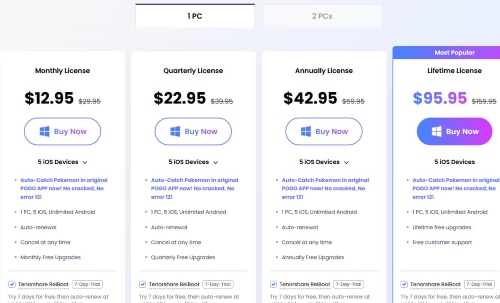
The standard entry-level plan covers 1 PC and up to 5 iOS devices, alongside unlimited Android device support. For this base tier, a monthly license costs $12.95, while longer commitments are priced at $22.95 quarterly, $42.95 annually, or $95.95 for a lifetime license.
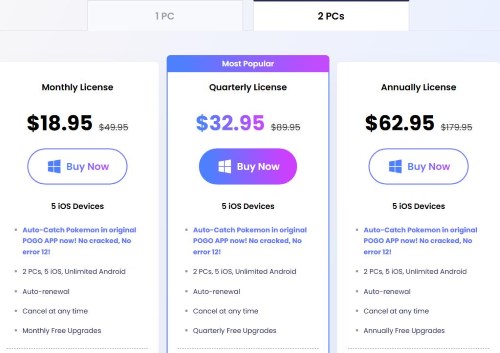
However, if you are a power user or need to manage multiple accounts, the costs scale up quickly.
- Expanded iOS Support: Upgrading to support up to 15 iOS devices on a single PC raises the price to $19.95 for a monthly license and $59.95 for an annual license.
- Multi-PC Access: If you need the flexibility to run the software on 2 PCs (for up to 5 iOS devices), the pricing shifts to $18.95 monthly, $32.95 quarterly, or $62.95 annually.
These varied pricing tiers highlight a significant hidden limitation that often frustrates users. The license you purchase is strictly bound to the specific number of computers you select at checkout.
This means if you purchase a standard 1-PC lifetime license and your computer breaks, or you decide to upgrade to a new machine, you cannot simply transfer your software access. You are locked into that single machine unless you purchase a new license or upgrade your plan. This rigid device lock makes the upfront cost feel much steeper if your hardware situation changes in the future.
Top iAnyGo Alternatives for a Smoother Experience
If you are tired of dealing with non-transferable PC licenses or crashing helper apps, there are other ways to manage your location. Exploring alternatives is crucial for a complete and objective review.
Solution 1: Pokeep Location Changer

For those seeking a more streamlined and stable desktop tool, the Pokeep Location Changer is an excellent alternative. It is specifically designed as a privacy-safe simulation workflow tool that cuts out the unnecessary clutter. Unlike apps that require messy secondary downloads, Pokeep focuses on reliable, out-of-the-box functionality.


It handles location simulation for app testing and gaming-related location strategy scenarios beautifully. You get realistic route simulation with multi-point movement and adjustable speeds to mimic human travel perfectly. It also features a history and favorite locations tab, which is incredibly useful for repeated workflows or content planning.
Solution 2: Jailbroken or Rooted Devices
Another advanced workaround involves using a dedicated smartphone that has been rooted (for Android) or jailbroken (for iOS). By unlocking the operating system's core restrictions, you gain the ability to install powerful system-level modification modules directly onto the phone itself.
This approach completely eliminates the need to tether your device to a computer. Rooted and jailbroken setups often bypass the strict anti-cheat measures found in popular AR games much more effectively than standard desktop software.
However, this method requires significant technical knowledge and carries the risk of bricking your device or voiding its warranty. It is highly recommended to only perform these complex modifications on a spare, secondary phone rather than your primary daily driver.
Solution 3: Physical GPS Hardware Dongles
If you want to avoid altering your phone's software entirely, physical GPS spoofing hardware is an increasingly popular alternative. These are small external dongles that plug directly into your smartphone's Lightning or USB-C charging port.
Because these plug-in devices feed modified GPS coordinates directly at the hardware level, they are exceptionally difficult for app developers to detect.


This hardware method offers a highly secure, plug-and-play experience without relying on complex PC software setups or risking a device jailbreak. The main drawback is the upfront investment, as reliable hardware dongles can be quite expensive compared to standard monthly digital subscriptions.
FAQs about iAnyGo
Does Tenorshare iAnyGo offer a free version?
No, iAnyGo is a premium paid software. While they occasionally offer a highly restricted free trial so you can test basic device connectivity, a paid subscription is required for any meaningful use. Plans start at $12.95 per month, but those costs scale up quickly if you need to connect more than five iOS devices or use the software across multiple computers.
What are the limitations of the iAnyGo free trial?
The free trial is highly restricted. You are given a strict one-hour time limit to test basic movement tools, such as One-Click and Multi-Spot movement. Additionally, the trial only supports 1 iOS device and completely blocks all advanced gaming features, including Auto Catch, Scan Nearby, and Official Routes.
Why does the map show an "Access blocked 403r" error?
You may occasionally see an "Access blocked 403r" warning tile on the map due to an OpenStreetMap server policy. According to official iAnyGo support, you can safely ignore this visual glitch; it is simply a "map error" and "won't affect anything with your gameplay".
Final Verdict: Should You Buy iAnyGo?
To wrap up this tenorshare iAnyGo review, it is clear that the software still works, but it requires significantly more effort than it used to. The addition of Bluetooth workarounds and secondary helper apps makes the setup process cumbersome.
It remains a viable option if you already have it running smoothly on your current machine. But for new users facing high subscription costs and strict single-PC license rules, looking into more stable alternatives might be the smarter move. Tools that focus on clean interfaces and reliable route simulation offer a much less frustrating experience in 2026.
 Related Articles



 Leave Your Comment