 By
By 

Location-based apps are everywhere, and the demand for reliable spoofing tools is higher than ever. Whether you are trying to bypass regional restrictions, test a new application, or optimize your strategy in location-based games, finding the right software is crucial.
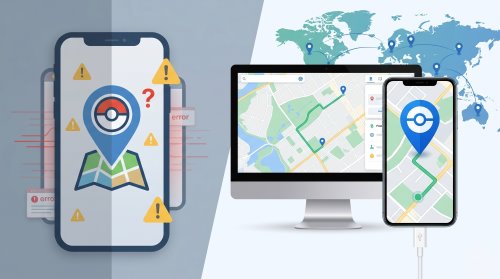
You have likely come across the MocPOGO location changer during your search, but its reputation online is incredibly mixed. This comprehensive guide will break down the app's features, evaluate its safety, and explore if it is actually worth your time or just a frustrating trap.
How Does MocPOGO Work?
At its core, MocPOGO is marketed as a powerful GPS location changer designed to function on both iOS and Android platforms. The software allows users to effortlessly change their GPS location to almost anywhere in the world with just a few clicks. For the gaming community specifically, it boasts interactive features like a smart joystick for manual navigation and route simulation to mimic real-world movement patterns.
The developers have also included a visual cooldown timer that displays directly on the screen. This feature is intended to remind users to wait a realistic amount of time before performing their next action after a teleport, theoretically reducing the risk of penalties. While these features look fantastic on paper, the real-world execution often leaves users searching for troubleshooting guides when they find the MocPOGO app not working properly.
How to Use MocPOGO Location Changer
MocPOGO is a dedicated GPS location spoofing tool designed for both iOS and Android platforms. Whether you need to simulate geographical movement for location-based games or privacy applications, this software offers a variety of features to meet your needs. Below is a comprehensive guide on how to navigate and utilize its core functionalities.
Getting Started and Device Connection
Before diving into the advanced features, you must install the software and authorize your mobile device. You can download the MocPOGO client directly from their official website and install it on your computer. If you are using a Mac and need to spoof an iOS 17 device, you will be prompted to enter your computer password to establish trust between the devices.
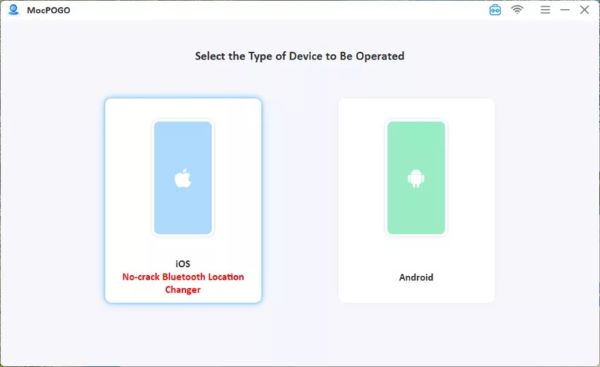
Step 1. Launch the software, select your device's operating system, and connect your phone to the computer using a standard USB cable or a Wi-Fi connection.
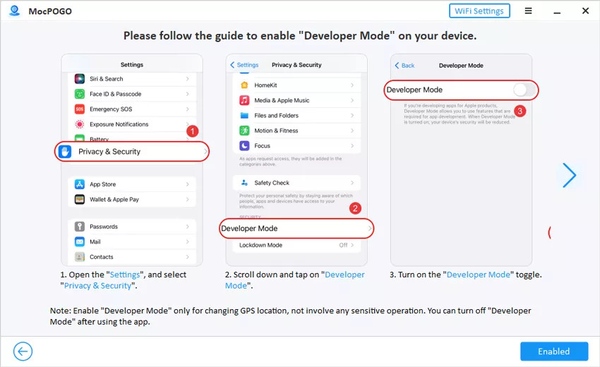
Step 2. For first-time iPhone users, navigate to "Privacy & Security" in your settings to enable "Developer Mode" and restart the device. For Android users, tap the build number multiple times to activate developer options and allow USB debugging.
Core Location and Movement Modes
MocPOGO provides several movement simulation modes tailored to different use cases. Understanding how each mode operates will help you maximize the software's potential.
Teleport Mode
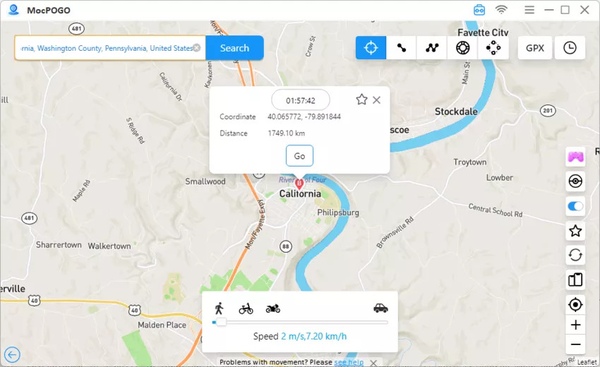
This is the ideal choice if you simply need to change your location instantly without simulating travel time.
Step 1. Click the "Teleport Mode" icon on the main interface and type your desired destination or coordinates into the search bar.
Step 2. Once you confirm the target location on the map, click the "Go" button to instantly teleport your device's GPS coordinates to that spot.
Two-Spot & Multi-Spot Mode
These features are perfect for users who need to simulate realistic travel routes.
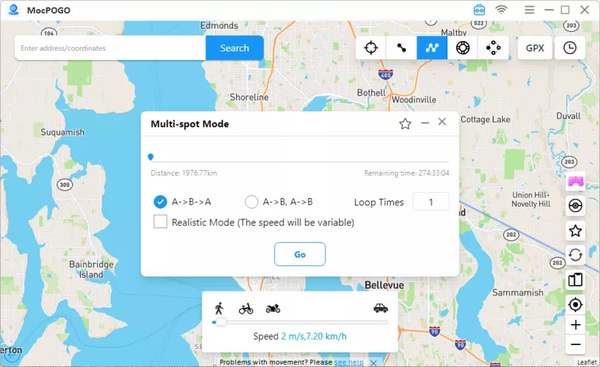
Step 1. Select either the "Two-spot" or "Multi-spot" route icon, then click on the map to define your destination or multiple waypoints.
Step 2. Customize your moving speed and the number of route loops in the settings panel, then click "Go" to begin the simulated journey.
To make your movement appear more natural to location-based apps, be sure to enable "Realistic Mode" for dynamic speed variations.
Jump Teleport Mode
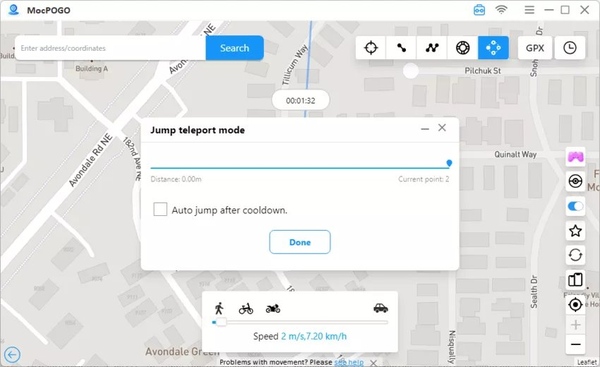
This unique mode lets you jump instantly between several predefined locations. You can choose to transition manually by clicking through each spot, or you can utilize the automatic jump feature designed specifically for location-based games. The built-in Cooldown Timer will display recommended waiting periods based on the jump distance, helping you manage the risk of account penalties.
Advanced Features: Joystick and Resource Search
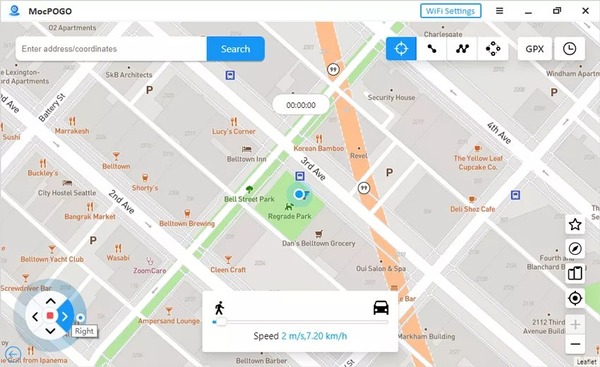
To enhance your experience further, the software includes a Joystick Mode for precise manual control. By activating the joystick icon at the bottom left of the screen, you can use your computer's keyboard to dictate the character's movement. Pressing the W, A, S, and D keys allows you to adjust direction and speed in real-time, providing a highly immersive navigation experience similar to standard PC games.
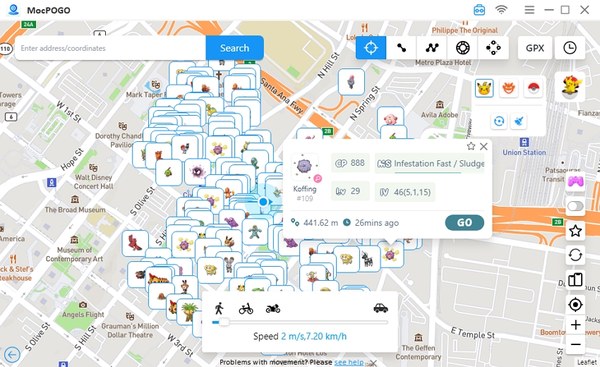
The latest updates have also introduced a powerful Resource Search tool and a secure Bluetooth connection method. The scanning feature lets you locate nearby points of interest and specific game coordinates directly on the map, displaying vital stats and spawn times. Alternatively, the new Bluetooth mode allows iOS users to connect their devices wirelessly to the PC and spoof locations on official, unmodified applications, offering an extra layer of account security.
The Big Question: Is MocPOGO Safe and Legit?
When browsing forums, the most common queries are "is MocPOGO legit" and "is MocPOGO safe reddit." The answer is complicated. While the software does technically exist and function for some users, utilizing on-device mobile spoofers carries inherent risks. Location-based games frequently update their anti-cheat mechanisms, and heavily relying on modified apps can quickly lead to account strikes or soft bans, despite the built-in cooldown timers.
Furthermore, getting the app to run on certain devices often requires jumping through frustrating technical hoops. Some iOS users find themselves forced to download third-party developer platforms like TestFlight just to grant the necessary permissions. This intrusive setup process raises significant privacy concerns for users who just want a simple location spoofing experience without compromising their device's core security.
MocPOGO Pricing: How Much Does the Location Changer Cost?
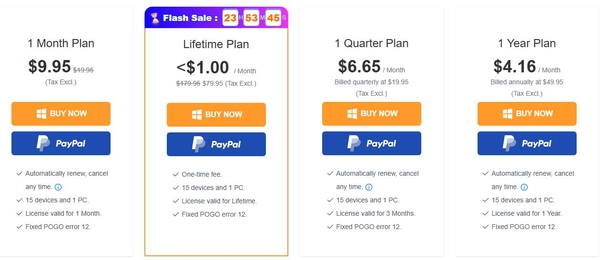
The financial commitment required is a major factor when deciding if this software is right for you. MocPOGO offers several pricing tiers that cater to different usage lengths, but there are important subscription policies to be aware of before checking out. Every plan officially supports up to 15 mobile devices (Android or iOS) and allows installation on a single computer. They also advertise that all tiers include a fix for the notorious Pokémon GO "error 12".
Breakdown of Subscription Plans
For users looking to purchase the Windows version, the company provides four distinct payment options.
- 1-Month Plan: Costs $9.95 and is intended for short-term spoofing needs.
- 1-Quarter Plan: Billed at $19.95 every three months.
- 1-Year Plan: Requires a $49.95 annual payment.
- Lifetime Plan: Available for a one-time fee of $79.95 for permanent access.
It is incredibly crucial to note that the monthly, quarterly, and annual plans are all set to automatically renew by default. While the company states you can cancel this recurring charge at any time, users should remain vigilant about upcoming billing dates. Buyers can occasionally use the promotional coupon code "MOCPGPRO" to receive a 20% discount on their purchase.
Hidden Costs and Cross-Platform Limitations
One significant limitation of the MocPOGO pricing model is its strict platform lock. A license purchased for Windows can only be activated on a Windows PC, and the same restrictive rule applies to macOS users. If you accidentally buy the wrong version, or if you use both operating systems, you cannot share the license across platforms and will be advised to seek a refund to repurchase the correct one.
Hardware upgrades can also cause unexpected friction. If you replace your current computer, your software license does not transfer automatically to the new machine. You must manually contact their customer support team via email to request a one-time reset of your registration code. This rigid licensing structure can quickly turn a seemingly affordable tool into an administrative hassle.
Top MocPOGO Alternatives in 2026
Since MocPOGO's subscription traps and app instability leave many users searching for a better way, here are the most effective, genuinely working alternatives for location spoofing today.
1. Official Developer Tools (Xcode & Android Studio)
If you have a bit of technical knowledge, the safest way to spoof your location is by using the official developer environments provided by Apple and Google. These tools are designed for app developers to test their software in different global regions.

Because you are using official developer protocols, this method is incredibly safe and virtually immune to anti-cheat detection systems. It is also completely free to use.

However, this method comes with significant drawbacks for the average user. Setting up Xcode on a Mac or Android Studio on a PC requires a steep learning curve and a large amount of hard drive space. Furthermore, these tools only offer static point-to-point teleportation; they do not feature gaming-focused utilities like a virtual joystick or customizable movement speeds.
2. External Hardware GPS Modifiers
Another highly effective alternative is using a dedicated hardware-based GPS spoofer. These are physical devices, often resembling a small USB flash drive or a portable Bluetooth dongle, that connect to your phone to forcefully override its internal GPS chip.
Bluetooth Multi-function Gaming Joystick 2.5
By handling the location data at the hardware level, these devices easily bypass the software-level detection systems used by most mobile games.
While hardware spoofers provide excellent account safety, they are not the most convenient solution. You have to purchase a physical item—which can easily cost between $70 and $100—wait for it to be shipped, and remember to carry it with you. Additionally, keeping an external Bluetooth device constantly connected can drain your smartphone's battery very quickly.
3. The Balanced Solution: Pokeep Location Changer
If you want the safety of a PC-tethered connection without the sheer complexity of learning developer coding tools, desktop-based location software is the smartest route. Pokeep Location Changer serves as the perfect middle ground, offering a professional-grade simulation environment that remains accessible to everyday users.


Instead of installing risky APKs or jumping through frustrating device permission hoops, Pokeep handles all the complex GPS manipulation directly from your computer. It provides the seamless one-click teleportation you expect, alongside advanced route simulation with adjustable speeds to create highly realistic movement paths.
Transitioning to this stable, desktop-driven workflow is incredibly simple:
Step 1. Install Pokeep Location Changer on your computer and launch the application.

Step 2. Connect your mobile device to your computer using a secure USB cable.

Step 3. Use the intuitive map interface to search for your desired destination, then click to instantly teleport or map out a multi-point route.
How to Change GPS Location on iPhone & Android | PoKeep Location Changer
Ultimately, avoiding mobile-only spoofing apps is the best way to protect your digital privacy and account standing. By utilizing official developer methods, hardware tools, or a streamlined desktop solution like Pokeep Location Changer, you can ensure your location-based tasks remain stable and uninterrupted.
Final Thoughts on Location Masking
While the MocPOGO location changer promises an effortless way to spoof your coordinates, the high volume of negative reviews, activation failures, and billing traps make it a risky investment today. For a truly safe and frustration-free experience, avoid applications that demand deep device permissions or force hidden subscriptions upon checkout.
Prioritize transparency and stability. Shifting your location simulation tasks to a reliable desktop environment will protect your digital privacy and ensure your apps run smoothly without unexpected interruptions.
 Related Articles


 Leave Your Comment