 By
By 

If you've been looking for ways to install modded games, tweaked apps, or access features usually reserved for jailbroken devices, you’ve likely stumbled upon iOSGods. As one of the largest communities for iOS modding, it offers a massive library of "hacked" IPAs that can be installed on non-jailbroken iPhones and iPads.
However, using the iOSGods App in 2026 comes with its own set of challenges: revoked certificates, installation errors, and safety concerns for your game accounts.
This comprehensive guide will walk you through how to use iOSGods safely, how to install apps using Sideloadly, and how to fix common errors like "Untrusted Enterprise Developer". We will also discuss why using modded IPAs for location-based games like Pokémon GO might be dangerous and suggest safer alternatives.
Is iOSGods Safe? (The Real Risks)
One of the most common questions new users ask is: "Is iOSGods safe to use?"
The short answer is yes, the platform itself is generally safe. The iOSGods community is well-moderated, and the administrators actively check files for malware. It is unlikely that the store itself will steal your data or hijack your device.
However, "safe from malware" does not mean "safe from consequences". There are two major risks you need to be aware of:
-
❌Certificate Revocations: Apple actively fights third-party app stores. If you use the direct web install method, Apple will eventually revoke the enterprise certificate, causing your apps to crash or fail to open.
-
❌Game Account Bans: This is the most critical risk for gamers. Using a modified IPA (a hacked version of a game) changes the game's code. Developers of server-side games, especially location-based titles like Pokémon GO and Monster Hunter Now, have anti-cheat systems that can detect these file modifications instantly.
The Danger of Modded Location Games
If you download a "Pokémon GO Spoofer" IPA from iOSGods, you are logging into a modified client. Niantic's security scans for these file discrepancies. Using these modified versions is the #1 cause of "Red Warnings" and permanent account bans.
A Safer Alternative for Location Gaming
If your main goal is to change your location or use a joystick in games like Pokémon GO, do not use a modified IPA.
Instead, use a tool like the PoKeep Location Changer. Unlike iOSGods mods, PoKeep runs on your computer (or connects via Bluetooth) and alters your GPS location at the system level. This allows you to play the official, legitimate App Store version of the game while still enjoying joystick movement and teleportation. Because you aren't modifying the game file, it is significantly safer for your account.


How to Download and Install iOSGods (No Jailbreak)
While there is a "Web Install" method, it is highly unstable due to the certificate issues mentioned above. The most reliable way to install iOSGods apps in 2026 is by "sideloading" the .IPA files using a PC tool called Sideloadly.
Using iOSGods with Sideloadly
This method requires a computer (Windows or Mac) and a USB cable. It uses your own Apple ID to sign the app, ensuring it works for at least 7 days before needing a refresh.
Step 1 Download the IPA
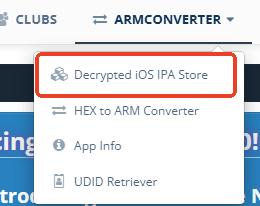
Go to the iOSGods website, create a free account, and find the game or app you want. Go to the “Decrypted iOS IPA Store” under “ARMCONVERTER” section. Look for the desired IPA download link.
Step 2 Set Up Sideloadly

Download and install Sideloadly on your computer. Launch the program and connect your iPhone or iPad via USB.
Step 3 Drag and Drop
Drag the .ipa file you downloaded from iOSGods into the Sideloadly window.
Step 4 Enter Credentials
Enter your Apple ID in the Sideloadly interface. This is required to create a free developer certificate for your device.
Step 5 Inject iGameGod (Optional)
Sideloadly has a feature to inject iGameGod (iOSGods' cheat engine) into the app during installation. Check this box if you want access to speed hacks or memory editors.
Step 6 Start
Click "Start". Sideloadly will install the app onto your device. Once finished, you will see the app icon on your home screen.
FAQs about iOSGods
Do I need to jailbreak my iPhone to use iOSGods?
No, you generally do not. The majority of apps on the iOSGods platform are designed specifically for Non-Jailbroken devices, often labeled as "Jailed" in their library. You can install these using the Sideloadly method described in this guide or via the iOSGods Web App without voiding your warranty or needing to jailbreak your phone.
Why does my app crash or stop opening after 7 days?
This is a common occurrence caused by Apple's restrictions on free developer accounts. If you used a free Apple ID to sign the app (via Sideloadly or AltStore), the digital certificate is only valid for 7 days.
To fix this, you simply need to connect your device to your computer and re-install the IPA using Sideloadly. This "refreshes" the app's certificate. In most cases, you do not need to delete the app first, which means your save data will remain intact.
How do I update a modded game from iOSGods?
Since these are modified files, they cannot be updated automatically through the Apple App Store. To get the latest version, you will need to manually overwrite the old app:
Step 1. Visit the iOSGods topic for the specific game and download the updated IPA file.
Step 2. Open Sideloadly and install the new IPA directly over the existing app on your phone.
Step 3. Ensure you do not delete the old app first, or you may lose your progress.
Can I use iOSGods for Pokémon GO without getting banned?
Using a modified client (IPA) from iOSGods for Pokémon GO is highly risky. Niantic’s anti-cheat system actively scans for file modifications, and using these hacked clients is the fastest way to trigger a permanent ban.
For location-based games, we strongly recommend avoiding modified IPAs entirely. Instead, use a system-level tool like PoKeep Location Changer. This allows you to play the original, legitimate App Store version of the game while still using a joystick to move around safely.
What is the difference between a Free iOSGods account and VIP?
While the free account grants access to a massive library of hacks, the VIP subscription unlocks exclusive content. VIP members gain access to hacks for high-profile online games that are hidden from the public to prevent patching. Additionally, it includes access to iOSGods App+, a custom app store that installs directly on your phone without a PC and suffers from far fewer certificate revokes than the free web version.
How do I fix the "Untrusted Enterprise Developer" error?
This error message is a standard Apple security feature that appears when you try to open an app from a developer that your phone doesn't recognize yet. You can resolve it in seconds:
Step 1. Open your iPhone Settings and tap on General.
Step 2. Scroll down and select VPN & Device Management (or "Profiles & Device Management").
Step 3. Tap on the email or enterprise name listed under the "Developer App" section.
Step 4. Select Trust and confirm your choice. The app should now open immediately.
Summary: Choose the Right Tool for the Job
iOSGods is an incredible resource for tweaking offline games, removing ads from utility apps, or trying out modified versions of single-player titles. By using Sideloadly, you can bypass many of the installation headaches associated with the platform.
However, for Location-Based Games (Pokémon GO, Monster Hunter Now), the risk of using iOSGods is simply too high due to aggressive anti-cheat detection.
For the safest experience:
-
Use iOSGods for: Offline games, ad-free apps, and single-player cheats.
-
Use PoKeep for: Pokémon GO, Monster Hunter Now, and any app requiring safe GPS simulation.
By separating these tools, you get the best of both worlds: the freedom of modding and the safety of a secure account.
 Related Articles




 Leave Your Comment