 By
By 

Pokebattler is one of the most detailed Pokémon GO battle analysis sites online. Instead of a simple type chart, it runs Monte Carlo simulations to rank counters, estimate raid difficulty, and compare matchups for raids, PvP, gyms, and Team GO Rocket.

This guide walks through every major section on Pokebattler — what it is for, where to find it, and how to actually use it. Whether you are preparing for a Legendary raid, building a Great League team, or fighting Giovanni, the workflow starts with knowing which tab to open.
What Is Pokebattler?
Pokebattler is a Pokémon GO simulator and rankings site. Its core strength is battle simulation: it models real fight conditions — movesets, weather, friendship bonuses, dodging, Shadow and Mega Pokémon, and more — then ranks results.
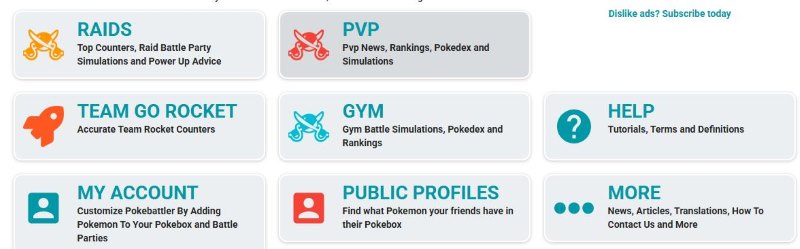
Most players come for raid counters, but the site also covers PvP leagues, gym battles, Team GO Rocket, personalized Pokebox teams, and a companion Raid Party app. Think of it as a planning dashboard: you pick a battle type, adjust settings to match your situation, and read the ranked output.
Pokebattler Site Navigation Overview
Every page on Pokebattler shares the same top navigation. Here is what each entry does and where it takes you.
| Top Nav Item | URL | What It Does |
|---|---|---|
| Gym | /fights | 1v1 gym battle simulator — pick attacker vs defender and run a fight simulation. |
| Raids | /raids | Raid boss counters, attacker rankings, infographics, guides, and raid advice. |
| PvP | /pvp | GO Battle League and Silph Cup rankings, PvP pokedex, simulator, and matchup matrix. |
| Team GO Rocket | /rocket | Counters for Grunts, Leaders, Executives, and Giovanni. |
| More | /news | Release notes, articles, help docs, translations, and contact info. |
| Login | /user | Sign in, manage your Pokebox, and save battle parties. |
Pokebattler Raids Section
The Raids area is Pokebattler's most popular feature. Go to pokebattler.com/raids to start.
Sub-pages in Raids
Inside Raids, a secondary menu splits the content into focused tools:
- Counters — Pick a raid boss and see ranked counter Pokémon. Includes a Breaking News feed with current and upcoming bosses.
- Attackers — Global raid attacker rankings independent of any single boss.
- Infographics — Visual counter charts you can share or screenshot.
- Guides — Written raid strategy articles.
- Raid Advice — Power-up and investment recommendations.
- Simulator — Full raid battle simulator with custom attacker and defender settings.
How to Use Raid Counters
Follow this workflow when you open a boss page (for example, Mewtwo):
Step 1. From Counters, click the boss you are fighting — use Breaking News links for current rotation bosses.
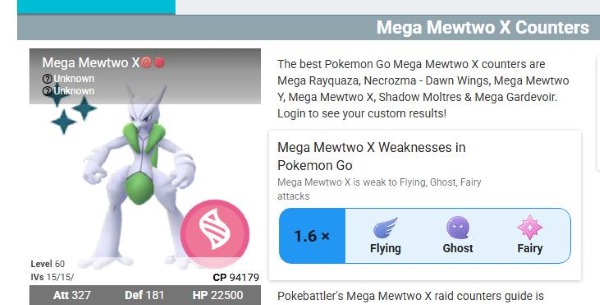
Step 2. Read the boss header: type, weaknesses, CP range, and Difficulty rating (Pokebattler Estimator for the boss).
Step 3. Scroll down and open Choose Moveset and select the boss's actual fast and charged moves. Counter rankings can change dramatically between movesets.
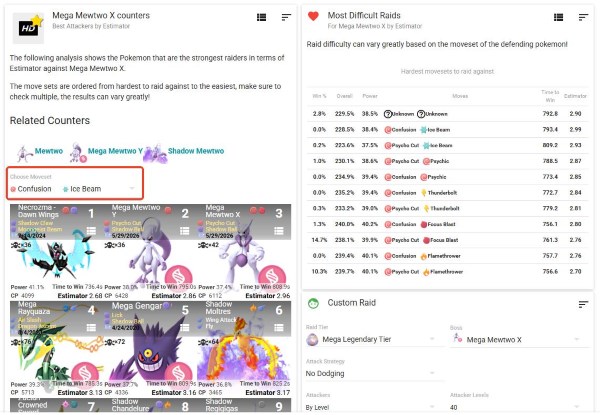
Step 4. Adjust filters to match your raid: weather, friendship level, Shadow/Legendary/Mega toggles, and Party Power if raiding with another player.
Step 5. Wait for the simulation to finish (the page shows "Calculating Raid Results" while millions of Monte Carlo runs complete).
Step 6. Read the ranked counter list. Each row shows recommended moves, Power %, Time to Win, Estimator, and expected Deaths.
Step 7. Log in and open Pokebox if you want results based on Pokémon you actually own — not just theoretical best options.
Related Counters links at the top of a boss page also let you jump to Mega, Shadow, or alternate forms of the same Pokémon without starting over.
Key Pokebattler Raid Metrics
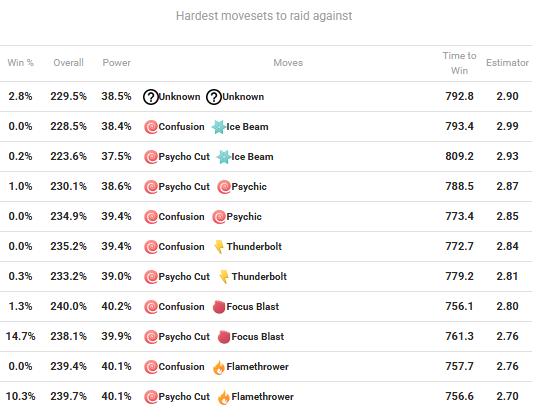
Understanding the numbers makes the counter list much more useful:
| Metric | What It Means | How to Use It |
|---|---|---|
| Estimator | Practical rating of how many trainers are needed with that counter performance. | Lower is better. Near 1 suggests solo potential under current settings; around 2 suggests a duo may work. |
| Time to Win | Simulated seconds to defeat the boss solo. | Lower is faster, but check Deaths — a fast glass cannon may waste time relobbying. |
| Deaths (×N) | Expected faints during the fight. | Fewer deaths mean fewer revives and less relobby risk in tight groups. |
| Power % | Share of total raid damage that Pokémon contributes. | Helps compare relative damage output in a team. |
| Difficulty rating | Boss-level Estimator shown at the top of the page. | Gives a quick sense of how hard the boss is before you pick counters. |
Pokebattler PvP Section
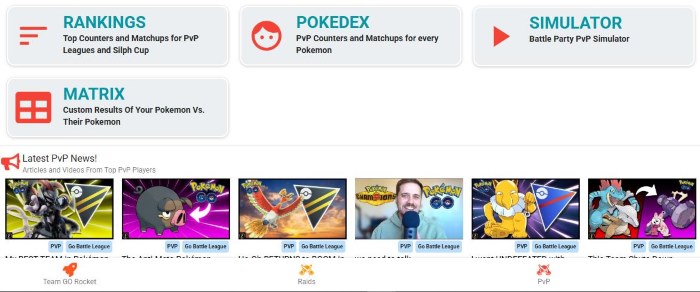
Open pokebattler.com/pvp for GO Battle League and Silph Arena analysis. The hub page links to four tools:
Rankings, Pokedex & Matrix
- Rankings (/pvp/rankings) — League-specific meta lists. Each league section offers Top 30 (toughest Pokémon in the field), Counters (Pokémon that beat the Top 30), and Pokedex links. Pokebattler supports Great, Ultra, Master, and Silph Cup formats.
- Pokedex (/pvp/pokemon) — Look up any Pokémon's PvP matchups and counters individually.
- Simulator (/pvp/simulator) — Run 3v3 PvP battle party simulations with custom teams.
- Matrix (/pvp/matrix) — Compare your saved Pokémon against an opponent's roster in bulk. Best for team-building and scouting.
How to use PvP Rankings: Pick your league, open Top 30 to see what dominates the meta, then switch to Counters to find what beats those Pokémon. Use Random Shield settings for a quick overview, or drill into specific shield scenarios for closer battles. For a single Pokémon question ("What beats Azumarill in Great League?"), go straight to the Pokedex.
Pokebattler Gym Section
The Gym simulator at pokebattler.com/fights is where Pokebattler started. It models a 1v1 fight between an attacker and a defender.
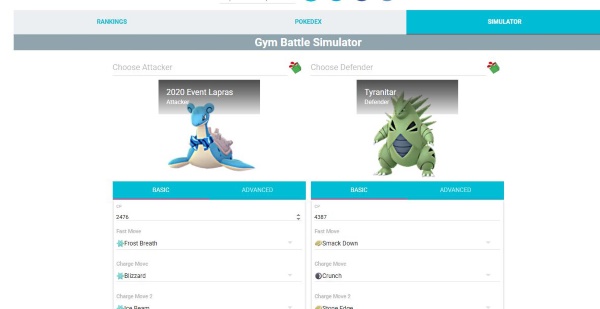
How to use it:
Step 1. Search for an Attacker in the left panel (defaults to Machamp).
Step 2. Search for a Defender in the right panel (defaults to Tyranitar).
Step 3. Set CP, level, IVs, fast move, charged moves, attack strategy, dodge strategy, weather, and simulation type (Monte Carlo - Gold is the most accurate).
Step 4. Click Battle to run the simulation.
Step 5. Review results and use Related Battles below to swap nearby Pokémon or moves and rerun instantly.
Switch between Basic and Advanced tabs for simpler or deeper controls. The Gym section also has its own Rankings and Pokedex sub-links for gym-specific tier lists.
Pokebattler Team GO Rocket Section
At pokebattler.com/rocket, Pokebattler lists counters for every Rocket battle type.
The page is organized by difficulty:
- Grunts — Easier 3v3 battles; Rocket Grunts do not use shields.
- Leaders (Cliff, Sierra, Arlo) — Harder fights with shielding on the first two charged moves.
- Executives — Higher stats and shield usage; Breaking News highlights current Executive Shadow Pokémon.
- Giovanni — Boss-level counters for his current Shadow Legendary.
- Shadow Legendary raids — Separate entries for in-person Shadow raid bosses.
How to use it: Find the Shadow Pokémon or Leader you are facing in Breaking News or the leader sections, click through to the counter page, and build a 3v3 team from the ranked results. Pokebattler's tips: resist the Grunt's fast move type and bring Pokémon that force early shield use against Leaders and Executives.
Pokebattler My Account & Pokebox
Sign in at pokebattler.com/user to unlock Pokebattler's personalization features.
Pokebox lets you save the Pokémon you actually own — level, IVs, and moves included. Once saved, raid and PvP counter pages can filter results to show only your collection, or rank your Pokémon against theoretical bests.
Battle Parties let you save preset teams for raids and PvP so you do not rebuild from scratch each time.
Without logging in, every counter list shows ideal-world recommendations. With Pokebox, you get answers like "your best Mewtwo counter is this Shadow Tyranitar at level 40" instead of a Legendary you do not have.
Pokebattler Public Profiles
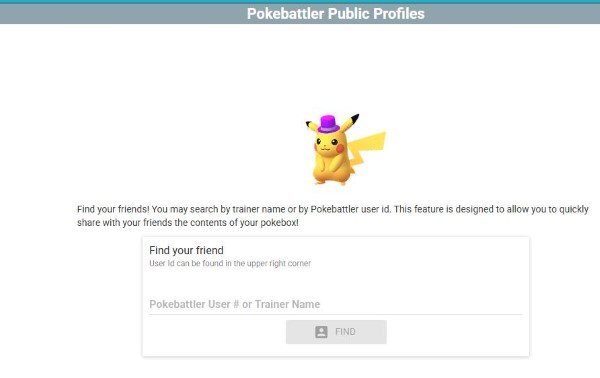
At pokebattler.com/profiles, you can search for other trainers by Pokebattler User # or Trainer Name and view their public Pokebox.
This is useful before a raid lobby forms: check whether teammates have strong counters for the current boss, or share your own profile so friends can see what you can bring.
More, Help & Raid Party
The More menu (at /news) is the site's info hub:
- News — Release notes and site update history.
- Articles — Long-form Pokémon GO content.
- Help (/help) — Tutorials for Raids, Simulator, Rankings, Pokebox, attack/dodge strategies, glossary, and FAQs.
- Translate, About, Privacy, Terms, Contact Us — Site info and support.
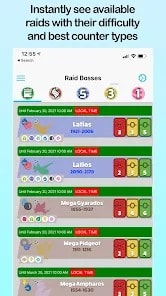
Pokebattler Raid Party App is a separate mobile app (linked from the homepage and raid pages). While the website focuses on simulation and research, Raid Party helps you host or join remote raids and see counter guidance in one place. Use the website to plan; use the app to find a group.
Quick Pokebattler Reference by Goal
| I Want To… | Go To | What To Do |
|---|---|---|
| Find counters for a raid boss | Raids → Counters | Pick boss → set moveset & filters → read Estimator-ranked list |
| See if my team can beat a boss | Raids → Counters + Pokebox | Log in, import your Pokémon, rerun the counter page |
| Build a PvP team | PvP → Rankings | Check Top 30 and Counters for your league |
| Compare my team vs a friend's | PvP → Matrix | Load both rosters and read matchup results |
| Simulate a gym fight | Gym (/fights) | Set attacker & defender → Battle |
| Beat a Rocket Leader or Giovanni | Team GO Rocket | Find the Shadow Pokémon → pick 3v3 counters |
| Check a friend's raid box | Public Profiles | Search trainer name or User # |
| Learn what a metric means | More → Help | Open Glossary or FAQs |
How PoKeep Location Changer Supports Raid Planning After Pokebattler

Pokebattler answers the battle question: Can my team beat this boss, and with which counters? After that, many players still need a practical way to reach active raids, move between gym-heavy areas, or revisit productive spots without wasting time.
That is where PoKeep Location Changer fits naturally into the workflow. PoKeep is built for changing GPS location on iPhone and Android, supports Pokémon GO, and includes 360° joystick movement, two-spot and multi-spot routes, jump teleport, custom speed, cooldown timer, saved locations, history records, favorite routes, and GPX import — with no jailbreak or root required.


A simple combined workflow looks like this:
Step 1. Use Pokebattler to check the raid boss, moveset, and best counters from your Pokebox.
Step 2. Confirm your Estimator, Time to Win, and Deaths look realistic for your group size.
Step 3. Use PoKeep to jump to a raid-dense area, save useful gym coordinates, or simulate a route between hotspots.
Step 4. Move with joystick control and respect cooldown timers instead of making unrealistic long-distance jumps.
Pokebattler handles battle preparation. PoKeep handles location flexibility. They solve different problems, so one does not replace the other. Always follow Pokémon GO's official rules and play responsibly when using any GPS-changing tool.
FAQs About Pokebattler
What is Pokebattler used for?
Pokebattler simulates Pokémon GO battles and ranks results. Its main uses are raid counter research, PvP meta analysis, gym fight simulation, Team GO Rocket counters, and personalized team planning through Pokebox.
Is Pokebattler only for raids?
No. Raids are the most popular feature, but Pokebattler also has full sections for PvP, Gym battles, Team GO Rocket, rankings, and battle simulators. The top navigation covers all of them.
What does Estimator mean?
Estimator is Pokebattler's core raid metric. It estimates how many trainers are needed to defeat a boss under the current settings. A lower Estimator means a stronger counter. Always check it together with Time to Win and Deaths — not on its own.
Do I need to log in?
No — guest users can browse all counters and rankings. Logging in unlocks Pokebox personalization, saved battle parties, and the ability to share a public profile. Login is worth it if you raid or PvP regularly and want results tailored to your collection.
Is Pokebattler safe to use?
Pokebattler is a web-based planning and simulation tool. It does not modify the Pokémon GO app or require game login credentials for basic counter lookups. As with any third-party site, avoid sharing sensitive account details and use official login only on Pokebattler's own pages.
How does PoKeep fit into a Pokebattler workflow?
Pokebattler helps you choose counters and estimate whether a raid is winnable. PoKeep Location Changer supports the location side of Pokémon GO with GPS changes, joystick movement, route simulation, cooldown-aware movement, and saved raid spots.
 Related Articles








 Leave Your Comment