 By
By 

For dedicated players, catching a monster is only half the battle; knowing its true potential is what really matters. Calculating Individual Values (IVs), tracking Damage Per Second (DPS), and determining PvP ranks can be incredibly tedious if done manually. This is where the Calcy IV app steps in to streamline the entire evaluation process. By displaying crucial stats conveniently on your screen, it helps you safely find your strongest contenders before you invest precious resources into them.

Let's dive into exactly how this powerful calculator works and how to resolve common scanning glitches.
Is Calcy IV Safe? Understanding Niantic's Terms of Service
One of the most common questions new users ask is whether using the Calcy IV app is a bannable offense. The short answer is that Calcy IV is completely safe to use. Because the application functions purely as a screen recorder and overlay, it never interacts directly with the game's servers or intercepts network traffic.
It simply reads the pixels displayed on your screen, such as the CP arc and ring colors, to perform its mathematical calculations. You do not need to log in with your game credentials, ensuring your account security remains fully intact. Niantic has no reason to flag this behavior, as it operates entirely outside of the game's internal code.
Core Features: Why the Calcy IV App Dominates on Android
While a version exists for iOS devices, Calcy IV truly shines on Android due to the operating system's flexible screen overlay permissions. The tool provides a suite of advanced features designed to optimize your gameplay experience without slowing you down.
Instant Auto-Scan
Calcy IV's most defining strength lies in its powerful screen-reading technology. By analyzing the pixels on your phone's screen, it accurately identifies a monster's CP arc and catch ring color. It then projects these crucial stats through a non-intrusive floating window without ever interrupting your gameplay.
The most impressive part? You can actually preview a monster's potential Individual Value (IV) range before you even throw a Pokeball. This immediate feedback drastically improves your filtering efficiency during wild encounters.
Advanced Nickname Generator
Organizing and categorizing can become a monumental task for veteran players with hundreds of monsters in their storage. Calcy IV offers a highly customizable renaming tool to solve this exact problem.

It automatically generates formatted names based on a monster's IV rating, move types, and level.
The system then copies this generated name directly to your device's clipboard. You simply tap paste inside the game to rename your catch. This automated workflow completely eliminates the hassle of tedious manual typing.
Battle and Raid Simulation
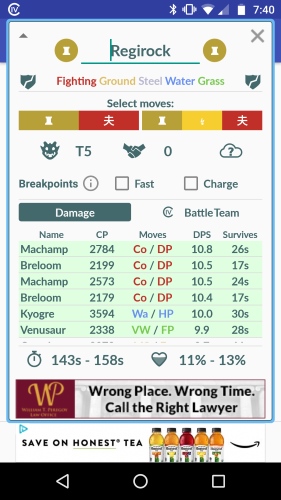
When facing formidable Raid Bosses, blindly deploying your highest CP monsters is rarely the optimal strategy. Calcy IV features a dedicated "Boss Screen" that simulates combat scenarios against specific opponents and recommends the absolute best lineup from your personal storage.
- It calculates exact Damage Per Second (DPS) and Total Damage Output (TDO).
- It generates a custom search string that you can paste directly into the game's search bar.
Using this generated code, you can instantly locate and deploy the ultimate counter-team tailored to exploit the Boss's specific weaknesses.
Resource Management & Detailed Info
Powering up monsters blindly is a surefire way to quickly deplete your precious Stardust and candy reserves. The detailed analysis screen in Calcy IV allows you to manually simulate the exact stat changes that would occur if you leveled up a monster or changed its moveset.
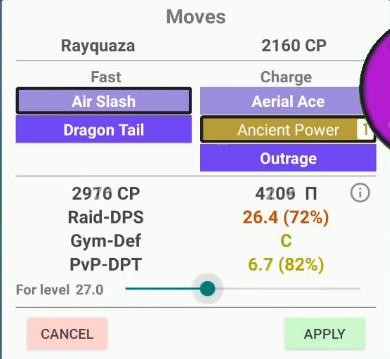
Before you actually tap the power-up button in-game, you can clearly see the precise resource costs required to reach a specific level breakpoint. This forecasting ability helps you allocate your resources intelligently. It ensures you only invest in monsters that will provide a genuine tactical breakthrough in actual combat.
Customized Filtering for Diverse Needs
This application also allows players to shift data priorities based on their specific combat requirements. You can easily toggle between different sorting formulas with a single tap.
Whether you are chasing the pure offensive power of a "Glass Cannon" or prioritizing a balanced approach for maximum survivability, Calcy IV adapts to your playstyle. This high level of freedom provides hardcore players with the deep strategic support they need to adjust tactics for different scenarios, such as PvP leagues or Gym battles. This robust flexibility is exactly why the tool has maintained its dominance on the Android platform.
How to Use Calcy IV: A Quick Setup Tutorial
Getting started with this IV calculator is designed to be as frictionless as possible. The initial setup only takes a few moments, after which the tool seamlessly integrates into your daily catching routine.
Step 1. Download the app and grant the necessary screen recording and overlay permissions required for it to function.

Step 2. Input your current Trainer Level in the settings, as this metric is crucial for the app to perform accurate math.
Step 3. Launch your game and tap the floating C-IV button while viewing a monster to generate an instant stat overlay.

Calcy IV Not Working? How to Fix Scanning Errors
Despite its reliability, you might occasionally encounter a "Calcy IV not scanning" error message. This usually happens when something disrupts the app's ability to read the colors and shapes on your screen. Fortunately, these issues are usually resolved with a few quick adjustments to your device settings.
Screen dimmers are the number one culprit for visual recognition failures.
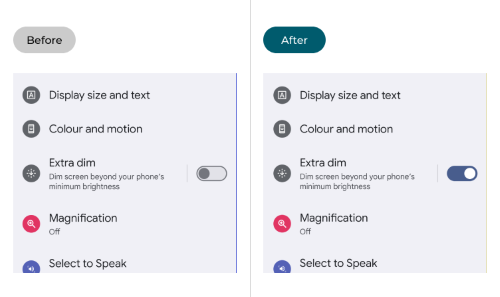
If you have "Extra Dim", an "Eye Comfort Shield", or any blue-light filtering applications active, they will distort the screen colors and cause the scan to fail. Disabling these visual filters is often the only fix required.
Additionally, a monster's idle animation can sometimes physically block the CP arc on your screen.
- Rotate the monster slightly on your screen to clear the visual obstruction.
- Navigate to the app's 3-dot menu and select "Reset scan config" to clear unexpected software glitches.
 Note:
Note:
Sometimes when error information like “Failed to detect location Error 12” appears on the top of the screen, it can lead to Calcy IV scanner not working as well.
Calcy IV vs Poke Genie: Which App is Right for You?
Both applications offer safe, reliable ways to appraise your collection without violating game rules. However, the right choice ultimately depends entirely on your mobile operating system.
Calcy IV: The Android Powerhouse
For Android users, Calcy IV is the undisputed champion of efficiency. The open Android ecosystem allows it to run a seamless overlay, delivering instantaneous background scanning while you play. Hardcore players also prefer its robust customization options, which dive deep into technical data and hyper-specific naming conventions.
Poke Genie: The iOS Favorite

If you play on an iPhone, Poke Genie is generally the superior choice. Apple’s strict security restrictions regarding screen capture make real-time overlays difficult to implement smoothly. As a result, the iOS version of Calcy IV can sometimes feel clunky or crash-prone. Poke Genie completely bypasses this friction with a beautifully optimized, clean interface tailored specifically for Apple devices.
FAQs About Calcy IV
Is Calcy IV completely free to use?
Yes, the core functionality of Calcy IV is completely free to use. You have full access to the auto-scanner, the advanced nickname generator, and the raid battle simulator without having to pay.
The free version is supported by advertisements. However, there are Premium in-app purchases available if you prefer an uninterrupted experience. Upgrading to Premium removes the ads and allows you to customize the appearance of the floating button with various cosmetic skins.
Why does the app sometimes show an IV percentage range (like 40-74%) instead of an exact number?
Calcy IV uses a mathematical formula based on the visible CP, HP, and stardust cost to calculate your monster's potential. For very low-level monsters, such as a Level 1 catch with only 10 CP, the mathematical possibilities are too broad for the app to pinpoint a single exact IV.
In these cases, it provides a possible percentage range instead. To narrow this down and get an exact number, you can use the in-game appraisal feature and input your team leader's specific stat bars directly into Calcy IV to eliminate the incorrect mathematical options.
Can I transfer my scan history to a new phone?
Absolutely. Calcy IV features a built-in backup tool so you do not lose your carefully curated battle teams and scan history when switching devices.
Step 1. Navigate to the app's settings menu and look for the Export/Backup section.
Step 2. Choose to back up your history and settings directly to your phone's local storage.
Step 3. Transfer that backup file to your new device and use the app's restore function to load your data back into your fresh installation.
Does the app support special monster variants like Shadow, Purified, or Mega Evolutions?
Yes, Calcy IV is regularly updated to fully support all new game mechanics and specialized monster forms. The app's database correctly calculates the unique stat modifiers, changing resource costs, and PvP viability associated with Shadow, Purified, Mega, Primal, and even newer Dynamax or Gigantamax variants.
Expanding Your Reach: Combining Calcy IV with Location Simulation
Once you have mastered evaluating your catches with Calcy IV, you might find yourself needing to explore new environments to find diverse biomes or specific regional catches. Sometimes, physically traveling to these locations isn't feasible. For players focused on testing location-based apps, planning content, or executing privacy-safe simulation workflows, the Pokeep Location Changer serves as a powerful desktop companion tool.


The Pokeep Location Changer allows you to seamlessly change the GPS location on your mobile device with a one-click teleport feature. Rather than just jumping from point to point, it offers route simulation with multi-point movement and adjustable speeds, creating highly realistic movement paths. This makes it an invaluable utility for gaming-related location strategy scenarios and geo-specific previews.

By utilizing its history and favorite locations features, you can easily repeat successful workflows. Whether you are using it for app testing or maintaining privacy-sensitive travel masking, Pokeep provides the geographic flexibility needed to maximize the analytical power of your IV calculators.
Finding the perfect stats doesn't have to be a guessing game. By pairing reliable data tools with smart, privacy-conscious location strategies, you can take complete control of your gameplay experience.
 Related Articles






 Leave Your Comment