 By
By 

Quick Verdict
A Pokémon GO Excellent Throw requires hitting the target circle when it is very small. Practice Curveballs and circle lock to improve consistency.
Who It's For
This guide is for Trainers who want to make Excellent Throws more consistently, complete Excellent Throw research tasks, earn more catch XP, improve Raid Boss catches, or understand whether Excellent Throw hacks, overlays, and apps actually help.
Key Takeaways
- Use circle lock: Set an Excellent-size circle first, wait for the Pokémon to attack, then throw near the end of the animation for more predictable timing.
- Practice Excellent Curveballs: Curveballs add another catch advantage, so consistently landing Excellent Curveballs is more useful than relying on straight throws alone.
- Prioritize consistency: Large, stable Pokémon are easier practice targets, and a repeatable Excellent or Great Curveball is usually better than constantly missing while chasing the tiniest possible circle.
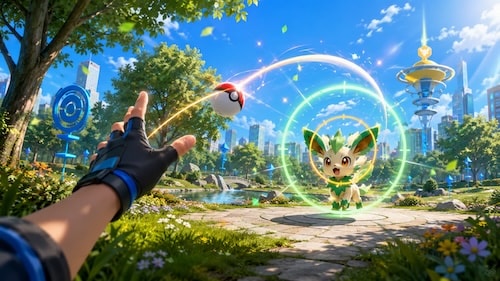
An Excellent Throw looks simple on paper: shrink the circle, throw the ball through it, and hit the Pokémon. In practice, different Pokémon stand at different distances, attack at different times, and have dramatically different target sizes.
Once you understand what the game is actually measuring, however, Excellent Throws become much less random.
What Is an Excellent Throw in Pokémon GO?
When you hold a Poké Ball during an encounter, a colored target ring repeatedly shrinks around the Pokémon. To receive Nice, Great, or Excellent, the ball must hit the Pokémon after passing through that target ring. Smaller target rings correspond to better throw bonuses.
An Excellent Throw is registered when the target circle has reached the smallest classification range and your Poké Ball still lands inside it. You do not need to strike the exact visual center of the Pokémon; what matters is getting the ball through the small inner circle.
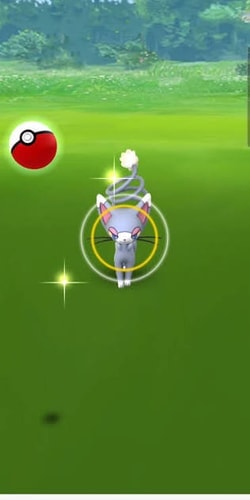
The circle's color is a different mechanic. Green, yellow, orange, and red indicate approximate catch difficulty, while the size of the circle determines whether a successful hit becomes Nice, Great, or Excellent.
Nice vs Great vs Excellent Throw
| Throw | Current Throw XP | Catch Accuracy | Best Use |
|---|---|---|---|
| Nice Throw | 20 XP | Large target | Beginner consistency |
| Great Throw | 100 XP | Medium target | Reliable everyday catches |
| Excellent Throw | 1,000 XP | Small target | XP farming and maximum throw bonus |
The current XP difference is substantial: an Excellent Throw gives ten times the throw XP of a Great Throw and fifty times the throw XP of a Nice Throw.
That does not mean you should force every encounter into an Excellent attempt. When balls are limited—especially after a Raid Battle—a Great Curveball you can land consistently may be more useful than an Excellent attempt that frequently misses the Pokémon altogether.
Does an Excellent Throw Increase Catch Rate?
Yes. Pokémon GO's official catching guidance confirms that accurate Nice, Great, and Excellent hits provide catch bonuses, and its Raid Boss guidance specifically recommends Great or Excellent Throws to increase the chance of catching the Pokémon.
There is also more nuance than the common idea that an Excellent Throw simply gives a fixed “2× bonus.” Community-documented catch mechanics model the throw modifier as scaling with the size of the target circle, with Excellent Throws covering roughly the upper 1.7× to 2.0× range. A throw made against an extremely small Excellent circle can therefore provide a larger bonus than one that barely qualifies as Excellent.
Aim for the smallest circle you can hit reliably.
If your success rate collapses when the circle gets extremely small, make it slightly larger. Consistent Excellent or Great Curveballs usually outperform repeatedly throwing balls past the Pokémon while chasing perfection.
How to Get an Excellent Throw in Pokémon GO
The basic technique is easier to learn when you separate circle size from throw trajectory. First learn where the ball needs to land, then make your swipe repeatable.
Step 1 Watch the Pokémon GO catch circle
Press and hold the Poké Ball instead of throwing immediately. Watch the colored inner circle shrink until it reaches a size that clearly falls within the Excellent range.
For early practice, do not wait until the circle becomes microscopic. Start with the largest circle that still produces Excellent and gradually work toward smaller targets as your accuracy improves.
Step 2 Spin the Poké Ball for a Curveball
Move the ball in small circles near the bottom of the screen until it begins spinning. Then swipe diagonally toward the Pokémon rather than throwing straight upward.
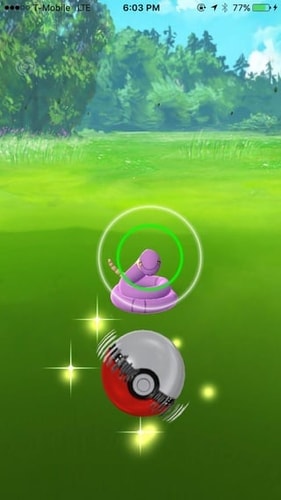
Curveballs are worth practicing because they do more than award extra XP. Pokémon GO's official catching guidance states that Curveballs also make a Pokémon easier to catch by reducing its chance of breaking free.
Step 3 Adjust your swipe for Pokémon distance
A short swipe that works beautifully against a nearby Pokémon may fall short against a distant Legendary. Likewise, an aggressive long swipe can fly over a Pokémon positioned close to the screen.
Instead of memorizing one universal finger path, develop a few repeatable motions for close, medium, and distant targets. Once you encounter the same species several times, your hand quickly begins to remember the required distance.
Step 4 Hit the small inner circle
The ball must enter the colored target circle while it is still within the Excellent range. Merely hitting the Pokémon does not qualify.
If you repeatedly get Great instead of Excellent, the most likely problem is not your aim—it is that your target ring is still too large when the ball arrives.
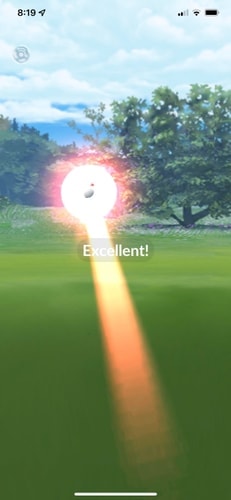
The Best Pokémon GO Excellent Throw Trick: Circle Lock
For difficult Pokémon, especially Raid Bosses, the circle lock technique removes much of the timing uncertainty.
The idea is to prepare your target circle before the throw rather than trying to shrink the circle, aim, avoid an attack, and release the ball all at once.
How the Circle Lock Technique Works
Step 1 Set the Excellent circle size
Hold the Poké Ball until the circle shrinks to your preferred Excellent size, then remove your finger without throwing. As long as you do not touch and hold the Poké Ball again, that target size is effectively prepared for your next throw.
Step 2 Throw at the end of the attack animation
Wait for the Pokémon to perform its attack animation. During that animation, spin and throw your ball so that it reaches the target immediately after the attack ends.
This gives the Pokémon much less time to attack again and knock the ball away. It is particularly useful in Legendary raid encounters, where Pokémon GO itself recommends observing the Raid Boss's movement and attack pattern before timing your throw.
Does Circle Lock Guarantee an Excellent Throw?
No.
Circle lock helps preserve the target size and timing, but you still control the trajectory of the Poké Ball. A throw that lands outside the circle will still fail to register Excellent.
Once target size becomes predictable, you can concentrate entirely on your Curveball aim.
How to Get Excellent Curveballs Consistently
If you can already make straight Excellent Throws, the next goal should be an Excellent Curveball.
A Curveball and an Excellent target bonus both improve catch probability. In an example catch-rate calculation using an average Excellent bonus, adding a Curveball produced a much higher final catch probability than the Excellent straight throw alone.
The direction you spin determines how the ball curves. If you consistently spin the same way, keep your release direction consistent as well rather than changing between clockwise and counterclockwise throws from one encounter to the next.
A controlled, repeatable curve is much easier to refine than a different swipe every time.
How to Get 3 Excellent Throws in a Row
Tasks requiring 3 Excellent Throws in a row feel difficult because one mistake resets the streak. The best strategy is therefore not to throw at every Pokémon you encounter.
Wait for Pokémon with large, predictable circles. Set an achievable Excellent target, use circle lock when practical, and avoid tiny or highly erratic targets until the task is complete.
Raid encounters can be particularly useful because many Raid Bosses have large circles and repeat predictable attacks. You may also get multiple throws against the same Pokémon if it breaks out, giving you repeated practice with the same target distance.
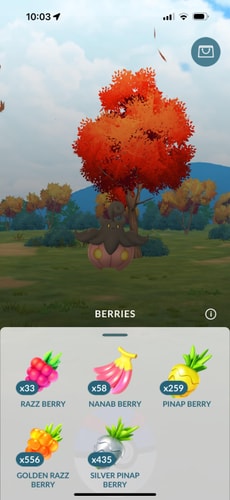
If movement is your main problem rather than catch probability, a Nanab Berry can make a restless Pokémon easier to aim at. If actually securing the catch is more important, use a Razz or Golden Razz Berry instead.
Easiest Pokémon for Excellent Throws
There is no permanent list of the single easiest Pokémon because spawn pools change and different species have different encounter distances. In general, however, large Pokémon with big target circles and stable positions are easier Excellent Throw practice targets than tiny Pokémon.
Species commonly considered comfortable practice targets include Pokémon such as Slowpoke, Snorlax, Wailmer, Chansey, Machop, and Ponyta, when they are available. Large Legendary and other raid Pokémon can also be surprisingly good training targets because their circles are often much easier to see.
The important factor is repetition. If a Spotlight Hour, Community Day, or other event gives you dozens of encounters with the same species, you can learn one distance and one circle much faster than constantly switching between targets.
What Are Excellent Throws Used For in Pokémon GO?
Excellent Throws appear in more places than ordinary catching. They can be required by research tasks and level-up challenges, and the game's current post-2025 progression extends Trainer levels to 80. Excellent Throw XP also makes the skill useful even when no task specifically requires it.
One particularly important evolution uses the mechanic directly.
Galarian Farfetch'd Excellent Throws for Sirfetch'd
To evolve Galarian Farfetch'd into Sirfetch'd, you need 50 Farfetch'd Candy and must complete 10 Excellent Throws while Galarian Farfetch'd is set as your Buddy.
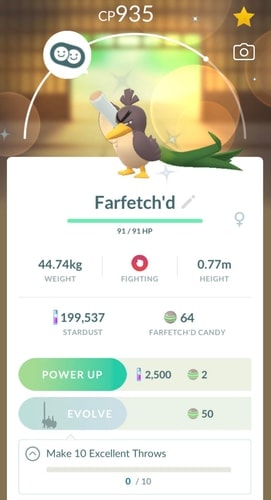
The Excellent Throws do not have to be made against Farfetch'd itself. Set the Galarian Farfetch'd you want to evolve as your Buddy, then complete your Excellent Throws against Pokémon with comfortable catch circles.
If you have been stuck on this evolution requirement, an event featuring a large Pokémon can be an excellent opportunity to finish all ten.
How to Make Excellent Throws on Raid Bosses
Raid catching rewards patience.
Instead of immediately throwing every Premier Ball, observe how the boss attacks and moves. Prepare your circle, wait for an attack, then throw late enough in the animation that the ball arrives when the Pokémon returns to its normal position.
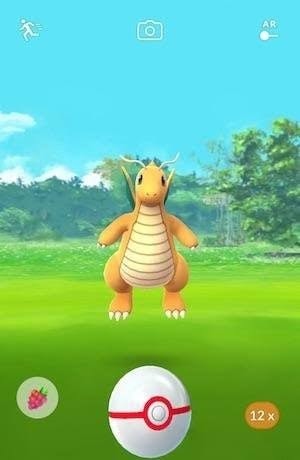
Pokémon GO's official Raid Boss guidance recommends Great or Excellent Throws, Curveballs, and Razz or Golden Razz Berries to improve your odds.
Once you learn one boss's timing, repeat the exact same pattern for every ball. Raid catches are one of the best places to turn the circle-lock technique from something you understand intellectually into muscle memory.
Why Your Pokémon GO Excellent Throw Is Not Working
If a throw looks perfect but registers Great, the most common explanation is that the target circle had not become small enough when the Poké Ball arrived.
If you hit the Pokémon but receive no Nice, Great, or Excellent message, the ball probably did not pass through the colored inner target circle. Hitting the Pokémon and hitting the target circle are not the same thing.
Another common mistake is focusing entirely on the circle while ignoring the Pokémon's movement. When a Pokémon jumps, flies upward, shifts sideways, or attacks, the trajectory you normally use may no longer line up with its hitbox.
Is There a Pokémon GO Excellent Throw Hack?
There is no legitimate universal Pokémon GO Excellent Throw hack that converts every throw into Excellent.
Several things marketed as hacks actually solve much smaller problems. An overlay may provide a visual reference for where to swipe, while a throw-training app may help you practice finger movement. Neither changes the game's target-ring requirement.
Modified Pokémon GO clients or software that directly automates throws are a different category. Niantic currently lists modified or unofficial software, unauthorized third-party access, and falsifying location among behaviors that can violate its rules.
How to Practice Pokémon GO Excellent Throws Faster
The fastest improvement usually comes from repeating the same throw against the same type of target. An event with many identical spawns is therefore ideal because your finger does not need to recalibrate for a new Pokémon every few seconds.
Start by choosing an Excellent circle that feels achievable. Once you can hit it consistently, shrink it slightly and repeat the process.
A better sign of progress is that your failures become predictable—you know whether the miss came from throwing too far, too short, too early, or outside the target circle.
Practice Excellent Throws in More Locations With PoKeep
Once you understand the throwing technique, another limitation can simply be finding enough suitable Pokémon to practice against.

PoKeep Location Changer is designed for changing GPS location and exploring location-based games. Its Pokémon GO-oriented tools include a 360° joystick, two-point movement, multi-point routes, and jump teleport between selected locations.


For Excellent Throw practice, the useful angle is not automatic throwing—PoKeep does not make your Poké Ball register Excellent for you. Instead, you can use its movement and route features to explore areas with more spawn points, move between Pokémon encounters, or return to locations where you have found productive catching sessions.
The throwing skill itself still comes from practice. PoKeep can change where you practice, but your timing, circle size, Curveball, and accuracy are what determine whether the game awards Excellent.
Pokémon GO Excellent Throw FAQ
What size circle counts as an Excellent Throw in Pokémon GO?
Excellent is awarded when you hit the inner target ring while it is in its smallest classification range. There is not one fixed pixel size because the target circle scales with the Pokémon and device display.
As a practical rule, start practicing near the larger edge of the Excellent range rather than waiting until the circle is almost invisible.
Does an Excellent Throw guarantee a Pokémon catch?
Normally, no. An Excellent Throw improves catch probability but does not guarantee the Pokémon stays inside the ball. Pokémon GO's catch calculation also considers factors such as the Pokémon, Poké Ball, Berries, Curveballs, and applicable catch bonuses.
A Pokémon can still break out immediately after a visually perfect Excellent Throw.
How much XP is an Excellent Throw in Pokémon GO?
The current Excellent Throw bonus is 1,000 XP, compared with 100 XP for Great and 20 XP for Nice.
This is separate from the base Pokémon catch XP and other applicable bonuses such as Curveball and First Throw.
Is an Excellent Curveball better than a straight Excellent Throw?
Yes for catch probability, assuming both throws hit. Curveballs provide an additional catching advantage and extra XP on top of the accuracy bonus.
For most Trainers, consistently landing Excellent Curveballs should therefore be the long-term target.
How do I get 3 Excellent Throws in a row?
Choose large Pokémon with stable circles rather than attempting the streak on every encounter. Set a comfortable Excellent-size circle, use circle lock against Pokémon with predictable attacks, and stick with one repeatable Curveball motion.
Raid Bosses can be especially useful because they often provide large targets and repeated attempts.
What Pokémon needs Excellent Throws to evolve?
Galarian Farfetch'd requires 10 Excellent Throws as part of its evolution requirement into Sirfetch'd, along with 50 Farfetch'd Candy.
Make sure the Galarian Farfetch'd you want to evolve is set as your Buddy while completing the requirement.
Can an app guarantee Excellent Throws?
A practice app or overlay may help you train your finger movement, but it cannot legitimately make every Pokémon GO throw Excellent. The encounter's target size, distance, movement, animation, and your actual throw trajectory still determine the result.
The most dependable approach remains the same: practice Curveballs, learn circle lock, and build muscle memory on large predictable targets.
Final Thoughts on Pokémon GO Excellent Throws
A Pokémon GO Excellent Throw is not a secret swipe or hidden hack. It is a repeatable skill built from understanding the catch circle, controlling your Curveball, adjusting for Pokémon distance, and choosing the right moment to release.
Start with a comfortable Excellent target rather than the tiniest possible circle. Once you can hit that consistently, add circle lock and gradually work toward smaller targets.
The payoff is substantial: better catch odds, far more catch XP, easier progress through Excellent-Throw tasks, and much more confidence when a valuable Raid Boss is sitting behind a limited number of Premier Balls.
 Related Articles





 Leave Your Comment